
1. Introduction
Thank you for choosing the Vipbear Smart Toilet with Bidet Built-in, Model OPT05. This advanced one-piece toilet integrates modern hygiene and comfort features, including a bidet system, heated seat, night light, UV-C sterilization, foam shield, and a dual-flush mechanism. This manual provides essential information for safe installation, operation, maintenance, and troubleshooting to ensure optimal performance and longevity of your product.
2. Safety Information
Please read all safety instructions carefully before installation and use. Failure to follow these instructions may result in electric shock, fire, or other hazards.
- Ensure the toilet is connected to a properly grounded electrical outlet.
- Do not immerse the toilet or its electrical components in water.
- Do not attempt to repair or modify the unit yourself. Contact qualified service personnel.
- Keep children and individuals with reduced physical, sensory, or mental capabilities away from the unit unless supervised.
- Disconnect power before cleaning or performing any maintenance.
- Ensure water supply connections are secure to prevent leaks.
3. Package Contents
Verify that all components are present in the package:
- Smart Toilet Unit (x1)
- Remote Control (x1)
- Water Valve (x1)
- Fixed Disk (x1)
- Flange Ring (x1)
- Installation Hardware (bolts, washers, etc.)
- User Manual
4. Setup and Installation
The Vipbear Smart Toilet is designed for straightforward installation. It is a floor-mounted, one-piece unit requiring a 12-inch rough-in. Professional installation is recommended for plumbing and electrical connections.
4.1 Pre-Installation Checks
- Ensure a standard 12-inch rough-in is available.
- Confirm a grounded electrical outlet (120V AC) is within reach of the toilet's power cord. Smart toilets require a power connection to operate all features.
- Verify water supply line is accessible and can be connected to the included water valve.
4.2 Installation Steps (Overview)
- Prepare the floor flange and ensure the area is clean and level.
- Install the flange ring onto the floor flange.
- Carefully position the toilet over the flange bolts, ensuring proper alignment.
- Secure the toilet to the floor using the provided fixed disk and hardware. Do not overtighten.
- Connect the water supply line to the toilet's water inlet using the provided water valve. Ensure all connections are watertight.
- Plug the toilet into the grounded electrical outlet.
- Turn on the water supply and check for leaks.

Image: The Vipbear Smart Toilet with key dimensions (26.8"D x 15.8"W x 19.1"H) and a note about 12" rough-in and the need for electrical plug-in. This illustrates the compact design and installation requirements.
5. Operating Instructions
Your Vipbear Smart Toilet offers a range of features for enhanced comfort and hygiene. Most functions are controlled via the included remote control.
5.1 Flushing System
The toilet features a powerful dual-flush system with multiple activation methods and a backup battery for power outages.
- Dual Flush: Choose between a 4.8L full flush for solids (approx. 15 seconds) and a 3.5L half flush for liquids (approx. 10 seconds) to conserve water.
- Flushing Methods:
- Remote Flush: Use the dedicated buttons on the remote control.
- Side Button Flush: A manual flush button is located on the side of the toilet unit.
- Off-Seat Auto Flush: The toilet can be set to automatically flush a small amount after you stand up.
- Foot Sensor Flush: A sensor at the base allows for hands-free flushing by a foot gesture.
- Powerful Flush Technology: Combines siphon jet and vortex flushing for efficient, rimless cleaning and to prevent clogging.

Image: Illustration of the four smart flushing modes: Remote Flush, Side Button Flush, Off Seat Auto Flush, and Foot Sensor Flush. It also highlights the built-in backup battery.
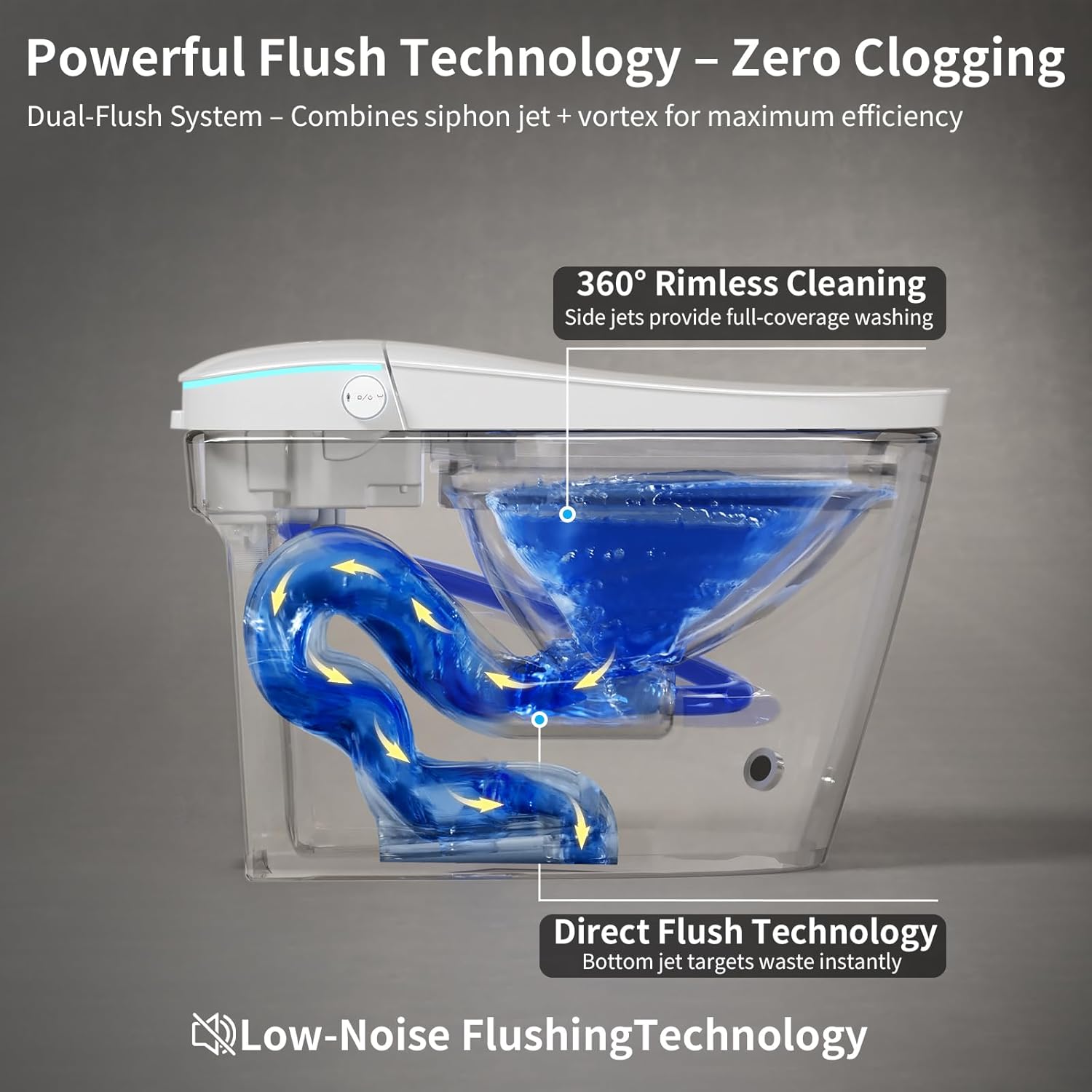
Image: A cutaway diagram showing the powerful dual-flush system, combining siphon jet and vortex for 360° rimless cleaning and direct flush technology to prevent clogging.
5.2 Bidet System
The premium dual-nozzle bidet system provides personalized cleaning with adjustable settings.
- Wash Modes: Posterior wash and feminine wash.
- Adjustable Settings: Customize water position, pressure (weak to strongest), and temperature (normal to 104°F).
- Kid-Friendly Cleaning Mode: A gentle water spray designed for children aged 3+ to promote independence.
- Nozzle Hygiene: Self-cleaning nozzles and UV-C light ensure sterilization before and after each use.

Image: Demonstrates the bidet functions including Rear wash, Female wash, Automatic clean after use, and Oscillating massage. It also shows the UV-C light sterilizing the bowl.

Image: Visual representation of adjustable water pressure (weak to strongest) and water temperature (normal, 93°F, 99°F, 104°F) for the bidet functions.
5.3 Heated Seat and Warm Air Dryer
- Heated Seat: Enjoy instant warmth with 4 adjustable temperature levels (93°F, 99°F, 104°F) for comfort in all seasons. Features temperature control safety protection to prevent overheating.
- Warm Air Dryer: Reduces the need for toilet paper by up to 80% with efficient warm air drying.

Image: Shows the instant heating element within the toilet seat and the warm air dryer function with temperature indicators.

Image: Detailed view of the thermostatic comfort seat, highlighting 6-gear temperature settings and safety protection against overheating.

Image: Illustration of the warm air drying feature, emphasizing fast and efficient drying and reduced toilet paper usage, with temperature range indicators.
5.4 Foam Shield and Night Light
- Foam Shield: Creates an airtight barrier of foam in the bowl to prevent splashback, block odors, and reduce waste from sticking, keeping the bowl cleaner.
- Night Light: An illuminating band of light around the top lid provides subtle illumination for nighttime use without needing to turn on bright bathroom lights.

Image: Demonstrates the Advanced Foam Shield Technology, showing how it prevents splash, blocks odor, and offers anti-stick properties for easy cleaning.

Image: Close-up view of the foam shield in the toilet bowl, illustrating its anti-splash, odor blocking, and anti-stick benefits.
5.5 UV-C Light
The integrated UV-C light provides additional hygiene by sterilizing the bidet nozzles and the toilet bowl interior, ensuring a clean environment before and after use.

Image: Illustrates the double hygienic protection provided by the UV-C light and the self-cleaning bidet nozzle.
6. Maintenance
Regular cleaning and maintenance will ensure the optimal performance and hygiene of your smart toilet.
- General Cleaning: Use a soft cloth and mild, non-abrasive cleaner for the exterior surfaces. Do not use harsh chemicals or abrasive pads.
- Nozzle Cleaning: The bidet nozzles are self-cleaning. For deeper cleaning, refer to the remote control functions to extend the nozzles for manual wiping with a soft cloth.
- UV-C Light: The UV-C light operates automatically to sterilize. No user maintenance is typically required for the UV-C component itself.
- Descaling: If you live in an area with hard water, periodic descaling of the bidet water path may be necessary. Consult a professional plumber or Vipbear support for guidance.
- Power Disconnection: Always disconnect power before performing any significant cleaning or maintenance.
7. Troubleshooting
If you encounter issues with your Vipbear Smart Toilet, refer to the following common problems and solutions:
| Problem | Possible Cause | Solution |
|---|---|---|
| No power/Unit unresponsive | Power cord unplugged, circuit breaker tripped, remote control batteries low. | Check power connection, reset circuit breaker, replace remote batteries. |
| Bidet not spraying water | Water supply valve closed, water pressure too low, nozzle clogged. | Open water supply valve, check household water pressure, clean bidet nozzle. |
| Heated seat not warming | Heated seat function off, temperature setting too low. | Activate heated seat via remote, increase temperature setting. |
| Toilet flushing repeatedly or unexpectedly | Sensor malfunction, debris in flush mechanism. | Clean around sensors, power cycle the unit. If problem persists, contact support. |
| Water splashes during flush | Water pressure too high, flush mechanism adjustment needed. | Adjust water pressure if possible. If issue persists, contact support for potential flush mechanism adjustment. |
| Pre-rinse function not activating | Function is disabled by default or incorrect activation steps. | Refer to the remote control instructions for activating the pre-rinse function. Typically involves pressing a specific button for a duration. If the manual refers to a 'close button on the toilet' that is not visible, contact support for clarification on activation. |
If the problem persists after attempting these solutions, please contact Vipbear customer support.
8. Specifications
| Brand | Vipbear |
| Model Number | OPT05 |
| Color | Ceramic White |
| Product Dimensions (D x W x H) | 26.78" x 15.79" x 18.35" |
| Material | Ceramic |
| Item Weight | 90 Pounds |
| Installation Method | Floor Mounted |
| Rough-In Requirement | 12 inches |
| Power Supply | 120V AC (requires grounded outlet) |
| Flush Volume (Full/Half) | 4.8L / 3.5L |
| Heated Seat Temperature Range | 93°F - 104°F (4 levels) |
9. Warranty and Support
The Vipbear Smart Toilet Model OPT05 comes with a 1-year warranty from the date of purchase. This warranty covers manufacturing defects and malfunctions under normal use. Please retain your proof of purchase for warranty claims.
For technical assistance, troubleshooting, or warranty inquiries, please contact our dedicated support team. Our team is ready to help with any questions or concerns you may have.
Contact Information: Please refer to the contact details provided on the Vipbear official website or your purchase documentation.
