
Introduction
Thank you for choosing the SIHOO Doro C300 Pro V2 Ergonomic Office Chair. This manual provides detailed instructions for assembly, operation, maintenance, and troubleshooting to ensure you get the most comfortable and supportive experience from your new chair. Designed with advanced adaptive features, the Doro C300 Pro V2 offers comprehensive support for your neck, back, lumbar region, and arms, adapting to your movements for sustained comfort throughout your workday.
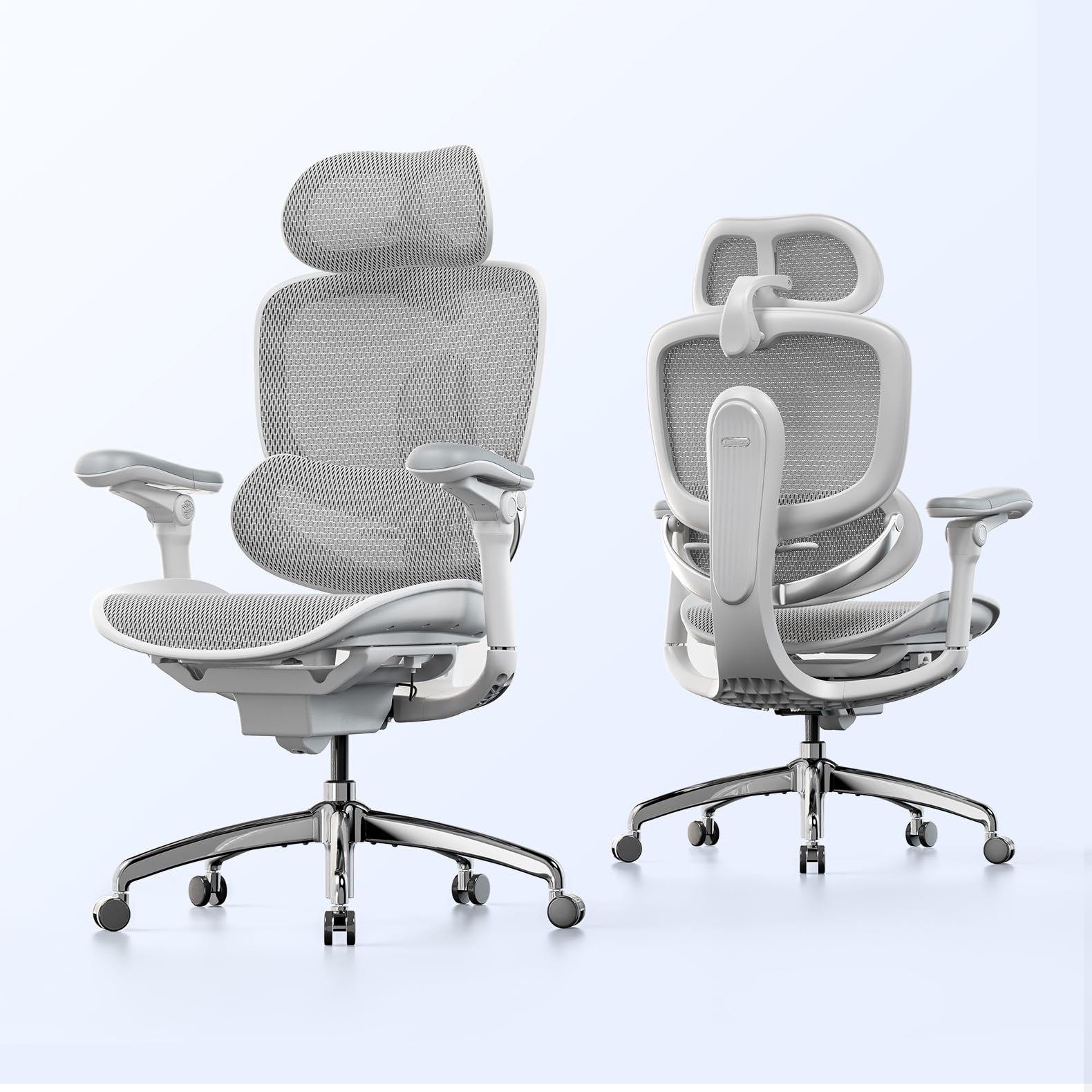
The SIHOO Doro C300 Pro V2 ergonomic office chair, designed for optimal comfort and support.
1. Setup and Assembly
Your SIHOO Doro C300 Pro V2 chair requires assembly. Please follow these general steps carefully. All necessary tools, typically an Allen key, are included in the package. It is recommended to assemble the chair on a soft surface to prevent scratches.
- Unpack Components: Carefully remove all parts from the packaging and lay them out. Verify all components are present against the parts list in your included manual.
- Attach Casters to Base: Insert the casters into the holes at the end of each leg of the chair base. Push firmly until they click into place.
- Install Gas Lift: Place the gas lift cylinder into the center hole of the chair base.
- Assemble Seat Mechanism: Attach the control mechanism to the underside of the seat cushion using the provided screws. Ensure the front of the mechanism faces the front of the seat.
- Attach Armrests: Secure the armrests to the seat cushion using the designated screws.
- Connect Backrest: Attach the backrest to the seat mechanism or directly to the seat frame, depending on the design, using the appropriate screws.
- Mount Headrest: Slide the headrest into its designated slot at the top of the backrest.
- Connect Seat to Base: Carefully place the assembled seat and backrest onto the gas lift cylinder. Apply downward pressure to secure it.
For detailed, step-by-step visual instructions, please refer to the PDF instruction manual provided with your purchase.
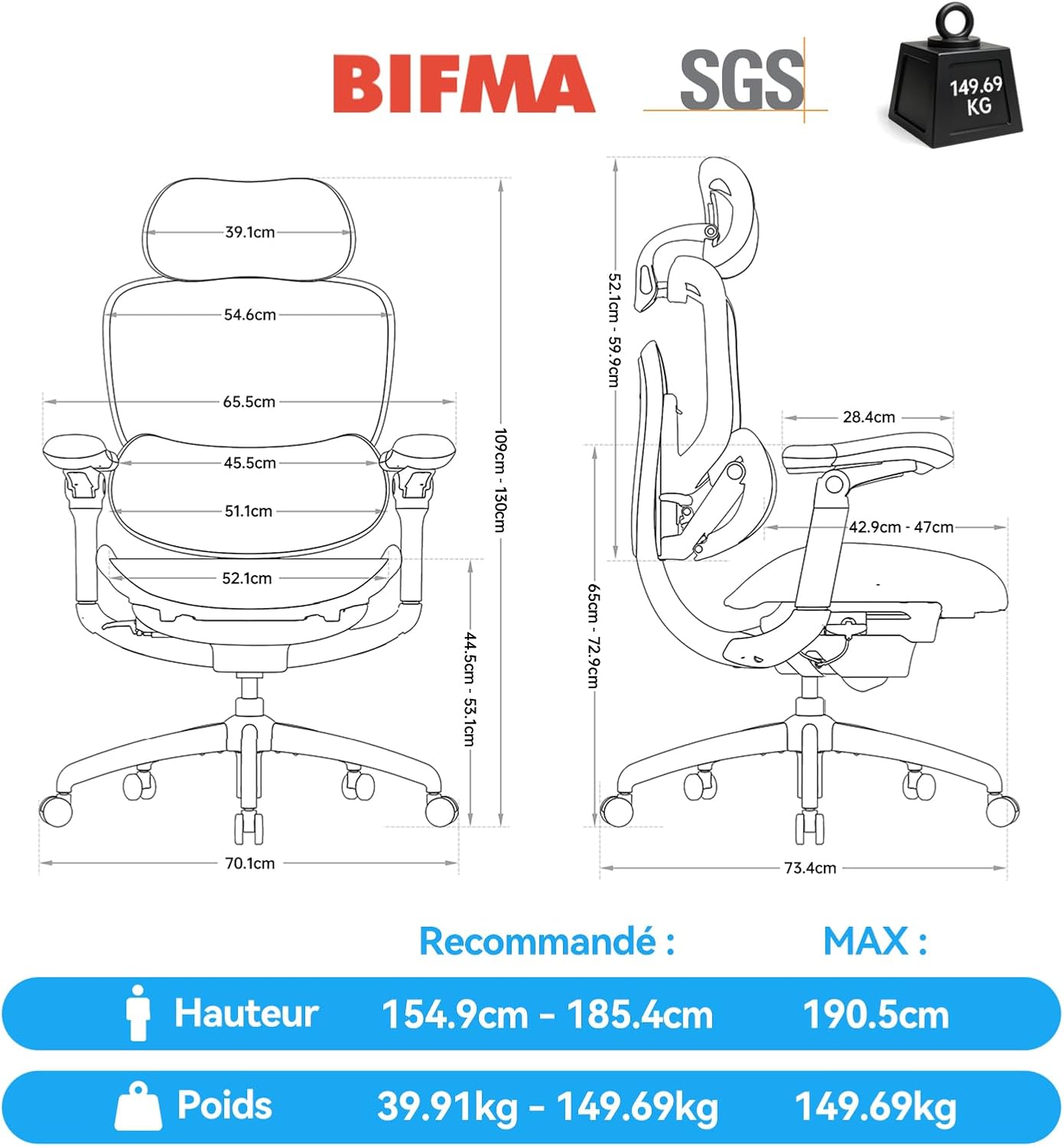
Dimensions and weight capacity of the SIHOO Doro C300 Pro V2 chair.
2. Operating and Adjustments
The SIHOO Doro C300 Pro V2 chair offers extensive adjustability to customize your seating experience for optimal ergonomics and comfort. Familiarize yourself with the various controls:
2.1. Seat Height Adjustment
- To Raise: While standing, pull the lever located on the right side of the seat upwards. The seat will rise. Release the lever at the desired height.
- To Lower: While seated, pull the lever located on the right side of the seat upwards. The seat will lower. Release the lever at the desired height.
2.2. Seat Depth Adjustment
- Locate the lever or button on the left side, beneath the seat.
- Pull the lever/button and slide the seat forward or backward to adjust the depth. Ensure there is a 2-3 finger gap between the edge of the seat and the back of your knees.
- Release the lever/button to lock the seat in position.
2.3. Backrest Recline and Tilt Tension
- Recline Angle: The chair features a 3-speed mechanism allowing recline positions of 105°, 120°, and 135°. Use the lever on the left side to select your preferred angle.
- Tilt Tension: The intelligent gravity-sensing chassis 2.0 automatically adjusts tilt resistance based on your weight. For fine-tuning, rotate the tension knob located underneath the seat (usually at the front) to increase or decrease resistance.

The SIHOO Doro C300 Pro V2 offers three recline positions: 105°, 120°, and 135°.
2.4. Lumbar Support Adjustment
- The auto-adaptive lumbar support 2.0 features a rotating cushion that automatically fills the gap between your lower back and the backrest as you recline.
- It offers 3 levels of adjustment for personalized support. Adjust the height of the lumbar support by sliding it up or down along the backrest to align with the natural curve of your lower back.

The Domino Lumbar Support II provides dynamic and adaptive lower back comfort.
2.5. Armrest Adjustments (8D)
The 8D bio-adaptive armrests offer comprehensive adjustability:
- Height: Press the button on the side of the armrest and slide it up or down.
- Depth (Forward/Backward): Slide the armrest pad forward or backward.
- Width (In/Out): Slide the entire armrest assembly inward or outward.
- Rotation: Pivot the armrest pads left or right.
- Tilt: The rear part of the armrest can be raised for elbow support during activities like gaming.

Demonstration of the 8D bio-adaptive armrests in various positions.
2.6. Headrest Adjustment (3D)
- The 3D headrest can be adjusted for height and tilt.
- Height: Gently pull the headrest up or push it down to your desired height.
- Tilt: Angle the headrest forward or backward to support the natural curve of your neck.

The 3D large headrest provides comprehensive neck support.
3. Maintenance
To ensure the longevity and optimal performance of your SIHOO Doro C300 Pro V2 chair, follow these simple maintenance guidelines:
- Cleaning: Regularly wipe down the chair with a soft, damp cloth. For mesh areas, use a mild soap solution if necessary, and allow to air dry completely. Avoid harsh chemicals or abrasive cleaners.
- Inspection: Periodically check all screws and bolts to ensure they are tight. Re-tighten if necessary to maintain stability and safety.
- Caster Care: Keep the casters clean from hair and debris to ensure smooth movement and prevent damage to your flooring.
- Weight Limit: Do not exceed the maximum weight capacity of 150 kg (330 lbs) to prevent damage and ensure safety.
4. Troubleshooting
If you encounter any issues with your SIHOO Doro C300 Pro V2 chair, refer to the following common problems and solutions:
| Problem | Possible Cause | Solution |
|---|---|---|
| Chair does not adjust height | Gas lift malfunction or lever not engaged. | Ensure the height adjustment lever is fully pulled. If the issue persists, the gas lift may need replacement. Contact customer support. |
| Chair wobbles or is unstable | Loose screws or uneven assembly. | Check and tighten all assembly screws, especially those connecting the seat to the mechanism and the base. Ensure the chair is on a flat surface. |
| Casters do not roll smoothly | Debris (hair, dust) caught in casters. | Turn the chair over and carefully remove any debris from the caster wheels. Clean regularly. |
| Armrests move too freely or cannot be locked | This model's 8D armrests are designed for dynamic movement and may not have a locking mechanism for all axes of rotation. | While some adjustments (like height) lock, the rotational movement is often free-moving to allow quick repositioning. This is a design feature. Ensure all screws are tight. |
| Squeaking noises | Loose connections or friction between parts. | Tighten all screws. Apply a small amount of silicone-based lubricant to moving parts or joints if the noise persists. |
If these solutions do not resolve the issue, please contact SIHOO customer support for further assistance.
5. Specifications
| Feature | Detail |
|---|---|
| Brand | SIHOO |
| Model Name | Doro C300 V2 |
| Color | Gris (Grey) |
| Material | Polypropylene frame, High-resilience mesh seat/back, Cotton filling |
| Product Dimensions (D x W x H) | 73.5P x 65.5l x 109H cm |
| Item Weight | 25.15 Kilograms |
| Recommended Maximum Load | 150 kg (330 lbs) |
| Back Style | Ergonomic, S-shape, SyncroFlex |
| Special Features | Multi-adjustable 8D Armrests, Large Adjustable Lumbar Support, Enlarged Headrest, Dynamic Lumbar Support, Elastic and Resistant Mesh Fabric |
| Seat Height (Min/Max) | 44.5 cm / 55.1 cm |
| Seat Depth (Min/Max) | 43 cm / 47 cm |
| Recline Positions | 3 positions (105°, 120°, 135°) |
| Assembly Required | Yes |
| Recommended Use | Office, Home Office |
6. Warranty Information
The SIHOO Doro C300 Pro V2 chair comes with a 3-year limited manufacturer's warranty. This warranty covers manufacturing defects and ensures that you will receive replacement accessories at no cost during the three-year period. Please retain your proof of purchase for warranty claims.
7. Customer Support
For any questions, concerns, or assistance with your SIHOO Doro C300 Pro V2 chair, please contact SIHOO customer support. We are committed to providing professional 24/7 support.
- Quality Guarantee: If there is a quality issue within 30 days of purchase, SIHOO will provide a free replacement.
- Contact: Refer to the contact information provided with your purchase or visit the official SIHOO website for support details.
- Online Resources: Explore the SIHOO Brand Store on Amazon for additional product information and FAQs.


