
Introduction
The Yeedi S20 Infinity Ultra is an advanced robot vacuum and mop designed to provide comprehensive floor cleaning. It features FocusJet Stain Pre-Dissolving Technology, a Mop Roller Smart Cover, powerful 22000Pa suction, 145°F hot air drying, hot water mop washing, and AI obstacle avoidance. This manual provides essential information for setting up, operating, maintaining, and troubleshooting your device to ensure optimal performance.
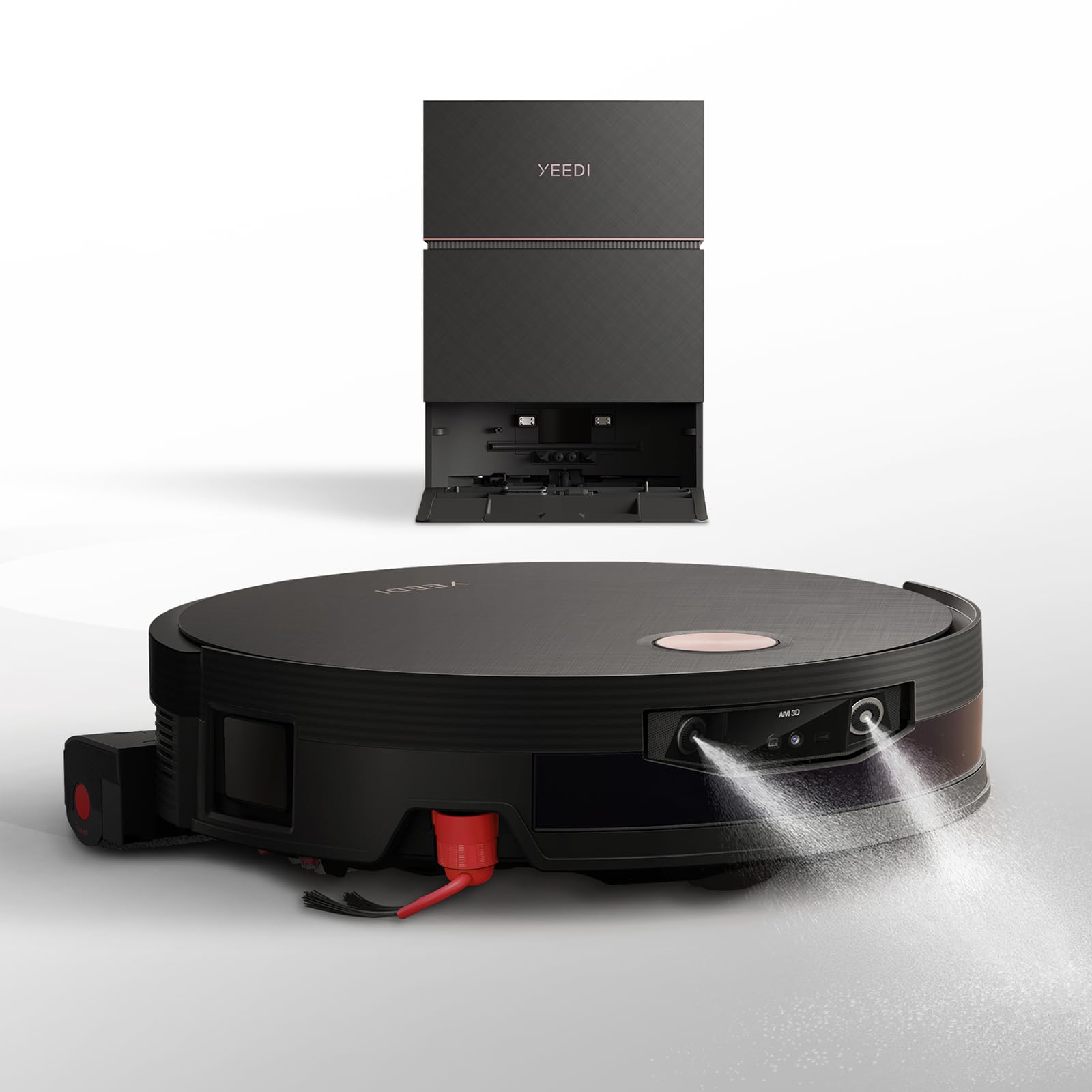
Image: The Yeedi S20 Infinity Ultra Robot Vacuum and Mop with its Omni Station.
Setup
Follow these steps to set up your Yeedi S20 Infinity Ultra for the first time:
- Unpack the Device: Carefully remove all components from the packaging. Ensure all protective films and packing materials are removed from the robot and the Omni Station.
- Position the Omni Station: Place the Omni Station on a hard, level surface against a wall, ensuring there is at least 0.5 meters (1.6 feet) of clear space on both sides and 1.5 meters (4.9 feet) in front. Plug the power cord into the station and a wall outlet.
- Install Side Brush and Main Brush: Attach the side brush to the designated post on the underside of the robot. Ensure the main brush and its cover are correctly installed.
- Fill Water Tanks: Fill the clean water tank in the Omni Station with clean water. If desired, add the provided cleaning solution to the solution tank.
- Place Robot on Station: Place the robot onto the Omni Station. It will begin charging automatically.
- Download the App: Download the Yeedi app from your smartphone's app store. Follow the in-app instructions to connect your robot to your 2.4GHz Wi-Fi network.
Video: An overview of the YEEDI S20 Infinity Ultra Robotic Vacuum and Mop, demonstrating its features and setup process.
Operating Instructions
The Yeedi S20 Infinity Ultra offers various cleaning modes and smart features for efficient floor care.
Cleaning Modes
- Auto Clean: The robot intelligently maps your home and cleans all accessible areas.
- Area Clean: Select specific rooms or zones to clean via the Yeedi app.
- Spot Clean: Direct the robot to clean a concentrated area for spills or localized dirt.
- Custom Clean: Adjust suction power, water flow, and cleaning frequency through the app.
FocusJet Stain Pre-Dissolving Technology
This technology sprays a targeted fine mist onto tough stains before mopping, allowing them to break down for more effective removal.

Image: The robot vacuum applying FocusJet Stain Pre-Dissolving Technology to a floor stain.
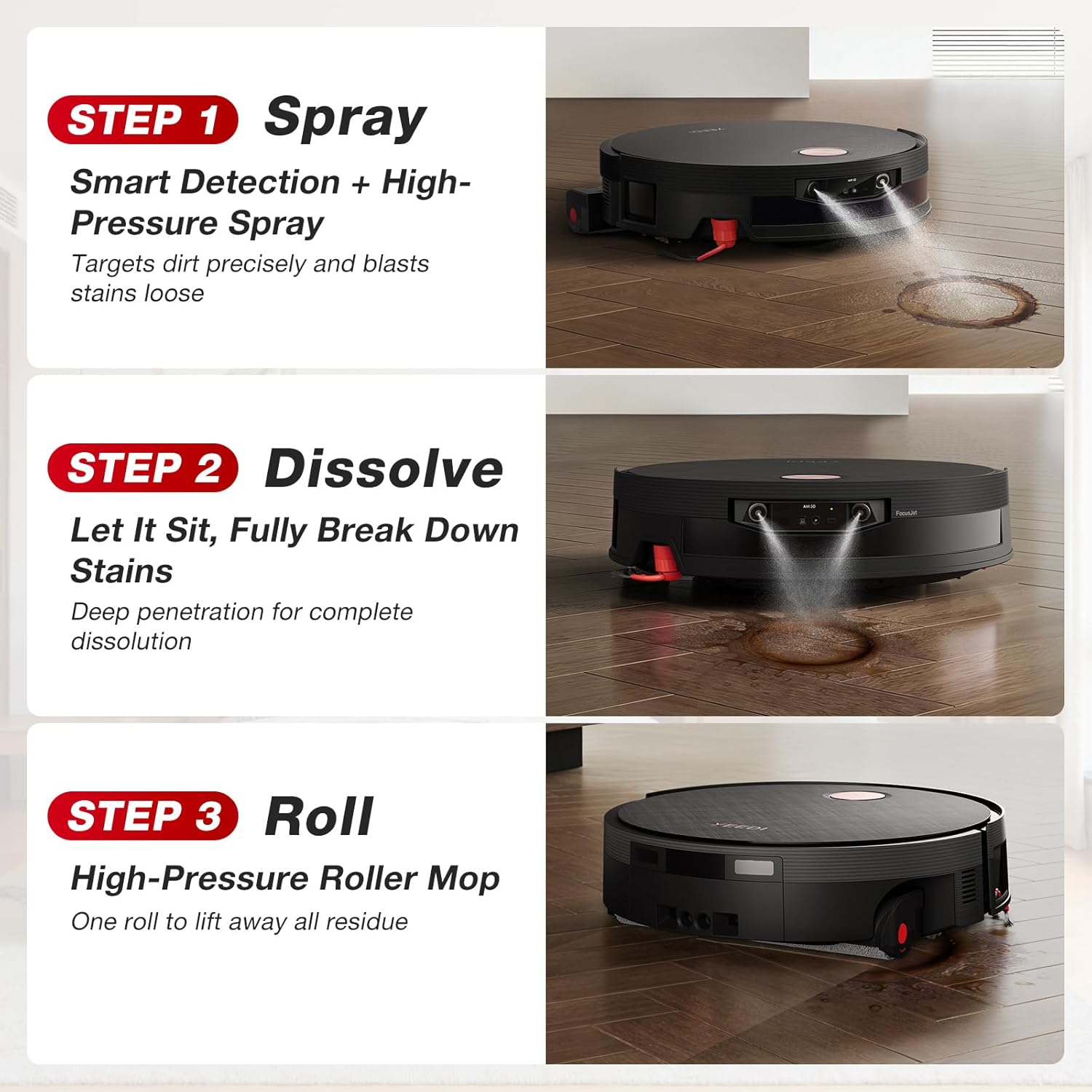
Image: Visual representation of the three steps of FocusJet technology: Spray, Dissolve, and Roll.
Mop Roller Smart Cover
The Mop Roller Smart Cover automatically shields the mop roller when the robot detects carpets or non-mopping zones, preventing wetting and cross-contamination.

Image: The robot vacuum demonstrating its mop roller lifting mechanism over a carpet.
AI Obstacle Avoidance
Equipped with RGBD AI obstacle avoidance technology, the robot identifies and navigates around furniture, toys, and other obstacles in real-time. It also recognizes stains and large particles, adjusting cleaning intensity as needed.

Image: The robot vacuum using AI to avoid obstacles and clean edges.
Maintenance
Regular maintenance ensures the longevity and optimal performance of your Yeedi S20 Infinity Ultra.
Omni Station Maintenance
- Empty Dirty Water Tank: Regularly empty the dirty water tank in the Omni Station. Rinse it with clean water.
- Refill Clean Water Tank: Ensure the clean water tank is always filled for mopping operations.
- Check Dust Bag: Replace the dust bag in the Omni Station when indicated by the app or when full.
- Clean Station Base: Periodically clean the base of the Omni Station to remove any accumulated dirt or debris.

Image: The 10-in-1 Smart Cleaning Station, illustrating its various automated maintenance functions.
Robot Maintenance
- Clean Mop Roller: The Omni Station automatically washes and hot-air dries the mop roller. Ensure the roller is free from debris.
- Clean Side Brush: Remove and clean the side brush regularly to prevent hair entanglement.
- Clean Main Brush: Remove the main brush and clean any hair or debris wrapped around it.
- Clean Filters: Tap out or rinse the robot's filter as needed. Allow to air dry completely before reinserting.
- Wipe Sensors: Use a dry cloth to wipe the robot's sensors to ensure accurate navigation.

Image: Close-up of the robot's underside, highlighting the Airflow-Directed Anti-Tangle Main Brush and ARClean Anti-Tangle Side Brush.
Troubleshooting
If you encounter issues with your Yeedi S20 Infinity Ultra, refer to the following common solutions:
| Problem | Possible Cause | Solution |
|---|---|---|
| Robot does not start or respond. | Low battery; power switch off; robot stuck. | Ensure robot is fully charged. Check if the power switch is on. Clear any obstructions. |
| Poor cleaning performance. | Full dustbin; clogged brushes; dirty filter; low water in tank. | Empty dustbin. Clean main and side brushes. Clean or replace filter. Refill clean water tank. |
| Robot gets stuck frequently. | Obstacles in path; dirty sensors; uneven surfaces. | Clear cables, toys, and other small items. Wipe all sensors with a dry cloth. Ensure cleaning area is suitable. |
| Mop leaves streaks or doesn't clean effectively. | Dirty mop roller; insufficient water; incorrect cleaning solution. | Ensure mop roller is clean and properly installed. Check clean water tank level. Use only recommended cleaning solutions. |
| Cannot connect to Wi-Fi. | Incorrect Wi-Fi band; wrong password; router issues. | Ensure you are connecting to a 2.4GHz Wi-Fi network. Double-check password. Restart router and robot. |
Specifications
| Feature | Detail |
|---|---|
| Brand | Yeedi |
| Model Name | YEEDI S20 Infinity Ultra |
| Surface Recommendation | Hard Floors & Carpets |
| Suction Power | 22000Pa |
| Special Features | FocusJet Technology, Mop Roller Smart Cover, OZMO ROLLER 3.0, PowerBoot PLUS, AI Obstacle Avoidance |
| Color | Black |
| Controller Type | App Control |
| Battery Life | Up to 5461 minutes (under specific conditions) |
| Battery Type | Lithium Ion |
| Voltage | 110 Volts |
| Dustbin Capacity | 2.5 Liters (Omni Station dust bag) |
| Item Dimensions (L x W x H) | Robot: 13.9"L x 13.82"W x 3.86"H, Station: 13.31"L x 18.07"W x 19.69"H |
| Included Components | Robot, OMNI Station, Power cord, User Manual, Quick guide, Side Brush, Main Brush & Cover, Filter, Dust Bag, Cleaning Solution (260mL), Heavy Duty Cleaning Solution (260mL), Auxiliary Compartment Auto-Fill Module, Ordinary Roller Mop, Clean Water Tank, Dirty Water Tank |
| UPC | 850066464304 |

Image: Dimensions of the Yeedi S20 Infinity Ultra robot and its Omni Station.
Warranty and Support
Yeedi provides comprehensive support for its products.
- Warranty: Yeedi offers a 1-year coverage for any manufacturing defects or quality issues.
- Returns: A 30-day free return policy is available through Amazon.
- Customer Service: For any issues or assistance, contact Yeedi customer support. Issues can often be resolved with guidance or replacement parts.
- Quality Assurance: Every product undergoes strict quality checks to ensure reliability.
For further assistance, please visit the official Yeedi website or contact their customer service directly.


