
1. Setup and Assembly
Your EYESUN QM-530W Exercise Bike is designed for easy assembly. Please follow the steps below carefully to ensure proper setup and safe operation.
1.1 Unpacking and Component Check
Carefully remove all components from the packaging. Verify that all parts listed in the user manual are present and undamaged. Lay out all parts on a clean, flat surface.

Image: All components of the EYESUN QM-530W Exercise Bike laid out for assembly.
1.2 Base and Stabilizer Installation
Attach the front and rear stabilizer bars to the main frame using the provided bolts and tools. Ensure they are securely tightened to provide a stable foundation for the bike.
1.3 Handlebar Assembly
Insert the handlebar post into the main frame. Connect the sensor wires from the handlebar to the main unit. Secure the handlebar in place with the adjustment knob. The handlebar features integrated heart rate sensors and a tablet holder.

Image: Close-up of the EYESUN QM-530W Exercise Bike handlebar with tablet holder and LCD monitor.
1.4 Seat Installation
Attach the padded seat to the seat post, then insert the seat post into the main frame. Secure it with the appropriate adjustment knob. The seat is 5-way adjustable for optimal comfort.
1.5 Pedal Attachment
Attach the heavy-duty metal foot pedals to the crank arms. Ensure they are tightened correctly. The pedals include adjustable straps to secure your feet during workouts.
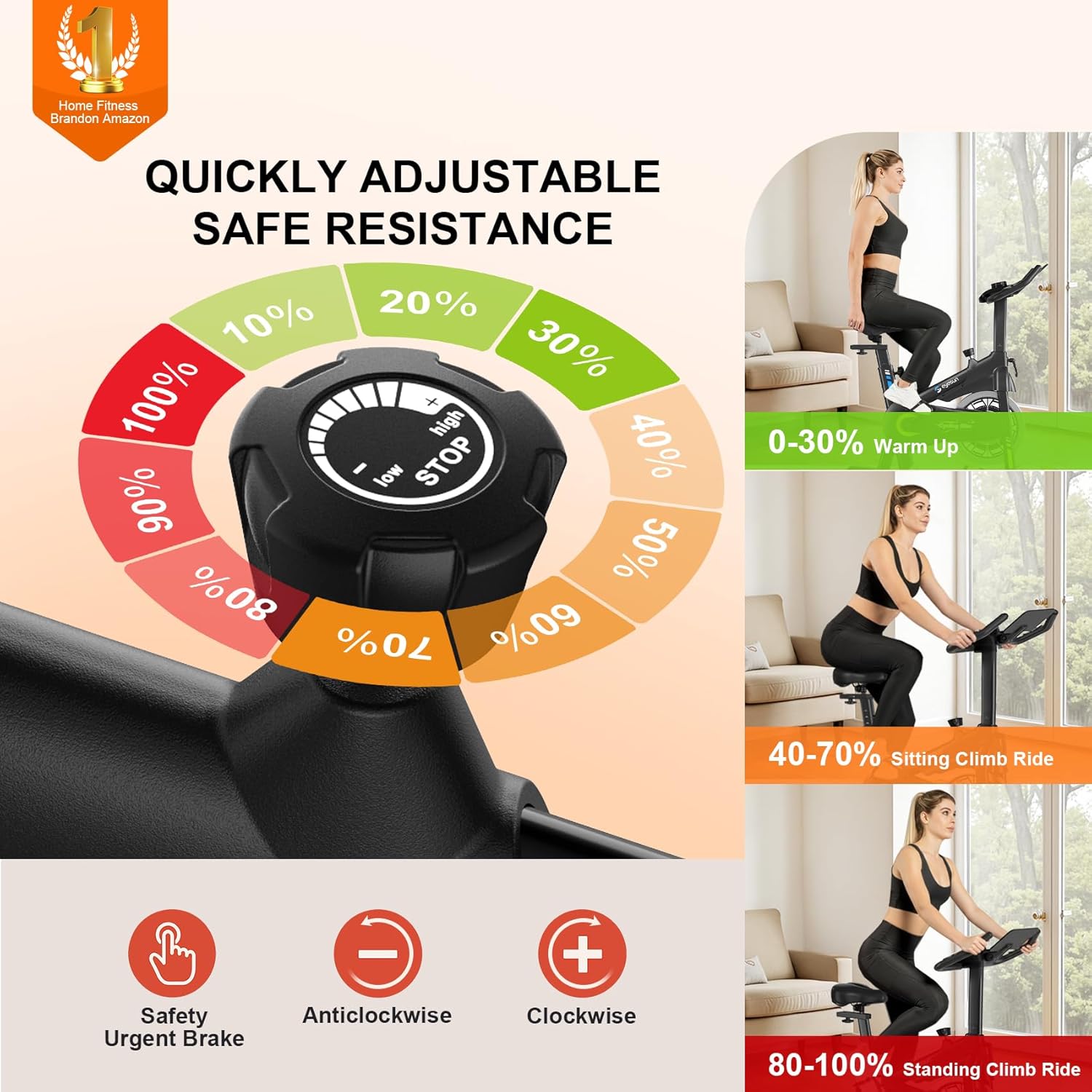
Image: Close-up of the EYESUN QM-530W Exercise Bike pedals with adjustable straps.
1.6 LCD Monitor Setup
Insert 2 AA batteries (not included) into the LCD monitor. Connect the monitor's wires to the corresponding cables from the handlebar post. The monitor will display time, speed, distance, calories, pulse, and odometer.
Video: Detailed assembly instructions for the EYESUN QM-530W Exercise Bike, including connecting wires and securing components.
2. Operating Instructions
The EYESUN QM-530W Exercise Bike offers a user-friendly experience with various adjustable features to customize your workout.
2.1 Adjusting Seat and Handlebar
To adjust the seat height, loosen the knob on the seat post, raise or lower the seat to your desired position (fits inseam 25"-35"), and tighten the knob. The seat can also be adjusted horizontally. The handlebar height is 3-way adjustable by loosening its knob, setting the height, and re-tightening.

Image: EYESUN QM-530W Exercise Bike showing adjustable seat and handlebar positions for various user heights.
2.2 Adjusting Resistance
The bike features adjustable magnetic resistance. Turn the resistance knob clockwise to increase resistance for a more challenging workout, or counter-clockwise to decrease resistance. Push the knob down for an emergency stop.

Image: Close-up of the EYESUN QM-530W Exercise Bike resistance knob with low, high, and emergency stop settings.
2.3 Using the LCD Monitor
The upgraded LCD monitor tracks real-time stats. Press the 'MODE' button to cycle through Time, Speed, Distance, Calories, Pulse, and Odometer. To measure your pulse, grip the heart rate sensors on the handlebars firmly.

Image: EYESUN QM-530W Exercise Bike LCD monitor displaying various workout metrics like time, speed, and calories.
2.4 App Connectivity
The bike supports Bluetooth connectivity and is compatible with FantomFite, KINOMAP, and Zwift apps. Sync your workout data with Google Fit and Apple Health for a smarter, more connected fitness experience.
Video: Demonstrates the quiet operation and various adjustable features of the EYESUN QM-530W Exercise Bike, including seat and handlebar adjustments.
3. Maintenance
Regular maintenance ensures the longevity and optimal performance of your EYESUN QM-530W Exercise Bike.
3.1 Cleaning
Wipe down the bike with a damp cloth after each use to remove sweat and dust. Avoid using abrasive cleaners or solvents that could damage the finish or electronic components.
3.2 Inspection
Periodically check all bolts and nuts to ensure they are tight. Inspect pedals, straps, and adjustment knobs for any signs of wear or damage. Replace worn parts immediately.
4. Troubleshooting
If you encounter any issues with your EYESUN QM-530W Exercise Bike, refer to the following common troubleshooting tips.
4.1 Console Not Displaying
Check if the 2 AA batteries are correctly installed and not depleted. Ensure all console wires are securely connected to the main unit.
4.2 Unusual Noises During Operation
Verify that all assembly bolts are tightened. Check for any loose components or obstructions around the flywheel or pedals. The silent belt drive system should operate quietly.
4.3 Resistance Not Changing
Ensure the resistance knob is functioning correctly and is not stuck. If the issue persists, contact customer support.
5. Specifications
| Feature | Detail |
|---|---|
| Brand | EYESUN |
| Model Name | QM-530W |
| Color | Azure |
| Resistance Mechanism | Magnetic (Friction) |
| Drive System | Belt |
| Item Weight | 43 Pounds |
| Product Dimensions | 39.4"D x 19.9"W x 42.1"H |
| Maximum Weight Recommendation | 330 Pounds |
| Adjustable Features | Pedal, Resistance Level, Seat (3-way handlebar, 5-way padded seat) |
| Connectivity | Bluetooth (FantomFite, KINOMAP, Zwift, Google Fit, Apple Health) |
6. Warranty and Support
Your EYESUN QM-530W Exercise Bike comes with comprehensive support to ensure your satisfaction.
6.1 Warranty Information
The product includes a 24-month worry-free warranty. Please refer to the warranty card included in your packaging for full details and terms.
6.2 Customer Support
For any questions, assistance, or warranty claims, please contact our friendly customer service team. We offer 24/7 support.
- Email: support@eyesun.net

