
1. Introduction
The GUGTTR Under Desk Elliptical Machine (Model QW026) is a compact, electric leg exerciser designed for low-impact workouts. It offers both automatic and manual modes with adjustable speeds and directions, making it suitable for various users, including seniors and individuals working in office environments. This manual provides essential information for safe and effective use of your elliptical machine.
2. Safety Information
- Read all instructions before use.
- Place the machine on a stable, flat surface.
- Ensure adequate space around the machine during operation.
- Keep children and pets away from the machine during use.
- Do not use if the power cord is damaged.
- Consult a physician before starting any new exercise program.
- Stop exercising immediately if you feel pain, dizziness, or discomfort.
- The machine is designed for seated use only. Do not stand on the pedals.
3. What's in the Box
- 1x Under Desk Elliptical Machine
- 1x User Manual
- 1x Remote Control
- 1x Power Cord
4. Setup
The GUGTTR Under Desk Elliptical Machine comes fully assembled and ready for use.
- Place the elliptical machine on a flat, stable surface near an electrical outlet.
- Connect the power cord to the machine and then plug it into a standard electrical outlet.
- Ensure the remote control has batteries (not included).

5. Operating Instructions
5.1 Powering On/Off
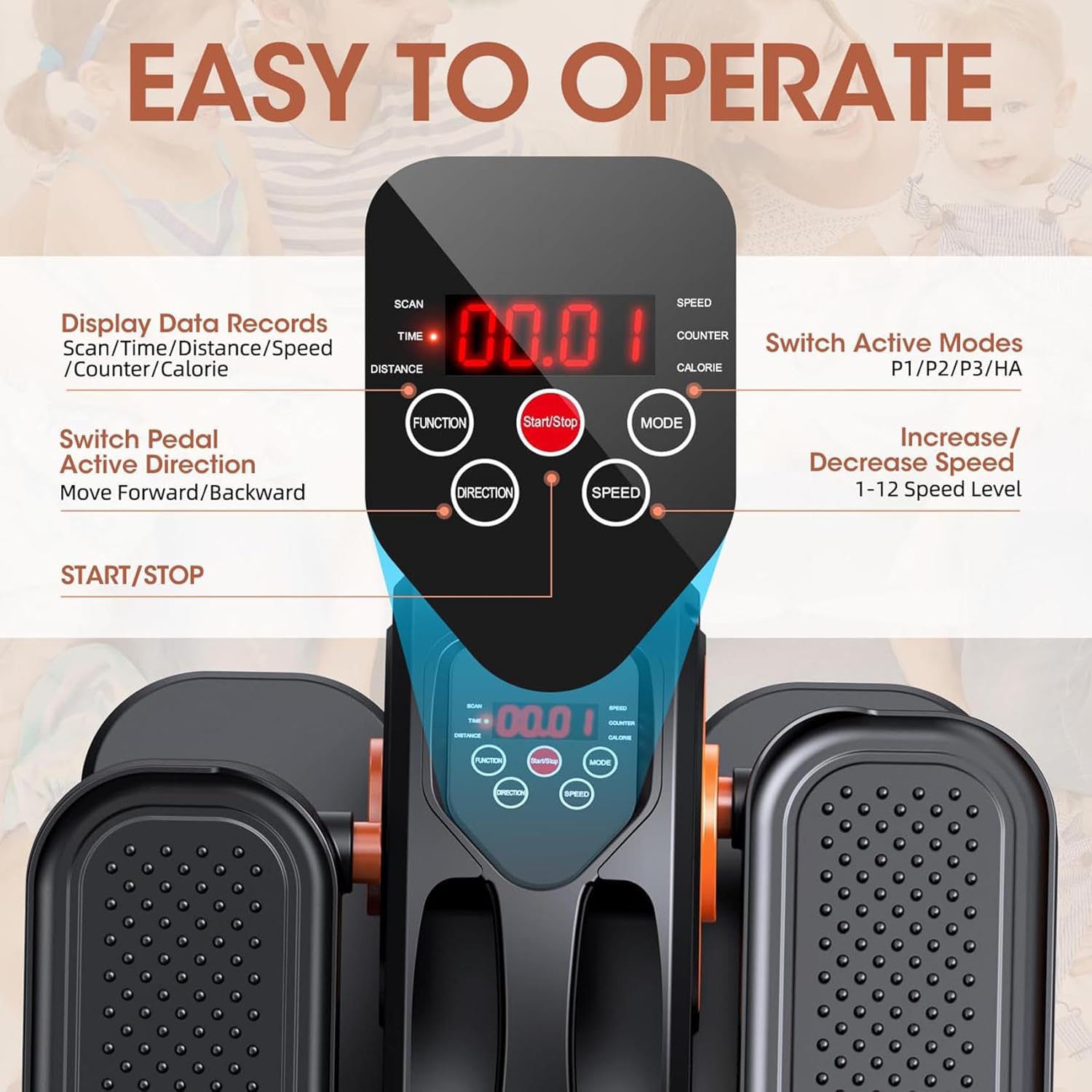
To power on the machine, press the "POWER" button on the remote control or the "Start/Stop" button on the main unit. To power off, press the "POWER" button again.
5.2 Modes of Operation
The machine offers two primary modes:
Manual Mode
- In Manual Mode, you can adjust the speed and direction of the pedals.
- Use the "SPEED +" and "SPEED -" buttons on the remote or the main unit to select from 12 different speed levels.
- Use the "DIRECTION" button to switch between forward and backward pedaling.
Automatic Modes (Pre-set Programs)
- The machine features three pre-set automatic programs (P1, P2, P3) that vary speed and direction automatically for a diverse workout.
- Press the "MODE" button on the remote or the main unit to cycle through P1 (Soft Mode), P2 (Walking Mode), and P3 (Exercise Mode).
- These modes typically run for 30 minutes with automatic speed and direction adjustments.
5.3 LCD Display Functions
The integrated LCD display tracks your workout data:
- SCAN: Cycles through all metrics.
- TIME: Duration of your workout.
- DISTANCE: Distance covered.
- SPEED: Current pedaling speed.
- COUNTER: Total number of rotations.
- CALORIE: Estimated calories burned.
6. Maintenance
- Cleaning: Wipe the machine with a damp cloth after each use. Avoid abrasive cleaners.
- Storage: Store in a cool, dry place away from direct sunlight.
- Inspection: Periodically check all parts for wear and tear. Ensure all connections are secure.
- Lubrication: No special lubrication is required for this model.
7. Troubleshooting
| Problem | Possible Cause | Solution |
|---|---|---|
| Machine does not power on | Power cord not properly connected; No power from outlet. | Check power cord connection; Try a different outlet. |
| Pedals are not moving smoothly | Obstruction; Machine not on a flat surface. | Check for any foreign objects; Ensure machine is on a stable, level surface. |
| Remote control not responding | Batteries low/dead; Remote out of range. | Replace remote batteries; Ensure remote is within 33ft range and pointed towards the machine. |
| Unusual noise during operation | Loose components; Internal issue. | Check for any loose parts and tighten if necessary; Contact customer support if noise persists. |
For issues not listed, please refer to the Warranty and Support section.
8. Specifications
| Feature | Detail |
|---|---|
| Model Name | QW026 |
| Brand | GUGTTR |
| Color | Black Orange |
| Product Dimensions | 16.5"D x 14"W x 8"H |
| Material | Vinyl |
| Resistance Mechanism | Manual |
| Number of Resistance Levels | 12 |
| Maximum Weight Recommendation | 500 Pounds |
| Item Weight | 7.37 Kilograms |
9. Warranty and Support
GUGTTR offers a three-month return service and lifetime after-sales support.
For any questions or concerns regarding your GUGTTR Under Desk Elliptical Machine, please contact customer support through Amazon messages or email.
The product includes a 1-year warranty.
For more information, visit the official GUGTTR Store on Amazon: GUGTTR Store.