
1. Introduction
Thank you for choosing the JISULIFE Handheld Fan Ultra2. This versatile 5-in-1 device combines a powerful fan, a portable power bank, a flashlight, a jet fan, and a mini air pump. This manual provides detailed instructions for safe operation, setup, maintenance, and troubleshooting to ensure optimal performance and longevity of your device. Please read this manual thoroughly before use and retain it for future reference.
2. Safety Information
- Do not expose the device to extreme temperatures, direct sunlight, or high humidity.
- Keep the device away from water and other liquids. The included case offers splash protection, but the device itself is not waterproof.
- Do not disassemble, repair, or modify the device yourself. Contact qualified service personnel for any repairs.
- Keep out of reach of children.
- Ensure the air inlet and outlet are not blocked during operation to prevent overheating.
- Avoid pointing the jet fan directly at eyes or sensitive body parts.
- Use only the provided charging cable or a certified equivalent.
- The safety lock feature prevents accidental activation. Always engage it when transporting or storing the fan.
3. Package Contents
Verify that all items are present in your package:
- JISULIFE Handheld Fan Ultra2
- Splash-proof portable case
- Small screwdriver
- Cleaning brush
- Storage bag
- Magnetic circular air nozzle
- Magnetic rectangular air nozzle
- Hanging rope
- USB-C to USB-A charging cable (1.0 meter long)
- User Manual (this document)
4. Product Overview
The JISULIFE Handheld Fan Ultra2 is designed for portability and multi-functionality. It features a robust metal body and an intuitive digital display.

Figure 4.1: The JISULIFE Handheld Fan Ultra2 demonstrating its five primary functions: Hand Fan, Power Bank, Flashlight, Jet Fan, and Air Pump. This image highlights the device's versatility for various outdoor and daily needs.
Key Components:
- Air Inlet: Features a honeycomb structure to prevent hair entanglement and is removable/washable for cleaning.
- Air Outlet: Where the powerful airflow is directed.
- Digital Display: Shows current wind speed (1-100) and remaining battery percentage.
- Control Wheel: Used to adjust fan speed.
- Power Button: For turning the device on/off and activating storm mode.
- Flashlight Button: Activates and cycles through flashlight modes.
- USB-C Port: For charging the device and for power bank output.
- Safety Lock Switch: Prevents accidental operation.
- Flashlight: Located at the rear of the device.

Figure 4.2: An internal view of the JISULIFE Handheld Fan Ultra2, highlighting its high-speed motor and large 9000mAh battery. This illustrates the robust engineering behind its powerful performance and extended runtime.
5. Setup
5.1 Initial Charging
Before first use, fully charge the device. Connect the provided USB-C to USB-A charging cable to the fan's USB-C port and a compatible 18W (or higher) USB power adapter (not included). The digital display will show the charging progress. A full charge typically takes several hours.
5.2 Attaching Air Nozzles
The fan comes with two magnetic air nozzles (circular and rectangular) for specific applications like jet fan or air pump functions. Simply align the nozzle with the fan's air outlet; it will snap into place magnetically.
6. Operating Instructions
6.1 Fan Operation
- Power On: Slide the safety lock switch to the 'on' position (typically indicated by '-'). Press and hold the Power Button for 2 seconds to turn on the fan. The digital display will illuminate, showing the current wind speed and battery percentage.
- Adjust Speed: Rotate the Control Wheel to adjust the wind speed from 1 to 100. The digital display will show the selected speed.
- Storm Mode: For maximum airflow (100 speed), press and hold the Power Button for 3 seconds. Release the button to return to the previously set speed.
- Power Off: Press and hold the Power Button for 2 seconds to turn off the fan. Slide the safety lock switch to the 'off' position (typically indicated by 'o') for storage or transport.

Figure 6.1: The JISULIFE Handheld Fan Ultra2's performance, illustrating its ultra-high-speed motor reaching up to 43,000 RPM and 1-100 adjustable speeds for instant cooling. A comparison shows its superior performance over a general fan.
6.2 Power Bank Function
The 9000mAh battery allows the fan to function as a power bank for other devices.
- Ensure the fan is charged.
- Connect your external device (e.g., smartphone) to the fan's USB-C port using a compatible charging cable.
- The fan will automatically begin charging the connected device. The digital display will show the fan's remaining battery percentage.

Figure 6.2: The JISULIFE Handheld Fan Ultra2 highlighting its substantial 9000mAh battery, capable of providing up to 25 hours of runtime and serving as a reliable power bank for other devices.
6.3 Flashlight Operation
The integrated flashlight offers multiple brightness levels and a flashing mode for emergencies.
- Press the Flashlight Button once to turn on the flashlight at Level 1 brightness.
- Press the Flashlight Button again to cycle through Level 2, Level 3, and the flashing mode.
- Press and hold the Flashlight Button to turn off the flashlight.

Figure 6.3: Detailed view of the JISULIFE Handheld Fan Ultra2's flashlight, showing its three brightness levels (Level 1: 8502K, 35LUX; Level 2: 8634K, 67LUX; Level 3: 10195K, 82LUX) at 100cm distance.

Figure 6.4: The JISULIFE Handheld Fan Ultra2's flashlight in use, demonstrating its utility as an outdoor lighting source with four adjustable settings, including a distress signal light, for various situations like camping.
6.4 Jet Fan / Air Pump Operation
Attach one of the magnetic air nozzles to the fan's outlet for focused airflow.
- Select the appropriate magnetic air nozzle (circular for general jet, rectangular for wider spread).
- Attach the nozzle to the fan's air outlet.
- Turn on the fan and adjust the speed using the Control Wheel. For maximum power, activate Storm Mode.
- Use the focused airflow for tasks such as dust removal, inflating small items (e.g., air mattresses with appropriate adapters, not included), or drying surfaces.

Figure 6.5: The JISULIFE Handheld Fan Ultra2 being used in Storm Mode (100 speed) to clear dust and leaves from a car windshield. This demonstrates its effectiveness as a jet fan for cleaning tasks.
7. Maintenance
7.1 Cleaning the Air Inlet Net
The rear air inlet net is removable and washable to ensure clean air output and prevent debris buildup.
- Ensure the device is powered off and the safety lock is engaged.
- Gently twist or unclip the air inlet net from the main body.
- Use the provided cleaning brush or a soft, damp cloth to remove dust and debris. For thorough cleaning, the net can be rinsed with water.
- Allow the net to dry completely before reattaching it to the fan.
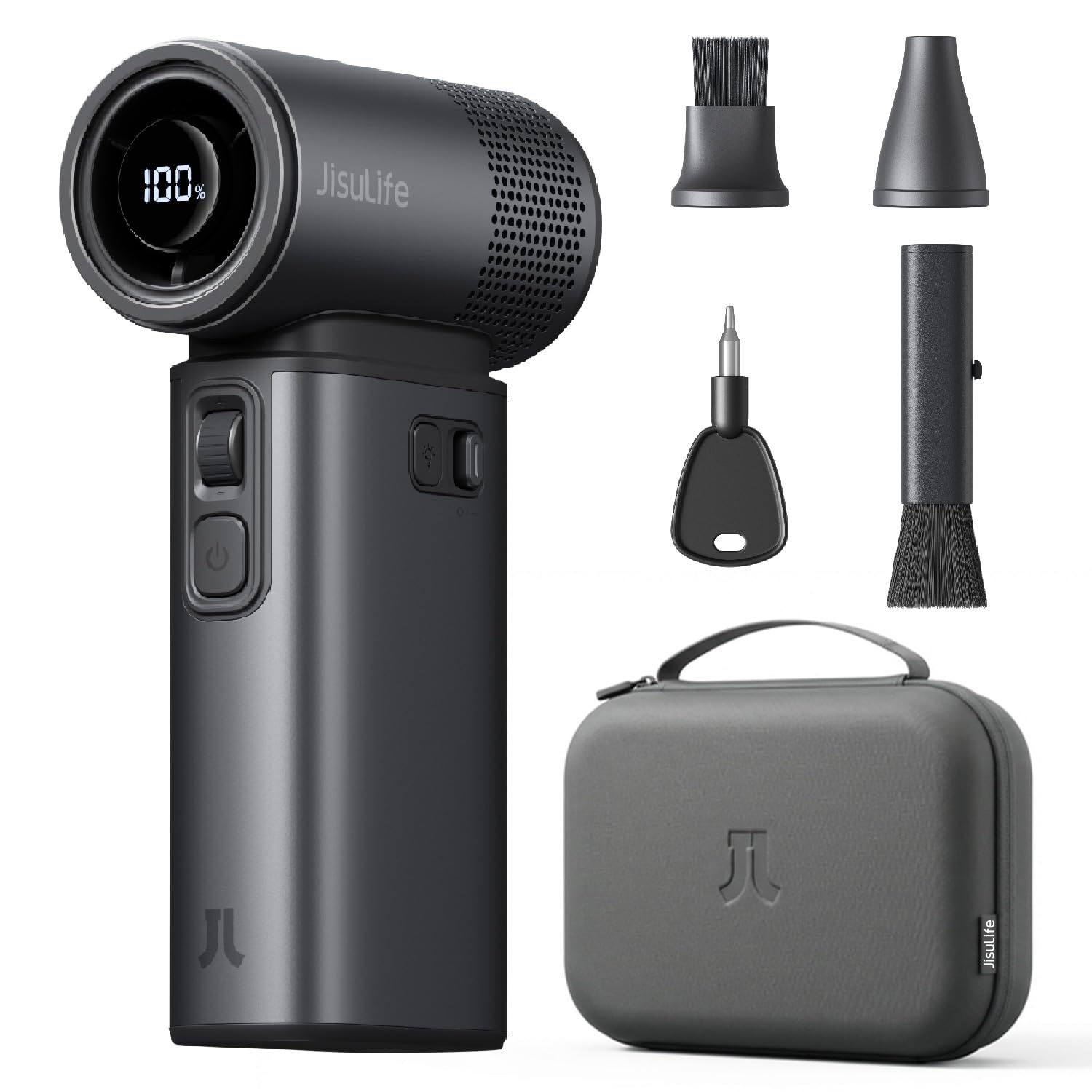
Figure 7.1: The JISULIFE Handheld Fan Ultra2 illustrating its removable and washable air inlet net, designed with a honeycomb structure to prevent hair entanglement. Also shown are the digital LED display, safety lock, and flashlight button.
7.2 General Cleaning
Wipe the exterior of the fan with a soft, dry cloth. Do not use abrasive cleaners or solvents.
8. Troubleshooting
| Problem | Possible Cause | Solution |
|---|---|---|
| Fan does not turn on. | Battery is depleted. Safety lock is engaged. Power button not pressed correctly. | Charge the fan. Slide the safety lock switch to the 'on' position. Press and hold the Power Button for 2 seconds. |
| Weak airflow. | Low battery. Air inlet/outlet blocked. Fan speed set too low. | Charge the fan. Clear any obstructions from the air inlet/outlet. Clean the air inlet net. Increase fan speed using the Control Wheel. |
| Flashlight does not work. | Battery is depleted. Flashlight button not pressed correctly. | Charge the fan. Press the Flashlight Button to cycle modes, or press and hold to turn off/on. |
| Device not charging. | Faulty cable or adapter. Loose connection. | Try a different USB-C cable and power adapter. Ensure the cable is securely plugged into both the fan and the power source. |
9. Specifications
| Feature | Specification |
|---|---|
| Brand | JISULIFE |
| Model Name | Handheld Fan Ultra2 |
| Model Number | FHU02R |
| Color | Grey |
| Product Dimensions (D x W x H) | 13.5 x 7.5 x 4 cm |
| Item Weight | 10.5 Ounces (approx. 297g) |
| Power Source | Battery Powered |
| Battery Capacity | 9000mAh |
| Max Runtime | Up to 25 hours |
| Charging/Output Wattage | 18W (dual-directional fast charging) |
| Motor Speed | 43000 RPM |
| Number of Speeds | 100 (adjustable) |
| Max Wind Speed | 17 m/s |
| Noise Level | 65 Decibels |
| Control Type | Button, Touch (Control Wheel) |
| Material | Aluminum (body and blades) |
| Special Features | 5-in-1 functionality, Digital Display, Splash-proof case, Safety Lock, Removable/Washable Air Inlet Net |
10. Warranty and Support
JISULIFE products are manufactured to high-quality standards. For warranty information, please refer to the warranty card included with your purchase or visit the official JISULIFE website. If you encounter any issues or have questions not covered in this manual, please contact JISULIFE customer support through their official channels or the retailer from whom you purchased the product.


