
Introduction
The EPOMAKER TH108 V2 PRO is a full-sized mechanical keyboard designed for multi-device compatibility across various operating systems. It features tri-mode connectivity (Bluetooth, 2.4GHz wireless, and USB-C wired), a 10000mAh battery, hot-swappable switches, and customizable RGB lighting. A functional screen and rotary knob provide real-time information and control over keyboard settings.
This manual provides instructions for setting up, operating, maintaining, and troubleshooting your TH108 V2 PRO keyboard.

Figure 1: EPOMAKER TH108 V2 PRO Full-size Wireless Mechanical Gaming Keyboard.
Setup
Package Contents
- EPOMAKER TH108 V2 PRO Full Sized Gaming Keyboard
- Detachable USB A-to-C Cable
- Wireless 2.4Ghz Receiver (stored under the left kick-stand)
- Extra Switch and a 2-in-1 Switch-and-Keycap Puller
- Summarized Multilingual Manual and Product Card
Video 1: Unboxing the TH108 V2 PRO keyboard, showing included accessories.
Connectivity Modes
The TH108 V2 PRO supports three connection modes: USB-C wired, 2.4GHz wireless, and Bluetooth. Use the switch located on the back of the keyboard to select your desired mode.
- Wired Mode: Connect the keyboard to your device using the provided USB A-to-C cable.
- 2.4GHz Wireless Mode: Locate the 2.4GHz receiver stored under the left kick-stand of the keyboard. Plug the receiver into a USB port on your device. Switch the keyboard to 2.4GHz mode.
- Bluetooth Mode: Switch the keyboard to Bluetooth mode. The keyboard can pair with up to 5 devices. Refer to the operating section for pairing instructions.

Figure 2: Connection Hub with Mac/Win and 2.4G USB BT switches.

Figure 3: Keyboard with Mac modifier PBT keycaps for macOS compatibility.
Operating System Compatibility
The keyboard is compatible with Windows, macOS, and Android devices. Use the dedicated Mac/Win switch on the back of the keyboard to ensure proper key mapping for your operating system.
Charging the Keyboard
Connect the keyboard to a USB power source using the provided USB A-to-C cable. The 10000mAh battery provides extended usage. The screen display will indicate charging status.
Operating Instructions
Switching Devices (Bluetooth)
To switch between paired Bluetooth devices, press FN + Q, FN + W, or FN + E. The keyboard can store up to 3 Bluetooth profiles. For 2.4GHz mode, ensure the keyboard is switched to 2.4GHz and the receiver is plugged in. For wired mode, simply connect the USB-C cable.
Screen and Knob Functionality
The integrated 1.06-inch screen displays real-time keyboard information, battery status, and can be customized with GIFs or images. The rotary knob, by default, controls volume and navigates screen pages. Press FN + KNOB to swap between these functions. The knob can also be customized for other actions via the software.

Figure 4: Smart Custom Display with screen and knob.
Video 2: Close-up views of the TH108 V2 PRO, demonstrating screen and knob functions.
RGB Lighting Control
The keyboard features customizable RGB backlighting, an integrated light bar, and a decor board. Lighting effects can be adjusted using the integrated knob and screen, quick shortcuts, or the web-based software.
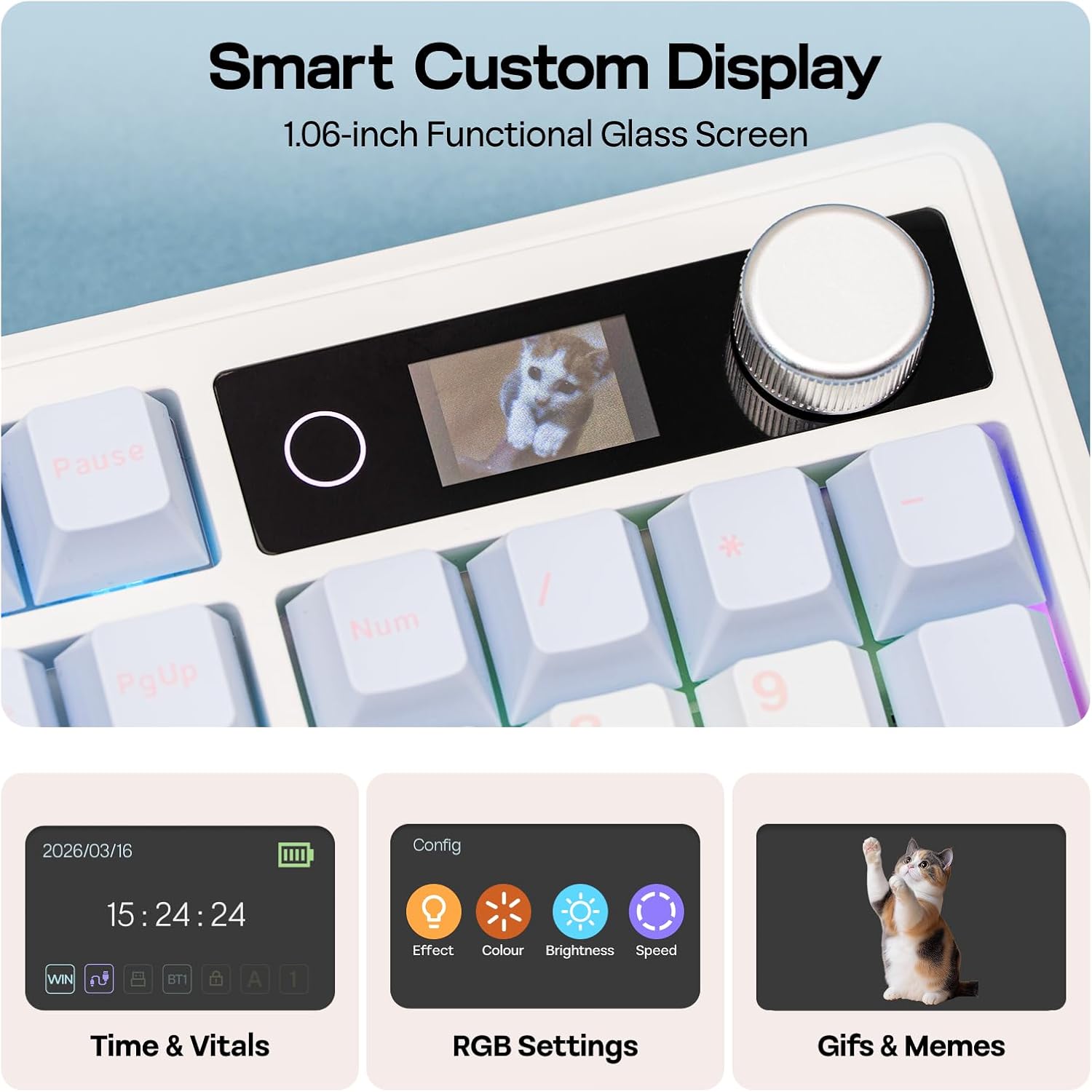
Figure 5: Vibrant RGB lighting with custom backlight, light panel, and light bar.
Software Customization
The TH108 V2 PRO utilizes a Chrome-based, multilingual web-compatible software for advanced customization. This software allows for macro recording, key remapping, and screen customization, including GIF uploading and time synchronization. Access the software via the official EPOMAKER website.

Figure 6: Programmable software interface for personalization.
Video 3: Guide on how to customize your TH108 V2 PRO keyboard.
Maintenance
Cleaning
To clean the keyboard, disconnect it from all power sources. Use a soft, lint-free cloth dampened with a small amount of water or a mild cleaning solution. Avoid spraying liquids directly onto the keyboard. For keycaps, they can be removed and cleaned separately with mild soap and water.
Switch Replacement (Hot-Swappable)
The TH108 V2 PRO features hot-swappable switch sockets, allowing you to change switches without soldering. Use the included 2-in-1 switch-and-keycap puller to carefully remove keycaps and switches. Align new 3-pin or 5-pin mechanical switches with the sockets and press firmly until they click into place. Ensure the pins are straight before insertion to prevent damage.

Figure 7: Hot-swappable PCBA compatible with 3/5 pin mechanical switches.
Battery Care
The keyboard is equipped with a 10000mAh battery. For optimal battery life, avoid fully discharging the keyboard frequently. Charge the keyboard when the battery indicator on the screen shows low power. Store the keyboard in a cool, dry place when not in use for extended periods.
Troubleshooting
- Keyboard not responding: Ensure the keyboard is charged. Check the connection mode switch (wired, 2.4GHz, Bluetooth) and ensure it matches your intended connection. For 2.4GHz, verify the receiver is properly inserted. For Bluetooth, ensure it's paired correctly.
- Connectivity drops: Ensure the keyboard is within range of your device for wireless connections. Minimize interference from other wireless devices.
- Keys not registering: If specific keys are not working, try replacing the switch using the included puller and a spare switch.
- Software issues: If experiencing problems with customization software, ensure your web browser is up to date and try clearing browser cache. The software is web-based, so no installation is required.
- Keyboard disconnects on Linux wake: Some Linux systems may require the keyboard to be unplugged and re-plugged to reconnect after the system wakes from sleep. This is a known behavior on certain Linux distributions.
- RGB lighting not working: Check RGB settings via the knob/screen or the customization software. Ensure brightness is not set to zero.
Specifications
| Feature | Detail |
|---|---|
| Brand | EPOMAKER |
| Model Name | TH108 V2 PRO |
| Connectivity Technology | 2.4Ghz Wireless, Bluetooth, USB Cable |
| Keyboard Description | Mechanical |
| Special Features | Backlit, Ergonomic, Hot-Swappable, Programmable Keys, Volume Roller, Screen Display |
| Keyboard Backlighting | RGB |
| Product Dimensions (L x W x H) | 17.61" x 5.54" x 1.1" (44.7 cm x 14.7 cm x 4.4 cm) |
| Weight | 1.5 kg |
| Power Source | Battery Powered (10000mAh) |
| Switch Type | Linear, Linear Silent (e.g., Sea Salt Silent, Creamy Jade) |
| Keyboard Layout | QWERTY, 104 Keys |
| Compatible Operating Systems | Mac OS 11 Big Sur, Windows 7 and above, Android |
| Enclosure Material | Plastic |
| Keyboard Plate Material | Polycarbonate |

Figure 8: Technical specifications and physical dimensions.
Warranty Information
The EPOMAKER TH108 V2 PRO Mechanical Keyboard comes with a 1-Year Warranty from the date of purchase. This warranty covers manufacturing defects and workmanship under normal use. It does not cover damage caused by misuse, accidents, unauthorized modifications, or natural wear and tear. Please retain your proof of purchase for warranty claims.
Support
For further assistance, technical support, or to explore other EPOMAKER products, please visit the official EPOMAKER store or contact customer service through their website.
Official EPOMAKER Store: Visit Store


