
LEKATO PA-2
LEKATO PA-2 Guitar Headphone Amplifier User Manual
Model: PA-2
Introduction
Thank you for choosing the LEKATO PA-2 Guitar Headphone Amplifier. This portable device is designed for electric and bass guitar players, offering a versatile practice solution with multiple amp models, built-in effects, Bluetooth connectivity for backing tracks, and USB OTG recording capabilities. Please read this manual carefully to ensure proper use and optimal performance.
Important Safety Information
- Do not disassemble or modify the device.
- Keep away from water, moisture, and extreme temperatures.
- Use only the specified charging cable.
- Avoid dropping or subjecting the device to strong impacts.
- Prolonged listening at high volume levels may cause hearing damage.
Package Contents
Verify that all items are present in your package:
- LEKATO PA-2 Headphone Amplifier x1
- User Manual x1
- Type-C Data Cable x1

Image: Contents of the LEKATO PA-2 package, including the amplifier, user manual, and Type-C charging cable.
Product Overview
Familiarize yourself with the various parts and controls of your LEKATO PA-2 amplifier.
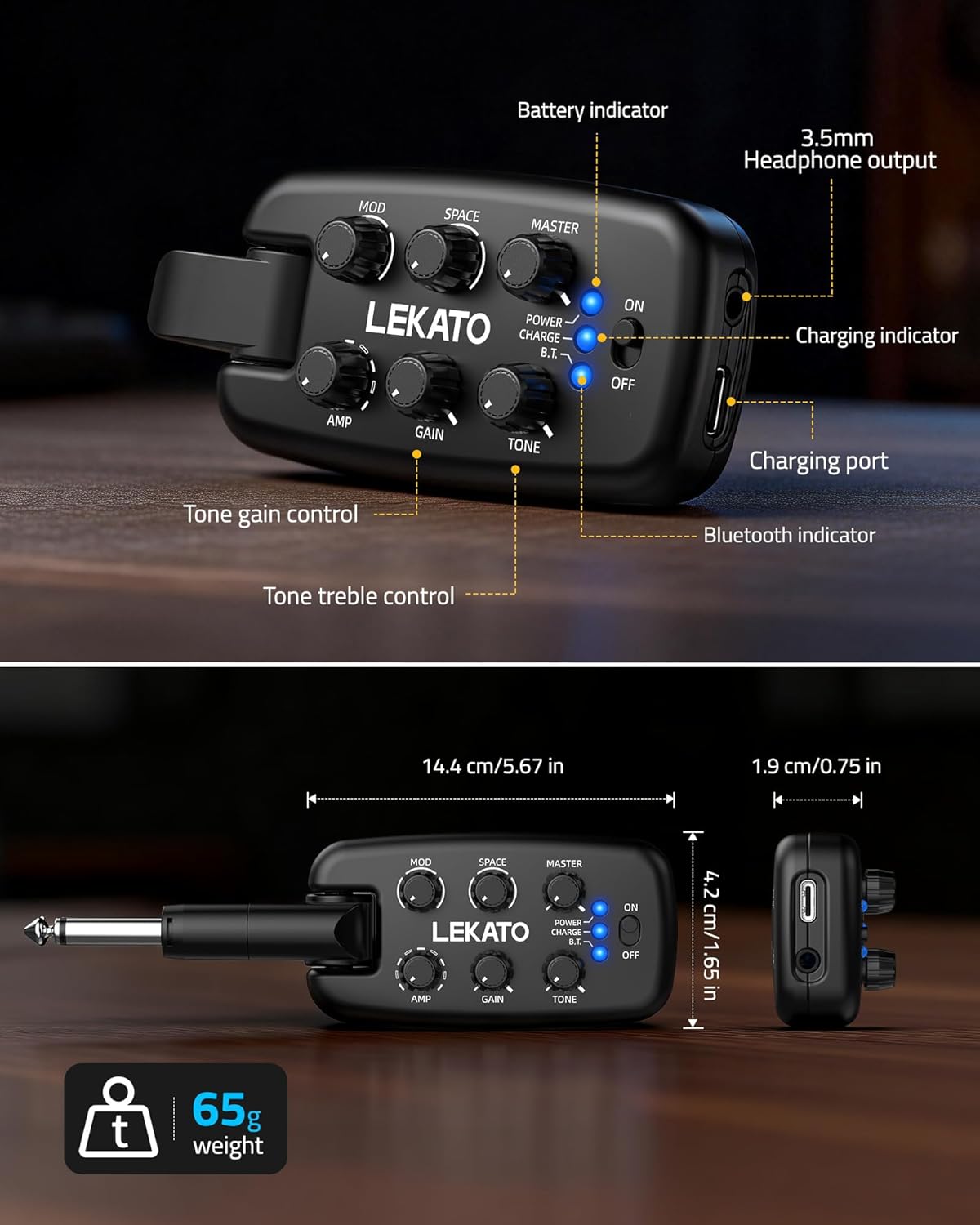
Image: Front view of the LEKATO PA-2 amplifier with labels pointing to the AMP, GAIN, TONE, MOD, SPACE, MASTER knobs, ON/OFF switch, POWER/CHARGE/B.T. indicators, charging port, and 3.5mm headphone output.
Controls and Indicators:
| Control/Indicator | Function |
|---|---|
| AMP Knob | Selects one of 9 amp models (clean, crunch, overdrive, distortion). |
| GAIN Knob | Adjusts the input gain level for the selected amp model. |
| TONE Knob | Adjusts the tonal characteristics (treble/brightness). |
| MOD Knob | Selects and adjusts modulation effects: Chorus, Phaser, Tremolo. Turn fully left to disable. |
| SPACE Knob | Selects and adjusts space effects: Reverb, Delay, Reverb+Delay. Turn fully left to disable. |
| MASTER Knob | Controls the overall output volume. |
| ON/OFF Switch | Powers the device on or off. |
| POWER Indicator | Solid light indicates normal operation. Blinking indicates low battery. |
| CHARGE Indicator | Red light indicates charging. Green light indicates fully charged. |
| B.T. Indicator | Solid light indicates Bluetooth connected. Blinking indicates Bluetooth on but not connected. Off indicates Bluetooth off. |
| 6.35mm Plug Pin | Connects to your electric or bass guitar's output jack. Features 180° rotation. |
| 3.5mm Headphone Output | Connects to your headphones for silent practice. |
| Type-C Charging Port | Used for charging the device and USB OTG recording/playback. |
Setup Guide
1. Charging the Device
Before first use, fully charge the PA-2 amplifier. A full charge takes approximately 2 hours and provides up to 5 hours of use.
- Connect the supplied Type-C data cable to the charging port on the PA-2.
- Connect the other end of the cable to a USB power adapter (not included) or a computer's USB port.
- The CHARGE indicator will show a red light during charging and turn green when fully charged.

Image: The LEKATO PA-2 amplifier connected to a USB-C charging cable, with a green battery icon indicating charging.
2. Connecting to Your Guitar
- Ensure the PA-2 is powered off.
- Insert the 6.35mm plug pin of the PA-2 into your electric or bass guitar's output jack. The plug can rotate 180° to accommodate various guitar jack positions.

Image: Diagram illustrating the 180-degree rotatable plug of the LEKATO PA-2, allowing it to fit various guitar jack orientations.
3. Connecting Headphones
- Plug your 3.5mm headphones into the headphone output jack on the PA-2.

Image: The LEKATO PA-2 showing its USB-C port and 3.5mm headphone output, with headphones and an external speaker connected via the headphone jack.
Operating Instructions
Power On/Off
- To power on, slide the ON/OFF switch to the "ON" position. The POWER indicator will light up.
- To power off, slide the ON/OFF switch to the "OFF" position.
Selecting Amp Models and Adjusting Tone
The PA-2 offers 9 distinct amp models, ranging from clean to high-gain distortion.
- Rotate the AMP knob to cycle through the 9 available amp models.
- Use the GAIN knob to adjust the amount of overdrive or distortion for the selected amp model.
- Adjust the TONE knob to shape the treble and overall brightness of your sound.
- Use the MASTER knob to control the overall output volume to your headphones.

Image: The LEKATO PA-2 connected to a guitar, with a visual representation of sound waves transitioning from clean to overdrive to distortion, illustrating the 9 amp simulator tones.
Using Built-in Effects (MOD & SPACE)
The PA-2 includes 3 modulation effects and 3 space effects.
- MOD Effects: Rotate the MOD knob to select and adjust Chorus, Phaser, or Tremolo. Turn the knob fully counter-clockwise to disable modulation effects.
- SPACE Effects: Rotate the SPACE knob to select and adjust Reverb, Delay, or Reverb+Delay. Turn the knob fully counter-clockwise to disable space effects.

Image: Close-up of the LEKATO PA-2 controls, highlighting the MOD knob for Chorus, Phaser, Tremolo, and the SPACE knob for Reverb, Delay, Reverb+Delay, along with the AMP, GAIN, TONE, and MASTER controls.
Bluetooth Connectivity for Backing Tracks
Connect your smartphone or tablet via Bluetooth to play backing tracks and jam along.
- Ensure the PA-2 is powered on. The B.T. indicator will blink, indicating it's ready for pairing.
- On your smartphone or tablet, enable Bluetooth and search for "LEKATO PA-2".
- Select "LEKATO PA-2" to pair. Once connected, the B.T. indicator will glow solid blue.
- Play audio from your device. The audio will be mixed with your guitar signal through your headphones.
Note: The LEKATO PA-2 is a Bluetooth receiver only and cannot connect to Bluetooth headphones.
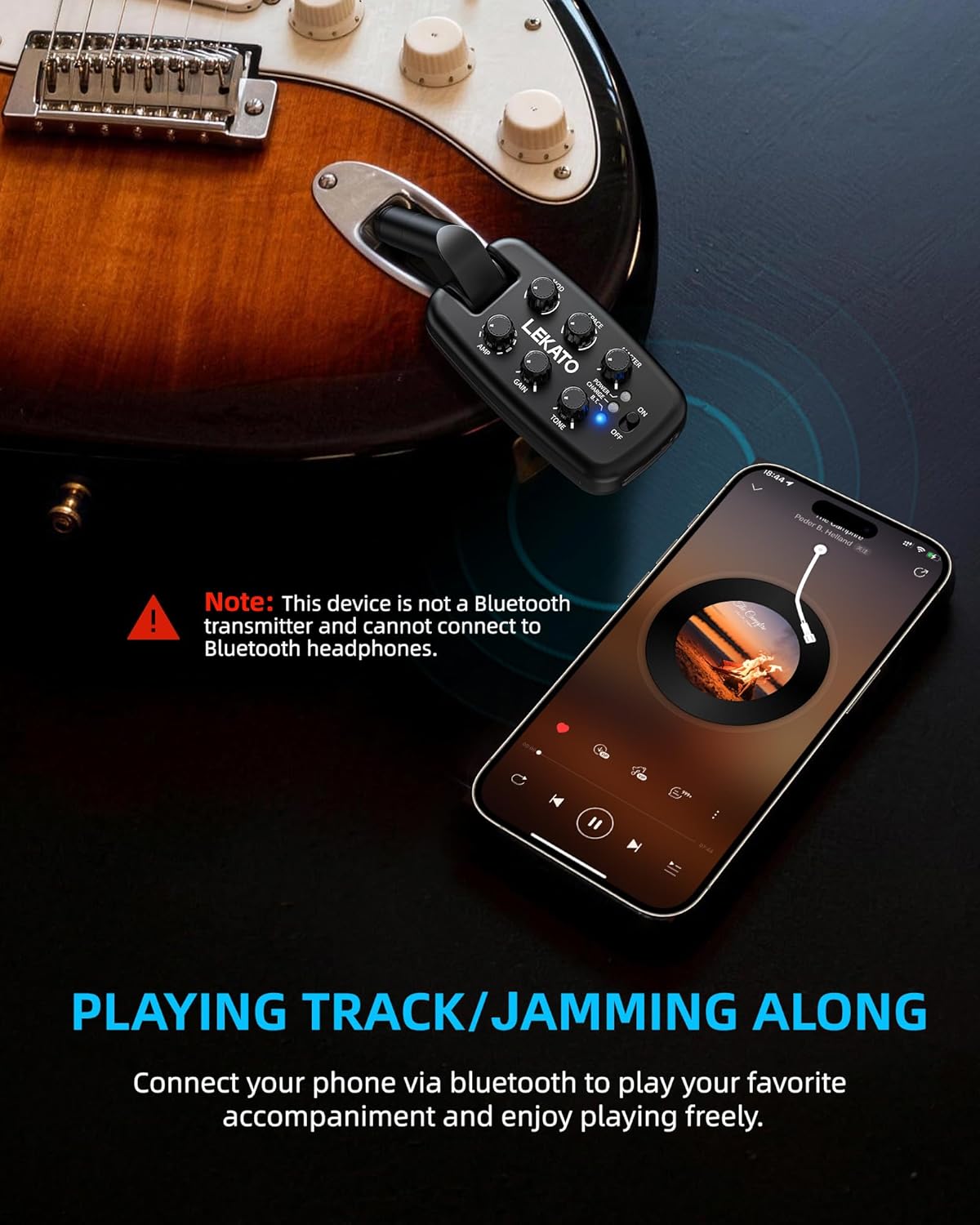
Image: The LEKATO PA-2 connected to a guitar, with a smartphone nearby displaying a music player interface, indicating Bluetooth connectivity for playing backing tracks.
USB OTG Recording and Playback
Record your guitar playing directly to your smartphone or tablet using the USB OTG function.
- Connect the PA-2 to your smartphone/tablet using a Type-C charging cable and an OTG adapter (sold separately).
- Open a recording application on your device. The PA-2 will be recognized as an audio input device.
- You can now record your guitar signal directly. The OTG function also supports playback through the PA-2.

Image: A user playing an electric guitar with the LEKATO PA-2 connected to the guitar. An illustration shows the PA-2 connected via a USB cable and OTG adapter to a smartphone for recording.
Silent Practice
The PA-2 is designed for silent practice, allowing you to play without disturbing others.
- Simply connect your headphones to the 3.5mm headphone output.
- Adjust the MASTER volume to a comfortable listening level.

Image: A person sitting on the floor, playing an electric guitar with headphones on, connected to the LEKATO PA-2 amplifier, demonstrating silent practice.
Battery Information
- The PA-2 features a built-in 780mAh rechargeable battery.
- A full charge provides up to 5 hours of continuous use.
- Recharge time is approximately 2 hours.
- For optimal battery health, recharge the device before it is fully drained.
- When the battery is low, the POWER indicator will blink. The device will power off after 10 minutes of low battery indication.

Image: The LEKATO PA-2 connected to a guitar, with icons indicating 180° rotatable plug, 780mAh battery, and 5-hour battery life.
Troubleshooting
| Problem | Possible Cause | Solution |
|---|---|---|
| No sound from headphones. |
|
|
| Bluetooth not connecting. |
|
|
| Poor sound quality / Noise. |
|
|
| Device not charging. |
|
|
Specifications
| Feature | Detail |
|---|---|
| Model Name | PA-2 |
| Brand | LEKATO |
| Compatible Devices | Electric Guitar, Bass Guitar |
| Amplifier Type | Digital Modeling |
| Amp Models | 9 (Clean, Crunch, Overdrive, Distortion) |
| Modulation Effects | 3 (Chorus, Phaser, Tremolo) |
| Space Effects | 3 (Reverb, Delay, Reverb+Delay) |
| Connectivity | Bluetooth Receiver, USB OTG |
| Headphone Output | 3.5mm Jack |
| Guitar Input | 6.35mm Plug Pin (180° Rotatable) |
| Power Source | Rechargeable Battery Powered |
| Battery Capacity | 780mAh |
| Battery Life | Up to 5 hours |
| Charging Time | Approx. 2 hours |
| Charging Port | Type-C |
| Material | Acrylonitrile Butadiene Styrene (ABS) |
| Dimensions (D x W x H) | 1.97" x 3.94" x 2.17" (5cm x 10cm x 5.5cm) |
| Weight | 65g |
Maintenance
- Clean the device with a soft, dry cloth. Do not use liquid cleaners.
- Store the amplifier in a cool, dry place away from direct sunlight and extreme temperatures.
- If not used for an extended period, charge the battery every 3 months to maintain its health.
Warranty and Support
The LEKATO PA-2 comes with a 12-month after-sales warranty.
For technical support or warranty claims, please contact LEKATO customer service through the retailer where you purchased the product or visit the official LEKATO website for contact information.
Ask a question about this manual
Ask about setup, troubleshooting, compatibility, parts, safety, or missing instructions. Manuals+ will review the question and use this page’s manual context to help answer it.