
Introduction
This instruction manual provides detailed guidance for the assembly, operation, and maintenance of your DUMOS L-Shaped Desk with Shelf and Drawers. This desk is designed for use in home offices, studies, or gaming setups, offering a spacious work surface, integrated power solutions, and versatile storage options. Please read this manual thoroughly before assembly and use to ensure proper setup and safe operation.
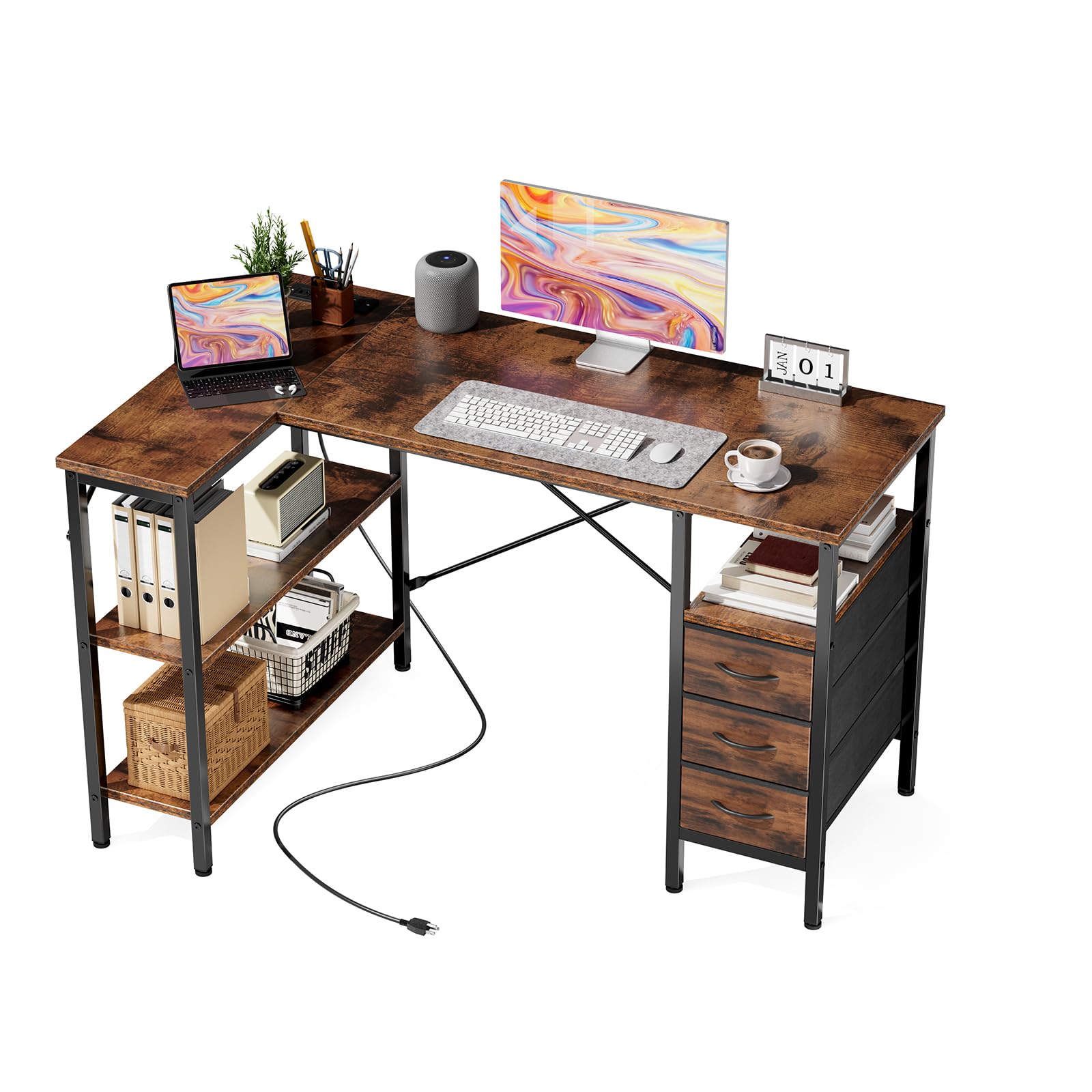
Figure 1: DUMOS L-Shaped Desk (47.2 Inch, Tank) overview.
Safety Information
Adhere to the following safety guidelines to prevent injury or damage to the product:
- Always follow the assembly instructions provided in the installation guide for proper setup and stability.
- Be cautious when using the drawers and charging station to prevent accidents.
- Keep the desk away from heat sources.
- Do not place heavy objects on the edges of the desk to maintain stability.
- Ensure all connections for the power outlet are secure before use.
- Do not exceed the maximum weight recommendation of 198 pounds (89.8 kg) for the desktop.
Package Contents
Before beginning assembly, verify that all components are present. Refer to the included installation guide for a complete list of parts and hardware. The package typically includes:
- Wooden Desktop Panels
- Metal Frame Components
- Fabric Drawers (3 units)
- Adjustable Shelves
- Built-in USB Port and Power Outlet Unit
- Assembly Hardware (screws, bolts, etc.)
- Installation Guide
Note: Assembly tools are not included.
Assembly Instructions
The DUMOS L-Shaped Desk requires assembly. Follow the step-by-step instructions provided in the included installation guide. Ensure all parts are correctly oriented and securely fastened.
- Unpack Components: Carefully remove all parts from the packaging and lay them out on a clean, soft surface to prevent scratches.
- Assemble Metal Frame: Connect the metal frame components according to the diagrams in the installation guide. Ensure the steel X-bar supports are correctly installed for enhanced stability.
- Attach Desktop Panels: Secure the wooden desktop panels to the assembled metal frame.
- Install Shelves and Drawers: The shelves and fabric drawers are reversible and can be installed on either the left or right side of the desk to suit your room layout. Use the pre-drilled holes to customize the shelf height for books, accessories, or a CPU tower.
- Integrate Power Outlet: Install the built-in power outlet unit into the designated slot on the desktop.
- Final Check: Once assembled, ensure all screws are tightened and the desk is stable before placing items on it.

Figure 2: Steel X-bar support for structural integrity.

Figure 3: Customizable storage shelf options.

Figure 4: Desk dimensions for planning your space.
Operating Instructions
Using the Charging Station
The desk is equipped with an integrated charging station to power your electronic devices. This station includes:
- 3 x Standard Power Outlets (2A/125V)
- 1 x USB-A Port (5V-DC-2.1A)
- 1 x Type-C Port (5V-DC-2.1A)
To use, plug the desk's main power cord into a wall outlet. Then, connect your devices to the appropriate ports on the charging station. Ensure devices are compatible with the provided power specifications.

Figure 5: Integrated charging station for electronic devices.
Utilizing Storage Features
The desk offers multiple storage solutions to keep your workspace organized:
- Fabric Drawers: Three sturdy fabric drawers provide enclosed storage for files, notebooks, and office supplies. Each drawer has a capacity of up to 22 lbs (10 kg). Use the smooth-pull handles for easy access.
- Adjustable Open Shelves: The open shelves can be adjusted in height to accommodate various items such as books, decorative pieces, or a computer tower. Refer to the assembly section for customization options.
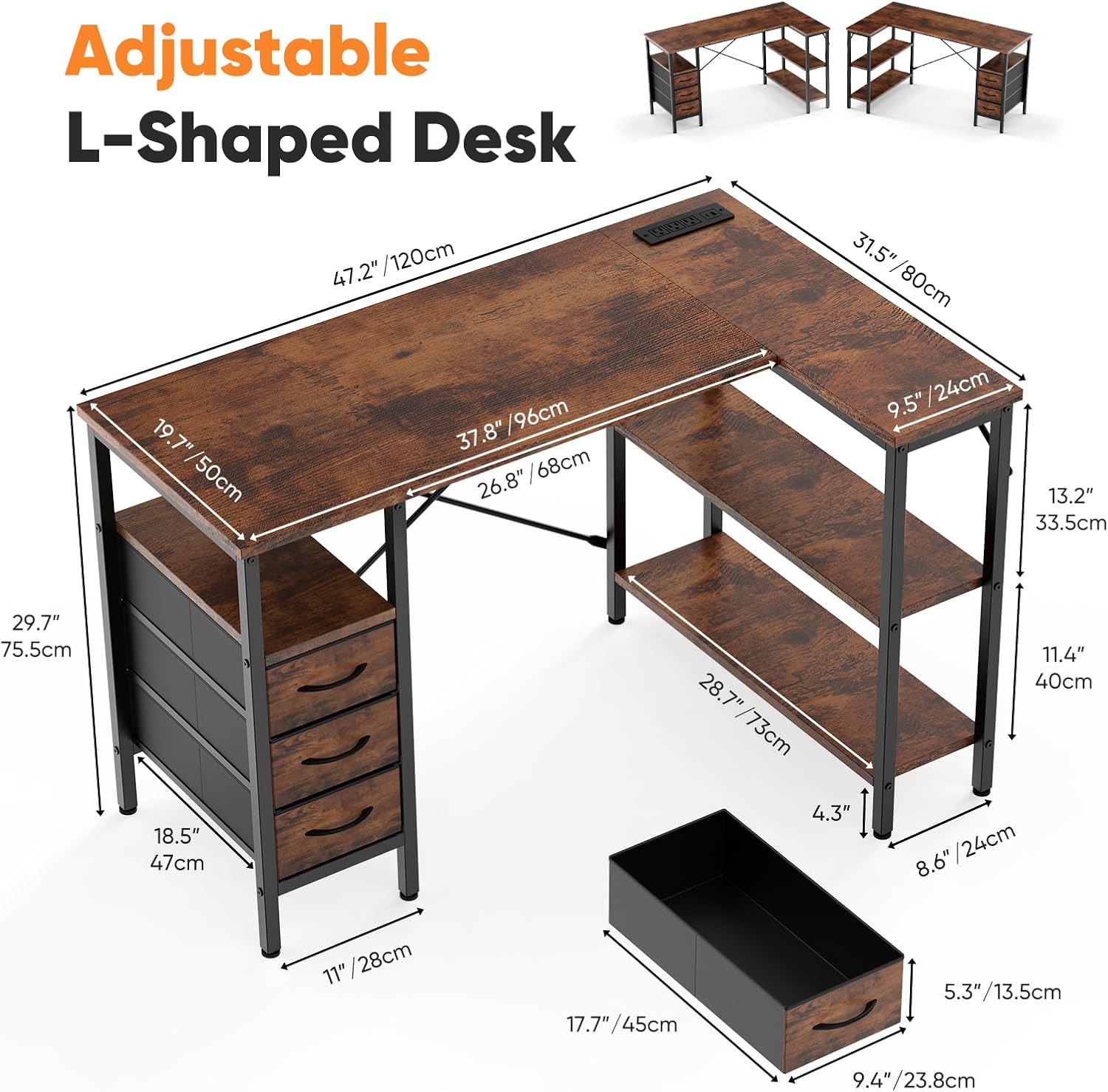
Figure 6: Three fabric storage drawers for organization.
Maintenance
To ensure the longevity and appearance of your DUMOS L-Shaped Desk, follow these maintenance guidelines:
- Cleaning: Wipe the desk surfaces with a damp cloth for general cleaning. For drying, use a dry cloth. Avoid abrasive cleaners or harsh chemicals that may damage the finish.
- Spills: Promptly wipe up any spills to prevent staining or damage to the wood finish.
- Inspection: Periodically check all screws and connections to ensure they remain tight. Re-tighten if necessary to maintain stability.
- Heat and Moisture: Avoid placing hot items directly on the desk surface. Use coasters or protective pads. Protect the desk from excessive moisture.
Troubleshooting
This section addresses common issues you might encounter:
| Problem | Possible Cause | Solution |
|---|---|---|
| Desk is wobbly or unstable. | Loose screws or uneven floor. | Check and tighten all assembly screws. Adjust the leveling feet at the bottom of the desk legs to compensate for uneven surfaces. |
| Charging station not working. | Desk not plugged in, or power strip switch is off. | Ensure the desk's main power cord is securely plugged into a functional wall outlet. Check if the power strip's switch (if any) is in the 'ON' position. Test with another device. |
| Drawers do not slide smoothly. | Fabric drawers are overloaded or misaligned. | Reduce the weight in the drawers (do not exceed 22 lbs per drawer). Ensure the fabric drawers are correctly inserted into their slots and not obstructed. |
Specifications
| Feature | Detail |
|---|---|
| Brand | DUMOS |
| Model Number | D3BC-RT47-DJ |
| Shape | L-Shape |
| Product Dimensions (D x W x H) | 80D x 119.4W x 75.4H Centimetres (29.7D x 47.2W x 29.7H Inches) |
| Color | Tank (Rustic) |
| Material | Wood (P2-grade engineered MDF) and Metal |
| Special Features | Adjustable, Adjustable Height, Built-In USB Outlet, Reversible, Scratch Resistant |
| Number of Drawers | 3 (Fabric, 22 lbs capacity each) |
| Number of Shelves | 1 (Adjustable open shelf) |
| Maximum Weight Recommendation | 198 Pounds (89.8 kg) |
| Charging Station | 3 AC Outlets (2A/125V), 1 USB-A Port (5V-DC-2.1A), 1 Type-C Port (5V-DC-2.1A) |
| Assembly Required | Yes |
| Product Care | Wipe with Damp Cloth, Wipe with Dry Cloth |
Warranty and Support
For warranty information or technical support, please refer to the contact details provided with your purchase documentation or visit the official DUMOS website. Keep your purchase receipt as proof of purchase for any warranty claims.


