
1. Introduction
Thank you for purchasing the Varia VS4 Grinder. This manual provides essential information for the safe and efficient operation, maintenance, and care of your new coffee grinder. Please read this manual thoroughly before first use and keep it for future reference.

Image 1: Varia VS4 Grinder main unit, showcasing its sleek design.
2. Safety Information
To prevent injury or damage to the appliance, always observe the following safety precautions:
- Ensure the power supply voltage matches the rating label on the grinder.
- The grinder is equipped with a 3-pin power plug. An adapter may be required for 2-pin outlets. Ensure proper grounding for safety.
- Do not operate the grinder with wet hands or near water.
- Keep fingers and foreign objects away from the burrs and bean hopper during operation.
- The grinder features an automatic stop function when the chamber is empty and overheat protection for the motor and gears.
- For safety during maintenance, the power automatically cuts off when the hopper or chamber is removed.

Image 2: Close-up of the grinder's safety mechanism, indicating secure locking points.
3. Package Contents
Verify that all items are present in the package:
- Varia VS4 Grinder Main Unit
- Power Cable
- Dosing Cup
- Cleaning Brush
- User Manual

Image 3: The Varia VS4 Grinder in Silver, shown with its retail packaging.
4. Setup
- Unpacking: Carefully remove all components from the packaging.
- Placement: Place the grinder on a stable, flat, and dry surface. Ensure adequate ventilation around the unit.
- Power Connection: Connect the power cable to the grinder and then to a suitable grounded electrical outlet. If your outlet is 2-pin, use a certified 3-pin to 2-pin adapter and ensure proper grounding.
- Initial Cleaning: Before first use, wipe the exterior with a damp cloth. Remove the hopper and burr chamber (refer to Section 6: Maintenance and Cleaning) and ensure they are free of any manufacturing residue.
5. Operating Instructions
The Varia VS4 Grinder is designed for single-dose grinding, ensuring minimal retention and fresh grounds every time.
- Adjust Grind Size: Before adding beans, adjust the grind size by rotating the adjustment dial. Refer to Section 5.1 for detailed grind adjustment.
- Add Coffee Beans: Open the hopper lid and add your desired amount of whole coffee beans (up to 40g capacity). Close the lid securely.
- Place Dosing Cup: Ensure the dosing cup is correctly positioned under the grind chute.
- Start Grinding: Press the power button to start the grinder. The grinder will operate until all beans have passed through the burrs.
- Stop Grinding: The grinder will automatically stop once the chamber is empty. You can also press the power button again to stop it manually.
- Collect Grounds: Remove the dosing cup and use the freshly ground coffee immediately.
5.1 Grind Adjustment
The Varia VS4 features a stepless grind adjustment with 10-micron increments, allowing for precise control over your grind size.
- Rotate the top dial clockwise for a finer grind and counter-clockwise for a coarser grind.
- The dial is marked to assist in repeatable settings.
- Experiment with settings to find the ideal grind for your brewing method, from espresso to filter coffee.
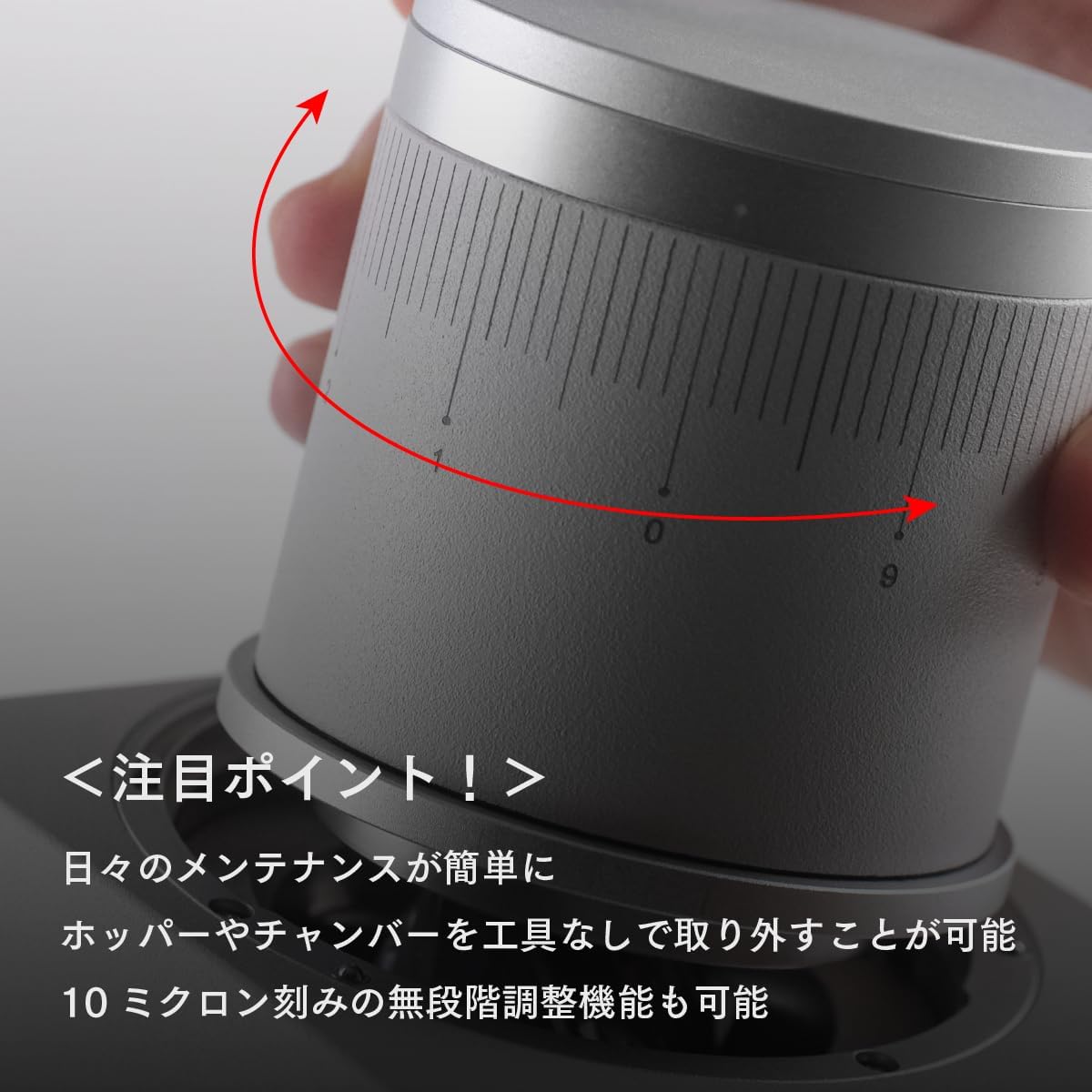
Image 4: Close-up of the stepless grind adjustment dial, showing precise markings for fine-tuning.
6. Maintenance and Cleaning
Regular cleaning ensures optimal performance and longevity of your Varia VS4 Grinder. The patented quick-connect bayonet system allows for tool-free disassembly.
- Power Off: Always unplug the grinder from the power outlet before cleaning.
- Remove Hopper: Twist and lift the bean hopper to remove it.
- Remove Burr Chamber: Twist and lift the burr chamber. The power will automatically cut off for safety.
- Clean Burrs: Use the provided brush to remove any coffee grounds or oils from the 53mm Supernova conical burrs. The internal parts are anodized for wear and static resistance, minimizing residue.
- Clean Chute: Use the brush to clean the grind chute. The electrodynamic flow design and active ionizer minimize static and powder residue.
- Reassemble: Carefully reassemble the burr chamber and hopper, ensuring they are securely locked into place.
- Exterior Cleaning: Wipe the exterior of the grinder with a soft, damp cloth. Do not use abrasive cleaners or immerse the unit in water.

Image 5: View of the 53mm Supernova conical burrs, highlighting the precision grinding components.

Image 6: The grind chute area, designed to minimize static and powder retention.
7. Troubleshooting
If you encounter issues with your Varia VS4 Grinder, refer to the table below for common problems and solutions.
| Problem | Possible Cause | Solution |
|---|---|---|
| Grinder does not start | Not plugged in; Hopper/chamber not secured; Overheat protection activated | Check power connection; Ensure hopper/chamber are correctly installed; Allow grinder to cool down |
| Inconsistent grind | Burrs are dirty; Grind setting too coarse/fine for beans | Clean burrs thoroughly; Adjust grind setting incrementally |
| Beans not feeding | Hopper empty; Beans stuck | Add more beans; Gently agitate beans in hopper (with grinder off) |
| Excessive static/powder retention | Humidity levels; Burrs need cleaning | Ensure proper humidity; Clean burrs and chute |
8. Specifications
Technical specifications for the Varia VS4 Grinder:
| Feature | Detail |
|---|---|
| Model Name | Varia VS4 |
| Color | Silver |
| Brand | Varia |
| Material | ADC12 Die-cast Aluminum Alloy Burrs, Aluminum, Silicone Rubber, Hardened Stainless Steel, Magnet, Food-safe Plastic |
| Style | Home/Commercial Use Possible (Small Cafes) |
| Product Weight | 1.24 kg |
| Country of Origin | China |
| Item Dimensions (L x W x H) | 9.8 cm x 3.4 cm x 16.1 cm |
| Capacity | 40 grams |
| Wattage | 200 W |
| Voltage | 100 Volts |
| Recommended Use | Coffee Bean Grinding |

Image 7: Diagram showing the dimensions of the Varia VS4 Grinder.
9. Warranty and Support
The Varia VS4 Grinder comes with a 1-year manufacturer warranty from the date of purchase. This warranty covers defects in materials and workmanship under normal use.
For warranty claims, technical support, or any inquiries regarding your product, please contact your retailer or the official Varia support channel. Please have your proof of purchase and product model number (VS4) ready when contacting support.


