
Miady 5000mAh, 10000mAh, 20000mAh Portable Chargers
Miady Portable Charger User Manual
Models: 5000mAh, 10000mAh, 20000mAh Power Banks
Introduction
Thank you for choosing Miady Portable Chargers. This manual provides essential information for the safe and efficient use of your 5000mAh, 10000mAh, and 20000mAh power banks. Please read these instructions carefully before use and retain them for future reference.
Product Overview
The Miady portable chargers are designed to provide reliable power on the go for various devices. This pack includes power banks with different capacities to suit diverse charging needs.
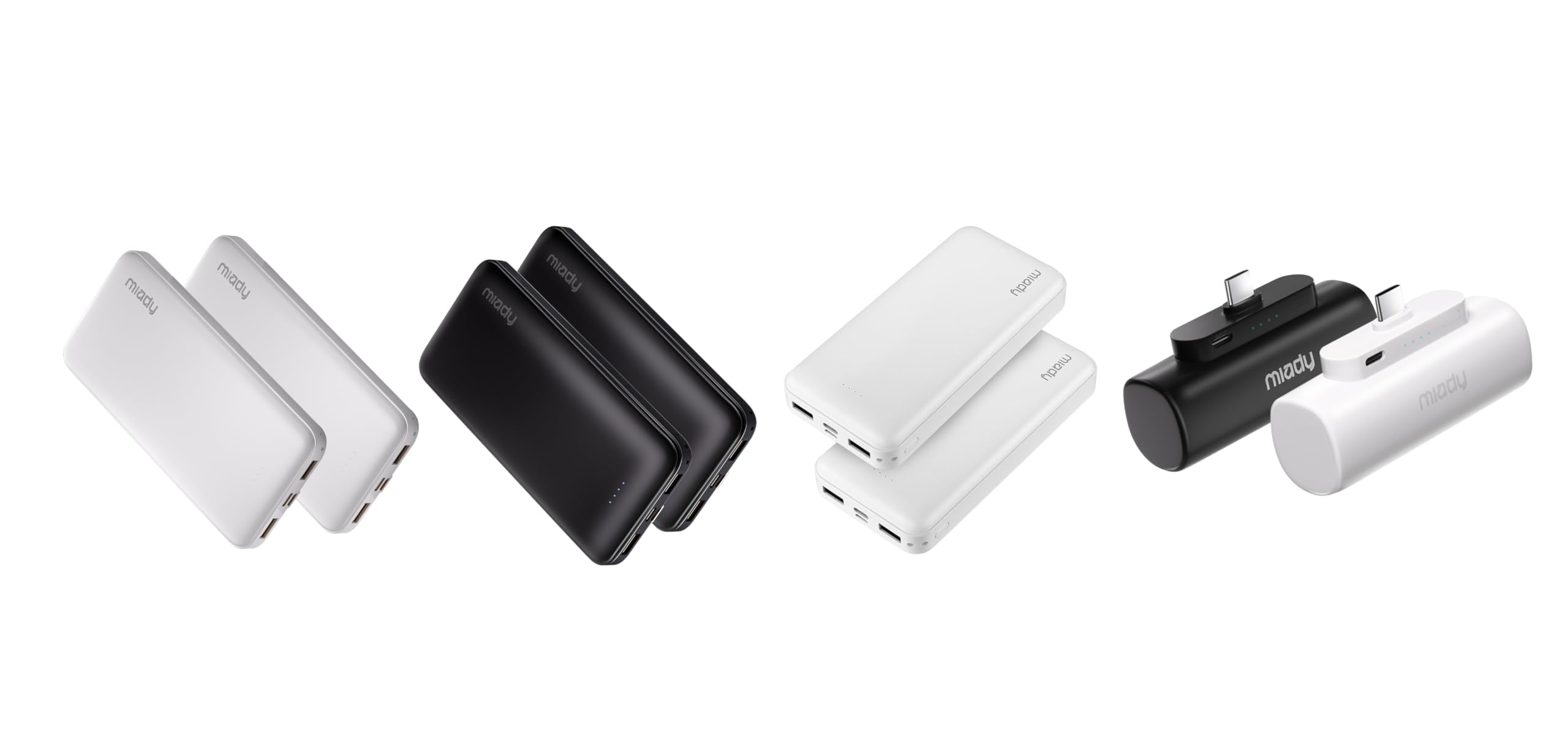
Image: A collection of Miady portable chargers, showcasing different capacities and designs.
Setup
Initial Charging of the Power Bank
Before first use, fully charge your Miady portable charger. This ensures optimal battery performance and longevity.
- Connect the power bank to a power source (e.g., wall adapter, computer USB port) using a compatible USB-C or Micro USB cable.
- The LED indicators on the power bank will illuminate to show the charging progress.
- Once all indicator lights are solid, the power bank is fully charged and ready for use.
Identifying Ports
Your Miady power bank may feature various ports for input and output:
- USB-A Output Ports: Used to charge your devices.
- USB-C Port: Can function as both an input (to charge the power bank) and an output (to charge your devices).
- Micro USB Input Port: Used to charge the power bank.

Image: A Miady power bank displaying its USB-A, USB-C, and Micro USB ports, indicating their functions.
Operating Instructions
Charging Your Devices
To charge your mobile phone, tablet, or other USB-powered devices:
- Connect your device to one of the power bank's output ports (USB-A or USB-C) using a compatible charging cable.
- The power bank will automatically begin charging your device. The LED indicators will show the remaining power level of the power bank.
- Disconnect your device once it is fully charged or when you no longer need to charge.

Image: A Miady power bank connected to and charging an iPhone, Android phone, and wireless earbuds, demonstrating universal compatibility.

Image: A smartphone being charged rapidly via a USB-C cable connected to a Miady power bank, highlighting 12W fast charging capability.
Plug and Play Mini Charger (Specific Model)
For the compact 5000mAh mini power bank with a built-in USB-C connector:
- Simply plug the built-in USB-C connector directly into your compatible phone's USB-C port.
- Ensure your phone case thickness is less than 4mm for a secure connection.
- The charger will automatically begin providing power.

Image: A compact Miady power bank with a built-in USB-C connector being plugged directly into a smartphone, illustrating the "Plug and Play" feature. Insets show proper fit with phone cases under 4mm.
This mini charger is ideal for travel, providing convenient power for GPS navigation or taking photos without extra cables.

Image: Two scenarios showing the mini Miady power bank in use: one person using it to power a phone for GPS, and another using it while taking pictures, emphasizing its utility as a travel companion.
Simultaneous Charging
Many Miady power bank models support charging multiple devices simultaneously. Each portable power bank has 2 USB-A and 1 USB-C output ports that detect connected devices and efficiently distribute current output up to 5V 2.4A. This allows you to charge up to three devices at the same time.
Maintenance
- Storage: Store the power bank in a cool, dry place away from direct sunlight and extreme temperatures.
- Cleaning: Use a soft, dry cloth to clean the exterior of the power bank. Do not use harsh chemicals or abrasive materials.
- Battery Care: To prolong battery life, fully charge the power bank at least once every three months, even if not in regular use. Avoid completely draining the battery frequently.
- Avoid Drops: Do not drop or subject the power bank to strong impacts, as this can damage internal components.
Troubleshooting
- Power Bank Not Charging:
- Ensure the charging cable is securely connected to both the power bank and the power source.
- Try a different charging cable or power adapter.
- Verify the power source is active.
- Device Not Charging from Power Bank:
- Check if the power bank has sufficient charge.
- Ensure the charging cable connecting your device to the power bank is functional and securely connected.
- Try a different output port on the power bank.
- Some devices may require a specific charging protocol; ensure compatibility.
- Slow Charging:
- Ensure you are using a high-quality cable and a compatible power adapter for charging the power bank or your device.
- Charging multiple devices simultaneously may reduce individual charging speeds.
Specifications
| Feature | Details |
|---|---|
| Brand | Miady |
| Model Capacities | 5000mAh, 10000mAh, 20000mAh |
| Input (Micro USB) | 5V / 2.0A |
| Input (USB-C) | 5V / 2.0A |
| Output (USB-A) | 5V / 2.4A (Max per port) |
| Output (USB-C) | 5V / 2.4A (Max) |
| Simultaneous Output | Up to 3 devices (Total 5V / 2.4A shared) |
| 10000mAh Dimensions | 5.5 x 2.6 x 0.6 inches |
| 10000mAh Weight | 7.68 oz |
| 5000mAh Mini Dimensions | 2.95 x 1.77 x 0.98 inches |
| 5000mAh Mini Weight | 0.2 lbs (approx. 3.2 oz) |
| Compatibility | iOS Devices, Android Devices, Other USB Devices (e.g., AirPods, Smartwatches, USB fans) |

Image: A 10000mAh Miady power bank next to various devices, illustrating its charging capacity: iPhone 15 (2.3 charges), iPad Mini (1.6 charges), AirPods Pro Case (11.5 charges), Galaxy S24 (1.8 charges).

Image: Two 20000mAh Miady power banks (one black, one white) with text indicating their charging capabilities: iPhone 15 (3.6 times), Samsung S23 (3.1 times), iPad 10 (1.8 times).
Safety Information
- Do not expose the power bank to water, moisture, or high humidity.
- Do not disassemble, modify, or attempt to repair the power bank yourself.
- Keep out of reach of children.
- Avoid extreme temperatures (below 0°C / 32°F or above 45°C / 113°F).
- Do not dispose of the power bank in fire, as it may explode.
- Use only certified cables and adapters for charging the power bank and your devices.
Warranty and Support
Miady products come with a standard warranty. For specific warranty details, please refer to the product packaging or the official Miady website. If you encounter any issues or have questions regarding your Miady portable charger, please contact Miady customer support through their official channels or the retailer where you purchased the product.
You can visit the Miady Store on Amazon for more information and support.
Related documents5000mAh, 10000mAh, 20000mAh Portable Chargers

Ask a question about this manual
Ask about setup, troubleshooting, compatibility, parts, safety, or missing instructions. Manuals+ will review the question and use this page’s manual context to help answer it.