
1. Overview
The Reboot RBC4000PUMP is a 40A 120V IGBT Inverter Digital Plasma Cutting Machine featuring a built-in air compressor. This integrated design eliminates the need for external air units, offering enhanced portability and space-saving benefits. It is designed for efficient and precise metal cutting, providing a 3/8 inch clean cut and a 3/5 inch maximum cut at 40A. The unit is engineered for quick setup and user-friendly operation, making it suitable for various workshop and job site applications.

2. Safety Information
Always prioritize safety when operating the plasma cutter. Failure to follow safety guidelines can result in serious injury or equipment damage.
- Eye and Face Protection: Always wear a welding helmet with appropriate shade settings to protect your eyes and face from intense light, sparks, and UV radiation.
- Body Protection: Wear flame-resistant clothing, heavy-duty gloves, and protective footwear to shield against sparks, hot metal, and electrical shock.
- Ventilation: Ensure adequate ventilation in the work area to remove fumes and gases produced during cutting. Work in an open area or use a fume extractor.
- Electrical Safety: Ensure the machine is properly grounded. Do not operate in wet conditions. Inspect cables and connections for damage before each use.
- Fire Prevention: Keep a fire extinguisher nearby. Remove all flammable materials from the work area. Sparks and hot metal can travel considerable distances.
- Compressed Air Safety: Although the compressor is built-in, ensure proper handling of the torch and maintain clear airflow around the machine to prevent overheating.
- Read the Manual: Familiarize yourself with all instructions and warnings in this manual before operating the equipment.
3. Package Contents
Verify that all items listed below are included in your package:
- RBC4000PUMP Plasma Cutter Machine
- Ground Clamp (2M/6.6FT cable)
- Plasma Cutting Torch (3M/9.9FT cable)
- Electrode and Nozzle Kit (Consumables)
- Instruction Manual
- Roller Guide

4. Product Features
- Built-in Air Compressor: The integrated high-efficiency air pump eliminates the need for a separate external air compressor, simplifying setup and reducing equipment requirements.
- Enhanced Portability: Its compact and self-contained design allows for easy transport and use across various job sites or workshops without the hassle of external air hoses or connections.
- Cost and Space Savings: By integrating the air compressor, the unit reduces initial equipment investment and ongoing maintenance, while maximizing available workspace.
- Plug-and-Play Operation: Designed for ease of use, the machine requires no complex air line connections or pressure adjustments, enabling faster operational readiness.
- Optimized Airflow: The engineered pump delivers stable and continuous airflow, ensuring a consistent plasma arc and clean cuts on various metal types.
- IGBT Inverter Technology: Provides stable output, high efficiency, and reliable performance.
- High Frequency (HF) Ignition: Ensures quick and reliable arc starting.
- Smart Fan Cooling: Automatically adjusts fan speed to optimize cooling and reduce noise.
- Overload and Thermal Protection: Built-in safety features to protect the machine from damage due to excessive load or temperature.


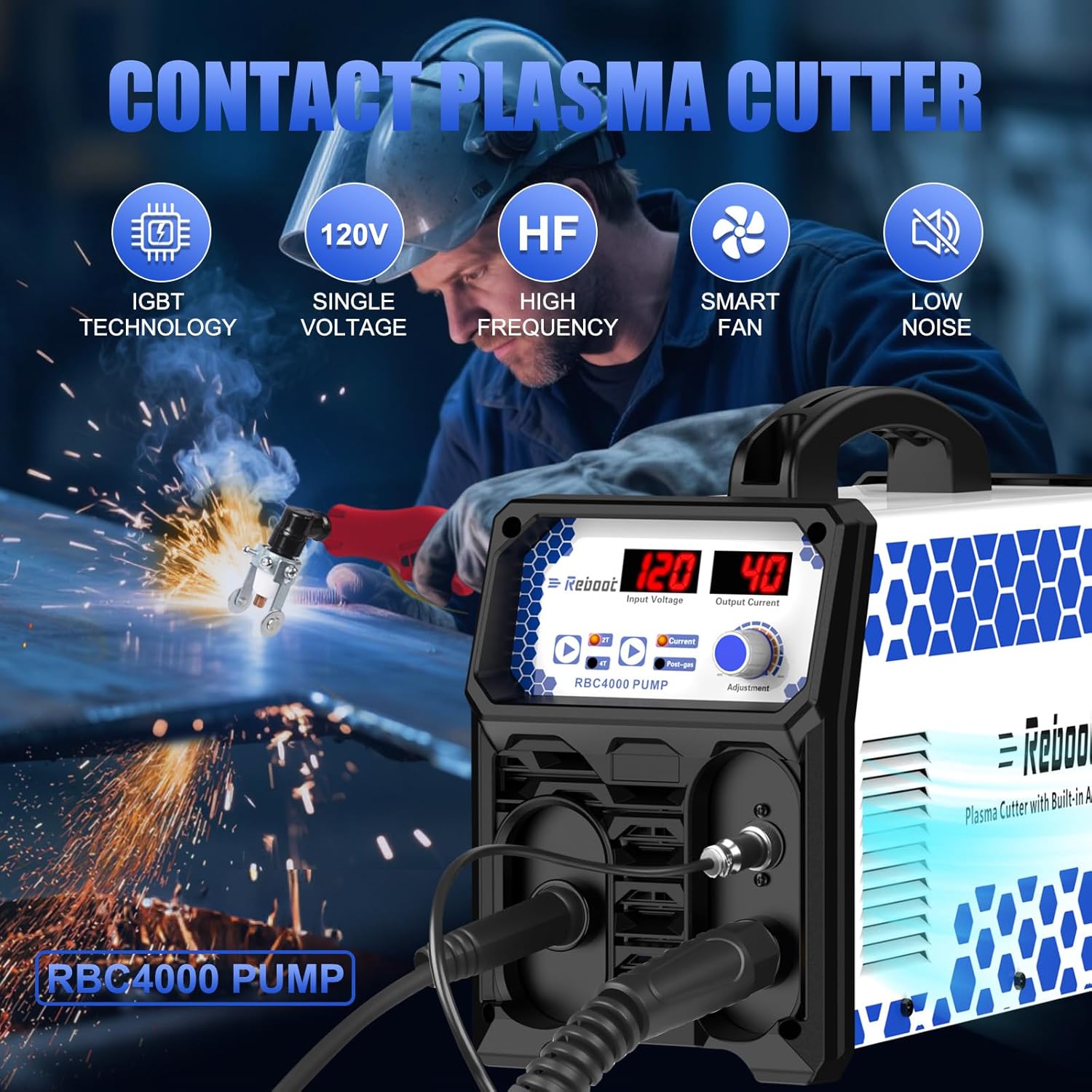

5. Specifications
| Feature | Description |
|---|---|
| Brand | Reboot |
| Model Number | RBC4000PUMP |
| Power Source | AC (120V) |
| Output Current | 40A |
| Clean Cut Thickness | 3/8 inch @ 40A |
| Max Cut Thickness | 3/5 inch @ 40A |
| Special Feature | Built-in Air Compressor |
| Technology | IGBT Inverter, High Frequency |
| Recommended Uses | Cutting |
6. Setup
Follow these steps to set up your plasma cutter:
- Unpack: Carefully remove the plasma cutter and all accessories from the packaging. Inspect for any shipping damage.
- Connect Plasma Torch: Insert the plasma torch connector into the designated port on the front panel of the machine. Ensure it is securely tightened.
- Connect Ground Clamp: Attach the ground clamp cable to the appropriate terminal on the machine's front panel. Secure the ground clamp to the workpiece or a sturdy metal workbench that is electrically connected to the workpiece.
- Power Connection: Connect the power cord to a suitable 120V AC power outlet. Ensure the power supply matches the machine's requirements.
- Prepare Work Area: Clear the work area of any flammable materials. Ensure proper ventilation.

7. Operating Instructions
Once the machine is set up, follow these steps for operation:
- Power On: Turn on the main power switch located on the machine. The digital display will illuminate.
- Adjust Current: Use the 'Current Adjust Knob' on the front panel to set the desired cutting amperage. Refer to the cutting thickness guidelines for appropriate settings.
- Select Mode (2T/4T): Press the '2T/4T Button' to select the desired trigger mode.
- 2T (Two-Touch): Press and hold the torch trigger to start the arc; release to stop.
- 4T (Four-Touch): Press and release the trigger to start the arc; press and release again to stop. This mode is useful for longer cuts to reduce hand fatigue.
- Set Post Gas Time: Adjust the 'Post Gas Time' knob if necessary. This controls how long air flows after the arc stops, helping to cool the torch and extend consumable life.
- Begin Cutting: Position the torch nozzle close to the workpiece. Press the torch trigger to initiate the plasma arc. Maintain a consistent standoff distance and travel speed for optimal cut quality.
- Monitor Cut: Observe the cut to ensure the plasma stream is passing completely through the material. Adjust travel speed or amperage as needed.
- Power Off: After completing your work, release the trigger, allow the post-gas to finish, and then turn off the main power switch.


8. Maintenance
Regular maintenance ensures optimal performance and extends the lifespan of your plasma cutter.
- Consumables Inspection: Regularly inspect the torch consumables (electrode, nozzle, shield cup) for wear. Replace them when signs of degradation appear to maintain cut quality.
- Torch Cleaning: Keep the torch head clean and free of spatter. Use a non-abrasive tool to remove any buildup.
- Air Filter: Periodically check and clean or replace the air filter for the built-in compressor to ensure clean airflow and prevent internal contamination.
- Cable Inspection: Inspect all cables (power, torch, ground) for cuts, abrasions, or loose connections. Repair or replace damaged cables immediately.
- General Cleaning: Keep the machine's exterior clean. Use compressed air to blow out dust and debris from cooling vents. Ensure the machine is unplugged before cleaning.
9. Troubleshooting
Refer to the table below for common issues and their potential solutions:
| Problem | Possible Cause | Solution |
|---|---|---|
| No Arc Ignition | Loose connections, worn consumables, insufficient ground, power issue. | Check all cable connections. Replace torch consumables. Ensure ground clamp is secure on bare metal. Verify power supply. |
| Poor Cut Quality | Worn consumables, incorrect amperage, improper travel speed or standoff distance. | Replace consumables. Adjust amperage according to material thickness. Optimize travel speed and maintain correct torch-to-workpiece distance. |
| Machine Overheating | Exceeding duty cycle, blocked ventilation, high ambient temperature. | Allow machine to cool down. Ensure clear airflow around vents. Reduce cutting time or amperage. |
| Air Flow Issues | Clogged air filter, internal compressor issue. | Check and clean/replace the air filter. If issues persist, contact customer support. |
10. Warranty and Support
This Reboot RBC4000PUMP Plasma Cutter comes with a standard manufacturer's warranty. Please refer to the warranty card included in your package for specific terms and conditions, including coverage duration and claim procedures. For technical assistance, troubleshooting beyond this manual, or warranty claims, please contact Reboot customer support through the official website or your point of purchase.


