
Introduction
Thank you for purchasing the Spigen Essential 15W MagSafe Wireless Charger. This device provides fast, stable, and convenient magnetic wireless charging for compatible smartphones. Please read this manual carefully to ensure proper use and optimal performance.

Image: The Spigen Essential 15W MagSafe Wireless Charger, showcasing its sleek design and magnetic charging pad.
What's in the Box
- 1 x Spigen Essential Single MagSafe Charging Stand
- 1 x USB-C to USB-C Cable (60W, 1m)
- 1 x Packaging Box
- 1 x Instruction Manual

Image: The Spigen Essential MagSafe Wireless Charger and its included USB-C to USB-C cable, as found in the product packaging.
Setup
- Connect the Cable: Insert one end of the included USB-C to USB-C cable into the charging port located at the base of the Spigen Essential MagSafe Wireless Charger.
- Connect to Power: Connect the other end of the USB-C cable to a compatible power adapter (not included). For optimal performance and 15W fast charging, a power adapter with 20W or higher output is recommended.
- Power On: Once connected to a power source, the charger is ready for use. A small LED indicator on the base may illuminate to confirm power.
Operating Instructions
1. Magnetic Attachment and Charging
- Place your MagSafe-compatible smartphone or MagSafe-enabled case onto the magnetic charging pad.
- The powerful N54 magnets will securely align your device for efficient wireless charging.
- The charger supports up to 15W wireless charging, with optimized power delivery: up to 7.5W for Apple devices and 10W for Samsung Galaxy smartphones.
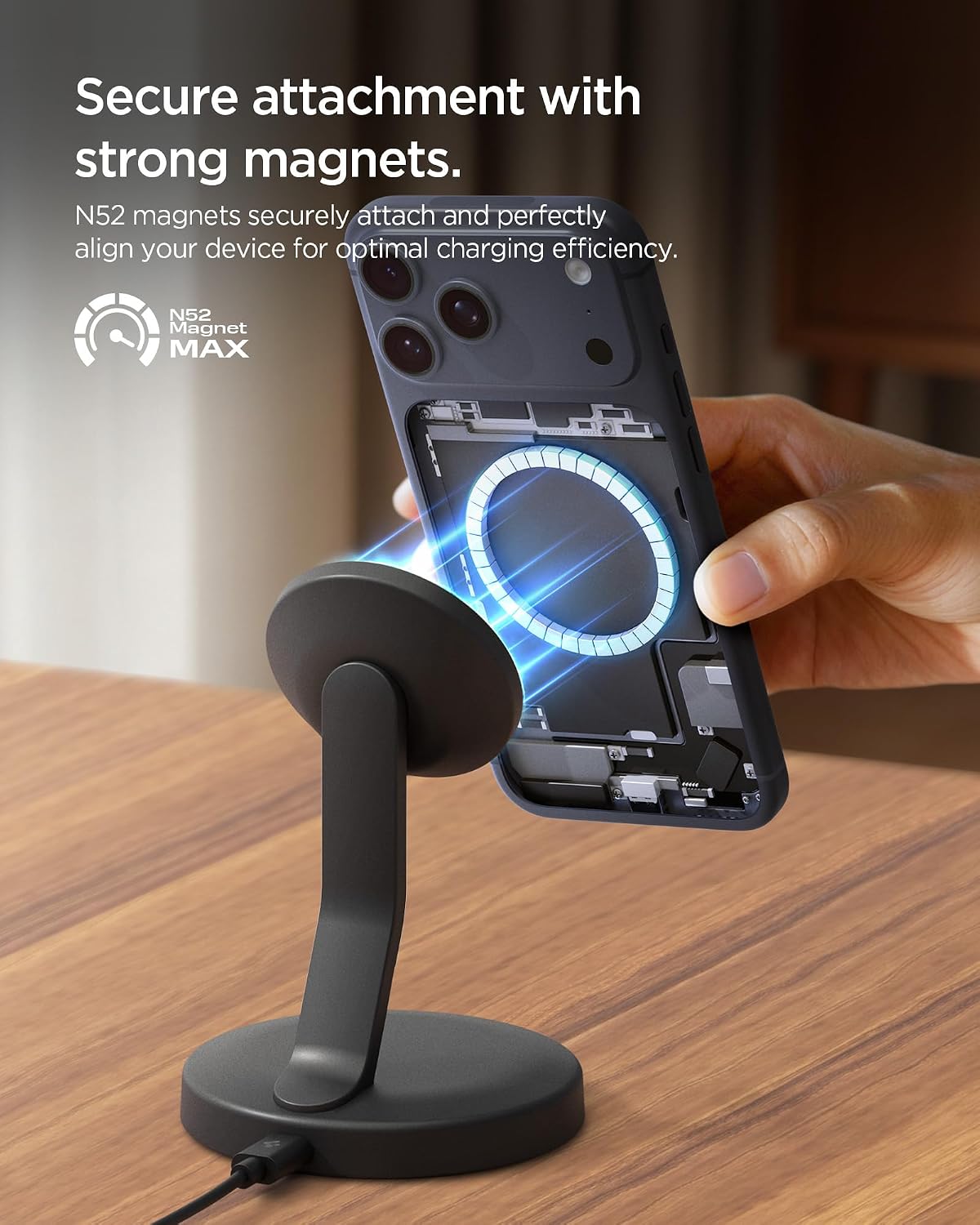
Image: A smartphone being securely attached to the Spigen Essential MagSafe Wireless Charger, demonstrating the strong magnetic connection.
2. Optimal Viewing Angles and Rotation
- The charger features an ergonomic 30-degree fixed viewing angle for comfortable hands-free viewing while charging.
- The circular charging head allows for free 360-degree rotation, enabling easy switching between portrait and landscape modes without interfering with the camera.

Image: A smartphone rotating 360 degrees on the Spigen Essential MagSafe Wireless Charger, illustrating its flexible viewing capabilities.
3. AirBoost Intelligent Power Optimization
The AirBoost intelligent power optimization system automatically detects the connected device and delivers the optimal wireless charging power (5W / 7.5W / 10W / 15W) for efficient and safe charging.

Image: A person using a smartphone mounted on the Spigen Essential MagSafe Wireless Charger while eating, demonstrating hands-free charging.
Maintenance
- Keep the charging stand clean and free from dust. Use a soft, dry cloth to wipe the surface.
- Avoid exposing the device to extreme temperatures, direct sunlight, or moisture.
- Do not disassemble or attempt to repair the charger yourself. This will void the warranty.
Troubleshooting
- Device not charging:
- Ensure the USB-C cable is securely connected to both the charger and the power adapter.
- Verify that the power adapter is functioning and connected to a live power outlet.
- Confirm your power adapter provides at least 20W output for optimal charging.
- Check if your phone case is MagSafe compatible. Non-MagSafe cases may prevent proper magnetic alignment and charging.
- Remove any foreign objects between the phone and the charging pad.
- Slow charging:
- Ensure you are using a power adapter with sufficient wattage (20W or higher recommended).
- Close any unnecessary background applications on your phone.
- Ensure the phone is properly aligned on the charging pad.
- LED indicator not lighting up:
- Check all cable connections and the power source.
- Try a different power adapter or USB-C cable.
Specifications
| Model Name: | EF151MS |
| Model Number: | ACH10441 |
| Dimensions: | 8.84 x 8.84 x 12.56 cm |
| Weight: | 280 g |
| Input Voltage: | 9 Volts |
| Amperage: | 2 Amperes |
| Power Output: | Up to 15 Watts (optimized: 7.5W for Apple, 10W for Samsung Galaxy) |
| Connector Type: | USB Type-C |
| Included Cable: | USB-C to USB-C (60W, 1m) |
Compatibility
The Spigen Essential 15W MagSafe Wireless Charger is compatible with:
- iPhone 17 / 16 / 15 / 14 / 13 / 12 Series (MagSafe compatible)
- Samsung Galaxy S25, Pixel 10 Pro XL, and other smartphones with MagSafe-compatible cases.
- Note: Not compatible with non-MagSafe phone cases. A MagSafe case is required for secure magnetic attachment and optimal charging.

Image: Illustration showing compatibility with iPhone 17-12 series and the requirement for MagSafe cases for other compatible devices.
Safety Information
The Spigen Essential MagSafe Wireless Charger incorporates a comprehensive 15-point intelligent safety system to protect your device and ensure safe operation. This system includes protection against:
- Overcharge prevention
- Overcurrent protection
- Short-circuit protection
- Overheating protection (Temperature Control)
- Electrostatic discharge protection
- Foreign Object Detection (FOD)
- AirBoost intelligent power optimization
- And other safety measures.
Always use the charger in a well-ventilated area and avoid placing metallic objects on the charging pad.

Image: Diagram illustrating Spigen's integrated multi-layer battery defense system, highlighting features like overcharge prevention, temperature control, and foreign object detection.
Warranty and Support
For warranty information and customer support, please refer to the official Spigen website or contact your local retailer. Keep your purchase receipt for warranty claims.
Online Support: Visit www.spigen.com for FAQs and support resources.


