
1. Introduction
This manual provides essential information for the safe operation, setup, and maintenance of your RC ERA C032 6-Channel RC Helicopter. Please read this manual thoroughly before operating the helicopter to ensure proper function and to prevent damage or injury.
The RC ERA C032 is a high-performance 6-channel RC helicopter designed for hobbyists, featuring a brushless motor, 6-axis gyroscope, optical flow, and TOF altitude hold for stable and precise flight. It supports advanced maneuvers including 3D inverted flight.
2. Safety Information
Operating an RC helicopter requires caution. Failure to follow safety guidelines can result in injury or property damage. Always prioritize safety.
- Flight Environment: Fly in open areas, away from people, animals, buildings, and power lines. Avoid flying in strong winds or adverse weather conditions.
- Pre-Flight Check: Always inspect the helicopter and transmitter before each flight. Ensure all parts are secure and undamaged.
- Battery Safety: Use only the specified batteries and chargers. Do not overcharge or short-circuit batteries. Disconnect batteries when not in use.
- Rotor Blades: Keep hands, face, and loose clothing away from rotating blades. Blades can cause severe injury.
- Age Recommendation: This product is intended for adults (180 months / 15 years and older).
- Water Exposure: Avoid exposing the helicopter to water or moisture.
- Signal Interference: Do not operate near other radio-controlled devices or strong electromagnetic sources to prevent signal loss.
3. Package Contents
Verify that all items are present in your package:
- Helicopter (1 pc)
- Transmitter (1 pc)
- User Manual (1 pc)
- USB Charger (1 pc)
- Main Blades (2 pcs)
- Tail Blade (1 pc)
- Lithium Battery (1 pc)
- Screwdriver (1 pc)
- Hex Wrench (1 pc)

Image 3.1: RC ERA C032 Helicopter and its modular battery, illustrating typical package contents.
4. Components Identification
Familiarize yourself with the main components of your RC ERA C032 helicopter and its remote control.
4.1 Helicopter Components
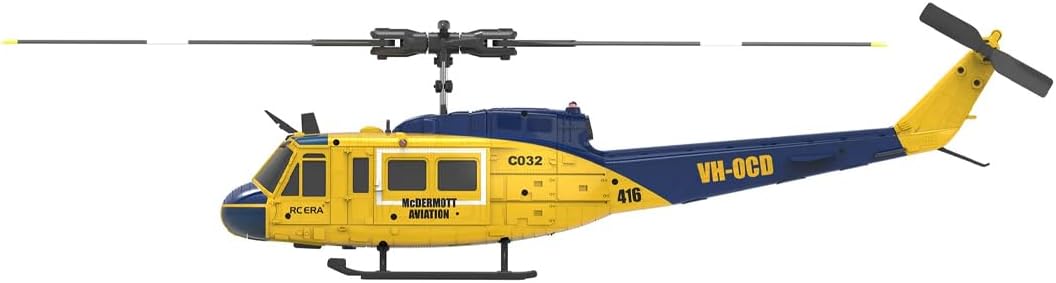
Image 4.1: Side view of the RC ERA C032 helicopter, highlighting its main body, rotor blades, and tail section.
- Main Rotor Blades: Provide lift and control.
- Tail Rotor: Controls yaw (left/right rotation).
- Brushless Motor: Powers the main rotor for efficient flight.
- Landing Skids: Support the helicopter on the ground.
- Battery Compartment: Houses the modular LiPo battery.
- Optical Flow Sensor: Assists with precise hovering and stability.
- TOF Sensor: Time-of-Flight sensor for enhanced altitude hold.
4.2 Transmitter (Remote Control)
The 6-channel transmitter allows for full control over the helicopter's movements. Refer to the transmitter's specific manual for detailed button layouts and functions.
5. Setup
5.1 Battery Charging
The helicopter uses a 7.4V modular Lithium Polymer (LiPo) battery. Always charge the battery using the provided USB charger.
- Connect the USB charger to a suitable USB power source (e.g., computer USB port, USB wall adapter).
- Connect the helicopter battery to the USB charger.
- Observe the charger's indicator light. It will typically show red during charging and turn green when fully charged.
- Do not leave batteries unattended while charging. Disconnect once fully charged.

Image 5.1: The modular 7.4V LiPo battery for the RC ERA C032 helicopter.
5.2 Transmitter Battery Installation
Install the required batteries (usually AA, refer to transmitter manual) into the remote control. Ensure correct polarity.
5.3 Helicopter Battery Installation
Carefully insert the fully charged modular battery into the helicopter's battery compartment. Ensure it clicks securely into place.
5.4 Binding/Pairing
To establish communication between the helicopter and the transmitter:
- Place the helicopter on a flat, level surface.
- Turn on the helicopter's power switch. The indicator lights will flash.
- Turn on the transmitter.
- Move the throttle stick (left stick) to the highest position, then immediately pull it down to the lowest position.
- The helicopter's indicator lights will stop flashing and remain solid, indicating successful binding.
5.5 Pre-Flight Checks
- Ensure all blades are securely attached and free from damage.
- Verify the battery is fully charged and properly installed.
- Check that the transmitter and helicopter are bound.
- Confirm all control surfaces respond correctly to transmitter inputs.
6. Operating Instructions
6.1 Basic Controls
- Throttle (Left Stick Up/Down): Controls altitude.
- Rudder (Left Stick Left/Right): Controls yaw (rotation around vertical axis).
- Elevator (Right Stick Up/Down): Controls pitch (forward/backward movement).
- Aileron (Right Stick Left/Right): Controls roll (sideways movement).
6.2 Takeoff and Landing
- One-Key Takeoff: Press the designated one-key takeoff button on the transmitter. The helicopter will automatically ascend to a stable hovering height.
- Manual Takeoff: Slowly increase the throttle until the helicopter lifts off the ground. Maintain a steady throttle to hover.
- One-Key Landing: Press the designated one-key landing button. The helicopter will automatically descend and land gently.
- Manual Landing: Slowly decrease the throttle while maintaining control over pitch and roll until the helicopter touches down. Cut throttle completely once landed.
6.3 Altitude Hold
The RC ERA C032 features barometric altitude hold, optical flow positioning, and TOF altitude hold for enhanced stability. Once airborne, the helicopter will attempt to maintain its current altitude automatically, allowing you to focus on directional control.
6.4 3D Inverted Flight
This model supports one-key 3D inverted flight. Consult your transmitter manual for the specific button or stick combination to activate this advanced flight mode. Ensure sufficient altitude and clear surroundings before attempting 3D maneuvers.
7. Maintenance
7.1 Cleaning
After each flight, gently clean the helicopter with a soft, dry cloth. Avoid using solvents or harsh chemicals. Ensure no dust or debris is obstructing the motors or sensors.
7.2 Blade Replacement
Inspect main and tail rotor blades for cracks, bends, or damage before and after each flight. Damaged blades can affect flight stability and safety. Use the provided screwdriver and hex wrench to replace damaged blades with new ones from the spare parts kit. Ensure blades are installed in the correct orientation.
7.3 Storage
When not in use, store the helicopter and transmitter in a cool, dry place, away from direct sunlight and extreme temperatures. Disconnect the helicopter battery before storage. For long-term storage, it is recommended to store LiPo batteries at a partial charge (around 3.8V per cell).
8. Troubleshooting
| Problem | Possible Cause | Solution |
|---|---|---|
| Helicopter does not respond to transmitter. | Not bound, low battery, signal interference. | Re-bind helicopter and transmitter. Charge batteries. Move to an area with less interference. |
| Helicopter cannot take off or lacks power. | Low helicopter battery, damaged main blades, motor issue. | Charge helicopter battery. Replace damaged main blades. Contact support if motor issue persists. |
| Helicopter drifts during hover. | Uncalibrated gyroscope, uneven surface during startup, wind. | Ensure helicopter is on a flat surface during power-on. Perform gyroscope calibration (refer to transmitter manual). Fly in calmer conditions. |
| Blades spin but helicopter does not lift. | Main blades installed incorrectly, motor not engaging properly. | Check main blade orientation. Ensure motor is securely connected. |
| Helicopter crashes immediately after takeoff. | Incorrect control input, damaged components, severe wind. | Practice gentle throttle control. Inspect for damage. Fly in calm conditions. |
9. Specifications
| Feature | Detail |
|---|---|
| Model Name | RC Helicopter (C032) |
| Model Number | MA01221019687 |
| Channels | 6-Channel |
| Motor Type | Brushless Motor |
| Stabilization | 6-Axis Gyroscope |
| Altitude Hold | Optical Flow & TOF Altitude Hold |
| Special Features | 3D Inverted Flight, One-Key Takeoff/Landing |
| Battery | 7.4V Modular LiPo Battery |
| Material | ABS + Electronic Components |
| Dimensions | 13.59 x 8.75 x 3.62 inches |
| Weight | 1.6 Pounds |
| Recommended Age | Adult (15+ years) |
10. Warranty and Support
For warranty information, technical support, or to purchase replacement parts, please refer to the retailer's website or contact customer service directly. Keep your purchase receipt as proof of purchase.


