
Introduction
Thank you for choosing the Monster S380 Bluetooth Speaker. This manual provides essential information for setting up, operating, and maintaining your speaker. Please read it carefully to ensure optimal performance and longevity of your device.
What's in the Box

The package includes:
- Monster S380 Bluetooth Speaker ×1
- USB-C Charging Cable ×1
- Portable Rope ×1
- Quick Start Guide ×1
This image displays all items included in the Monster S380 Bluetooth Speaker retail packaging, ensuring you have everything needed to get started.
Product Overview
Controls and Ports

Top Panel Controls:
- M Button: Mode switching (Bluetooth, AUX, TF Card).
- Play/Pause Button: Play or pause audio.
- Power Button: Press and hold to power on/off.
- Volume Down / Previous Song Button: Press to decrease volume, hold to go to previous track.
- Volume Up / Next Song Button: Press to increase volume, hold to go to next track.
This image illustrates the layout and function of the control buttons located on the top surface of the speaker.
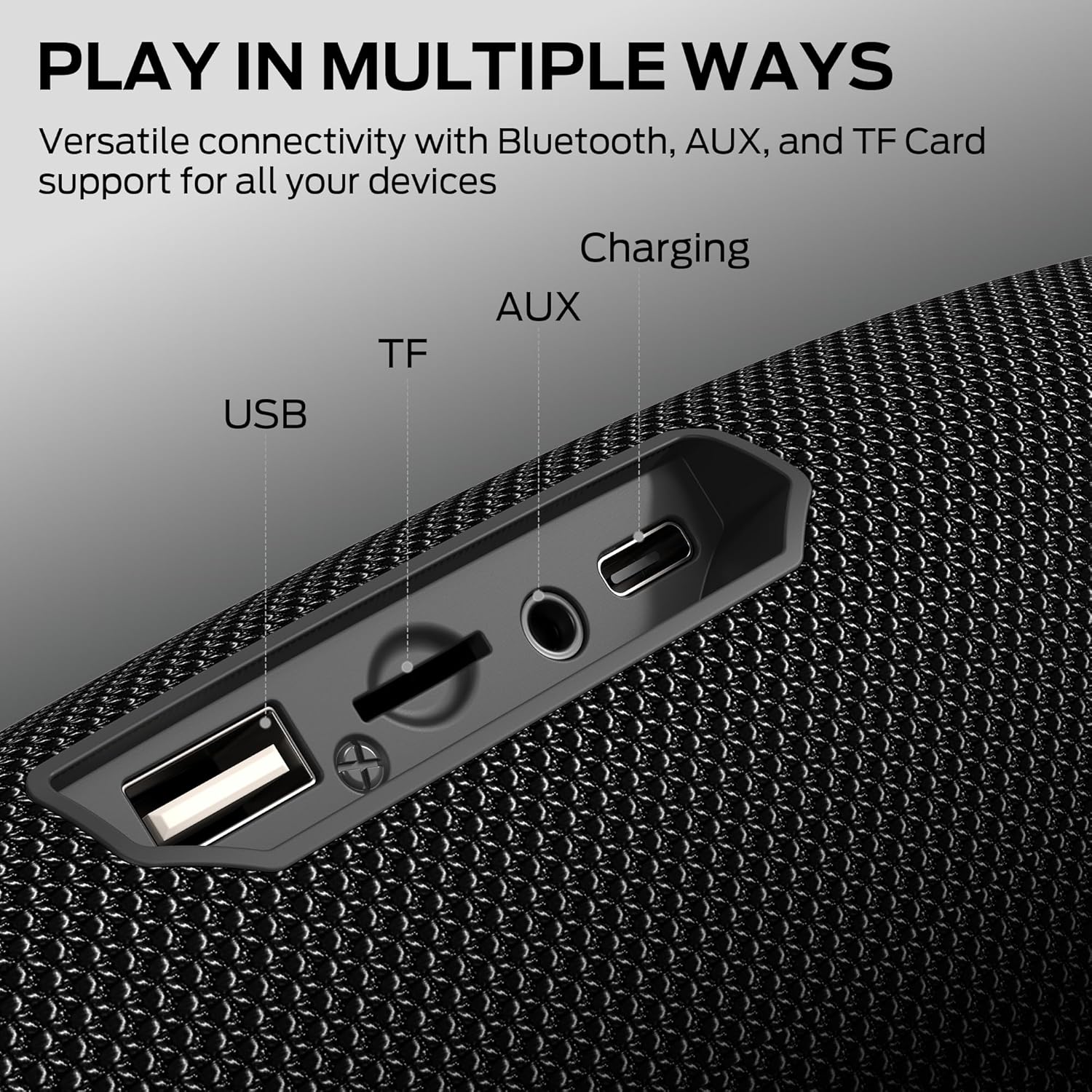
Rear Panel Ports (under protective flap):
- USB Port: For USB drive playback.
- TF Card Slot: For TF/MicroSD card playback.
- AUX Input: For wired audio connection via 3.5mm cable.
- Charging Port: USB-C input for charging the speaker.
This image shows the various connectivity ports available on the speaker, protected by a rubber flap for water resistance.
Setup
1. Charging the Speaker
Before first use, fully charge the speaker. Connect the provided USB-C charging cable to the speaker's charging port and the other end to a USB power adapter (not included) or a computer's USB port. The charging indicator light will show the charging status.
2. Power On/Off
Press and hold the Power Button for approximately 2-3 seconds to turn the speaker on or off. A sound prompt will indicate the power status.
3. Bluetooth Pairing

- Turn on the speaker. It will automatically enter Bluetooth pairing mode, indicated by a flashing LED light.
- Enable Bluetooth on your device (smartphone, tablet, computer).
- Search for "Monster S380" in the list of available Bluetooth devices.
- Select "Monster S380" to connect. Once connected, the LED indicator will stop flashing and remain solid, and you will hear a confirmation sound.
This image highlights the speaker's Bluetooth 6.0 capability, ensuring a fast and stable wireless connection.
4. True Wireless Stereo (TWS) Pairing

To achieve a true wireless stereo sound experience, you can pair two Monster S380 speakers together:
- Ensure both S380 speakers are powered on and not connected to any Bluetooth device.
- On one speaker (this will be the primary speaker), double-press the Power Button. The speaker will enter TWS pairing mode.
- The two speakers will automatically connect to each other. A confirmation sound will indicate successful TWS pairing.
- Once paired, connect your device to the primary speaker via Bluetooth as described in step 3. Both speakers will now play audio in stereo.
This image demonstrates two Monster S380 speakers linked together for a True Wireless Stereo setup, doubling the audio output.
Operating
Basic Audio Controls
- Play/Pause: Press the Play/Pause Button once.
- Volume Up/Down: Press the Volume Up (+) or Volume Down (-) buttons.
- Next Track: Hold the Volume Up (+) button.
- Previous Track: Hold the Volume Down (-) button.
Hands-Free Calling
When connected via Bluetooth, the speaker's built-in microphone allows for hands-free calls:
- Answer Call: Press the Play/Pause Button once.
- End Call: Press the Play/Pause Button once during a call.
- Reject Call: Press and hold the Play/Pause Button for 2 seconds.
Multi-Input Modes (AUX, TF Card, USB)
The speaker supports multiple audio input sources:
- Switch Mode: Press the M Button to cycle through Bluetooth, AUX, TF Card, and USB modes.
- AUX Mode: Connect an audio device using a 3.5mm AUX cable to the AUX input port.
- TF Card Mode: Insert a TF/MicroSD card with audio files into the TF card slot.
- USB Mode: Insert a USB drive with audio files into the USB port.

Battery Life:
The Monster S380 provides up to 20 hours of continuous playback on a full charge, depending on volume levels and audio content.
This image illustrates the speaker's extended 20-hour battery life, suitable for prolonged listening sessions.
Maintenance
Water Resistance (IPX6)

The Monster S380 speaker is rated IPX6 waterproof, meaning it can withstand powerful water jets. It is suitable for use outdoors and near water, but it is not designed to be submerged.
- Ensure the protective rubber flap covering the ports is securely closed before exposing the speaker to water.
- Do not submerge the speaker in water.
- After exposure to water, wipe the speaker dry with a soft cloth.
This image shows the speaker's IPX6 water resistance, making it suitable for outdoor and poolside use.
Cleaning and Storage
- Clean the speaker with a soft, damp cloth. Do not use abrasive cleaners or solvents.
- Store the speaker in a cool, dry place away from direct sunlight and extreme temperatures.
- If not used for an extended period, charge the speaker at least once every three months to maintain battery health.
Portable Design

The speaker features a convenient lanyard design for easy portability. Attach it to your backpack or carry it with ease for music on the go.
This image highlights the speaker's portable lanyard design, ideal for travel and outdoor activities.
Troubleshooting
| Problem | Possible Cause | Solution |
|---|---|---|
| Speaker does not power on. | Battery is depleted. | Charge the speaker using the provided USB-C cable. |
| Cannot pair via Bluetooth. | Speaker is not in pairing mode; Bluetooth is off on device; Speaker is connected to another device. | Ensure speaker is in pairing mode (flashing LED). Turn on Bluetooth on your device. Disconnect from other devices. Try restarting both speaker and device. |
| No sound or low volume. | Volume too low on speaker or device; Incorrect input mode; Loose cable connection (AUX). | Increase volume on both speaker and connected device. Press the 'M' button to select the correct input mode. Ensure AUX cable is securely connected. |
| TWS pairing fails. | Speakers are already connected to a device; Incorrect pairing procedure. | Ensure both speakers are disconnected from any Bluetooth device. Follow the TWS pairing instructions carefully. |
| Poor sound quality. | Speaker too far from device; Obstructions; Low battery. | Move speaker closer to the connected device. Remove obstructions. Charge the speaker. |
Specifications

- Model Name: MS62153
- Speaker Maximum Output Power: 40 Watts
- Bluetooth Version: 6.0
- Bluetooth Range: Up to 33 feet (10 meters)
- Water Resistance: IPX6
- Playtime: Up to 20 hours (at 50% volume)
- Connectivity Technology: Bluetooth, Auxiliary (3.5mm), USB, TF Card
- Audio Output Mode: Stereo
- Built-in Microphone: Yes, for hands-free calling
- Product Dimensions: 2.9"D x 8.6"W x 3.5"H
- Item Weight: 1.94 pounds
- Power Source: Battery Powered (1 AA battery included)
- Material: Plastic
This image emphasizes the speaker's powerful 40W audio output, delivering rich and clear sound.
Warranty and Support
Warranty Information
The Monster S380 Bluetooth Speaker comes with a limited warranty. Please refer to the warranty card included in your package for specific terms and conditions. Keep your purchase receipt as proof of purchase for warranty claims.
Customer Support
For technical assistance, troubleshooting, or warranty inquiries, please contact Monster customer support through their official website or the contact information provided in your Quick Start Guide.
You can also visit the official Monster Store on Amazon for more information: Monster Store


