
1. Introduction
Welcome to the WERHY H5PRO 8.5'' Electric Scooter user manual. This guide provides essential information for the safe and efficient operation, maintenance, and care of your new electric scooter. Please read this manual thoroughly before your first ride to ensure proper usage and to maximize your riding experience.
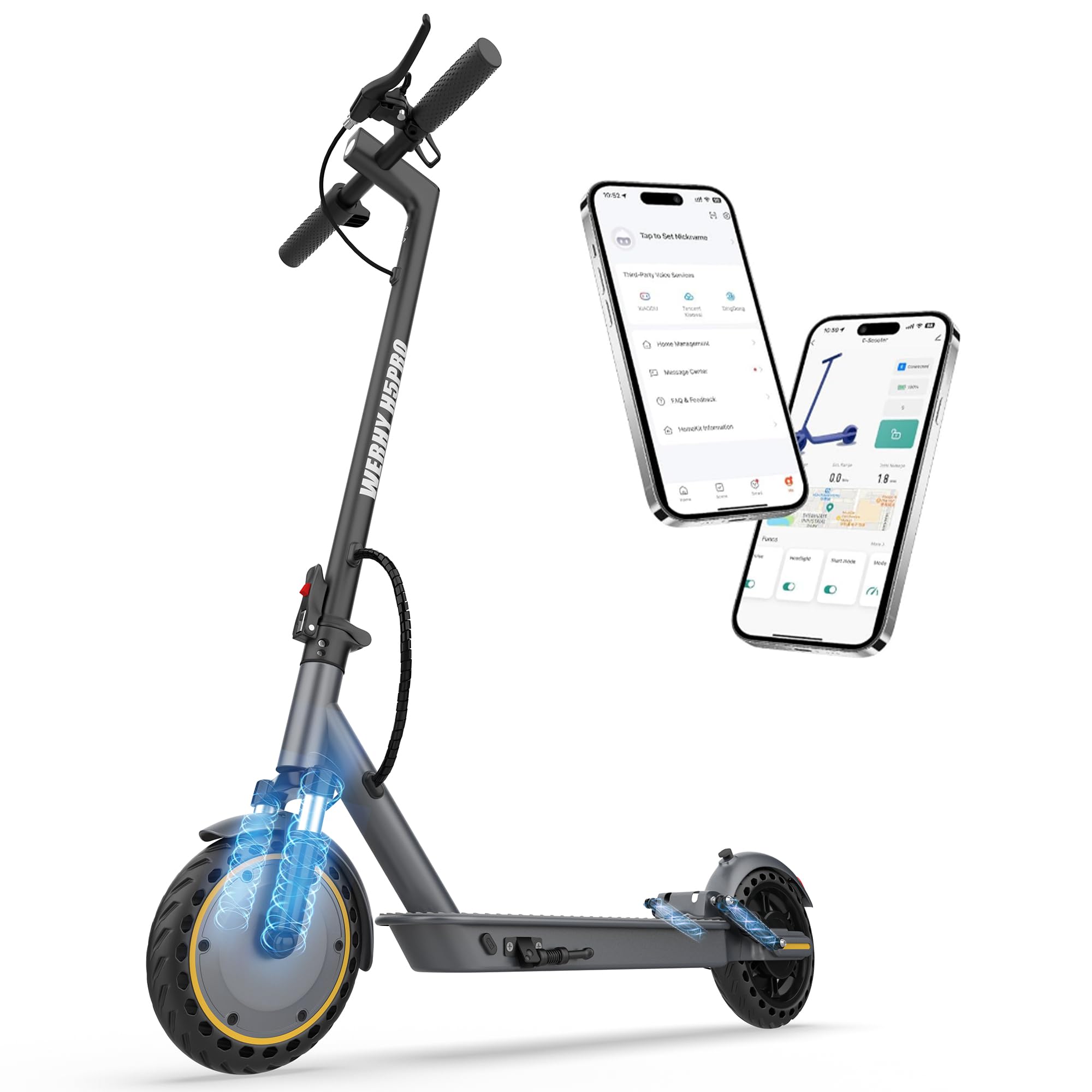
Image: The WERHY H5PRO 8.5'' Electric Scooter in a park setting, showcasing its sleek design.
2. Safety Information
Your safety is paramount. Always wear a helmet and appropriate protective gear when riding. Familiarize yourself with local laws and regulations regarding electric scooter usage. Ensure the scooter is in good working condition before each ride.
- Helmet Use: Always wear a certified helmet.
- Pre-Ride Check: Inspect brakes, tires, and all components for proper function.
- Weight Limit: Do not exceed the maximum load capacity of 265 pounds (120 kg).
- Road Conditions: Exercise caution on wet, uneven, or slippery surfaces.
- Visibility: Use the lighting system during low-light conditions.
3. Product Overview
The WERHY H5PRO is designed for urban commuting and recreational use, featuring a robust aluminum frame and advanced components for a reliable ride.
Key Features:
- Dual Suspension: Front and rear suspension for enhanced comfort on varied terrains.
- Powerful Motor: 350W motor for speeds up to 19 mph and a 15% climbing capability.
- Long Range Battery: High-capacity battery offering up to 15 miles of range.
- Smart App Control: Connects to your smartphone for various functions including lock/unlock, riding modes, and status display.
- Dual Braking System: Front electronic brake and rear wheel drum brake for reliable stopping power.
- Bright Lighting System: Includes a bright headlight and warning taillight for visibility.
- Maintenance-Free Solid Tires: 8.5-inch solid tires eliminate concerns about punctures.
- Portable Folding Design: Folds in 3 seconds for easy transport and storage.
4. Setup
The WERHY H5PRO Electric Scooter comes mostly pre-assembled. Initial setup primarily involves attaching the handlebars.
- Unpack: Carefully remove the scooter and all accessories from the packaging.
- Handlebar Attachment: Secure the handlebars to the stem using the provided screws and tool. Typically, this involves four screws.
- Initial Charge: Fully charge the scooter's battery before its first use. Refer to the charging section for details.
5. Operating Instructions
Power On/Off
Press and hold the power button on the LCD display to turn the scooter on or off.
Riding Modes
The scooter features multiple riding modes to suit different preferences and conditions. These can be selected via the LCD display or the companion app.

Image: A user interacting with the smart app, showing various riding modes and settings.
Acceleration
Gently press the throttle lever to accelerate. The 350W motor provides powerful performance, reaching speeds up to 19 mph.

Image: Detailed view of the 350W powerful motor, highlighting its components.
Braking
Utilize the dual braking system for effective stopping. The front electronic brake and rear drum brake provide responsive and safe deceleration.

Image: Close-up of the scooter's rear wheel and electronic handbrake, illustrating the dual braking system.
Lighting System
Activate the bright headlight and warning taillight for improved visibility, especially during evening rides or in low-light conditions.

Image: A rider on the scooter at dusk, with the bright headlight illuminating the path ahead.
6. Smart App Control
The WERHY H5PRO can be connected to a dedicated smartphone application, offering enhanced control and monitoring features. The scooter can also be used without the app.
- Lock/Unlock: Secure your scooter remotely.
- Riding Modes: Easily switch between speed levels (e.g., Eco, Drive, Sport).
- Light System Control: Manage your scooter's lights.
- Cruise Control: Activate and manage cruise control for consistent speed.
- Scooter Status Display: View real-time information such as speed, battery level, and distance traveled.
7. Maintenance
Regular maintenance ensures the longevity and optimal performance of your WERHY H5PRO Electric Scooter.
- Tires: The 8.5-inch solid tires are maintenance-free, eliminating the need for inflation or puncture repairs.
- Cleaning: Wipe down the scooter with a damp cloth. Avoid high-pressure washing or submerging parts in water.
- Battery Care: Charge the battery regularly, even when not in use, to prolong its lifespan. Store in a cool, dry place.
- Brakes: Periodically check the brake levers and cables for proper tension and function.
- Fasteners: Ensure all screws and bolts are securely tightened.
8. Troubleshooting
If you encounter any issues with your WERHY H5PRO Electric Scooter, please refer to the following general advice. For complex problems, contact customer support.
- Scooter Not Turning On: Ensure the battery is charged and properly connected.
- Loss of Power/Range: Check battery level. Performance can be affected by rider weight, terrain, temperature, and riding style.
- Brake Issues: Inspect brake cables for damage or looseness. Adjust as needed or seek professional assistance.
- App Connectivity: Ensure Bluetooth is enabled on your smartphone and the scooter is within range.
9. Specifications
| Feature | Specification |
|---|---|
| Brand | WERHY |
| Model Name | H5PRO |
| Motor Power | 350W |
| Top Speed | Up to 19 mph |
| Maximum Range | Up to 15 miles |
| Weight Limit | 265 Pounds |
| Wheel Size | 8.5 Inches |
| Wheel Type | Solid |
| Suspension Type | Dual Suspension |
| Brake Style | Dual Braking System |
| Charging Time | Approximately 4 Hours |
| Frame Material | Aluminum |
| Special Features | Cruise Control, Digital Display, Foldable |
10. Warranty and Support
WERHY provides a 12-month service for different parts of your electric scooter. For returns, exchanges, or any questions regarding your product, please feel free to contact our customer service team.
Warranty Description: 180/365 days for different parts.
For support, please visit the official WERHY store or contact the seller directly through your purchase platform.
11. Folding and Portability
The WERHY H5PRO is designed for convenience, featuring a quick-folding mechanism that allows it to be folded in approximately 3 seconds. Its lightweight design (approximately 33 lbs) makes it easy to lift and carry with one hand, fitting effortlessly into a car trunk or public transport.

Image: A person carrying the folded WERHY H5PRO Electric Scooter up a set of stairs, demonstrating its portability.
Folding Demonstration Video:
Video: A demonstration of the electric scooter's folding mechanism and ease of transport, including placing it in a car trunk.
12. Riding Experience and Performance
The WERHY H5PRO is engineered to provide a smooth, powerful, and comfortable ride for teens and adults.
- Smooth Ride: The dual front and rear suspension system effectively absorbs shocks and vibrations, adapting to various road conditions for a consistently comfortable journey.
- Powerful Acceleration: The 350W motor delivers strong acceleration and can easily handle inclines of up to 15%.
- Reliable Range: With a maximum range of 15 miles, it is suitable for daily commutes and leisure rides.
- Stable and Safe: The 8.5-inch solid tires provide good grip and stability, complemented by the responsive dual braking system for secure stops.

Image: A close-up of the scooter's front wheel, highlighting the dual suspension system designed for shock absorption.