
1. Introduction
This manual provides essential information for setting up, operating, maintaining, and troubleshooting your REDMI Note 15 Pro+ 5G smartphone. Please read this guide carefully to ensure optimal performance and longevity of your device.
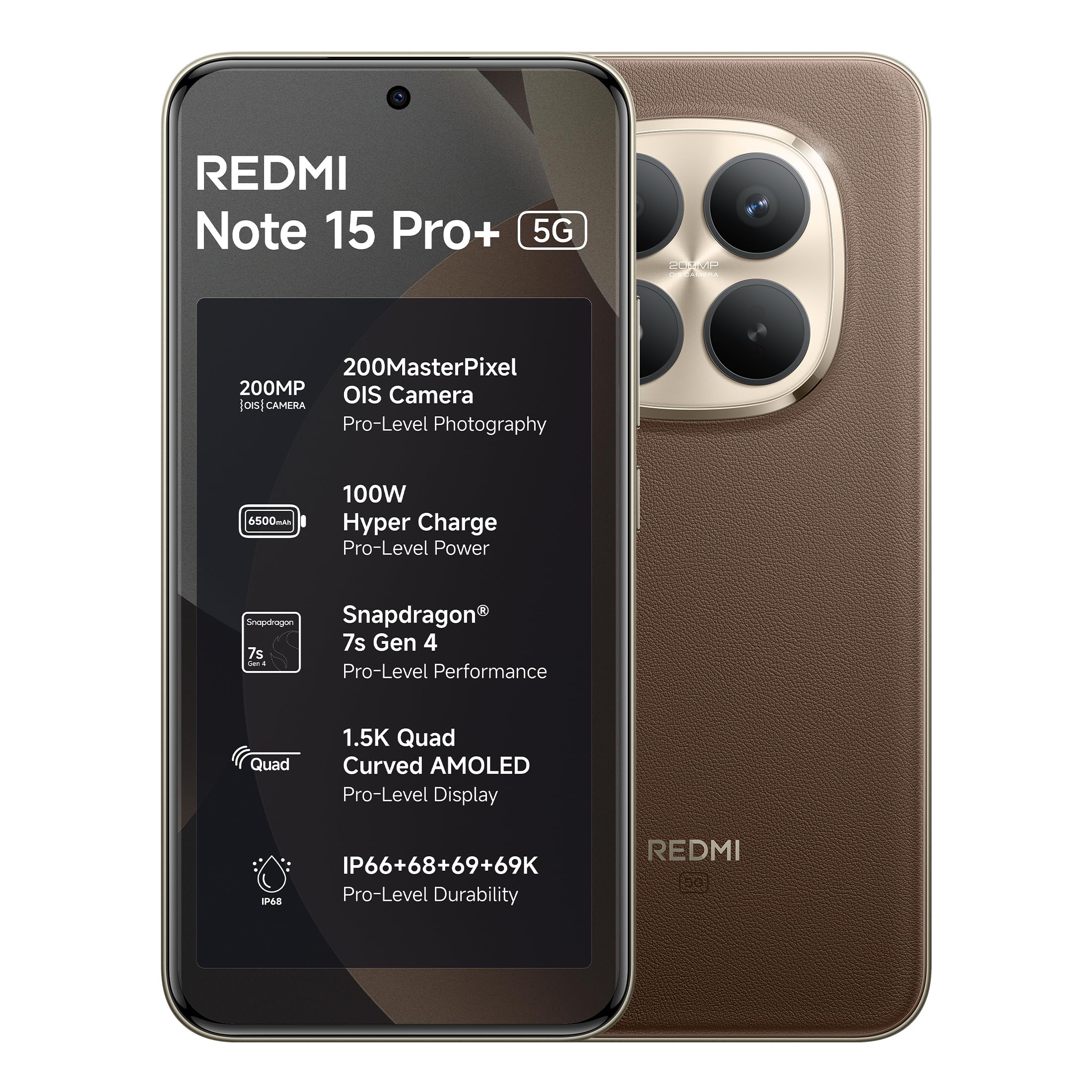
Figure 1: Rear view of the REDMI Note 15 Pro+ 5G smartphone.
2. Setup
2.1 Unboxing and Package Contents
Upon opening the package, verify that all items are present:
- REDMI Note 15 Pro+ 5G Smartphone
- Charger
- USB Type-C Cable
- SIM Eject Tool
- Warranty Card
- User Guide (this document)
- Protective Case
2.2 SIM Card Installation
- Locate the SIM card tray on the side of your device.
- Insert the SIM eject tool into the small hole next to the tray and press gently until the tray pops out.
- Place your Nano-SIM card(s) into the designated slots on the tray. Ensure the gold contacts face downwards. The device supports Dual SIM functionality.
- Carefully reinsert the SIM card tray into the phone.
2.3 Initial Power On and Setup Wizard
- Press and hold the Power button until the REDMI logo appears.
- Follow the on-screen instructions to complete the initial setup, including language selection, Wi-Fi connection, Google account login, and security settings.
3. Operating the Device
3.1 Display and Navigation
The REDMI Note 15 Pro+ 5G features a 6.83-inch Quad curved 1.5K Ultra QHD resolution liquid AMOLED display with 3200 nits peak brightness and a 120Hz adaptive refresh rate. Navigation is primarily touch-based, with gestures or on-screen buttons.

Figure 2: The 1.5K Quad-curved AMOLED display of the REDMI Note 15 Pro+ 5G.
3.2 Camera Usage
The device is equipped with an advanced 200MP OIS camera system. To access the camera, tap the Camera icon on your home screen or lock screen.
- Capture Ultra-Sharp Details: Utilize the 200MP mode for high-resolution photography.
- Steady Videos: Optical Image Stabilization (OIS) helps in recording stable videos, even while moving. The camera supports 4K (3840 x 2160) video recording.
- Portraits: Use Portrait mode for photos with natural depth of field.

Figure 3: Detail of the 200MasterPixel OIS Camera system.
3.3 Performance and Gaming
Powered by the Snapdragon 7s Gen 4 processor, the device offers smooth performance for multitasking and gaming. The IceLoop cooling technology helps maintain optimal temperatures during intensive use.
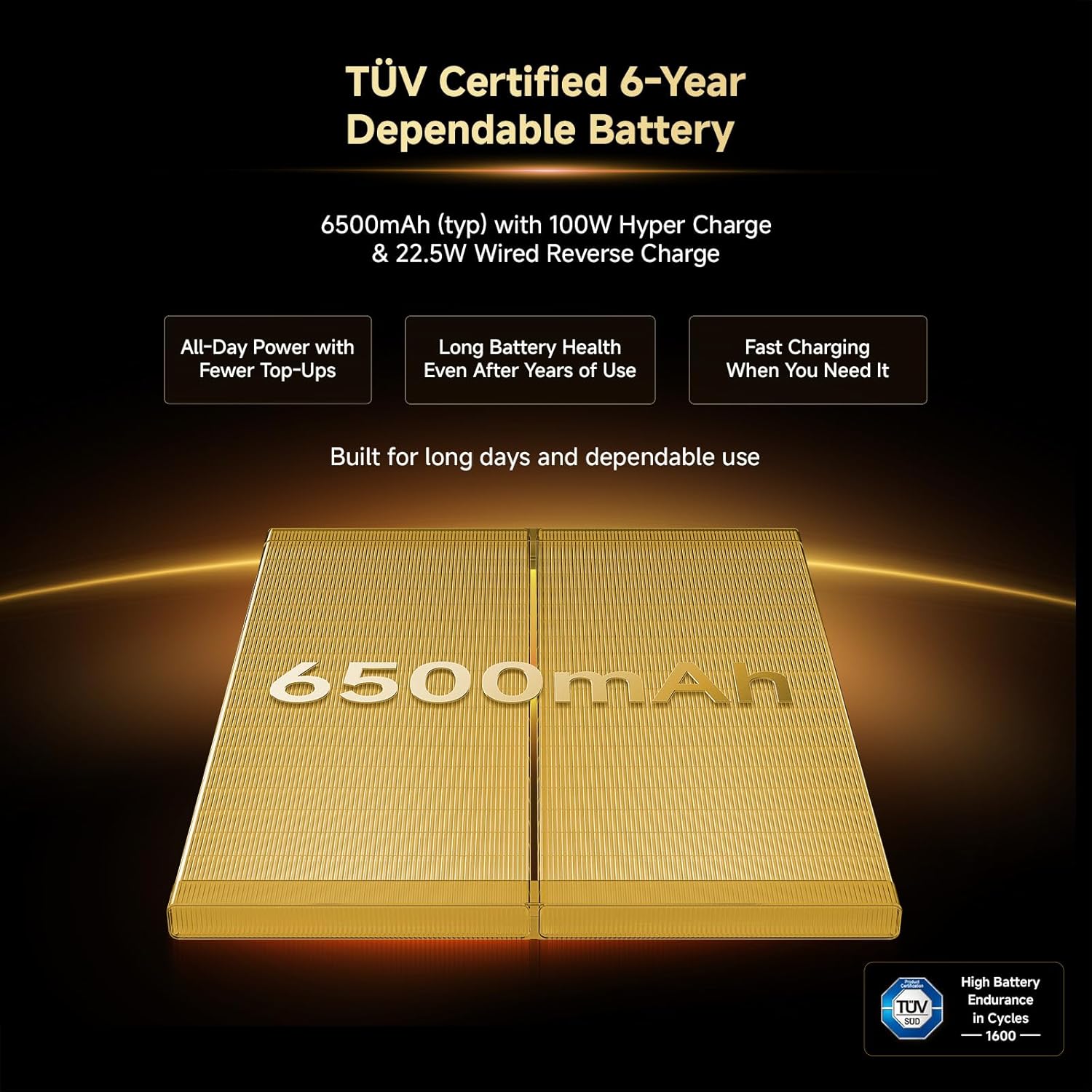
Figure 4: Snapdragon 7s Gen 4 processor for efficient performance.
3.4 Battery Management
The REDMI Note 15 Pro+ 5G is equipped with a 6500mAh Silicon-Carbon battery. It supports 100W HyperCharge for rapid charging and 22.5W reverse charging.
- Fast Charging: Use the provided 100W charger and cable for optimal charging speeds.
- Battery Health: The battery is designed for advanced 1600 lifecycles, ensuring long-term durability.
- Reverse Charging: Connect compatible devices via a USB-C cable to use your phone as a power bank.

Figure 5: The 6500mAh Silicon-Carbon battery with 100W HyperCharge capability.
3.5 Sound
The device features symmetric stereo speakers with Dolby Atmos support, providing enhanced audio quality for media consumption and calls.

Figure 6: Symmetric stereo speakers with Dolby Atmos for immersive sound.
3.6 AI Features
The REDMI Note 15 Pro+ 5G integrates AI tools like Circle to Search and Gemini Assistance, enhancing user interaction and productivity.

Figure 7: AI features including Circle to Search and Gemini Assistance.
3.7 Offline Communication
Xiaomi HyperOS enables kilometer-level device-to-device calling without cellular or Wi-Fi, providing reliable communication in no-signal zones or during network congestion.

Figure 8: Xiaomi Offline Communication feature.
4. Maintenance
4.1 Cleaning Your Device
To clean your REDMI Note 15 Pro+ 5G, use a soft, lint-free cloth. Avoid abrasive materials, solvents, or aerosol sprays. For stubborn smudges, slightly dampen the cloth with water. Do not immerse the device in liquid.
4.2 Software Updates
Regularly check for and install software updates to ensure your device has the latest features, security patches, and performance improvements. Updates are delivered via Xiaomi HyperOS.

Figure 9: Xiaomi HyperOS 2 for seamless and intelligent cross-device connectivity.
4.3 Storage Management
The device comes with 512 GB of internal storage. Regularly manage your storage by deleting unnecessary files, uninstalling unused apps, and backing up important data to cloud services or external storage.
4.4 Durability and Water Resistance
The REDMI Note 15 Pro+ 5G features a fiberglass back panel and Corning Gorilla Glass Victus 2 for enhanced durability. It boasts IP66/IP68/IP69K protection, making it waterproof and resistant to dust and splashes. While highly durable, avoid intentional exposure to water or extreme conditions.

Figure 10: Device durability with Corning Gorilla Glass Victus 2 and IP69K protection.
5. Troubleshooting
5.1 Common Issues and Solutions
- Device Not Turning On: Ensure the battery is charged. Connect the charger and wait a few minutes before attempting to power on again.
- Screen Unresponsive: Force restart the device by holding the Power button for approximately 10-15 seconds.
- Apps Crashing: Clear the cache of the problematic app or reinstall it. Ensure your operating system is up to date.
- Poor Network Connectivity: Check if your SIM card is properly inserted. Try restarting the device or toggling Airplane Mode on and off.
5.2 Factory Reset
A factory reset will erase all data from your device and restore it to its original factory settings. This can resolve persistent software issues but should be used as a last resort after backing up all important data.
- Go to Settings > About phone > Factory reset.
- Follow the on-screen prompts to confirm the reset.
6. Specifications
| Feature | Specification |
|---|---|
| Brand | Redmi |
| Model | Note 15 Pro+ 5G |
| Operating System | Android 15, Xiaomi HyperOS |
| Processor | Snapdragon 7s Gen 4 |
| RAM | 12 GB |
| Internal Storage | 512 GB |
| Screen Size | 6.83 Inches |
| Display Type | AMOLED, 1.5K Ultra QHD, 3200 nits peak brightness |
| Rear Camera | 200 MP (OIS) |
| Video Capture Resolution | 4K (3840 x 2160) |
| Battery Capacity | 6500 mAh |
| Charging | 100W HyperCharge, 22.5W Reverse Charging |
| Water Resistance Level | IP66/IP68/IP69K (Waterproof) |
| SIM Card Slot Count | Dual SIM (Nano) |
| Connectivity | 5G, USB Type C |
| Item Dimensions | 16.3 x 7.8 x 0.8 Centimeters |
| Item Weight | 208 Grams |
7. Warranty Information
Your REDMI Note 15 Pro+ 5G comes with a 1-year manufacturer warranty for the device itself. In-box accessories, including batteries, are covered by a 6-month manufacturer warranty from the date of purchase.
Please retain your proof of purchase for warranty claims. For detailed terms and conditions, refer to the warranty card included in your package.

Figure 11: Information on repair services and support.
8. Support and Contact Information
For further assistance, technical support, or warranty inquiries, please contact:
- Manufacturer: DBG Technology (India) Pvt Ltd, PLOT NO-2, BAWAL, SECTOR-8, Rewari, Haryana, 123501.
- Importer: Xiaomi Technology India Private Limited, Building Orchid. Block E, Embassy Tech Village, Marathahalli Outer Ring Road, Devarabisanahalli, Bengaluru 560103.
You can also visit the official Redmi support website for FAQs and additional resources.


