
1. Introduction
This manual provides detailed instructions for the LIGE Analog Watch Model LG8974. This timepiece features a Japanese Quartz movement, chronograph functionality, date display, and a moon phase indicator. It is designed for daily wear and offers water resistance up to 30 meters (3 ATM).
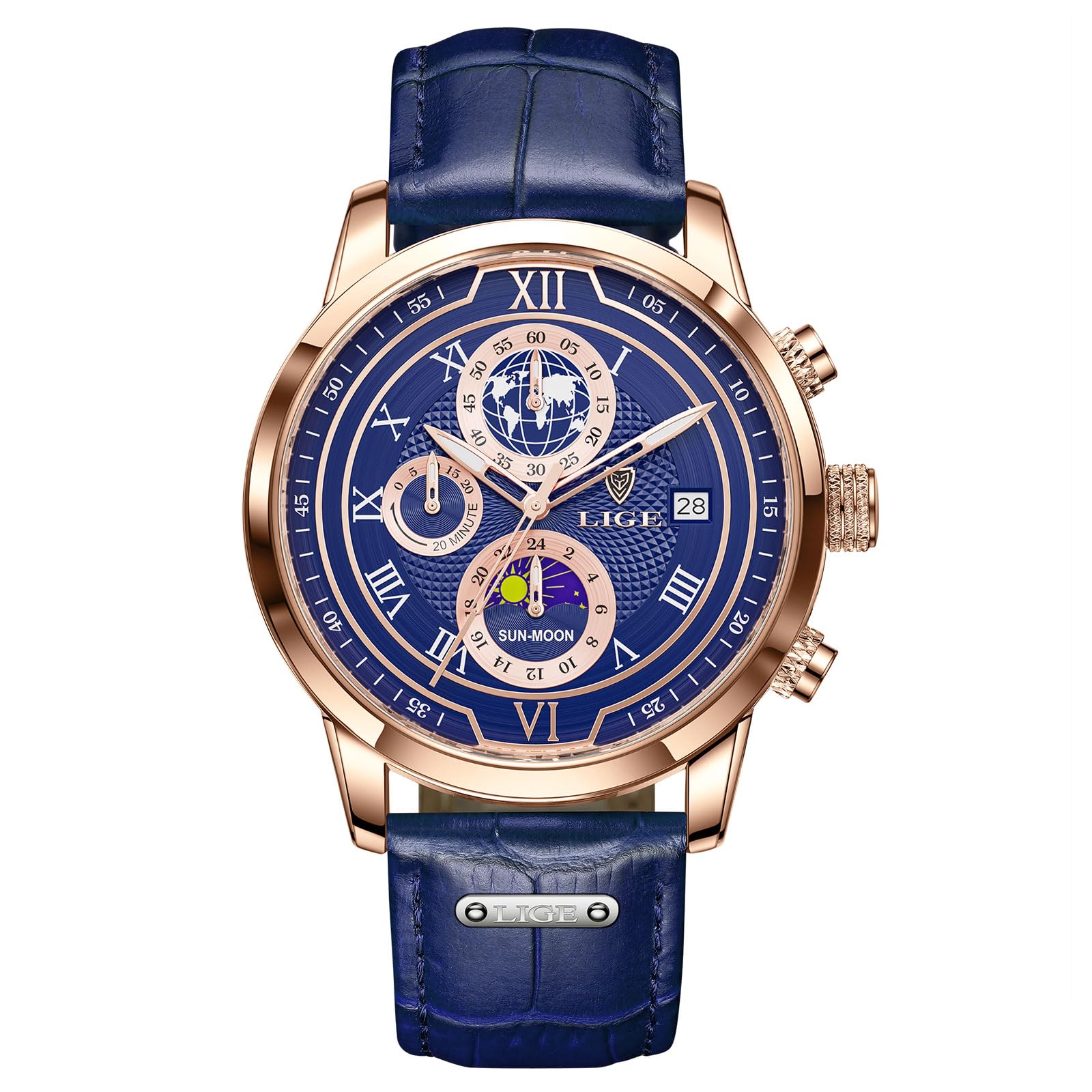
Image 1: LIGE Analog Watch Model LG8974, showcasing its blue dial, gold casing, and leather strap.
2. Product Overview
Familiarize yourself with the various components and functions of your LIGE watch.

Image 2: Function description of the LIGE watch, indicating the crown for time/date adjustment and pushers for chronograph control.
- Crown (Middle): Used for setting the time and date.
- Upper Pusher: Activates and pauses the chronograph stopwatch.
- Lower Pusher: Resets the chronograph stopwatch.
- Chronograph Stopwatch Sub-dial: Measures elapsed time in seconds.
- Chronograph Minutes Sub-dial: Measures elapsed time in minutes (up to 20 minutes).
- Date Display: Shows the current date.
- Moon Phase Indicator: Displays the current phase of the moon or a 24-hour sun/moon cycle.
- Luminous Hands: Allow for time reading in low-light conditions.
3. Setup
3.1 Setting the Time
- Pull the crown out to position 2 (farthest out).
- Turn the crown to move the hands clockwise until the desired time is set. Ensure AM/PM is correctly accounted for if setting the date.
- Push the crown back to position 0 (normal position).
3.2 Setting the Date
- Pull the crown out to position 1 (first click).
- Turn the crown clockwise or counter-clockwise (depending on the specific movement) to adjust the date.
- Once the correct date is displayed, push the crown back to position 0.
- Note: Avoid setting the date between 9 PM and 3 AM, as this may interfere with the automatic date change mechanism. If the date needs to be set during this period, first set the time outside this window, adjust the date, then reset the time.
3.3 Setting the Moon Phase / 24-Hour Indicator
The moon phase sub-dial typically advances with the main time. If it requires separate adjustment, it is usually done by rotating the crown in position 1 or by a small recessed pusher on the side of the case (refer to specific model instructions if a pusher is present). For this model, the "moon phase" is often a 24-hour indicator (sun/moon) that synchronizes with the main time setting.
4. Operating the Chronograph
The chronograph function allows for precise timing of events.
- To start the chronograph, press the upper pusher. The chronograph second hand will begin to move.
- To pause the chronograph, press the upper pusher again. The hands will stop, displaying the elapsed time.
- To resume timing, press the upper pusher once more.
- To reset the chronograph, ensure it is stopped (paused or not running), then press the lower pusher. All chronograph hands will return to their zero positions.

Image 3: A detailed view of the watch face, showing the chronograph sub-dials and main hands.
5. Maintenance
5.1 Water Resistance
This watch is rated for 3 ATM (30 meters) water resistance. This means it is suitable for daily use and can withstand splashes or brief immersion in water, such as rain or hand washing.
- Do NOT wear the watch for showering, bathing, swimming, or diving.
- Do NOT operate the crown or pushers when the watch is wet or submerged.
- Ensure the crown is fully pushed in to maintain water resistance.

Image 4: The watch demonstrating its 30M water resistance against splashes.
5.2 Cleaning and Care
- Wipe the watch case and crystal with a soft, dry cloth regularly.
- For leather straps, avoid prolonged exposure to water, direct sunlight, and harsh chemicals to prevent damage and discoloration.
- Store the watch in a cool, dry place when not in use.
5.3 Battery Replacement
The watch is powered by a nonstandard battery (included). When the watch stops or the second hand begins to jump erratically, it indicates a low battery. Battery replacement should be performed by a qualified watch technician to ensure proper sealing and water resistance.
6. Troubleshooting
- Watch not running: Check if the crown is fully pushed in. If it is, the battery may need replacement.
- Time/Date not changing: Ensure the crown is fully pushed in after setting. If the date is set between 9 PM and 3 AM, it might not advance correctly.
- Chronograph hands not resetting to zero: This may require a chronograph reset procedure. Consult a watch technician if the standard reset (pressing the lower pusher) does not work.
- Condensation inside the watch: This indicates a loss of water resistance. Avoid further contact with water and have the watch inspected by a professional immediately.
7. Specifications
| Feature | Detail |
|---|---|
| Model Number | LG8974 |
| Movement | Japanese Quartz Movement |
| Case Material | Stainless Steel |
| Dial Case Diameter | 42mm |
| Dial Case Thickness | 12mm |
| Band Material | Genuine Leather |
| Band Width | 22mm |
| Water Resistance Depth | 30M (3 ATM) |
| Crystal Material | Mineral Glass (Hardness 500-600 Hv) |
| Special Features | Date, Chronograph, Moon Phase (24-hour indicator) |
| Battery | 1 Nonstandard Battery (included) |
8. Warranty and Support
LIGE provides a two-year customer service commitment for this watch. Additionally, a 60-day return/exchange policy is offered.
For any questions or assistance, please contact LIGE customer support. Refer to your purchase documentation for specific contact details.
9. Product Video
Video 1: Overview of the LIGE LG8974 watch, showcasing its design, features, and water resistance. This video is provided by ROMANTE WATCHES.