
1. Product Overview
The Acekool 18000 BTU Split Air Conditioner with Heater is a versatile and efficient system designed to provide year-round comfort. Featuring a 19 SEER2 inverter system, it offers both powerful cooling and heating capabilities for spaces up to 1250 sq. ft. This unit operates on 230V and includes smart control options via WiFi, Alexa, and a mobile app.
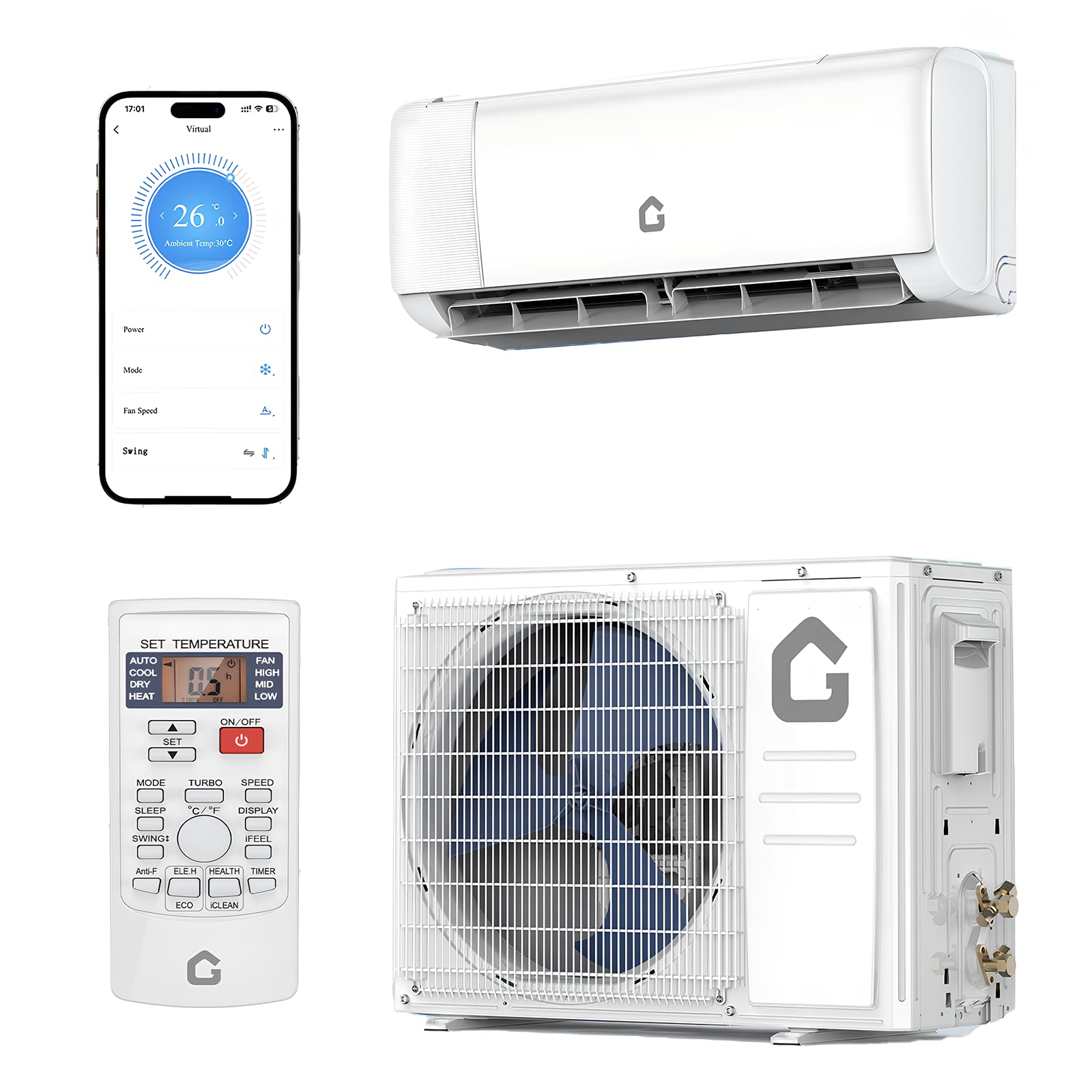
Image 1.1: Acekool 18000 BTU Split Air Conditioner system components.
The system is engineered for stable operation across a wide temperature range, from -13°F to 140°F, ensuring reliable performance in various climates. Its design focuses on energy efficiency and quiet operation.

Image 1.2: All-weather performance of the Acekool outdoor unit.
2. Safety Information
Please read all safety instructions carefully before installation and operation to prevent injury or damage. Keep this manual for future reference.
2.1 General Safety Precautions
- Professional Installation Required: Installation, maintenance, and repair of this unit must be performed by a licensed HVAC technician. Improper installation can lead to electric shock, fire, water leakage, or other hazards.
- Electrical Safety: This unit requires a 230V power supply. Ensure the electrical installation complies with all local and national electrical codes. Do not use extension cords.
- Refrigerant Handling: The system uses R32 refrigerant. Handling of refrigerant must be done by qualified personnel only.
- Keep Unit Upright: Before installation, keep the unit upright for at least 24 hours to allow the refrigerant to settle.
- Children and Pets: Keep children and pets away from the unit during operation and maintenance.
- Ventilation: Ensure proper ventilation around the outdoor unit as specified in the installation guide.
3. Package Contents
The Acekool 18000 BTU Split Air Conditioner system ships in two separate boxes. Please ensure both boxes have arrived before scheduling installation. The package includes the following components:
- Indoor Unit
- Outdoor Unit
- 13 ft Copper Connection Pipe - Air Pipe
- 13 ft Copper Connection Pipe - Liquid Pipe
- 8 ft Power Line
- 15 ft Communication Wire
- 6.5 ft Drain Pipe
- Remote Control + Batteries
- User Manual (this document)
- Tape
- Luting (Putty)

Image 3.1: Package list for the Acekool Split Air Conditioner.
4. Setup and Installation
Important: Installation of this split air conditioner system requires specialized knowledge and tools. It must be performed by a licensed and qualified HVAC technician to ensure proper function, safety, and warranty validity.
4.1 Pre-Installation Steps
- Receive All Components: Confirm that both the indoor and outdoor units, along with all accessories listed in Section 3, have arrived. The two boxes may arrive separately.
- Unit Positioning: Keep the outdoor unit upright for at least 24 hours before installation to allow the refrigerant oil to settle.
- Site Preparation: Ensure the chosen installation location for both indoor and outdoor units meets the manufacturer's specifications for clearance, structural support, and drainage.
4.2 Professional Installation Process
Your licensed HVAC technician will perform the following key steps:
- Mounting the indoor unit on the wall.
- Mounting the outdoor unit on a stable surface.
- Drilling a hole through the wall for the line set.
- Connecting the copper refrigerant lines between the indoor and outdoor units.
- Connecting the communication wire and power line.
- Creating a vacuum in the refrigerant lines to remove air and moisture.
- Checking for leaks.
- Connecting the drain hose for condensate removal.
- Testing the system for proper operation.
5. Operating Instructions
The Acekool Split Air Conditioner offers multiple operating modes and control options for optimal comfort.
5.1 Remote Control Functions
Use the included remote control to manage your unit's settings. Ensure batteries are correctly inserted.

Image 5.1: Multifunctional remote control overview.
- MODE Button: Cycle through Cool, Heat, Dry, and Fan modes.
- Temperature Adjustment: Use the Up/Down arrows to set your desired temperature.
- FAN Speed: Select from Low, Mid, High, or Turbo fan speeds. The unit features 4D auto-sweep airflow for even distribution up to 50 feet.
- DRY Mode: Activates a one-key drying mode to reduce indoor humidity.
- SLEEP Mode: Adjusts temperature and fan speed for quiet, comfortable sleep, reducing noise levels.
- ECO Mode: Optimizes power consumption during low-demand periods for energy savings.
- TIMER: Program the unit to turn on or off at specific times.
- SELF-CLEAN: Initiates an automatic self-cleaning function for the indoor unit.
- DISPLAY On/Off: Turns the unit's display lights on or off.
- °C/°F: Toggles between Celsius and Fahrenheit temperature display.
5.2 Smart Control (WiFi/App/Voice)
The unit is WiFi-enabled, allowing for convenient control via a mobile application or voice commands through Alexa.

Image 5.2: Intelligent control options via app and voice assistants.
- Download App: Download the official Acekool smart home app from your device's app store.
- Connect to WiFi: Follow the in-app instructions to connect your AC unit to your home WiFi network.
- Pair with Voice Assistant: If desired, link the Acekool app with your Amazon Alexa or Google Assistant account for voice control.
- Remote Operation: Control modes, temperature, fan speed, and other settings from anywhere using the app.
5.3 Quiet Operation
The Acekool unit is designed with double-layer soundproofing and low-vibration engineering to ensure whisper-quiet operation, making it suitable for bedrooms and offices.

Image 5.3: Ultra-silence feature for improved sleep.
6. Maintenance
Regular maintenance ensures optimal performance and longevity of your Acekool air conditioner.
6.1 Filter Cleaning
The unit features a reusable filter that requires seasonal cleaning. This saves on replacement costs and maintains air quality.
- Turn off the unit and disconnect power before cleaning.
- Open the front panel of the indoor unit and carefully remove the air filter.
- Clean the filter with a vacuum cleaner or wash it with lukewarm water and mild detergent.
- Allow the filter to dry completely before reinstalling.
- Reinstall the filter and close the front panel.
6.2 Self-Cleaning Function
Utilize the self-cleaning function on your remote control to automatically clean the indoor coil, preventing mold and odor buildup.
6.3 Professional Servicing
It is recommended to have a licensed HVAC technician inspect and service your unit annually to ensure all components are functioning correctly and to prevent potential issues.
7. Troubleshooting
If you experience issues with your Acekool air conditioner, please refer to the following basic troubleshooting steps. For complex problems, contact a licensed HVAC technician.
- Unit Not Turning On: Check if the unit is properly plugged into a 230V outlet. Ensure the circuit breaker has not tripped. Check remote control batteries.
- No Cooling/Heating: Verify the correct mode (Cool/Heat) is selected. Check if the temperature setting is appropriate. Ensure air filters are clean and not blocked.
- Weak Airflow: Clean the air filters. Check for any obstructions around the indoor or outdoor units.
- Unusual Noises: Minor noises during operation are normal. If you hear loud or unusual noises, turn off the unit and contact a technician.
- WiFi/App Connectivity Issues: Ensure your home WiFi network is active and the unit is within range. Restart your router and the AC unit. Re-pair the unit with the app if necessary.
8. Specifications
Detailed technical specifications for the Acekool 18000 BTU Split Air Conditioner with Heater.

Image 8.1: Dimensions and key specifications of the Acekool AC unit.
| Feature | Specification |
|---|---|
| Brand | Acekool |
| Model Number | PHO_161IDQ1A-8133xf7w |
| Cooling Power | 18000 British Thermal Units (BTU) |
| Heating Capacity | 18000 BTU/h |
| SEER2 Rating | 19 SEER2 |
| Coverage Area | Up to 1250 Sq.Ft |
| Power Supply | 208V~230V/60Hz |
| Refrigerant Type | R32 |
| Noise Level | 42 Decibels |
| Product Dimensions (Outdoor Unit) | 37"D x 25"W x 31"H |
| Item Weight | 110 Pounds |
| Special Feature | Inverter Compressor |
| Controller Type | App Control, Remote Control |
| Installation Type | Split System |
| Annual Energy Consumption | 576 Kilowatt Hours Per Year |
9. Warranty and Support
9.1 Product Warranty
This Acekool Split Air Conditioner comes with a Two-Year Warranty. Please retain your proof of purchase for warranty claims. The warranty covers defects in materials and workmanship under normal use.
Note: Improper installation by an unlicensed technician may void the product warranty.
9.2 Customer Support
For technical assistance, warranty claims, or any questions regarding your Acekool product, please contact Acekool customer support through their official website or the contact information provided with your purchase documentation.
You can also visit the Acekool Store on Amazon for more information and support resources.
