
Introduction
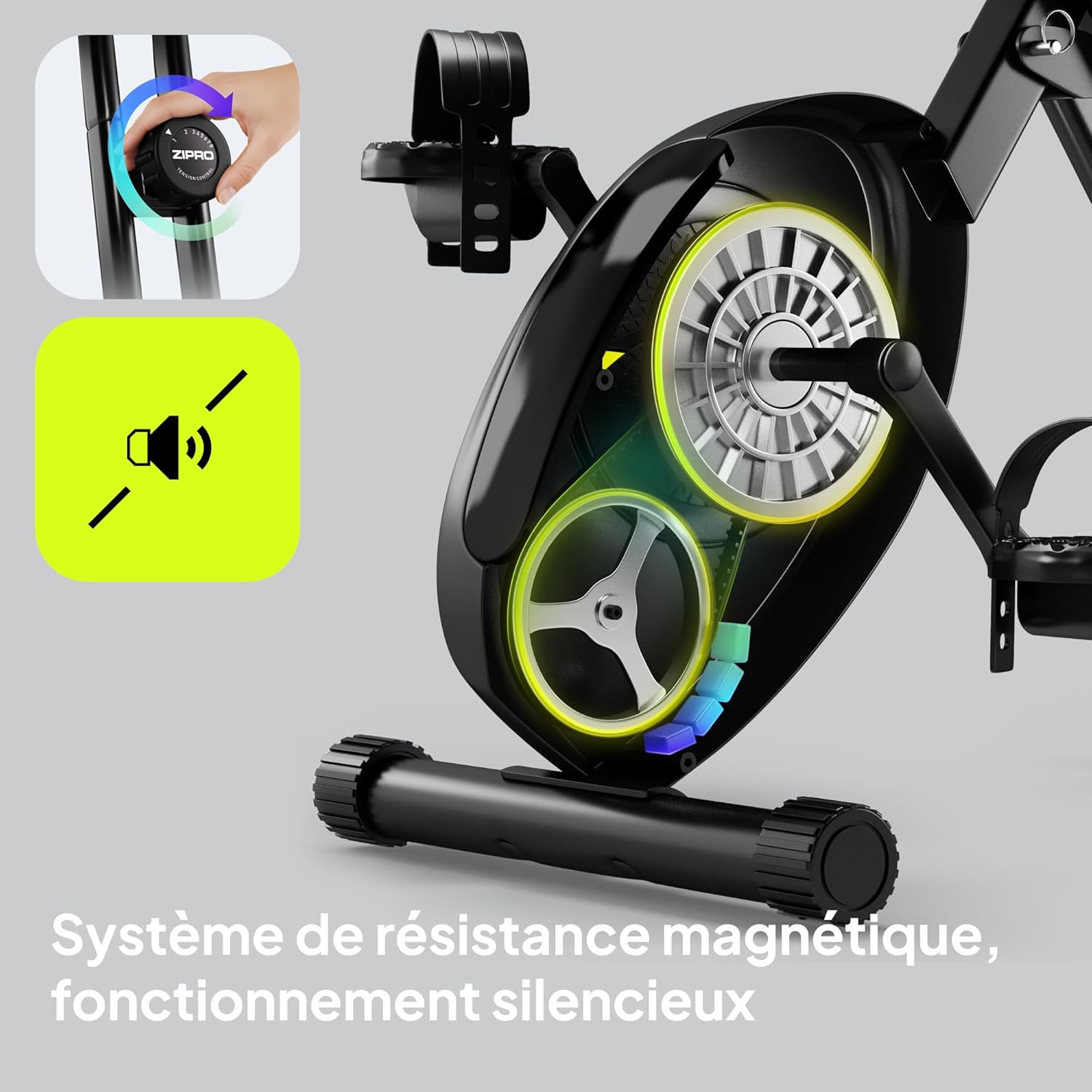
Thank you for choosing the ZIPRO Eclipse X Foldable Exercise Bike. This manual provides essential information for the safe and efficient use of your new fitness equipment. The Eclipse X is designed for comfortable home workouts, featuring a foldable structure, adjustable seat, and stable design. It integrates easily into small spaces and is simple to move. Its adjustable magnetic resistance system offers 8 levels, ensuring smooth and silent operation suitable for all fitness levels.
Safety Information
Please read all instructions carefully before assembly and use. Keep this manual for future reference.
- Consult your physician before starting any exercise program.
- Ensure all parts are securely fastened before each use.
- Place the exercise bike on a flat, stable surface.
- Keep children and pets away from the equipment during operation.
- Do not exceed the maximum user weight of 110 kg (242 lbs).
- Wear appropriate exercise attire and footwear.
- Stop exercising immediately if you feel faint, dizzy, or experience pain.
Setup and Assembly
The ZIPRO Eclipse X is designed for easy setup. Follow these steps to prepare your bike for use.
1. Unpacking
Carefully remove all components from the packaging. Check against the parts list (not provided in this manual, refer to your product's included guide) to ensure all items are present and undamaged.
2. Unfolding the Bike
To unfold the bike, locate the folding mechanism (often a pin or lever near the main frame hinge). Release the mechanism and carefully extend the frame until it locks into the upright position. Ensure the locking pin is fully engaged for stability.


3. Adjusting the Seat
The seat height and distance are adjustable for optimal comfort. Loosen the adjustment knob located beneath the seat, slide the seat to your desired height and distance, and then securely tighten the knob. Ensure your knees have a slight bend at the bottom of the pedal stroke.


Operating Instructions
1. Powering On the Console
The console is battery-powered. It will automatically turn on when you start pedaling or press any button. To conserve battery, it will automatically turn off after a period of inactivity.
2. Using the Console Display
The integrated computer display tracks your workout metrics:
- Time: Duration of your workout.
- Speed: Current cycling speed.
- Distance: Total distance covered during the session.
- Calories: Estimated calories burned.
- Pulse: Heart rate measured via hand sensors on the handlebars.
Use the "MODE" button to cycle through display functions. "RESET" typically clears current workout data. "SET" may be used for setting target values.


3. Adjusting Magnetic Resistance
The bike features 8 levels of magnetic resistance. Turn the resistance knob, located on the main frame, clockwise to increase resistance and counter-clockwise to decrease it. Start with a lower resistance and gradually increase as your fitness improves.

4. Using Pedal Straps
The non-slip pedals are equipped with adjustable straps. Place your feet on the pedals and tighten the straps to secure your feet, preventing them from slipping during your workout.
5. Bluetooth Connectivity and Phone Holder
The ZIPRO Eclipse X features Bluetooth connectivity, allowing for data management with compatible fitness applications. A phone holder is integrated into the console for convenience.

Maintenance
Regular maintenance ensures the longevity and safe operation of your exercise bike.
- Cleaning: Wipe down the bike with a damp cloth after each use to remove sweat and dust. Avoid abrasive cleaners.
- Inspections: Periodically check all bolts, nuts, and moving parts for tightness and wear. Tighten any loose fasteners.
- Lubrication: The magnetic resistance system is generally maintenance-free. Do not lubricate internal components unless specifically instructed by the manufacturer.
- Storage: When not in use, fold the bike for compact storage. Ensure it is stored in a dry, cool place away from direct sunlight.


Troubleshooting
Refer to this section for common issues and their solutions.
| Problem | Possible Cause | Solution |
|---|---|---|
| Console not displaying | Dead batteries; Loose connection | Replace batteries (AA or AAA, typically); Check console cable connections. |
| Unusual noise during operation | Loose parts; Friction from moving components | Check and tighten all bolts and nuts. Ensure no foreign objects are caught in the mechanism. |
| Resistance not changing | Resistance cable disconnected or damaged | Inspect the resistance cable connection to the knob and the flywheel. Contact support if damaged. |
| Bike feels unstable | Not fully unfolded/locked; Uneven surface | Ensure the folding mechanism is fully engaged. Place the bike on a level surface. |
Specifications
| Feature | Detail |
|---|---|
| Model Name | Eclipse X |
| Item Model Number | 15248434 |
| Brand | ZIPRO |
| Color | Black |
| Resistance Mechanism | Magnetic (8 levels) |
| Drive System | Pedals |
| Material | PU (main material) |
| Max User Weight Capacity | 110 Kilograms |
| Max Recommended User Height | 185 Centimeters |
| Product Dimensions (L x W x H) | 85.5 x 44.5 x 107.5 cm (Unfolded) |
| Folded Footprint | Less than 0.5 m² |
| Item Weight | 14.4 Kilograms |
| Power Source | Battery Powered (for console) |
| Special Features | Bluetooth connectivity, Integrated transport wheels, Adjustable seat (height and distance), Foldable design |
| Recommended Use | Indoor |
| Country of Origin | China |
Warranty Information
The ZIPRO Eclipse X exercise bike comes with a standard manufacturer's warranty. Please refer to the warranty card included with your product for specific terms, conditions, and duration. Keep your proof of purchase for any warranty claims.
Customer Support
For technical assistance, spare parts, or any questions regarding your ZIPRO Eclipse X exercise bike, please contact ZIPRO customer support. Contact details can typically be found on the manufacturer's website or on the packaging materials.
You may also visit the official ZIPRO website for FAQs and additional resources: www.zipro.pl (Note: This is a placeholder URL, please verify the correct support website).


