
Introduction
This manual provides detailed instructions for the proper use, setup, and maintenance of your TRAUSI i27 Wireless Earbuds. Please read this manual thoroughly before using the product to ensure optimal performance and longevity.
What's in the Box
Verify that all items listed below are present in your package:
- TRAUSI i27 Wireless Earbuds (Left and Right)
- Charging Case
- Type-C Charging Cable
- Eartips (3 sizes: S/M/L)
- User Manual (this document)

Image: Contents of the TRAUSI i27 Wireless Earbuds package, including earbuds, charging case, Type-C cable, and various eartip sizes.
Product Overview
Earbud Components
- Earhook: Provides a secure and comfortable fit for active use.
- Touch Control Area: For managing music playback, calls, and voice assistant.
- LED Indicator: Displays connection status and battery level.
- Microphone: Built-in for calls and voice commands.
Charging Case Components
- Earbud Charging Slots: Securely holds and charges the earbuds.
- LED Digital Display: Shows the charging case battery percentage and individual earbud charging status.
- Type-C Charging Port: For recharging the charging case.
Setup
Charging the Earbuds and Case
For first-time use, fully charge both the earbuds and the charging case.
- Place the earbuds into the charging case. Ensure they are correctly seated.
- Connect the Type-C charging cable to the charging port on the case and to a USB power source.
- The LED digital display on the case will show the battery percentage during charging. The earbuds' LED indicators will light up during charging and turn off when fully charged.
- A full charge for the case takes approximately 1.5 hours. A 10-minute quick charge provides 2 hours of playback.

Image: Illustration of the earbuds and charging case, highlighting 54 hours total playtime with the case, 6 hours single earbud playtime, and Type-C fast charging.

Image: The TRAUSI i27 earbuds resting in their open charging case, displaying LED indicators for charging status.
Power On/Off
- Power On: The earbuds automatically power on when removed from the charging case.
- Power Off: The earbuds automatically power off and begin charging when placed back into the charging case and the lid is closed.
Bluetooth Pairing
- Ensure the earbuds are charged.
- Open the charging case. The earbuds will automatically enter pairing mode, indicated by a flashing LED on one or both earbuds.
- On your device (smartphone, tablet, laptop), enable Bluetooth and search for available devices.
- Select "i27" from the list of found devices.
- Once connected, the earbud LED indicator will stop flashing.
- The earbuds will automatically reconnect to the last paired device when removed from the case, if Bluetooth is enabled on the device.

Image: The TRAUSI i27 earbuds and charging case displayed alongside a smartphone and laptop, illustrating automatic pairing and compatibility with iOS, Android, and Windows devices.

Image: The TRAUSI i27 earbuds in their charging case, with a smartphone and laptop nearby, demonstrating the pairing process.
Wearing the Earbuds
The i27 earbuds feature an earhook design for a secure and comfortable fit.
- Identify the Left (L) and Right (R) earbuds.
- Gently place the earbud into your ear canal.
- Adjust the earhook over the top of your ear until it feels secure and comfortable.
- Experiment with the different sized eartips (S/M/L) to find the best seal and comfort for your ears.

Image: A woman wearing a TRAUSI i27 earbud, demonstrating the lightweight, ergonomic earhook design for a perfect and protective fit.

Image: A close-up of a woman wearing the TRAUSI i27 earbud, showcasing its secure earhook design.
Operating Instructions
Touch Controls
The TRAUSI i27 earbuds feature intuitive touch controls on each earbud. The functions are as follows:
| Action | Function |
|---|---|
| Single Tap | Answer Call / Hang Up Call |
| Double Tap (Left Earbud) | Volume Down |
| Double Tap (Right Earbud) | Volume Up |
| Triple Tap (Either Earbud) | Activate Voice Assistant (Siri/Google Assistant) |
| Press and Hold (Left Earbud, 2s) | Previous Track |
| Press and Hold (Right Earbud, 2s) | Next Track |
| Press and Hold (Either Earbud, 2s) | Reject Call |

Image: A visual guide to the touch controls on the TRAUSI i27 earbuds, detailing actions for calls and music playback.
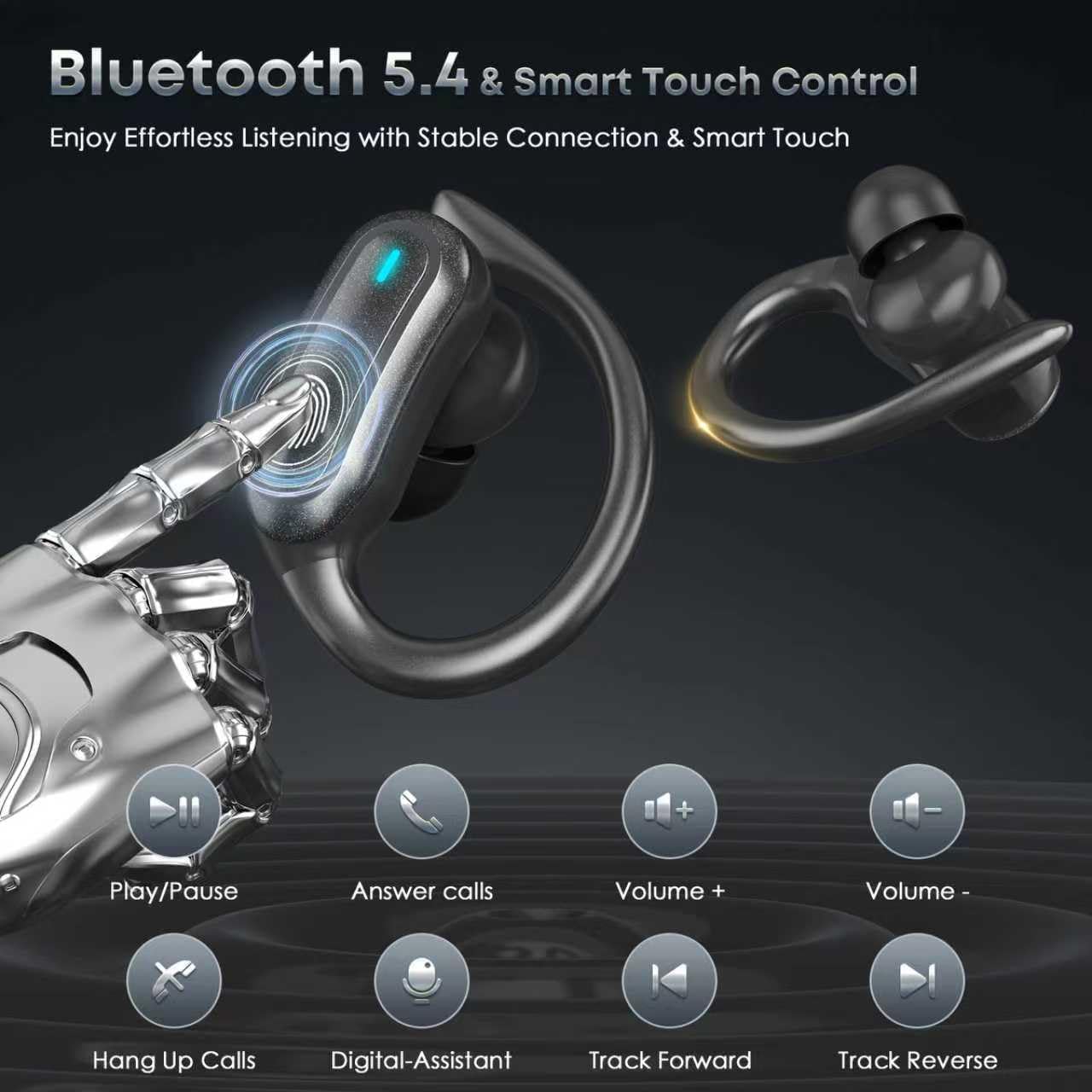
Image: A detailed view of the TRAUSI i27 earbud, indicating the smart touch control area for various functions.
LED Indicators
The LED indicators on the earbuds and charging case provide information about their status:
- Earbud LED (Flashing): Indicates pairing mode or connection status.
- Earbud LED (Solid): Indicates charging (inside case) or fully charged (off when fully charged).
- Case LED Digital Display: Shows the charging case's battery percentage (0-100) and individual earbud charging status (L/R icons).

Image: The TRAUSI i27 charging case and earbuds displaying their LED power digital displays, showing battery levels for both the case and individual earbuds.

Image: The TRAUSI i27 charging case open, revealing the LED digital display indicating the battery percentage of the case and the charging status of the earbuds.
Maintenance
Cleaning
Regular cleaning helps maintain sound quality and hygiene.
- Use a soft, dry, lint-free cloth to wipe the earbuds and charging case.
- For earwax or debris in the eartips or speaker mesh, use a cotton swab or a small, soft brush.
- Do not use abrasive cleaners, alcohol, or chemical solvents.
Storage
When not in use, store the earbuds in their charging case to protect them and keep them charged.
- Store in a cool, dry place, away from extreme temperatures and direct sunlight.
- Avoid storing in dusty or dirty environments.
Water Resistance (IPX7)
The TRAUSI i27 earbuds are IPX7 waterproof, meaning they are protected against immersion in water up to 1 meter for up to 30 minutes. This makes them suitable for workouts, running, and protection against sweat, rain, and splashes.
Important Note: IPX7 rating does not mean the earbuds are suitable for swimming, showering, or prolonged submersion in water. The charging case is not waterproof.

Image: The TRAUSI i27 earbuds shown with water splashes, indicating their IPX7 waterproof and sweatproof capabilities.

Image: The TRAUSI i27 earbuds partially submerged in water, illustrating their IPX7 water resistance.
Troubleshooting
If you encounter issues with your earbuds, refer to the following common problems and solutions:
- Earbuds not pairing with device:
- Ensure earbuds are charged and removed from the case.
- Turn off and on Bluetooth on your device.
- Forget/delete "i27" from your device's Bluetooth list and try pairing again.
- Ensure your device is within the 15-meter Bluetooth range.
- Only one earbud working:
- Place both earbuds back into the charging case, close the lid, then open it again and remove them.
- Ensure both earbuds are charged.
- Try resetting the earbuds (refer to manufacturer's website for specific reset instructions if needed).
- No sound or low volume:
- Adjust the volume on both your device and the earbuds using touch controls.
- Ensure the earbuds are properly connected to your device.
- Clean any debris from the earbud speaker mesh.
- Earbuds not charging:
- Ensure the charging cable is securely connected to both the case and the power source.
- Check if the charging case has power (LED display should show percentage).
- Ensure the earbuds are correctly seated in the charging slots.
- Clean the charging contacts on both the earbuds and the case.
Specifications
| Feature | Detail |
|---|---|
| Model Number | i27 |
| Brand | TRAUSI |
| Bluetooth Version | 5.4 |
| Bluetooth Range | Up to 15 meters (50 feet) without obstacles |
| Earbud Playtime | Up to 6 hours (single charge) |
| Total Playtime (with Charging Case) | Up to 54 hours |
| Charging Case Battery Capacity | 400mAh |
| Charging Port | Type-C |
| Quick Charge | 10 minutes for 2 hours playback |
| Water Resistance Rating | IPX7 (earbuds only) |
| Noise Control | Environmental Noise Cancellation (Mic) |
| Control Type | Touch Control |
| Ear Placement | Open Ear (with earhook) |
| Frequency Range | 20Hz - 20,000Hz |
| Earbud Weight | 7g each |
| Material | Plastic |
| Compatible Devices | iPhone, Android, Cellphones, Desktops, Laptops, Tablets |
Warranty and Support
Manufacturer's Warranty
The TRAUSI i27 Wireless Earbuds come with a 90-day manufacturer's warranty from the date of purchase. This warranty covers manufacturing defects and workmanship issues under normal use. It does not cover damage caused by misuse, accidents, unauthorized modifications, or normal wear and tear.
Customer Support
For technical assistance, warranty claims, or any questions regarding your TRAUSI i27 Wireless Earbuds, please contact TRAUSI customer support through the retailer's platform or the official TRAUSI website.
Please have your purchase receipt and product model number (i27) ready when contacting support.