
1. Important Safety Instructions
Please read and understand all instructions before beginning installation. Failure to follow these instructions may result in electric shock, fire, or personal injury.
- Ensure the power supply is disconnected at the circuit breaker before installation or maintenance.
- All electrical connections must be made in accordance with local codes, ordinances, or national electrical codes. If you are unfamiliar with electrical wiring, consult a qualified electrician.
- The fan must be mounted with a minimum of 7 feet (2.1 meters) clearance from the floor to the trailing edge of the blades.
- This fan is rated for outdoor, damp locations (IP65). Do not immerse in water.
- Do not bend the blade holders during installation, balancing, or cleaning.
- Verify that the mounting structure can support the weight of the fan (approximately 10.6 lbs).
2. Package Contents
Carefully unpack your fan and check the contents. You should have the following items:
- Fan Motor Assembly
- Fan Blades (5)
- Downrods (6-inch and 10-inch options)
- Mounting Bracket
- Remote Control with Wall Mount
- Hardware Pack (screws, washers, wire nuts)
- Instruction Manual
3. Product Features
- IP65 Wet Rated: Designed for outdoor use, resistant to dust and water jets, suitable for covered patios, gazebos, and porches.
- Reversible DC Motor: Allows for both downdraft (cooling) and updraft (air circulation) modes, enhancing comfort year-round.
- 6-Speed Settings: Provides precise control over airflow intensity.
- Integrated LED Light: Features 3 color temperatures (3000K Warm, 4000K Natural, 6000K Cold White) and dimmable brightness.
- Plug and Play Installation: Includes a 9.9 ft power cord for easy setup without hardwiring.
- Remote Control: Conveniently adjust fan speed, light settings, and direction from anywhere in the room.
- Durable Plywood Blades: Engineered for outdoor conditions, resisting rust, moisture, and UV damage.

Figure 3.1: Overview of the Fanbulous 52-inch Outdoor Ceiling Fan, highlighting its waterproof design, DC motor, plywood blades, and LED light.

Figure 3.2: The fan blades offer two aesthetic options: a sleek black finish and a natural wood grain, allowing for versatile decoration styles.
4. Installation Guide
This fan is designed for plug-and-play installation. Ensure all safety instructions are followed before proceeding.
4.1 Pre-Installation
- Identify a suitable mounting location that can support the fan's weight and provides adequate clearance.
- Ensure a grounded electrical outlet is within reach of the 9.9 ft power cord.
- Gather all necessary tools: screwdriver, ladder, wire strippers (if needed).
4.2 Mounting the Fan
- Secure the mounting bracket to the ceiling joist or a suitable support structure using the provided hardware.
- Attach the chosen downrod (6-inch or 10-inch) to the fan motor assembly.
- Carefully lift the fan assembly and hang it from the mounting bracket.
4.3 Connecting Power
- Plug the fan's power cord into a grounded outdoor-rated electrical outlet.
- Ensure the connection is secure and protected from moisture.
4.4 Attaching Blades
- Attach each fan blade to the motor housing using the provided screws. Ensure they are securely fastened.
- Double-check all connections and ensure no wires are pinched.
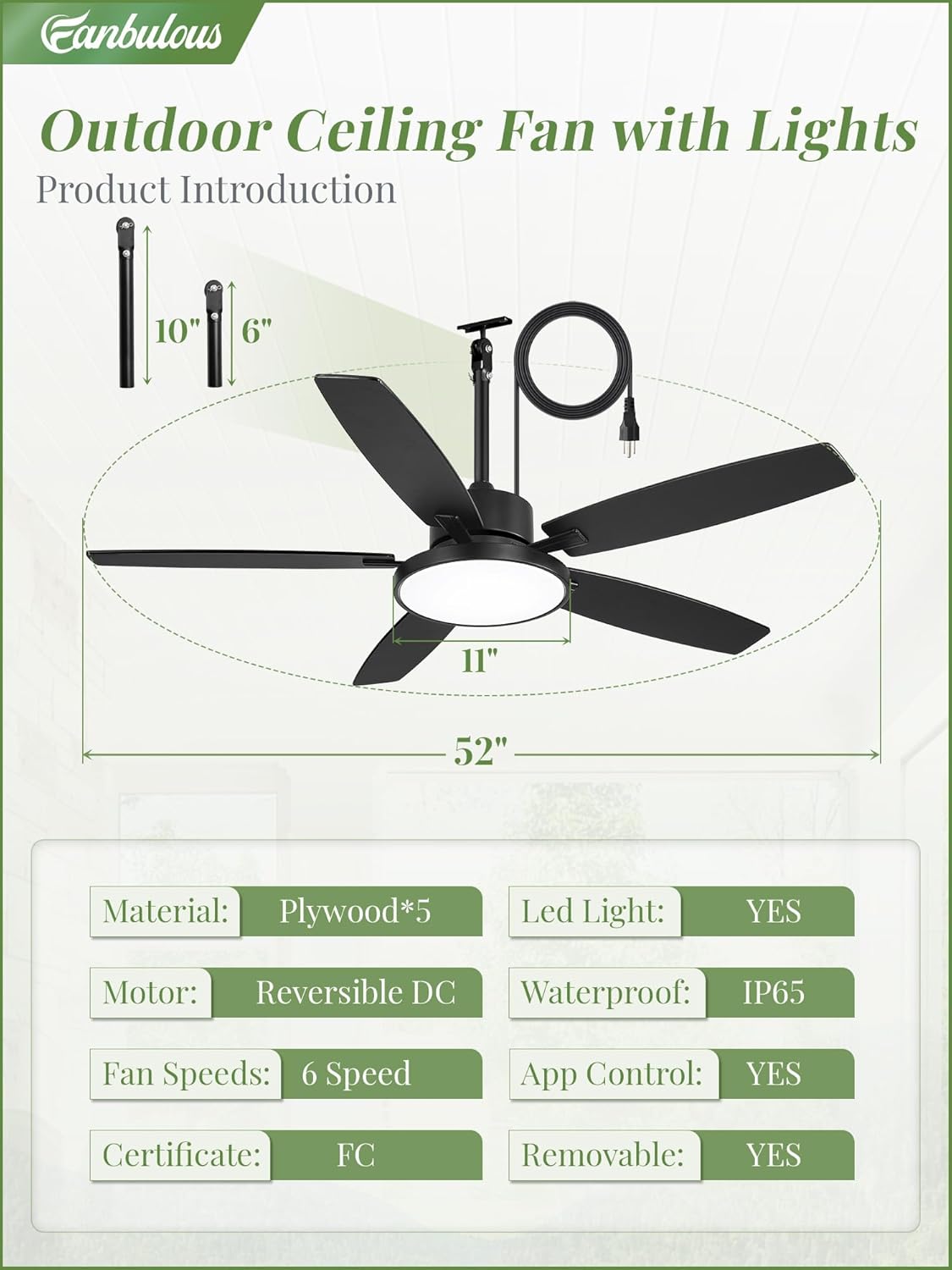
Figure 4.1: Product introduction with dimensions and key components for installation.
Video 4.1: An official product video demonstrating the features and general overview of the Fanbulous 52-inch Outdoor Ceiling Fan.
5. Operating Instructions
Your Fanbulous ceiling fan comes with a remote control for convenient operation.
5.1 Remote Control Functions

Figure 5.1: Remote control layout and button functions.
- Light On/Off: Press the light button to turn the LED light on or off.
- Fan Speed: Use buttons 1-6 to select desired fan speed. 1 is the lowest, 6 is the highest.
- Reverse Function (F/R): Press to change the direction of blade rotation.
- Color Temperature (CCT): Cycle through 3000K (Warm), 4000K (Natural), and 6000K (Cold White) light settings.
- Brightness Adjustment: Use the brightness buttons to dim or brighten the light.
- Timer: Press the timer button (e.g., 2H) to set the fan to turn off automatically after 2 hours.
5.2 Reversible Motor Function
The reversible DC motor allows you to optimize airflow for different seasons:
- Summer Mode (Downdraft): Blades rotate counter-clockwise, pushing air downwards to create a cooling breeze.
- Winter Mode (Updraft): Blades rotate clockwise, drawing air upwards to circulate warm air more evenly.

Figure 5.2: Effective air circulation for both cooling in summer and warming in winter.
5.3 Light Color Temperature and Dimming
Adjust the light to suit your preference and scenario:
- Cycle through 3000K (warm light), 4000K (natural light), and 6000K (cold white light) using the CCT button on the remote.
- Use the dedicated brightness buttons to smoothly dim or brighten the light from 10% to 100%.

Figure 5.3: Adjustable 3-color temperature and dimmable light settings.
6. Maintenance
Regular maintenance helps ensure the longevity and optimal performance of your Fanbulous outdoor ceiling fan.
- Cleaning: Periodically wipe the fan blades and motor housing with a soft, damp cloth. Do not use abrasive cleaners or solvents.
- Inspection: Annually check all screws and connections for tightness. Ensure the mounting hardware is secure.
- Blade Care: The plywood blades are designed for outdoor use. Avoid harsh impacts that could damage them.
Video 6.1: An official product video highlighting the IP65 waterproof rating of the Fanbulous ceiling fan, demonstrating its durability in outdoor conditions.
7. Troubleshooting
If you experience issues with your fan, refer to the following troubleshooting guide:
| Problem | Possible Cause | Solution |
|---|---|---|
| Fan does not start | No power to the fan; Remote control battery low; Incorrect pairing. | Check power outlet and circuit breaker. Replace remote battery. Re-pair remote with fan (refer to remote instructions). |
| Light does not work | No power to the light; Light setting off; LED module failure. | Check power. Ensure light is turned on via remote. Contact customer support if LED module is faulty. |
| Remote control not working | Battery low or dead; Obstruction between remote and receiver; Remote not paired. | Replace battery. Ensure clear line of sight. Re-pair remote. |
| Excessive wobbling | Loose blade screws; Unbalanced blades; Loose mounting. | Tighten all blade screws. Use a balancing kit (not included) if needed. Ensure mounting bracket is secure. |
| Noisy operation | Loose parts; Motor issue. | Check for and tighten any loose screws. If noise persists, contact customer support. |
8. Specifications
| Feature | Detail |
|---|---|
| Brand | Fanbulous |
| Model Number | PDX52 |
| Size | 52 Inch |
| Color | Black |
| Material | Engineered Wood, Painted Metal |
| Motor Type | DC |
| Number of Blades | 5 |
| Number of Speeds | 6 |
| Air Flow Capacity | 5500 Cubic Feet Per Minute |
| Noise Level | 35 Decibels |
| Wattage | 62 watts |
| Voltage | 120 Volts |
| IP Rating | IP65 (Wet Rated) |
| Mounting Type | Downrod Mount |
| Downrod Lengths | 6 Inches, 10 Inches |
| Special Features | Adjustable Height, App Operable, Quiet Operation, Remote Controlled, Waterproof |
| Product Dimensions (D x W x H) | 52"D x 52"W x 19.13"H |
| Item Weight | 10.6 Pounds |
9. Warranty and Support
Fanbulous stands behind the quality of its products.
- Warranty: This product is covered by a 2-year manufacturer's warranty from the date of purchase.
- Customer Service: For any questions, concerns, or technical assistance, please contact our 24/7 customer service team. Refer to your purchase documentation for specific contact details.

