
Introduction
This manual provides detailed instructions for the installation, operation, and maintenance of your Olafus 65W WiFi Smart Flood Light. This outdoor motion sensor floodlight offers advanced features including app and voice control, adjustable color temperature, dimming, and smart scheduling, designed to enhance security and convenience for your outdoor spaces.
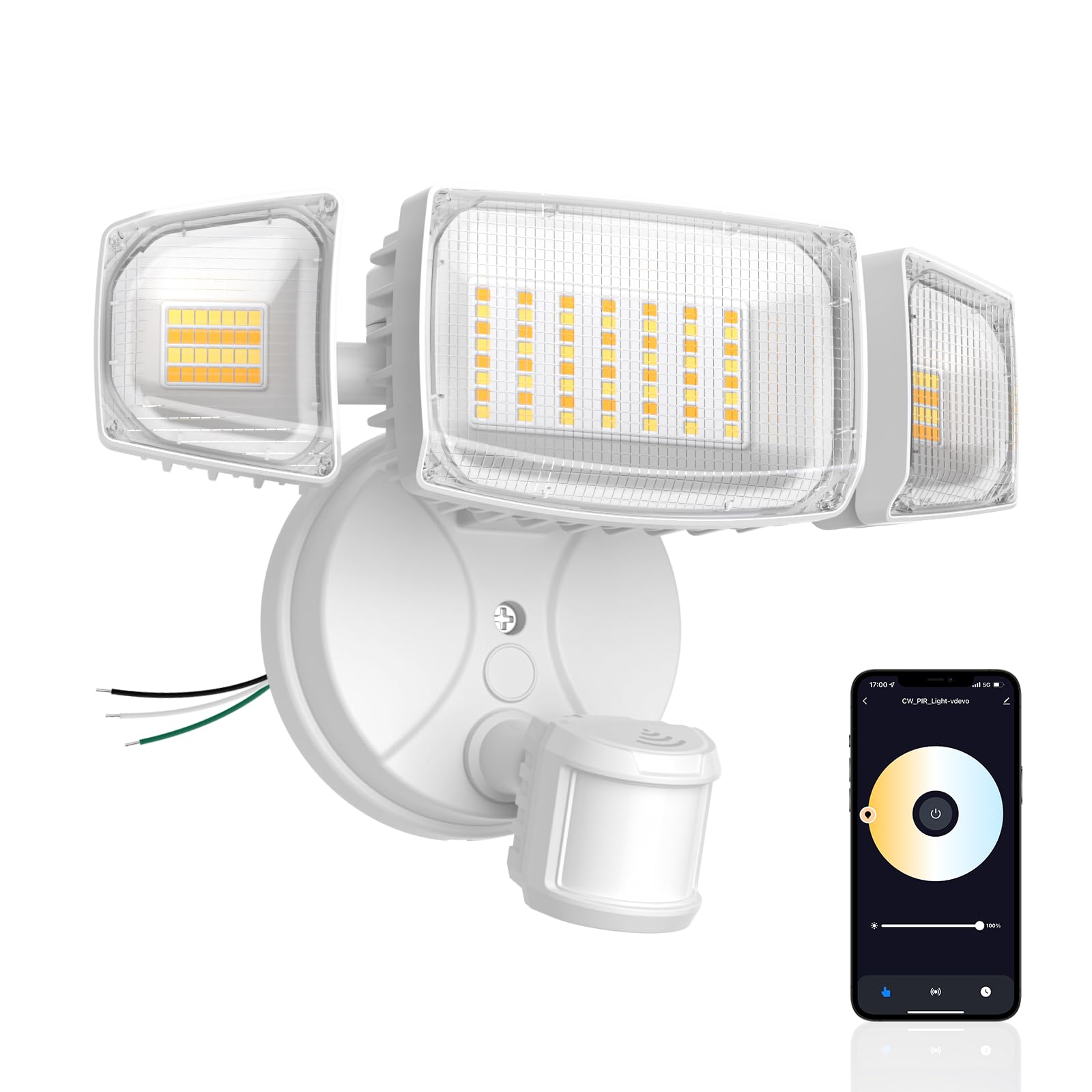
Figure 1: Olafus 65W WiFi Smart Flood Light, front view.
What's in the Box
Verify that all components are present before beginning installation:
- Motion Sensor Light (1 unit)
- Instruction Manual (this document)
Specifications
| Feature | Specification |
|---|---|
| Brand | Olafus |
| Model Number | 3-LBW65Q |
| Color | White |
| Material | Plastic, Aluminum |
| Light Source | LED |
| Wattage | 65 watts |
| Brightness | 6500 Lumen |
| Color Temperature | 2700K-6500K (Adjustable White) |
| Voltage | 120 Volts |
| Motion Sensor Detection Angle | 180° |
| Motion Sensor Detection Distance | Up to 72 ft |
| Water Resistance Level | IP65 Waterproof |
| Connectivity | 2.4GHz Wi-Fi |
| Control Methods | App Control (Smart Life), Voice Control (Alexa, Google Assistant) |
| Mounting Type | Wall Mount |
| Item Dimensions (L x W x H) | 9.29"L x 4.56"W x 4.48"H |
Setup
1. Safety Precautions
- Ensure power is turned off at the circuit breaker before installation.
- Consult a qualified electrician if you are unfamiliar with electrical wiring.
2. Mounting the Fixture
The flood light is designed for wall mounting. Use the included adjustable bracket to secure the fixture to a junction box or suitable surface.

Figure 2: Illustration of hardwired installation process.
3. Wiring Connection
Connect the flood light to your standard 110-120V household wiring. The fixture includes wire nuts for secure connections.
- Connect the Live Wire (typically black) from your household wiring to the light's live wire.
- Connect the Neutral Wire (typically white) from your household wiring to the light's neutral wire.
- Connect the Ground Wire (typically green or bare copper) from your household wiring to the light's ground wire.
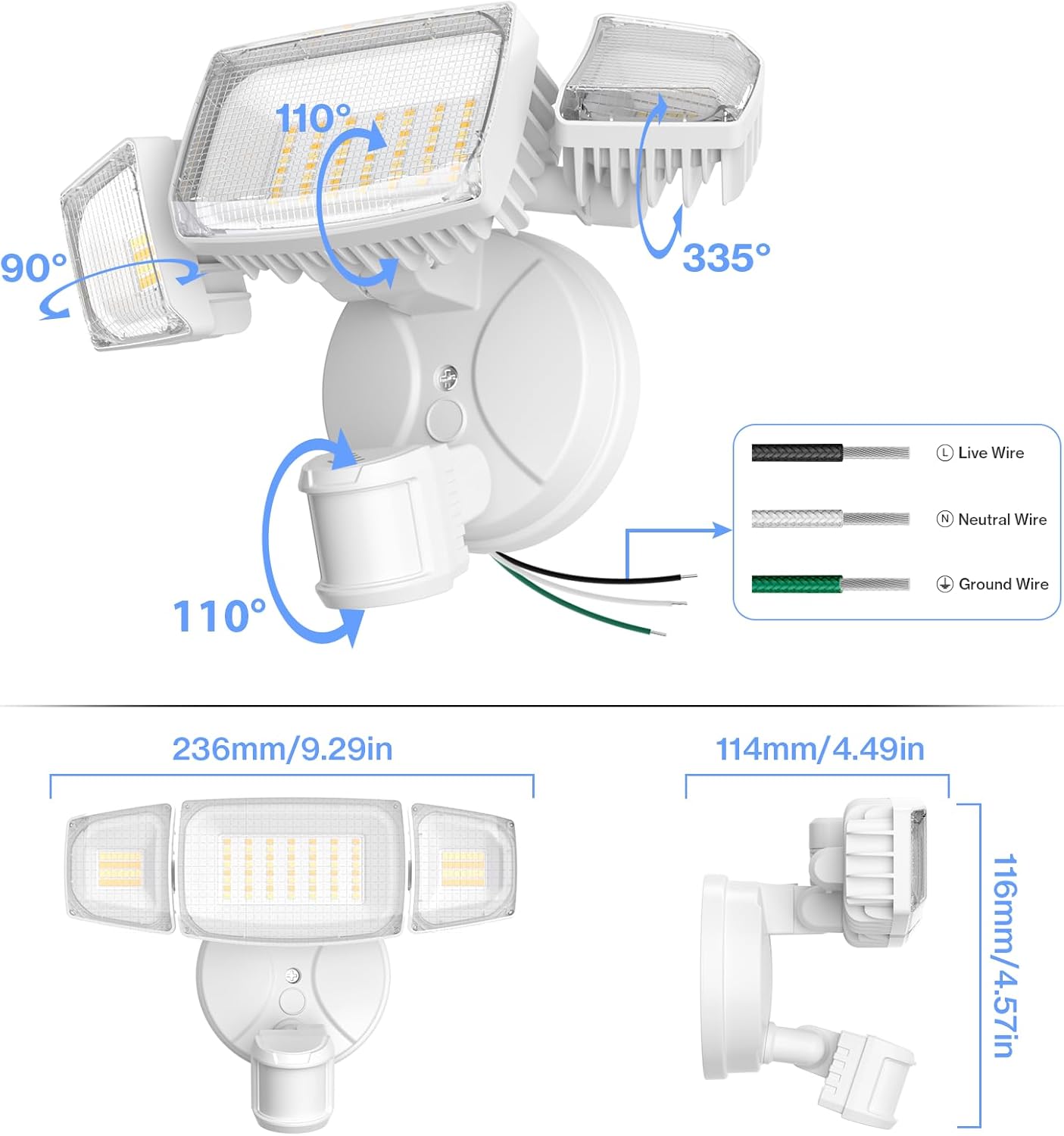
Figure 3: Wiring connections and product dimensions.
4. Adjusting Light Heads and Sensor
The light heads and motion sensor can be adjusted to cover your desired area. The light heads offer up to 355° up/down and 90° side-to-side rotation, with a beam angle up to 270°. The motion sensor covers a 180° area.

Figure 4: Adjustable design for light heads and motion sensor.
5. App Pairing
After installation, restore power and follow the instructions in the Smart Life app to pair your device. Ensure your Wi-Fi network is 2.4GHz.
Operating Instructions
1. Smart Voice & App Control
Control your flood light using the Smart Life app or voice commands via Alexa or Google Assistant. The app allows you to turn the light on/off, adjust modes, color temperature, brightness, set schedules, and delay shut-off.
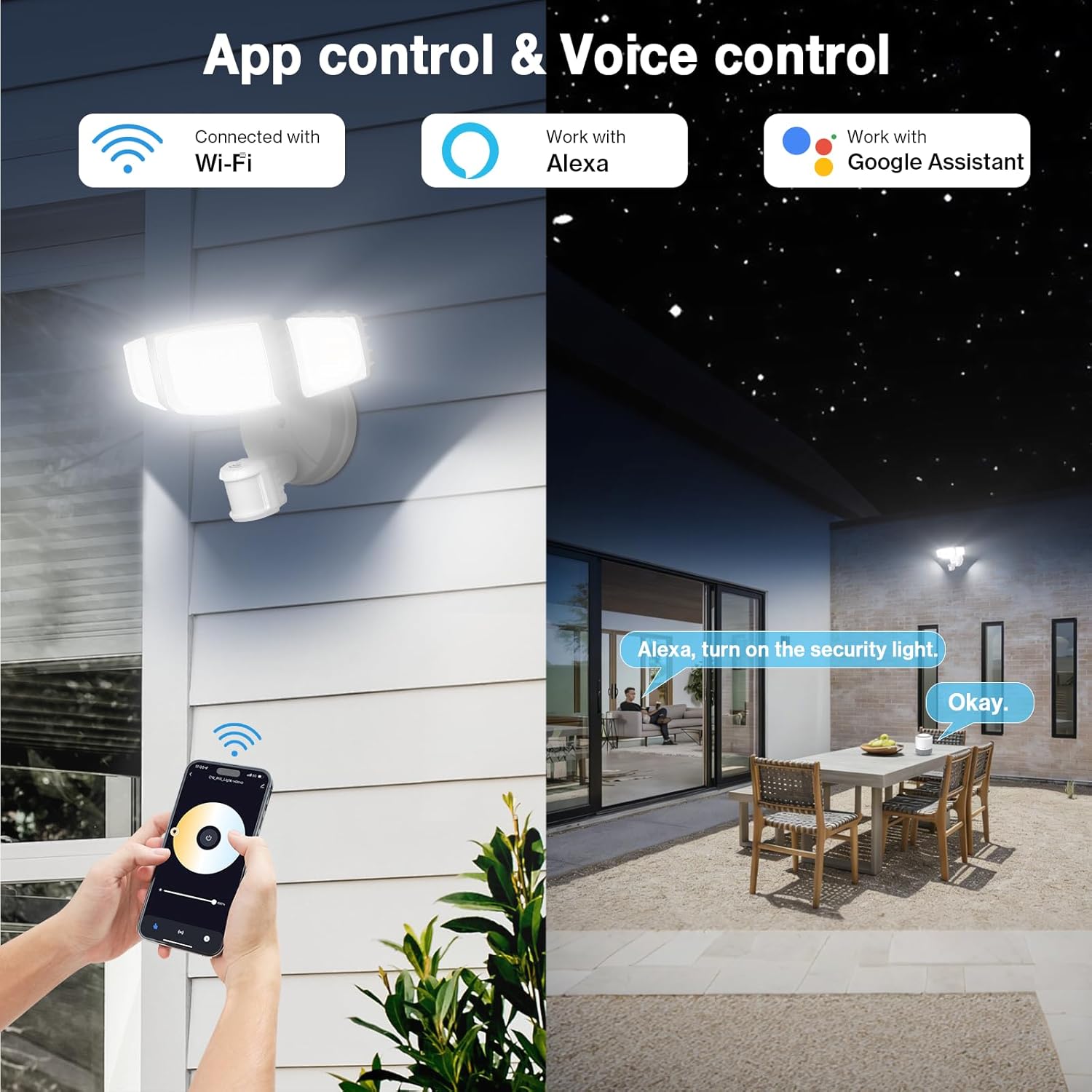
Figure 5: Demonstrating app and voice control functionality.
2. Lighting Modes
The flood light offers two primary lighting frameworks:
- Always-On Mode: Provides full manual control over brightness, color temperature, and schedules.
- Smart Sensing Mode: Combines motion and daylight detection. It activates only during set times (Day, Night, Dusk to Dawn, or Evening).
Additionally, the Slight Light Mode allows for a soft, adjustable glow (1%-30%) that can be set for a duration or continuously. It brightens to 100% upon motion detection before dimming back.

Figure 6: Visual representation of Motion Sensor Mode and Dim Light Mode.
3. Motion Sensing
The enhanced motion sensor covers a 180° area up to 72 ft with three adjustable sensitivity levels (Low, Medium, High). The app logs every activation for review.

Figure 7: Illustration of motion detection range and event logging.
4. Full-Range Dimming & Color Temperature
Personalize your lighting with stepless dimming from 1% to 100% brightness. Adjust the color temperature from warm white (2700K) to cool daylight (6500K). The built-in memory function retains your last setting.

Figure 8: App interface for adjusting color temperature and brightness.
5. Smart Schedules & Groups
Automate your lighting with advanced scheduling. Set the Timer to program different brightness, color temperature, and modes for specific days and times. Create a delayed shutoff for convenience.
Use Group Control in the app to link multiple lights, allowing them to trigger and operate in unison, creating a coordinated smart lighting system.
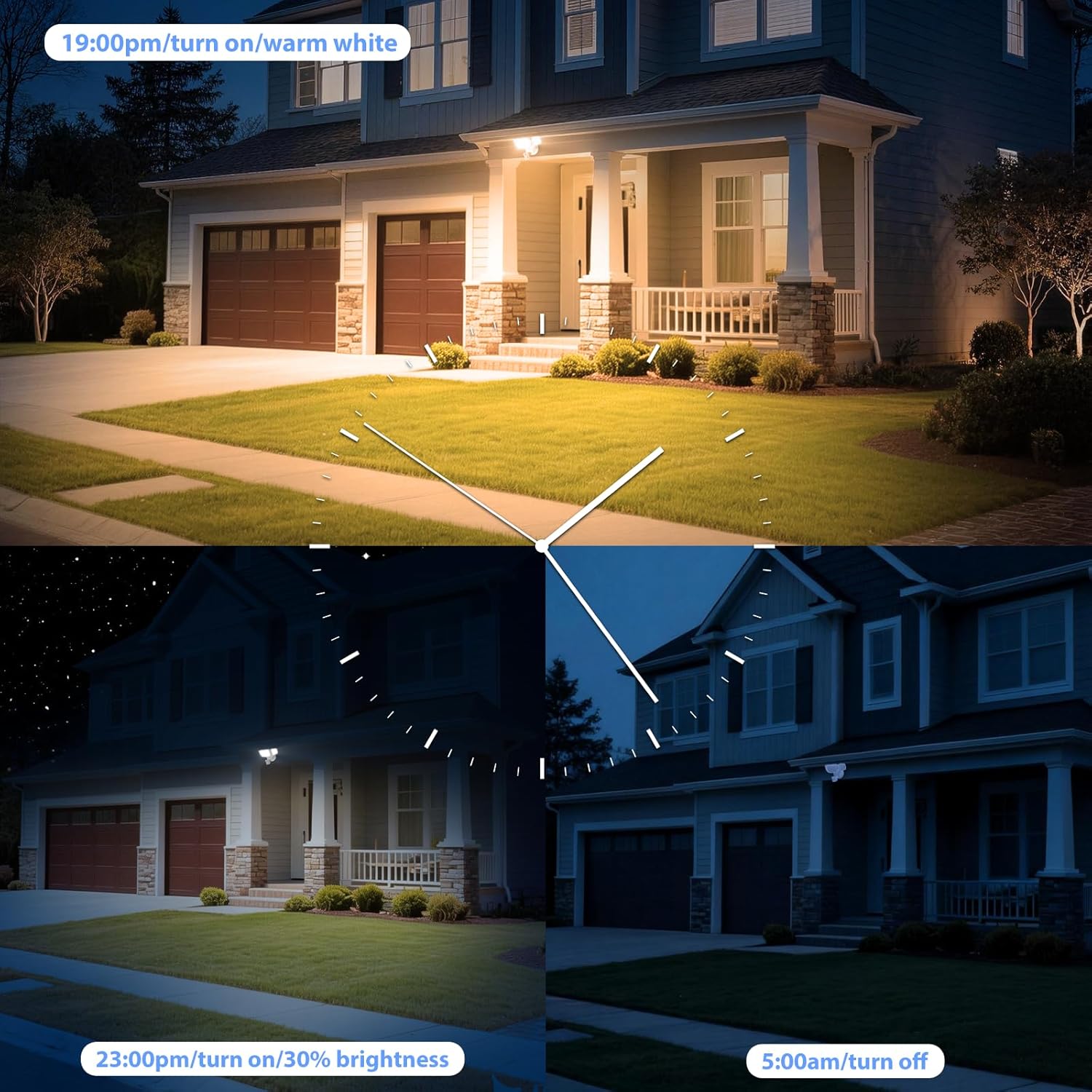
Figure 9: Example of setting smart schedules for the flood light.

Figure 10: Illustration of multiple lights controlled via Group Control.
6. Product Features Video
Video 1: An overview of the Olafus 65W Smart WiFi Motion Security Light's features, including voice control, adjustable settings, motion detection, and group control.
Maintenance
1. Cleaning
To clean the flood light, ensure power is off. Wipe the exterior with a soft, damp cloth. Do not use abrasive cleaners or solvents.
2. Weather Resistance
The Olafus flood light has an IP65 waterproof rating, ensuring reliable performance in various weather conditions, including rain and snow. Its efficient cooling design prevents overheating and extends lifespan.

Figure 11: The flood light is designed to withstand outdoor elements with an IP65 rating.

Figure 12: The design incorporates effective heat dissipation for durability.
Troubleshooting
- Light not turning on: Check power supply, circuit breaker, and wiring connections. Ensure the light is not in an 'off' schedule or mode.
- Motion sensor not detecting: Verify sensor sensitivity settings in the app (Low, Medium, High). Ensure the sensor is not obstructed and is aimed correctly. Check for ambient light conditions that might prevent activation if set to 'night only'.
- App connectivity issues: Ensure your Wi-Fi network is 2.4GHz. Restart your router and the flood light. Re-attempt the pairing process in the Smart Life app. Check if the app is updated to the latest version.
- Voice control not working: Ensure the flood light is properly linked to your Alexa or Google Assistant account. Check your internet connection and voice assistant device functionality.
- Light flickering or inconsistent brightness: Check for stable power supply. If issues persist, contact customer support.
Warranty and Support
1. Manufacturer Warranty
This Olafus 65W WiFi Smart Flood Light comes with a 1-year manufacturer's warranty.
2. Customer Support
For technical assistance, warranty claims, or any questions regarding your product, please contact Olafus customer support. Refer to the contact information provided with your purchase or visit the official Olafus website.

