
Important Safety Information
Read all instructions carefully before installation and use. Retain this manual for future reference.
- Electrical Safety: Ensure power is disconnected at the circuit breaker before installation or servicing. All electrical connections must comply with local codes and ordinances. If you are unsure about wiring, consult a qualified electrician.
- Mounting: The fan must be mounted to a structure capable of supporting the fan's weight (minimum 35 lbs). Ensure proper clearance from walls and other objects.
- Blade Clearance: Maintain a minimum of 7 feet (2.1 meters) clearance from the floor to the bottom of the fan blades.
- Outdoor Use: This fan is IP65 rated for outdoor use, providing protection against dust and water jets. However, avoid direct high-pressure water spray.
- Children and Pets: Keep children and pets away from the fan during operation and installation.
Package Contents
Verify that all components are present before beginning installation:
- Ceiling Fan Motor Housing
- Fan Blades (5)
- Downrods (4-inch and 8-inch options)
- Mounting Bracket
- Remote Control with Wall Mount
- Power Cord (9.8 ft)
- Hardware Pack (screws, washers, wire nuts)
- Instruction Manual
Setup and Installation
This Fanbulous ceiling fan features a quick plug-and-play design with pre-assembled components for simplified installation. No electrician is typically needed for the electrical connection if a suitable outdoor outlet is available.
- Prepare Mounting Location: Ensure the mounting surface is structurally sound and can support the fan's weight.
- Attach Mounting Bracket: Secure the mounting bracket to the ceiling joist or a suitable support structure using the provided hardware.
- Assemble Downrod: Select either the 4-inch or 8-inch downrod based on your ceiling height and desired fan position. Attach the chosen downrod to the fan motor housing.
- Hang Fan: Carefully lift the fan assembly and hang it onto the mounting bracket.
- Connect Power: Plug the fan's 9.8-foot power cord into a grounded outdoor electrical outlet. Ensure the outlet is protected from direct water exposure.
- Attach Fan Blades: Securely attach the five fan blades to the motor housing. The blades are dual-finish (walnut/matte black); choose your preferred side facing down.
- Final Checks: Ensure all connections are secure and the fan is properly balanced.
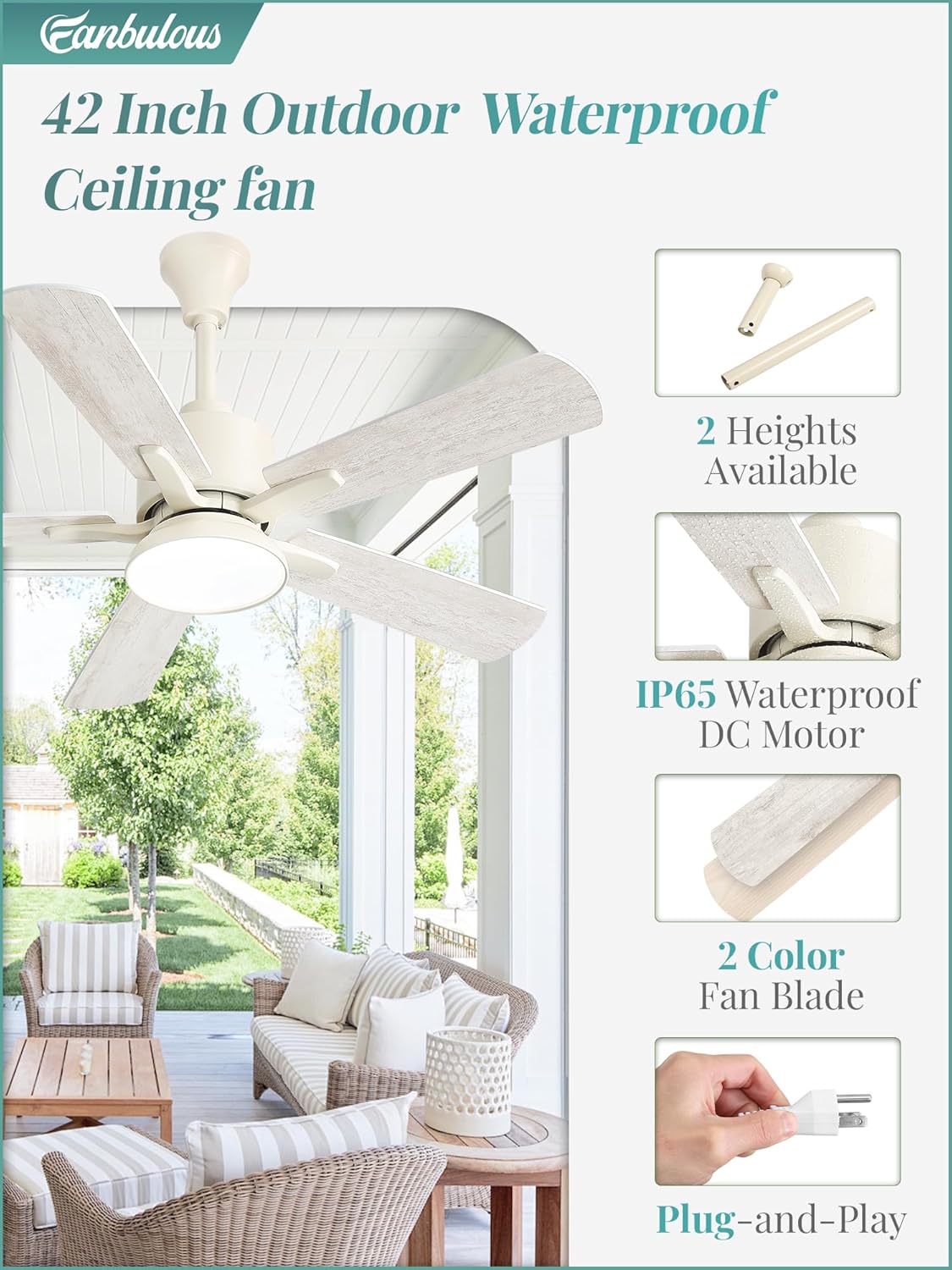
Image: Fan components showing downrod options, dual-finish blades, and the plug-and-play power cord for easy installation.
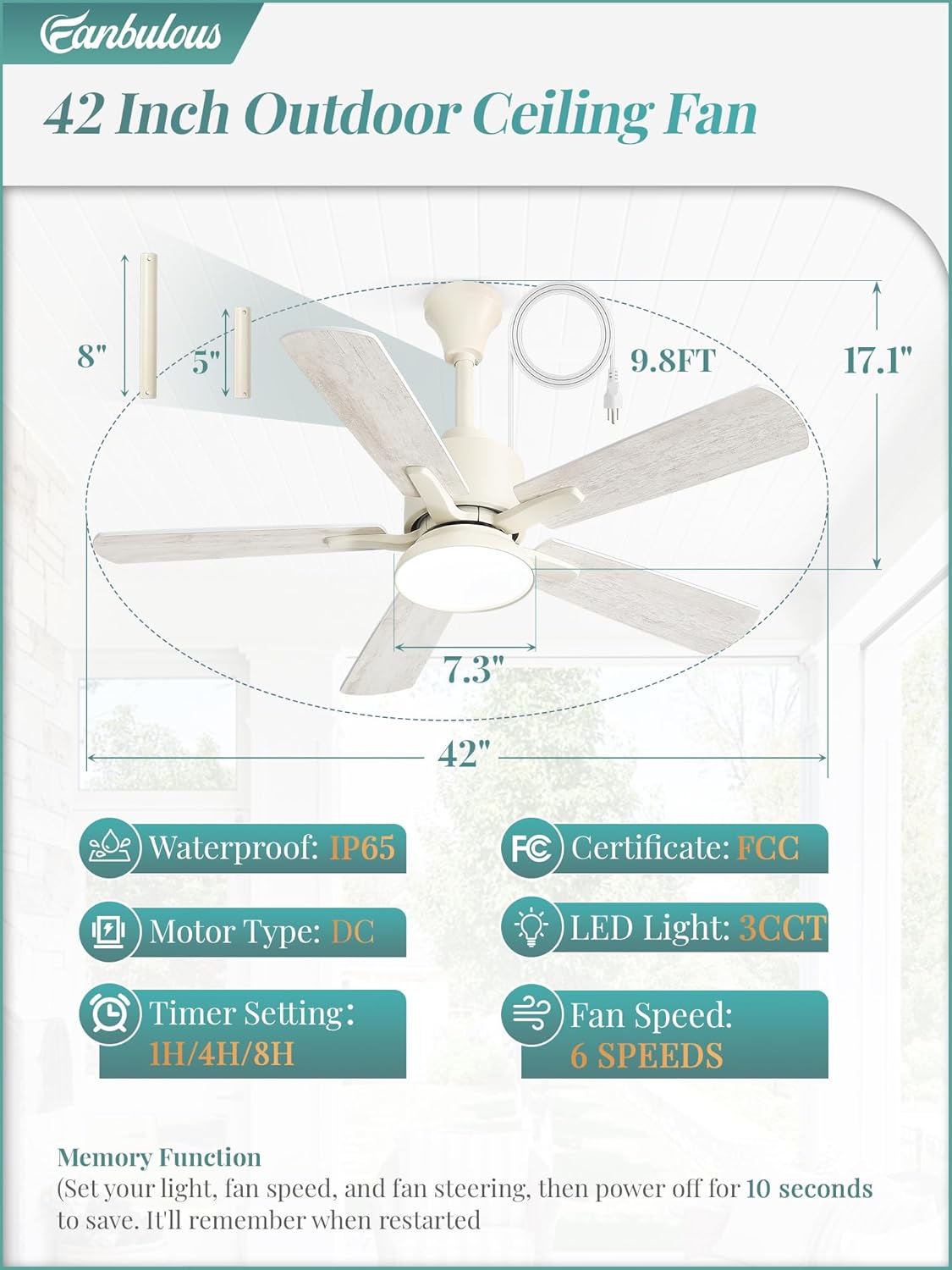
Image: Detailed dimensions of the 42-inch ceiling fan, illustrating the 4-inch and 8-inch downrod options and overall fan height.
Operating Instructions
Your Fanbulous ceiling fan can be controlled using the included remote control or a compatible mobile application.
Remote Control Functions
The remote control allows for comprehensive adjustment of fan and light settings. The fan features automatic preference memory, retaining your last settings when restarted.
- Power On/Off: Turn the fan and light on or off.
- Fan Speed: Select from 6 speed settings (1-6) to adjust airflow.
- Light Control: Turn the light on/off separately from the fan.
- Color Temperature: Cycle through 3 light color temperatures: 3000K (warm light), 4500K (neutral light), and 6500K (cool light).
- Dimming: Adjust the brightness of the light from 10% to 100%.
- Timer: Set a sleep timer for 1 hour, 4 hours, or 8 hours.
- Reversible Motor: Switch between summer mode (downward airflow for cooling) and winter mode (upward airflow for warm air circulation).
- Natural Wind Mode: Simulates natural breeze patterns.
- Mute: Silences remote control beeps.

Image: Remote control layout with descriptions of each button's function, including fan speed, light control, timer, and reversible motor settings.

Image: Illustration of the fan's integrated light, showing the adjustable color temperatures (3000K, 4500K, 6500K) and dimming capability.

Image: Visual representation of the reversible DC motor, explaining how summer mode creates a cooling breeze and winter mode circulates warm air.
App Control (FanLamp Pro)
For enhanced control, download the 'FanLamp Pro' application on your smartphone.
- Download the 'FanLamp Pro' app and allow WLAN/Cellular and Bluetooth access.
- Open the app, click the plus sign to add a new device.
- Power on the fan, open the device card in the app, and click the pairing button within 5 seconds. The light blinking or a beep indicates successful pairing.

Image: Step-by-step guide for connecting the fan to the 'FanLamp Pro' app via Bluetooth, showing app interface screenshots.
Maintenance
Regular maintenance ensures optimal performance and longevity of your Fanbulous ceiling fan.
- Cleaning: Disconnect power before cleaning. Use a soft, damp cloth to wipe down the fan housing and blades. Do not use abrasive cleaners or solvents. The IP65 rating allows for gentle rinsing, but avoid high-pressure water.
- Blade Inspection: Periodically check that all blade screws are tight. Loose blades can cause wobbling and noise.
- General Care: Ensure the fan is free from obstructions. Do not attempt to lubricate the motor; it is permanently lubricated.
Troubleshooting
If you encounter issues with your fan, refer to the following common problems and solutions:
| Problem | Possible Cause | Solution |
|---|---|---|
| Fan does not start | No power supply; Loose wiring; Remote control battery low. | Check power outlet and circuit breaker. Ensure all connections are secure. Replace remote control batteries. |
| Light does not work | Light connection issue; LED failure. | Check light wiring connections. If LED is faulty, contact customer service. |
| Fan wobbles | Loose blades or mounting; Unbalanced blades. | Ensure all blade screws and mounting hardware are tight. Check for bent blades. |
| Fan is noisy | Loose parts; Motor issue. | Tighten all screws. If noise persists, contact customer service. |
| Light turns on automatically after power outage | Default power-on state. | This is a design characteristic. Manually turn off the light using the remote or app after power is restored. |
Specifications
| Feature | Detail |
|---|---|
| Brand | Fanbulous |
| Model Number | ZX42 |
| Size | 42 inch |
| Color | White (with dual-finish blades: walnut/matte black) |
| Product Dimensions | 42"D x 42"W x 17.13"H |
| Power Source | AC/DC, Plug-in |
| Voltage | 120 volts |
| Motor Type | DC Motor, Reversible |
| Number of Speeds | 6 |
| Light Type | Integrated LED (3CCT: 3000K, 4500K, 6500K) |
| Control Method | Remote, App (FanLamp Pro) |
| Timer Settings | 1H, 4H, 8H |
| Indoor/Outdoor Usage | Outdoor (IP65 Waterproof) |
| Downrod Lengths | 4 inches, 8 inches |
| Included Components | Remote, Cord |
Warranty
Fanbulous provides a 2-year warranty for this product. This warranty covers manufacturing defects and ensures the product is free from defects in materials and workmanship under normal use.
Please retain your proof of purchase for warranty claims. The warranty does not cover damage caused by improper installation, misuse, accidents, or unauthorized modifications.
Customer Support
For any questions, concerns, or assistance with your Fanbulous ceiling fan, please contact our dedicated customer service team. Refer to the contact information provided with your purchase or visit the official Fanbulous website for support details.


