
1. Product Overview
The AEOCKY Air Purifier is designed to improve indoor air quality through advanced filtration technology. It features a bionic turbo-jet design for efficient air circulation and a multi-effect filter system for comprehensive air purification.

Image 1.1: Front view of the AEOCKY Air Purifier unit.
Key Features:
- Bionic Turbo-Jet Design: Incorporates 16 CFD-Optimized Blades, an Integrated Airflow Chamber, and a 2-GEN DC VFD Motor to enhance airflow circulation and reduce wind resistance.
- YearChange Filter Technology: Engineered for extended filter longevity, designed to last significantly longer than conventional filters. Includes two pet-specific washable pre-filters.
- All-in-One Multi-Effect Filter: A 5-layer filtration system effectively removes dust, dander, pollen, smoke, VOCs, odors, and fine particles.
- Energy Efficiency: Consumes approximately 0.15 kWh per day at its highest setting.
- Authoritative Certifications: Tested and certified by SGS, CARB, ETL, DOE, and FCC, ensuring zero ozone emission.
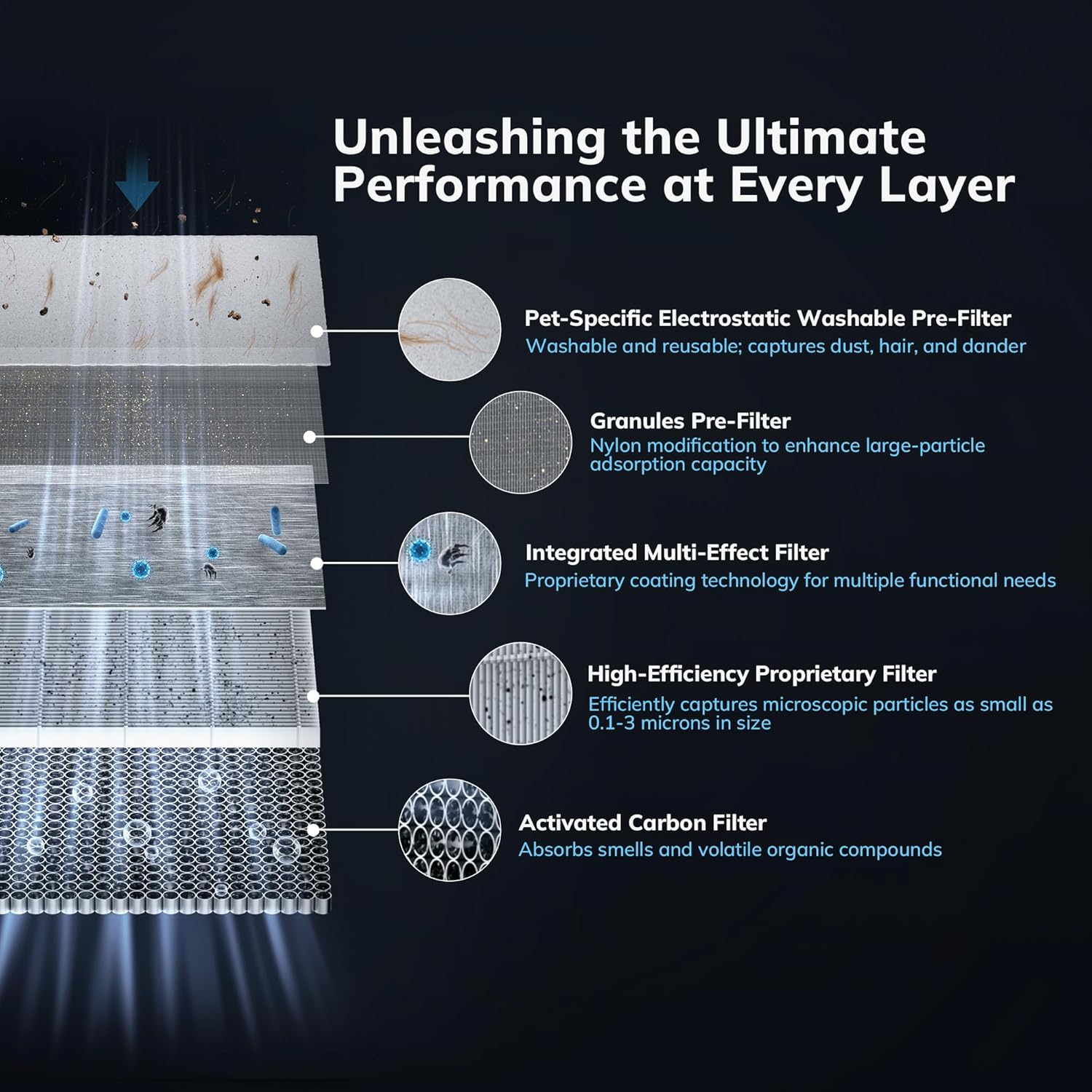
Image 1.2: Diagram illustrating the five distinct layers of the multi-effect filter system, including the Pet-Specific Electrostatic Washable Pre-Filter, Granules Pre-Filter, Integrated Multi-Effect Filter, High-Efficiency Proprietary Filter, and Activated Carbon Filter.
2. Safety Instructions
Please read all safety instructions carefully before using the air purifier to prevent injury or damage.
- Always unplug the air purifier before cleaning, performing maintenance, or when not in use for extended periods.
- Do not operate the appliance with a damaged cord or plug. Contact customer support for assistance.
- Keep the air purifier away from water or moist environments. Do not immerse the unit in water or other liquids.
- Ensure that air inlets and outlets are not blocked. Maintain adequate clearance around the unit for proper airflow.
- Do not insert fingers or foreign objects into any openings.
- This appliance is not intended for use by persons (including children) with reduced physical, sensory, or mental capabilities, or lack of experience and knowledge, unless they have been given supervision or instruction concerning use of the appliance by a person responsible for their safety.
- Use only AEOCKY genuine replacement filters.
3. Package Contents
Verify that all items are present in the package:
- AEOCKY Air Purifier Unit
- One (1) Multi-Effect Filter (pre-installed)
- One (1) Extra Multi-Effect Filter
- User Manual (this document)
4. Setup and Installation
4.1 Unpacking
- Carefully remove the air purifier from its packaging.
- Remove all plastic bags and protective materials.
4.2 Filter Installation
The air purifier comes with one filter pre-installed and one extra filter. Ensure the pre-installed filter is correctly seated before first use.
- Turn the air purifier upside down.
- Twist the base cover counter-clockwise to unlock and remove it.
- Remove the pre-installed filter from its protective plastic bag.
- Insert the filter into the unit, ensuring it is seated correctly.
- Replace the base cover and twist clockwise to lock it securely.

Image 4.1: The AEOCKY YearChange Series Filter and its packaging, demonstrating the filter's design.
4.3 Placement
- Place the air purifier on a firm, level surface.
- Ensure there is at least 6 inches (15 cm) of clearance on all sides for optimal airflow.
- Avoid placing the unit near heat sources, direct sunlight, or in areas with excessive moisture.
4.4 Power Connection
Plug the power cord into a standard electrical outlet. The unit is now ready for operation.
5. Operating Instructions
5.1 Power On/Off
Press the power button on the control panel to turn the air purifier on or off.
5.2 Fan Speed Control
Cycle through available fan speeds (e.g., Low, Medium, High, Turbo) by pressing the fan speed button. Select the desired speed based on your air purification needs.
5.3 Mode Selection
If available, press the mode button to switch between different operating modes such as Sleep Mode (for quiet operation) or Auto Mode (adjusts fan speed based on air quality).
5.4 Filter Reset Indicator
The air purifier is equipped with a filter life indicator. When the indicator light illuminates, it signifies that the filter needs to be checked or replaced. After replacing the filter, press and hold the filter reset button (if available) for 3-5 seconds to reset the filter life counter.
6. Maintenance
Regular maintenance ensures optimal performance and extends the lifespan of your AEOCKY Air Purifier.
6.1 Filter Replacement
The AEOCKY YearChange filter technology is designed for extended use, lasting significantly longer than conventional filters. Replace the filter when the filter indicator light illuminates or when you notice a decrease in performance or an increase in odors.
- Unplug the air purifier from the power outlet.
- Turn the unit upside down and unlock the base cover by twisting it counter-clockwise.
- Remove the old filter and dispose of it properly.
- Unpack a new AEOCKY genuine replacement filter.
- Insert the new filter into the unit, ensuring it is seated correctly.
- Replace the base cover and twist clockwise to lock it securely.
- Plug in the air purifier and reset the filter life indicator as described in Section 5.4.
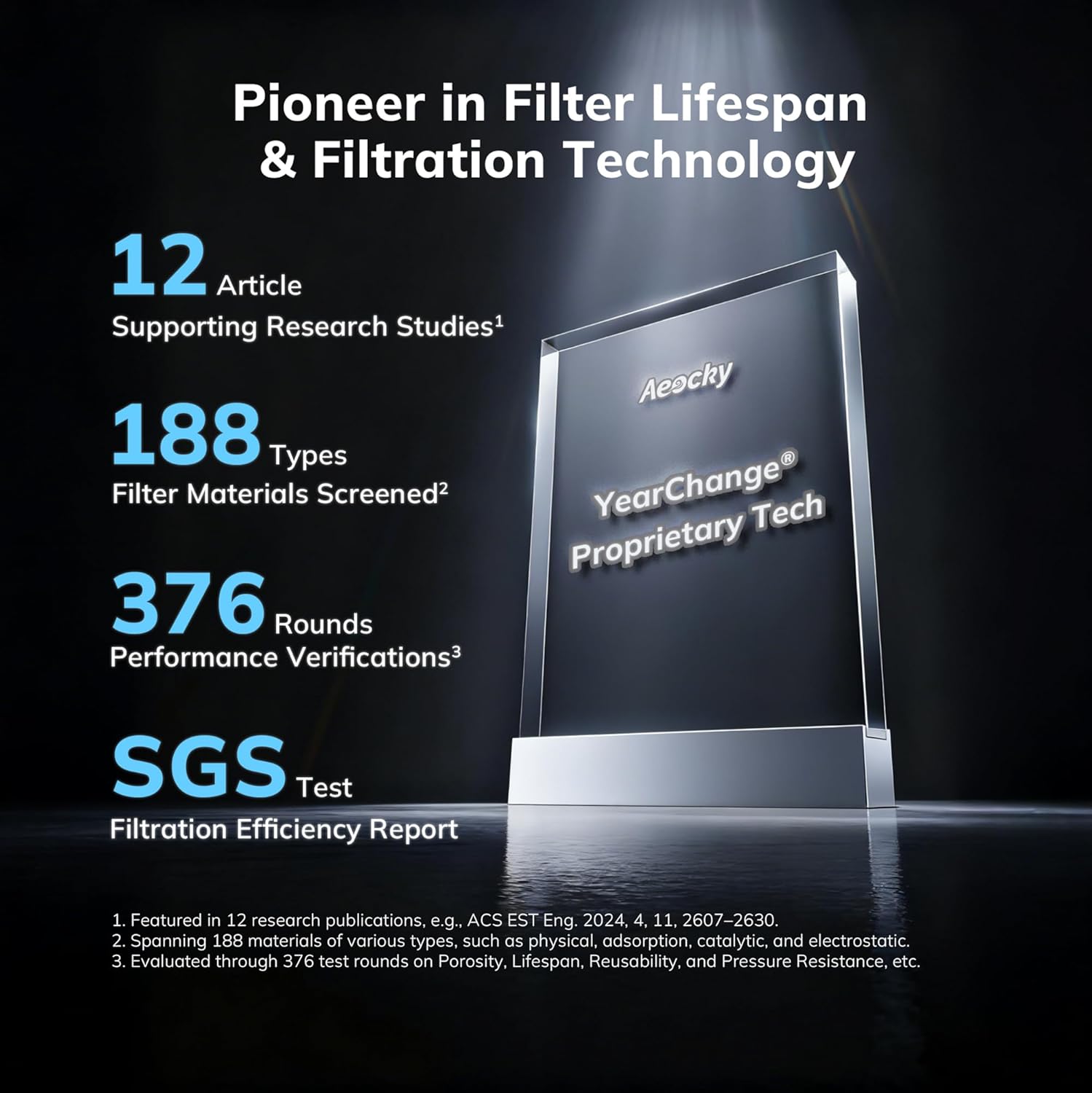
Image 6.1: An illustration highlighting AEOCKY's commitment to filter lifespan and filtration technology, showing research studies, material screening, performance verifications, and SGS test results.
6.2 Washable Pre-Filter Cleaning
The air purifier includes pet-specific washable pre-filters designed to capture large particles like hair and dander. Regular cleaning of these pre-filters helps prolong the life of the main filter.
- Unplug the air purifier.
- Remove the pre-filter layer (refer to filter replacement steps for access).
- Gently rinse the pre-filter under running water.
- Allow the pre-filter to air dry completely before re-installing it. Do not use heat to dry.
6.3 Exterior Cleaning
Wipe the exterior surface of the air purifier with a soft, dry cloth. Do not use abrasive cleaners or solvents.
7. Troubleshooting
Refer to this section for common issues and their solutions.
| Problem | Possible Cause | Solution |
|---|---|---|
| Unit does not turn on | No power supply; Power cord not securely plugged in | Check power outlet; Ensure power cord is firmly connected. |
| Reduced airflow | Filter is dirty or clogged; Air inlets/outlets blocked | Clean or replace filter; Ensure no obstructions around the unit. |
| Unusual noise | Filter not installed correctly; Foreign object inside unit | Reinstall filter; Unplug and check for foreign objects (if safe to do so). |
| Filter indicator light remains on after replacement | Filter life counter not reset | Press and hold the filter reset button for 3-5 seconds. |
If the problem persists after attempting these solutions, please contact customer support.
8. Specifications
- Model: B0G2SS3VLJ
- Brand: AEOCKY
- Filter Type: 5-layer Multi-Effect Filter with YearChange Technology and Washable Pre-Filter
- Energy Consumption: Approximately 0.15 kWh per day (at highest setting)
- Ozone Emission: Zero
- Certifications: SGS, CARB, ETL, DOE, FCC
- First Available Date: October 21, 2025

Image 8.1: Display of various authoritative certifications including California Air Resources Board Certificate, Electrical Testing Laboratories Certificate, Federal Communications Commission Certificate, and SGS verification, confirming the product's adherence to international standards.
9. Warranty and Support
9.1 Warranty Information
Specific warranty details for your AEOCKY Air Purifier are typically provided with the product packaging or available on the official AEOCKY website. Please retain your proof of purchase for warranty claims.
9.2 Customer Support
For technical assistance, troubleshooting beyond this manual, or warranty inquiries, please contact AEOCKY customer support through their official website or the retailer where the product was purchased.


