
1. Introduction
Thank you for choosing the MAXLANDER ML-DCS16 4.2 Gallon Battery Powered Backpack Sprayer. This electric sprayer is designed for efficient and comfortable application of various liquids for lawn and garden care, cleaning, and other tasks. It features a powerful motor, adjustable pressure, and a comfortable backpack design for extended use.
2. Safety Information
Read all instructions carefully before operating the sprayer. Failure to follow these instructions may result in electric shock, fire, and/or serious injury.
- Always wear appropriate personal protective equipment (PPE) such as gloves, eye protection, and a mask when operating the sprayer, especially when handling chemicals.
- Do not spray flammable liquids, strong acids, or highly corrosive substances.
- Ensure the battery is fully charged before use and stored in a dry, cool place.
- Keep children and pets away from the spraying area.
- Never point the spray wand at people or animals.
- Disconnect the battery before performing any maintenance or cleaning.
- Do not immerse the sprayer or battery in water.
3. Package Contents
Verify that all items are present in your package. If any parts are missing or damaged, contact MAXLANDER customer support.
- 4.2 Gallon Sprayer Tank (16L)
- Pressure Handle
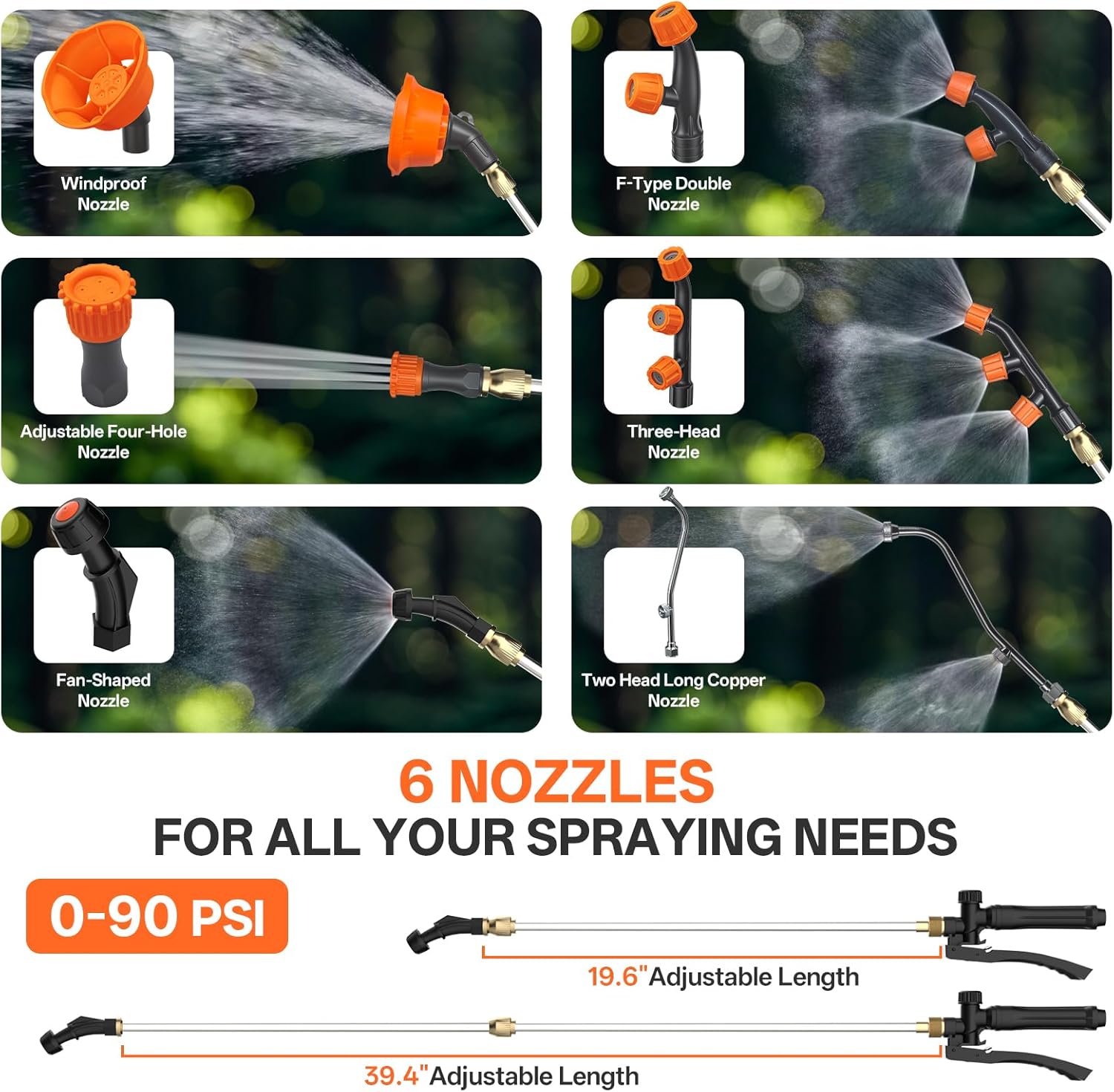
- Telescopic Stainless Steel Spray Wand (up to 39.3 inches)
- High Pressure Hose
- 6 Spray Nozzles (Windproof, F-Type Double, Adjustable Four-Hole, Three-Head, Fan-Shaped, Two Head Long Copper)
- 2 x 20V 2.0Ah Batteries
- Battery Charger
- Waist Support
- Wide Cushioned Shoulder Straps
- Soft Back Padding
- Sealing Gaskets
- Lance Clamp
- Measuring Cup

4. Setup
4.1 Attaching Straps and Waist Support
- Attach the wide cushioned shoulder straps to the designated loops on the top and bottom of the sprayer tank.
- Secure the soft back padding to the back of the tank.
- Connect the waist support for added comfort and stability during use.

4.2 Charging and Installing Batteries
- Before first use, fully charge both 20V 2.0Ah batteries using the provided charger. The charger indicator light will change when charging is complete.
- Insert a charged battery into the battery compartment on the side of the sprayer until it clicks into place.
4.3 Assembling the Spray Wand and Nozzle
- Connect the high-pressure hose to the sprayer tank outlet and the pressure handle. Ensure connections are tight to prevent leaks.
- Attach the telescopic stainless steel wand to the pressure handle.
- Select the desired nozzle from the 6 included options and securely screw it onto the end of the spray wand.
4.4 Filling the Tank
- Ensure the sprayer is on a level surface.
- Unscrew the tank lid and remove the filter screen.
- Carefully pour the desired liquid into the tank, observing the clear gallon-marked tank for accurate measurement. Do not overfill beyond the 4.2-gallon capacity.
- Replace the filter screen and securely tighten the tank lid.

5. Operating Instructions
5.1 Powering On and Spraying
- Once the tank is filled and the battery is installed, put on the backpack sprayer, adjusting the straps and waist support for a comfortable fit.
- Locate the power switch (usually near the battery compartment) and turn the sprayer ON.
- Point the nozzle towards the target area and press the trigger on the pressure handle to begin spraying.
- For continuous spraying, engage the lock button on the pressure handle. Release the lock to stop spraying.

5.2 Adjusting Pressure and Spray Pattern
- The sprayer features an adjustable knob to control the pressure, allowing for a range up to 90 PSI. Turn the knob clockwise for higher pressure and a more powerful jet, and counter-clockwise for lower pressure and a gentler mist.
- Change nozzles as needed to achieve different spray patterns for various applications (e.g., wide coverage, targeted stream).

5.3 Monitoring Battery Life
The sprayer is equipped with a digital display to show the battery's condition. Monitor this display to ensure sufficient power for your task. The auto-shutoff protection feature helps prevent battery damage from over-discharge.
6. Maintenance
6.1 Cleaning the Sprayer
- After each use, especially when spraying chemicals, thoroughly rinse the tank with clean water.
- Spray clean water through the wand and nozzles to flush out any residue.
- Remove and clean the filter screen regularly to prevent clogging.
- Wipe down the exterior of the sprayer with a damp cloth. Do not use abrasive cleaners.
6.2 Battery Care and Storage
- Always remove the battery from the sprayer when not in use or during cleaning.
- Store batteries in a cool, dry place, away from direct sunlight and extreme temperatures.
- Charge batteries fully before long-term storage and recharge every 3-6 months to maintain battery health.
6.3 Checking for Leaks
Periodically inspect all connections (hose to tank, hose to handle, wand to handle, nozzle to wand) for tightness. Replace any worn sealing gaskets to prevent leaks.
7. Troubleshooting
| Problem | Possible Cause | Solution |
|---|---|---|
| Sprayer does not turn on | Battery not installed correctly; Battery discharged; Power switch off | Ensure battery is fully inserted; Charge battery; Turn power switch ON |
| No spray or weak spray | Tank empty; Nozzle clogged; Low battery; Pressure knob set too low | Refill tank; Clean nozzle; Charge battery; Adjust pressure knob |
| Liquid leaking from connections | Connections loose; Worn sealing gaskets | Tighten all connections; Inspect and replace sealing gaskets if necessary |
| Sprayer runs but no liquid comes out | Hose kinked; Filter clogged; Air in system | Straighten hose; Clean filter; Prime pump by spraying water until consistent flow |
8. Specifications
| Feature | Specification |
|---|---|
| Model Number | ML-DCS16 |
| Tank Volume | 4.2 Gallons (16 Liters) |
| Maximum Pressure | 90 PSI |
| Power Source | Battery Powered |
| Battery Type | 2 x 20V 2.0Ah Lithium-Ion |
| Runtime | Up to 2 hours (approx. 19 full tanks per charge) |
| Wand Length | Telescopic, up to 39.3 inches |
| Number of Nozzles | 6 |
| Product Dimensions | 38.2 x 20.5 x 48.3 cm |
| Item Weight | 3.6 Kilograms |
| Material | Plastic, Rubber, Silicone, Stainless Steel |
9. Warranty and Support
MAXLANDER products are designed for reliability and performance. For warranty information, please refer to the documentation included with your purchase or contact MAXLANDER customer support directly. The manufacturer's warranty status is indicated as 'no_warning_applicable' in product specifications, suggesting that warranty details should be obtained from the manufacturer at the time of purchase or through their official channels.
For technical assistance, troubleshooting, or to inquire about replacement parts, please contact MAXLANDER customer service. Manufacturer contact information: Maxlander.