Introduction
Thank you for choosing the Redragon K762 Wireless Gasket Gaming Keyboard. This manual provides essential information for setting up, operating, and maintaining your new keyboard. Please read it thoroughly to ensure optimal performance and longevity of your device.
What's in the Box
- Redragon K762 Wireless Gasket Gaming Keyboard
- USB Cable (USB-A to USB-C)
- Keycap/Switch Puller
- Spare Switches
Setup and Connection
The Redragon K762 keyboard supports three connection modes: USB-C wired, Bluetooth 3.0/5.0, and 2.4GHz wireless.
Wired Connection
Connect the keyboard to your computer using the provided USB-C cable. The keyboard will automatically switch to wired mode and begin charging.
2.4GHz Wireless Connection
Locate the 2.4G dongle (USB receiver) stored in the keyboard's back compartment. Plug the dongle into an available USB port on your computer. Switch the keyboard's mode selector to 2.4G. The keyboard should connect automatically.

Image: Close-up view of the 2.4G dongle storage slot and adjustable feet on the underside of the Redragon K762 keyboard.
Bluetooth Connection
Switch the keyboard's mode selector to BT (Bluetooth). On your device (PC, laptop, tablet), search for Bluetooth devices and select 'Redragon K762' to pair. The keyboard supports multiple Bluetooth profiles (BT1, BT2, BT3) for quick switching between devices.
Video: This video provides an overview of the Redragon K762 Gaming Keyboard, including its Hype Screen and various features. It demonstrates the keyboard's design and functionality.
Operating Instructions
Smart Info-Island Screen
The 1.14-inch TFT screen displays essential keyboard information such as connection mode, battery level, and typing status. It also supports customized GIF animations for a personalized touch.
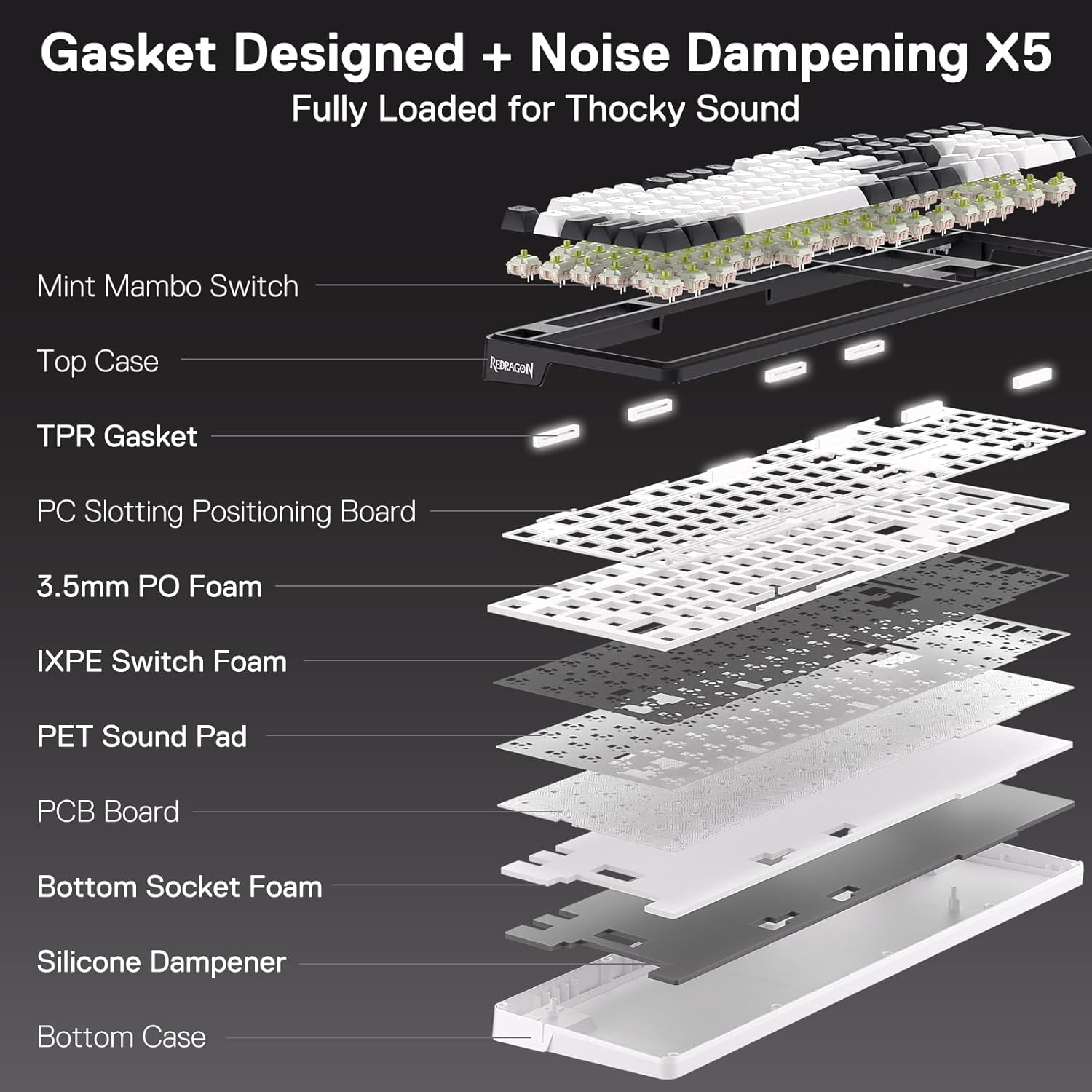
Image: The 1.14-inch TFT LCD Smart Screen on the Redragon K762 keyboard showing various information like time, date, battery level, and system mode (Win/Mac).
One-Knob Control
The convenient control knob allows for easy adjustment of keyboard backlight brightness and media functions (volume, play/pause, track switching) without needing extra keys.
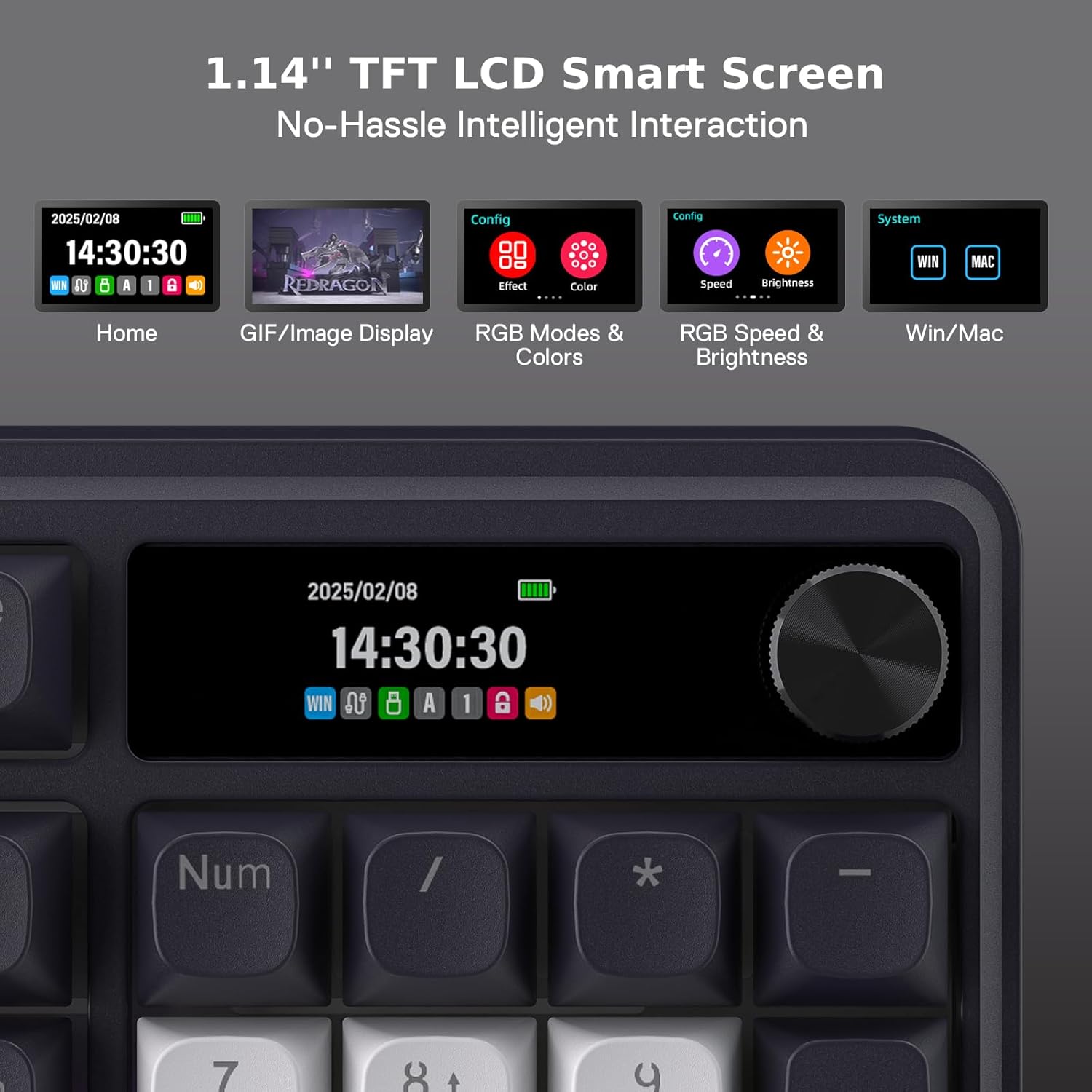
Image: A close-up of the multi-functional control knob on the Redragon K762 keyboard, indicating its use for screen operation, volume adjustment, and brightness control.
RGB Backlighting Control
The keyboard features vibrant RGB backlighting. Use the dedicated function keys (Fn + arrow keys or Ins key) to cycle through 18 different backlight modes, adjust brightness, and change animation speed. The Pro Software offers further customization.

Image: The Redragon K762 keyboard illuminated with a rainbow spectrum of RGB backlighting, highlighting the individual key illumination.
Video: A short video demonstrating various RGB lighting effects on a Redragon keyboard. Note: This is a 14-second preview video.
Key Features Overview
Gasket Design and 5-Layer Noise Dampening
The keyboard features a gasket-mounted design that uses precision-locked covers with gaskets to reduce noise and enhance typing flexibility. Combined with five layers of noise-dampening materials (3.5mm PO foam, IXPE switch foam, PET sound pad, bottom socket foam, silicone bottom pad), it delivers a crisp, clean, and softer typing feel by significantly reducing hollow noise.

Image: An exploded diagram illustrating the internal layers of the Redragon K762 keyboard, highlighting the gasket design and five layers of noise-dampening materials for enhanced acoustics.
Custom Mint Mambo Switches
Equipped with thick-lubed custom linear Mint Mambo switches, the K762 offers cushioned, rich linear travel with silky, creamy, and comfortable typing feedback. The upgraded socket is compatible with most 3/5-pin switches, allowing for easy customization.
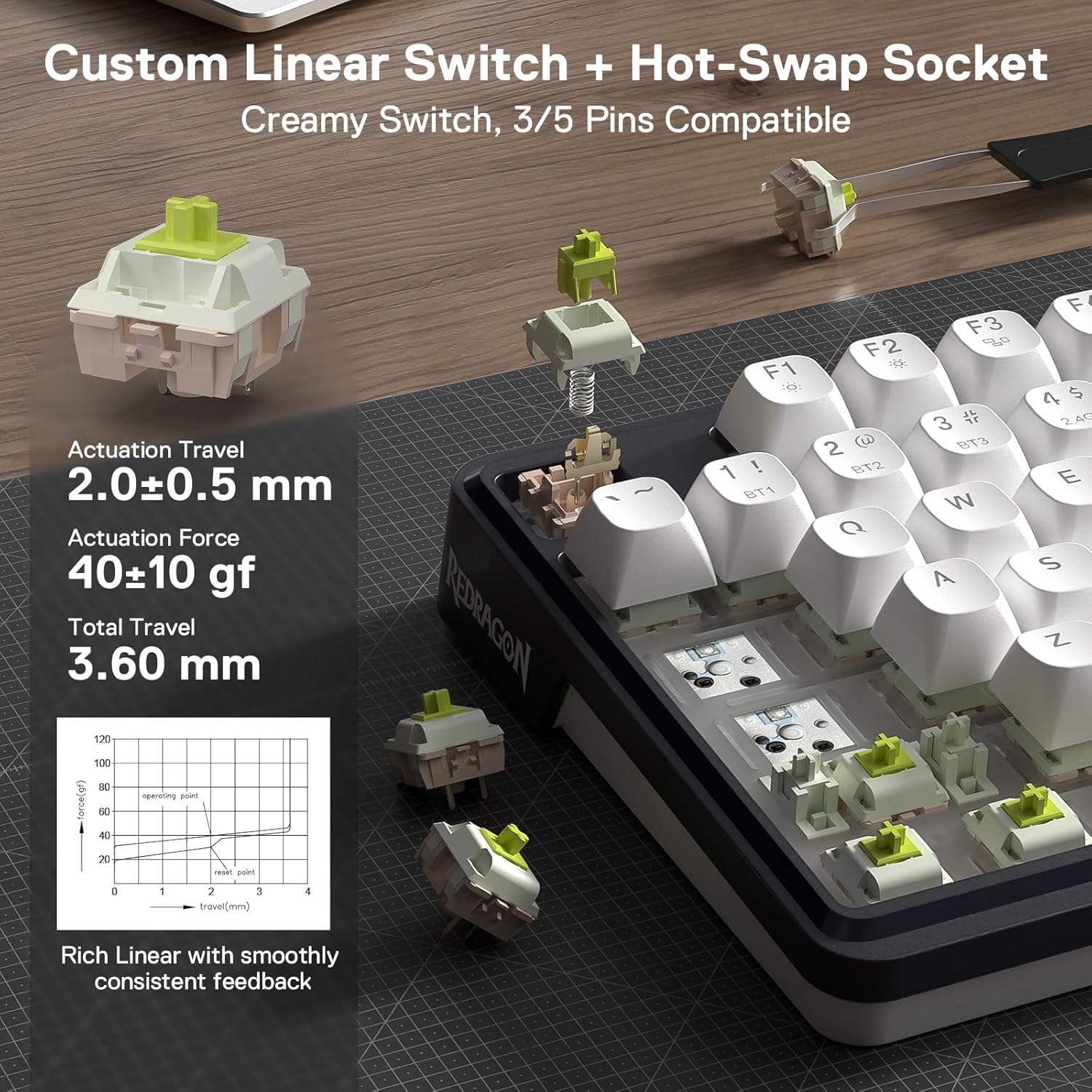
Image: A detailed view of the custom linear Mint Mambo switches and the hot-swappable sockets on the Redragon K762 keyboard, along with a force curve diagram.
Round PBT Keycaps
The keyboard features durable round PBT keycaps, providing a premium light effect and tactile feel. PBT material is known for its resistance to shine and wear over time.

Image: The Redragon K762 keyboard showcasing its shine-through round PBT keycaps, emphasizing the premium light effect and tactile feel.
4000mAh Long-Lasting Battery
The K762 is equipped with a 4000mAh lithium polymer battery, ensuring extended usage in wireless modes. The Hype Screen displays the current battery level.

Image: The Redragon K762 keyboard highlighting its 4000mAh long-lasting battery, with a battery indicator visible on the Hype Screen.
Pro Software Support
Expand your customization options with the dedicated Pro Software available on the Redragon website. This software allows you to design new RGB modes and effects, create macros with different keybindings or shortcuts, and manage on-screen time synchronization with your PC's system time.

Image: A screenshot of the Redragon K762 Pro Software interface, showing options for GIF settings, macro editing, key redefinition, and RGB backlight customization.
Specifications
| Feature | Detail |
|---|---|
| Model Number | K762 |
| Keys | 104 Keys |
| Connectivity Technology | 2.4Ghz, Bluetooth, USB-C |
| Special Feature | Gasket Design, 3-Mode Tech, Custom Mambo Switch, Hype Display & Knob, Knob Control |
| Keyboard Backlighting | RGB |
| Switches | Mint Mambo Linear Switches (Hot-swappable) |
| Keycaps | Round PBT Keycaps |
| Battery | 1 Lithium Polymer battery (4000mAh) |
| Compatible Devices | PC, Laptop, Tablet |
| Operating System Compatibility | Windows, macOS |
| Item Weight | 1.94 pounds |
| Package Dimensions | 17.63 x 6.54 x 1.89 inches |
Maintenance
To ensure the longevity and optimal performance of your Redragon K762 keyboard, follow these maintenance guidelines:
- Cleaning: Regularly clean the keycaps and keyboard surface with a soft, dry cloth. For deeper cleaning, use the provided keycap puller to remove keycaps and clean underneath with compressed air or a small brush.
- Storage: Store the keyboard in a cool, dry place away from direct sunlight and extreme temperatures.
- Liquid Exposure: Avoid exposing the keyboard to liquids. In case of spills, immediately disconnect the keyboard, dry it thoroughly, and allow it to air dry completely before reconnecting.
- Switch Replacement: Use the provided switch puller to carefully remove and replace switches if needed. Ensure proper alignment when inserting new switches to avoid bending pins.
Troubleshooting
- Keyboard Not Responding: Ensure the keyboard is properly connected (wired, 2.4GHz dongle, or Bluetooth). Check the mode switch on the keyboard. For wired connection, try a different USB port. For wireless, ensure the dongle is securely plugged in or Bluetooth is paired correctly.
- RGB Lights Not Working: Check the keyboard's brightness settings using the Fn + Up/Down arrow keys. Ensure the RGB mode is not set to 'Off'. If using software, verify settings there.
- Bluetooth Connection Issues: Ensure the keyboard is in Bluetooth pairing mode. Remove the keyboard from your device's Bluetooth list and attempt to re-pair. Ensure the keyboard battery is charged.
- Keys Not Registering: If specific keys are not working, try removing and re-inserting the switch using the provided switch puller. If the issue persists, replace the switch with a spare one.
- Battery Not Charging: Ensure the USB-C cable is securely connected to both the keyboard and a power source. Try a different USB port or charging adapter.
Warranty and Support
Redragon products typically come with a manufacturer's warranty. For specific warranty details, please refer to the warranty card included with your product or visit the official Redragon website. For technical support, troubleshooting assistance, or to inquire about replacement parts, please contact Redragon customer service through their official support channels.
Visit the Redragon Store for more information and support.


