
1. Product Overview
The Philips Norelco All-in-One 7000 Series Trimmer (MG7975/49) is a versatile grooming tool designed for face, beard, head, and body. It features self-sharpening full metal blades for lasting precision and a durable lithium-ion battery providing up to 5 hours of runtime.
This 22-piece kit includes various attachments and combs to achieve a wide range of styles and lengths, from precise beard trimming to full body grooming.

Image: The Philips Norelco All-in-One 7000 Series Trimmer, showcasing its sleek design and main trimming head.

Image: A collage demonstrating the versatility of the trimmer for face, hair, and body grooming.
Key Features:
- 22 Attachments: Comprehensive set for beard, hair, nose/ear, and body grooming.
- Self-Sharpening Steel Blades: Designed for long-lasting precision without the need for blade oil.
- BeardSense Technology: Automatically adjusts power based on beard density for an even trim.
- Long-Lasting Battery: Up to 5 hours of runtime with a 5-minute quick charge option.
- 100% Showerproof: Suitable for wet and dry use, and easy to clean under running water.
2. Safety Information
WARNING: To reduce the risk of electric shock, injury, or damage:
- Do not use the trimmer near water while charging.
- Ensure the appliance is dry before connecting it to the power adapter.
- Keep the appliance and power cord away from heated surfaces.
- Do not use the appliance if it is damaged.
- Keep out of reach of children.
- Blades are sharp; handle with care to avoid cuts.
3. Setup and Charging
Initial Charge:
Before first use, fully charge the trimmer. Connect the USB-A charging cable to the trimmer and a compatible USB-A power adapter (not included). A full charge provides up to 5 hours of runtime. A 5-minute quick charge offers enough power for one trimming session.

Image: Illustration of the USB-A charging cable and battery status indicators on the trimmer.
Attaching/Detaching Heads and Guards:
The trimmer features an easy click-on/off system for attachments. To attach a head or guard, align it with the trimmer body and press firmly until it clicks into place. To detach, gently pull the attachment away from the trimmer body.
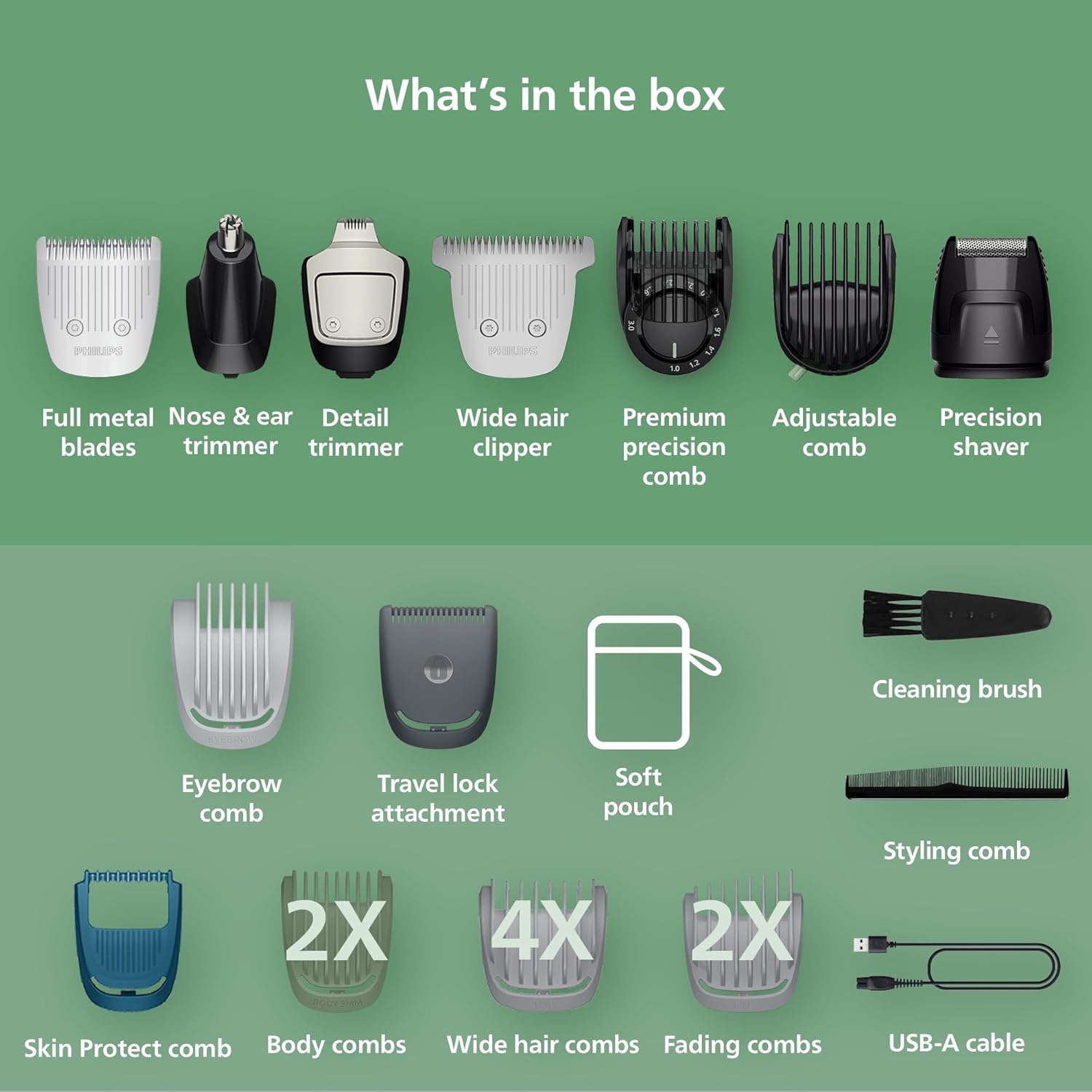
Image: A visual representation of the trimmer and its 22 included attachments, such as full metal blades, nose & ear trimmer, detail trimmer, wide hair clipper, and various combs.
Video: A seller demonstrates unboxing the Philips Norelco Series 7000 23-Piece Groomer, showing the main unit and various attachments.
Video: A seller provides an overview of the Philips Norelco Multigroom 7000 Series, highlighting its 23 pieces and multi-purpose functionality.
4. Operating Instructions
General Trimming:
Select the desired trimming head and attach it securely. For general trimming, use the full metal blade. For specific lengths, attach the appropriate comb. Turn on the trimmer by pressing the power button.
Beard and Facial Hair:
Use the premium precision comb for 11 length settings (1 to 3 mm in 0.2 mm steps) to achieve your desired beard style. The detail trimmer helps create sharp lines and fine details around cheeks, chin, and neck. The BeardSense Technology ensures consistent power for dense beards.

Image: Close-up of the premium precision comb, showing its adjustable dial for 11 length settings.

Image: Visual representation of BeardSense technology detecting beard density and adapting power for an even trim.
Head and Body Hair:
Utilize the wide hair clipper and various hair combs (4-16 mm) for haircuts. For body grooming, attach the body combs (3-5 mm) or the Skin Protect comb for a gentle, effective trim. The nose and ear hair trimmer attachment safely removes unwanted hair.
5. Maintenance and Cleaning
Cleaning:
The trimmer is 100% showerproof, allowing for easy cleaning. Simply rinse the trimmer head and attachments under running water after each use. Ensure the trimmer is turned off before cleaning.
Blade Care:
The self-sharpening steel blades require no oiling or special maintenance. They are designed to stay sharp for long-lasting precision.

Image: Close-up of the self-sharpening metal blades, emphasizing their durability and precision.
6. Troubleshooting
- Trimmer not turning on: Ensure the battery is charged. Connect to the USB-A charging cable and allow for a quick charge or full charge.
- Reduced trimming performance: Clean the trimming head and combs thoroughly. Ensure no hair is lodged in the blades.
- Attachments not fitting: Verify that the correct attachment is being used for the desired grooming area and that it is aligned properly before pressing firmly.
7. Specifications
| Feature | Detail |
|---|---|
| Model Number | MG7975/49 |
| Power Source | Battery Powered (1 Nonstandard Battery included) |
| Battery Runtime | Up to 5 hours |
| Charging Time | 60 minutes (5-minute quick charge available) |
| Connector Type | USB-A (power adapter not included) |
| Waterproof | Yes (100% Showerproof) |
| Blade Material | Stainless Steel (Self-Sharpening) |
| Minimum Cutting Length | 0.5 Millimeters |
| Maximum Cutting Length | 16 Millimeters |
| Item Weight | 1.12 Pounds |
| Color | Steel |
8. Warranty and Support
Warranty Information:
This Philips Norelco product comes with a limited manufacturer's warranty. For full details regarding warranty coverage, terms, and conditions, please refer to the warranty card included in your product packaging or visit the official Philips Norelco website.
Customer Support:
For further assistance, product registration, or to access FAQs and additional resources, please visit the official Philips Norelco website or contact their customer support line as provided in your product documentation.


