
1. Important Safety Information
Please read all instructions carefully before assembly and use. Keep this manual for future reference.
- Caution: Assemble the chair following the manual's instructions to ensure stability and user safety.
- Ensure all screws and bolts are securely tightened before use. Periodically check and re-tighten as necessary.
- Do not stand on the chair.
- Do not use the chair if any parts are damaged or missing. Contact customer support for replacement parts.
- Keep children away from moving parts during adjustment.
- Maximum recommended weight capacity: 120 kg (264 lbs).
2. Package Contents
Verify that all components are present before beginning assembly. A detailed list of parts is included in the assembly manual provided in the package.

Image: The HOMCOM Ergonomic Office Chair, fully assembled, showcasing its design with a mesh backrest, padded seat, adjustable armrests, headrest, and an extended footrest. The chair is black and features a five-star base with casters.
3. Setup (Assembly Instructions)
The HOMCOM Ergonomic Office Chair requires assembly. Simple assembly can typically be completed within 30 minutes by following the detailed instructions provided in the included manual. Ensure you have adequate space and the necessary tools (usually an Allen key, often included) before starting.
- Unpack all components and lay them out on a clean, soft surface to prevent scratches.
- Attach the casters to the five-star base.
- Insert the gas lift cylinder into the center of the base.
- Assemble the seat and backrest according to the diagrams in your manual.
- Attach the armrests to the seat.
- Mount the assembled seat onto the gas lift cylinder.
- Attach the headrest to the backrest.
- Ensure all connections are secure before using the chair.
4. Operating Instructions
This chair offers multiple adjustment features to customize your seating experience for optimal comfort and ergonomic support.
4.1. Seat Height Adjustment
To adjust the seat height, locate the lever under the right side of the seat. While seated, pull the lever up to lower the seat. To raise the seat, stand up slightly and pull the lever up. Release the lever at the desired height.
4.2. Reclining Function and Footrest
The chair's backrest can recline up to 135 degrees. Use the recline lever (typically on the left side under the seat) to adjust the angle. To engage the footrest, pull it out from under the seat and extend it to your desired length. This allows for a comfortable transition between work and relaxation modes.

Image: A person comfortably seated in the HOMCOM office chair, which is fully reclined to 135 degrees with the footrest extended, demonstrating the chair's relaxation capabilities.
4.3. Lumbar Support Adjustment
This chair features 3 adaptable lumbar zones. The central support is adjustable, and the lateral zones conform to your back. Adjust the lumbar support to provide optimal comfort and maintain proper spinal alignment throughout your workday.

Image: A diagram illustrating the 3-zone elastic lumbar support system of the chair, showing how the central and lateral supports adjust to provide comprehensive back support.
4.4. Armrest Adjustment
The 3D armrests can be adjusted in multiple directions to suit your preference and desk height, helping to alleviate arm fatigue.
- Height Adjustment: Press the button on the side of the armrest and move it up or down.
- Forward/Backward Adjustment: Slide the armrest pad forward or backward.
- Swivel Adjustment: Rotate the armrest pad left or right.
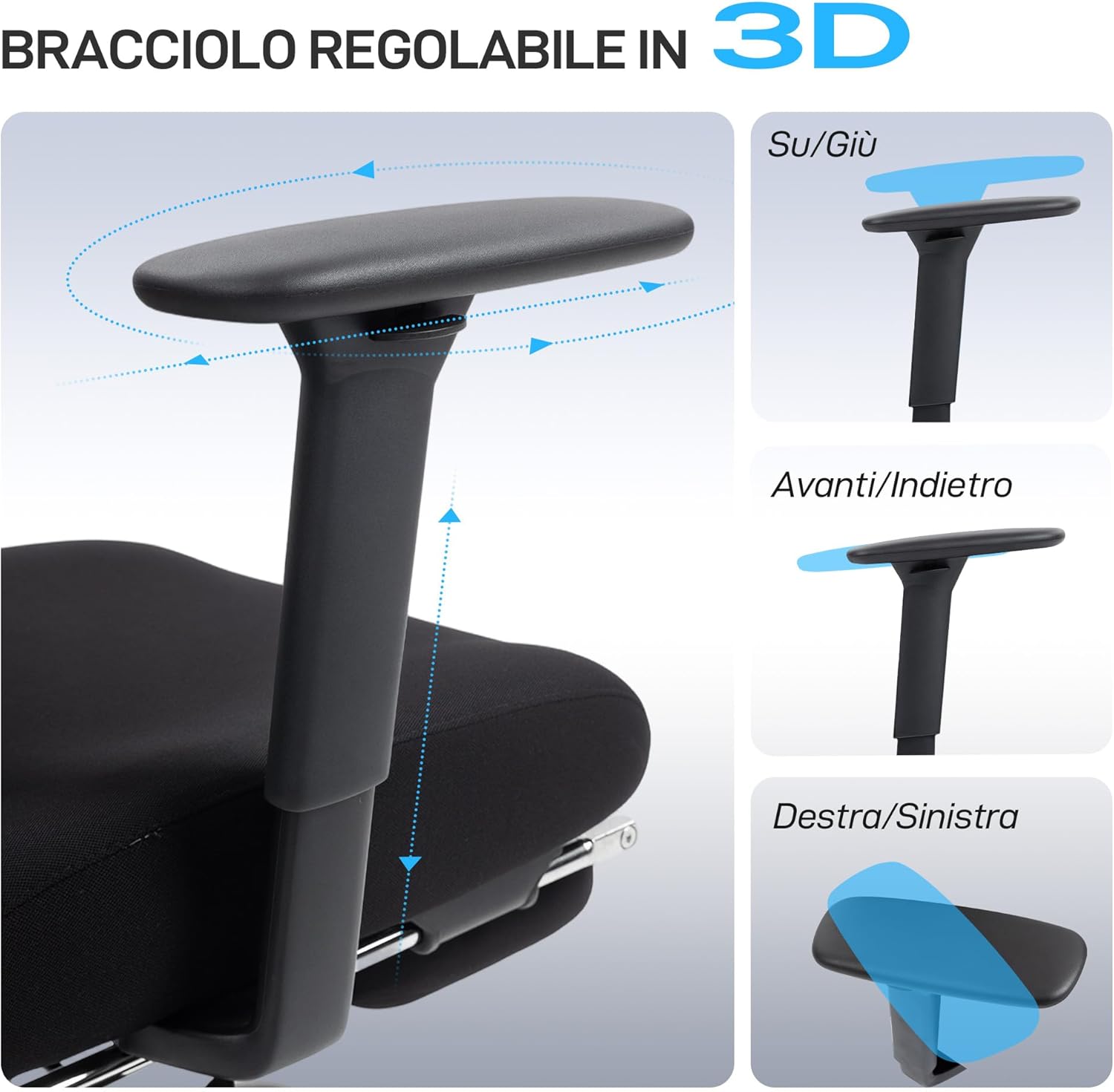
Image: A visual representation of the chair's 3D adjustable armrests, demonstrating their ability to move up/down, forward/backward, and swivel left/right for personalized comfort.
4.5. Headrest Adjustment
The headrest is both height-adjustable (up to 4 cm) and features a swivel function to provide optimal neck support.

Image: A close-up of the chair's headrest, illustrating its vertical (up/down) and rotational (swivel) adjustment capabilities for neck support.
4.6. Swivel Function
The chair features a 360-degree swivel function, allowing for easy movement and access to different areas of your workspace without needing to reposition the entire chair.
5. Maintenance
Regular maintenance helps prolong the life and appearance of your office chair.
- Cleaning: Wipe clean with a damp cloth. For mesh areas, a soft brush can be used to remove dust. Avoid harsh chemicals or abrasive cleaners.
- Inspection: Periodically check all bolts and screws to ensure they are tight. Re-tighten if necessary.
- Casters: Keep casters free of hair and debris to ensure smooth movement. The PU casters are designed for various floor types, including hard floors.

Image: A close-up of the chair's PU casters, highlighting their suitability for various floor types such as wood, carpet, and marble, ensuring silent and smooth movement.
6. Troubleshooting
If you encounter any issues with your HOMCOM Ergonomic Office Chair, refer to the following common solutions:
- Chair feels wobbly: Ensure all assembly bolts and screws are securely tightened. Check that the gas lift is properly seated in the base.
- Chair does not adjust height: Verify that the height adjustment lever is functioning correctly and that the gas lift cylinder is not damaged. Ensure no obstructions are preventing movement.
- Casters not rolling smoothly: Check for debris (hair, lint) wrapped around the caster wheels and remove them. Clean the wheels if necessary.
- Recline function not working: Ensure the recline lock mechanism is disengaged. Check for any obstructions preventing the backrest from moving.
If problems persist, please contact HOMCOM customer support for assistance.
7. Specifications
Detailed technical specifications for the HOMCOM Ergonomic Office Chair Model 921-902V00BK.

Image: A diagram illustrating the key dimensions of the HOMCOM office chair, including overall width (73 cm), depth (75 cm), adjustable height (120-128 cm), seat width (51 cm), seat depth (53 cm), and adjustable seat height (50-58 cm).
| Feature | Specification |
|---|---|
| Brand | HOMCOM |
| Model Number | 921-902V00BK |
| Color | Black |
| Overall Dimensions (W x D x H) | 73 cm x 75 cm x 120-128 cm |
| Seat Dimensions (W x D) | 51 cm x 53 cm |
| Adjustable Seat Height | 50 cm - 58 cm |
| Backrest Inner Height | 62 cm |
| Armrest Height (from seat) | 19.5 cm - 27 cm (adjustable) |
| Materials | Mesh (backrest), 100% Polyester (seat fabric), Foam (filling), Plastic (frame), PU (casters) |
| Max Recommended Weight | 120 kg (264 lbs) |
| Item Weight | 17.5 kg (38.5 lbs) |
| Recline Angle | Up to 135° |
| Special Features | Adjustable Height, 3D Armrests, Casters, Ergonomic Design, Footrest, Adjustable Headrest, Reclining, Adjustable Lumbar Support, Swivel |
| Assembly Required | Yes |
| Recommended Uses | Office, Gaming, Relaxation |
8. Warranty and Support
For warranty information, please refer to the documentation included with your purchase or contact the seller directly. HOMCOM products typically come with a manufacturer's warranty covering defects in materials and workmanship.
If you require technical support, replacement parts, or have any questions regarding your HOMCOM Ergonomic Office Chair, please contact the retailer or manufacturer's customer service. The manufacturer is Aosom Italy.


