
1. Product Overview
The LIGE Smart Watch EF24-A is a versatile and durable smartwatch designed for active lifestyles. It features a 1.7-inch HD display, long-lasting 1000mAh battery, Bluetooth calling, comprehensive health tracking, and over 100 sports modes. This manual provides essential information for setting up, operating, and maintaining your device.
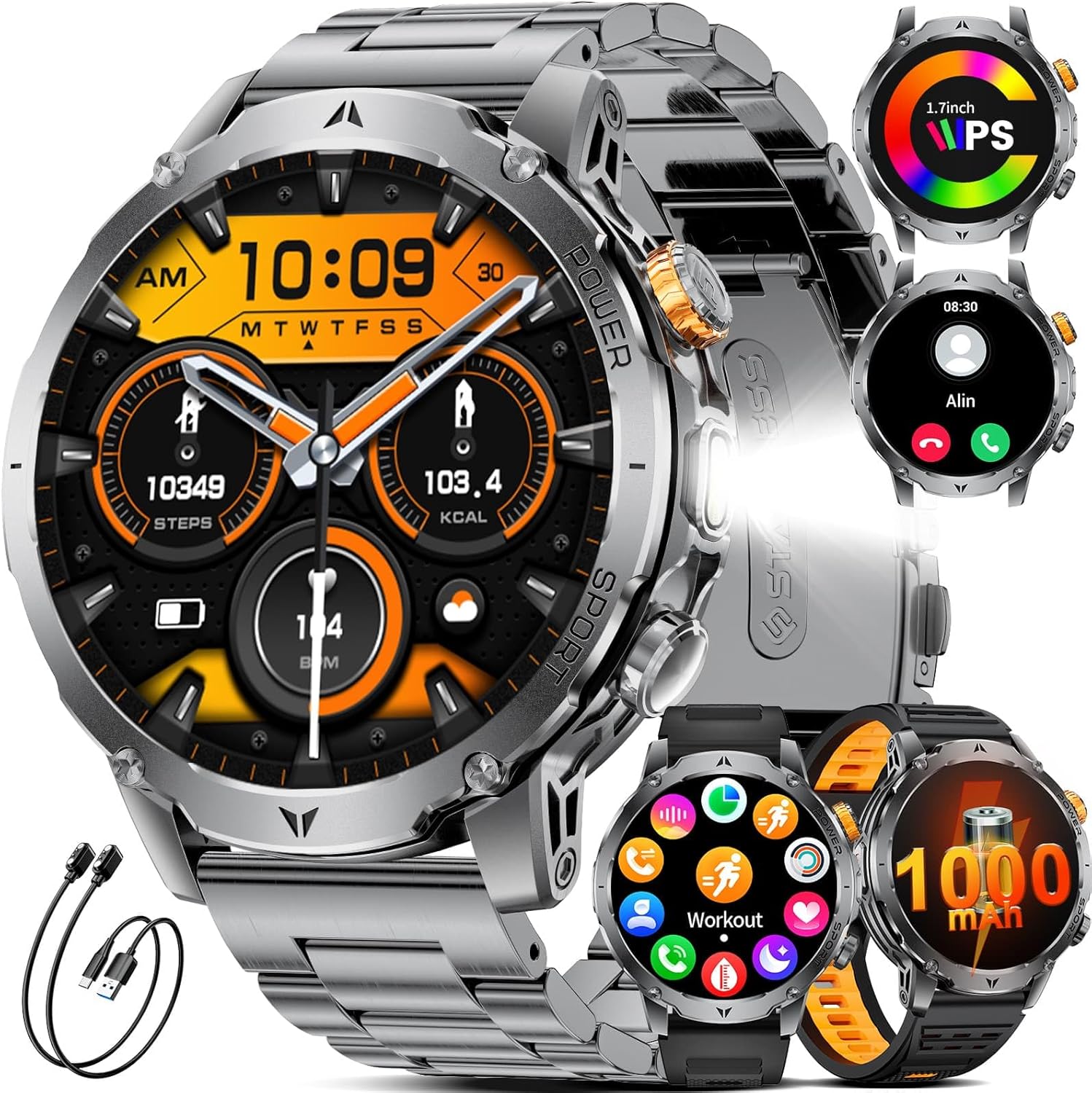
Figure 1: LIGE Smart Watch EF24-A. This image displays the smartwatch with a metal strap, showcasing its round face and robust design.
2. What's in the Box
Upon opening your LIGE Smart Watch EF24-A package, you should find the following items:
- Smart Watch (1 unit)
- Watch Bands (3 units: 1 stainless steel, 2 silicone)
- Charging Cables (2 units: USB and Type-C magnetic charging cables)
- User Manual (1 unit)

Figure 2: Package contents including the smartwatch, three watch bands, and two charging cables.
3. Setup Guide
3.1 Charging the Smart Watch
Before initial use, fully charge your smartwatch. The device comes with two magnetic charging cables (USB and Type-C) for convenience.
- Connect one of the magnetic charging cables to a compatible USB or Type-C power adapter (not included) or a computer's USB port.
- Align the magnetic end of the cable with the charging contacts on the back of the smartwatch. The watch will snap into place and display a charging indicator.
- Allow approximately 2 hours for a full charge. A full charge provides up to 15 days of typical daily use and over 60 days of standby time.

Figure 3: The smartwatch being charged using both USB and Type-C magnetic cables, highlighting the 1000mAh battery capacity.
3.2 App Installation and Device Pairing
To unlock the full potential of your smartwatch, download and install the companion app on your smartphone.
- Scan the QR code in the manual or on the watch packaging, or search for the designated app (e.g., 'FitCloudPro' as commonly used by LIGE) in your smartphone's app store (compatible with iOS 8.0+ and Android 4.4+).
- Install and open the app. Follow the on-screen instructions to create an account or log in.
- Enable Bluetooth on your smartphone.
- In the app, navigate to the device pairing section and search for your smartwatch (e.g., 'EF24-A').
- Select your device from the list to initiate pairing. Confirm the pairing request on both your phone and the smartwatch.
3.3 Strap Installation
The LIGE Smart Watch EF24-A comes with three interchangeable straps: a stainless steel band and two silicone straps. To change a strap:
- Locate the quick-release pins on the back of the watch straps.
- Slide the pin inwards to detach the current strap from the watch body.
- Align the new strap with the watch lugs and slide the pin inwards. Release the pin once the strap is in place to secure it. Gently pull on the strap to ensure it is firmly attached.
4. Operating Instructions
4.1 Basic Navigation
The smartwatch features a full touch screen and physical buttons for navigation:
- Swipe Up/Down: Scroll through menus and notifications.
- Swipe Left/Right: Access quick functions or widgets.
- Tap: Select an item or confirm an action.
- Press Side Buttons: The watch typically has a power/home button and a customizable function button. Refer to the watch settings for specific button assignments.

Figure 4: Various menu interfaces and navigation options on the smartwatch display.
4.2 Bluetooth Calling and Notifications
With its advanced dual-core chip and BLE 5.3 support, the smartwatch offers stable Bluetooth calling and real-time notifications.
- Making/Receiving Calls: Once paired, you can answer or make calls directly from your watch using the built-in speaker and microphone.
- Message Notifications: Receive real-time alerts from social apps (e.g., Facebook, Twitter, WhatsApp) and other smartphone notifications directly on your wrist. Ensure notification permissions are enabled in the companion app.

Figure 5: The smartwatch displaying incoming calls and various app notifications.
4.3 Watch Faces
Personalize your smartwatch with a wide selection of watch faces.
- The watch comes with 7 built-in faces.
- The companion app offers over 400 additional UI designs. You can also upload a photo to create a unique personal background.
- To change watch faces, long-press the home screen or select from the watch face settings in the app.

Figure 6: A selection of customizable watch faces available for the smartwatch, including options for DIY backgrounds.
4.4 Flashlight Function
The smartwatch includes a powerful LED flashlight for various situations.
- Access the flashlight function from the watch's menu.
- It offers different modes, including constant light, warning mode, and SOS mode.

Figure 7: The smartwatch's powerful LED flashlight being used in various outdoor and emergency scenarios.
4.5 Other Features
The LIGE Smart Watch EF24-A offers a range of practical features:
- AI Voice Assistant: Interact with your watch using voice commands.
- Music Control: Control music playback on your smartphone directly from the watch.
- Remote Camera: Use your watch as a remote shutter for your phone's camera.
- Weather Display: Get real-time weather updates.
- Alarm Clock: Set alarms directly on your watch.
- Timer: Utilize the built-in timer function.
- Find Phone: Locate your paired smartphone by making it ring.
- Sedentary Reminder: Get alerts to move after periods of inactivity.
- Water Reminder: Receive reminders to drink water throughout the day.

Figure 8: A collage showing the smartwatch's music control, weather display, alarm clock, camera control, find phone, sedentary reminder, and water reminder features.
5. Health Tracking
The LIGE Smart Watch EF24-A is equipped with sensors to monitor various health metrics. Note: Measurements are for reference only and are not medical data.
5.1 Heart Rate Monitoring
The watch tracks your heart rate 24 hours a day. All data can be synced to the app to record physical changes.
- To view your current heart rate, navigate to the heart rate section on your watch.
- The app provides detailed historical data and analysis.

Figure 9: The smartwatch displaying real-time heart rate and blood oxygen levels, with a user actively monitoring their health.
5.2 Blood Oxygen (SpO2) Monitoring
Monitor your blood oxygen levels directly from your wrist.
- Access the blood oxygen feature on your watch to take a measurement.
- Ensure the watch is snug on your wrist for accurate readings.
5.3 Sleep Quality Monitoring
The smartwatch automatically tracks your sleep patterns, providing insights into awake, light, and deep sleep stages.
- Wear the watch to bed for automatic sleep tracking.
- View detailed sleep analysis in the companion app to understand your sleep quality.

Figure 10: The smartwatch displaying sleep quality data, including total sleep duration and different sleep stages, with a person sleeping in the background.
5.4 Pressure Detection and Breathing Training
The watch can help you stay on top of stress levels and guide you through breathing exercises.
- Access the pressure detection feature to monitor your stress.
- Use the breathing training function to relax and recover.

Figure 11: The smartwatch displaying pressure detection data, with a graph showing stress levels over time, and a user engaged in focused work.
6. Sports Modes
The LIGE Smart Watch EF24-A offers over 100 sports modes to track your physical activities. It monitors key metrics such as steps taken, distance covered, calories expended, and exercise duration.
- To start a workout, navigate to the 'Workout' or 'Sports' section on your watch.
- Select your desired activity (e.g., walking, running, cycling, tennis, mountaineering, basketball, badminton, rope skipping).
- The watch will begin tracking your activity. End the workout when finished to save the data.
- Review detailed workout summaries in the companion app.

Figure 12: The smartwatch displaying various sports modes and tracking metrics like steps, distance, and calories, with images of people engaged in different sports activities.
7. Maintenance
7.1 Durability and Water Resistance
The LIGE Smart Watch EF24-A is built with military-grade protection standards, offering exceptional resistance to scratches, impacts, and harsh environmental conditions. It is IP68 waterproof, protecting it from splashes, rain, and sweat, and suitable for swimming (without hot water or steam).
- Avoid exposing the watch to hot water, steam, or high-pressure water jets.
- Do not operate the watch buttons underwater.
- After exposure to water, wipe the watch dry with a soft cloth.

Figure 13: The smartwatch highlighting its water-resistant, cold-resistant, shock-resistant, and dust-resistant properties.
7.2 Cleaning and Care
- Regularly clean the watch body and straps with a soft, damp cloth.
- Avoid using harsh chemicals or abrasive materials, as these can damage the finish.
- Ensure the charging contacts are clean and dry before charging to prevent corrosion.
8. Troubleshooting
If you encounter issues with your LIGE Smart Watch EF24-A, try the following troubleshooting steps:
8.1 Connectivity Issues
- Ensure Bluetooth is enabled on your smartphone and the watch is within range.
- Restart both your smartphone and the smartwatch.
- Unpair and re-pair the device through the companion app.
- Check if the companion app is running in the background and has necessary permissions.
8.2 Battery Life Concerns
- Ensure the watch is fully charged using the provided magnetic cables.
- Reduce screen brightness and turn off unnecessary features (e.g., continuous heart rate monitoring, always-on display) to conserve battery.
- Check for app updates, as software optimizations can improve battery performance.
8.3 Display Not Responding
- Try restarting the watch by pressing and holding the power button.
- Ensure the screen is clean and dry.
- If the issue persists, perform a factory reset (note: this will erase all data on the watch).
9. Specifications
| Feature | Specification |
|---|---|
| Model Number | EF24-A |
| Display Size | 1.7 Inches |
| Display Resolution | 360*360 pixels |
| Battery Capacity | 1000 mAh Lithium Polymer |
| Typical Use Battery Life | Up to 15 days |
| Standby Time | Above 60 days |
| Charging Time | Approx. 2 hours |
| Connectivity | Bluetooth 5.3 |
| Operating System | Android (4.4 and above), iOS (8.0 and above) |
| Water Resistance | IP68 |
| Product Dimensions | 5.91 x 2.76 x 0.79 inches |
| Item Weight | 8.8 ounces (0.25 Kilograms) |

Figure 14: Visual comparison of the 1.7-inch display size of the LIGE Smart Watch EF24-A against other smartwatches.
10. Warranty and Support
10.1 Warranty Information
LIGE stands behind the quality of its products. The LIGE Smart Watch EF24-A comes with a 24-month worry-free product warranty. This warranty includes services such as replacement, return, or accessory replacement.
10.2 Customer Support
If you have any questions or concerns about your smartwatch, please do not hesitate to contact our customer support team. Our team is always ready to provide you with the support you need.
- Refer to the contact information provided in your product packaging or on the official LIGE website for support channels.
- Please have your model number (EF24-A) and purchase details ready when contacting support.
11. Product Videos
11.1 Military Smart Watch for Men EF24 Overview
Video 1: This video provides a comprehensive overview of the LIGE Smart Watch EF24, showcasing its design, various watch faces, flashlight function, and charging capabilities. It also highlights health monitoring features like heart rate and blood pressure, along with music control and weather updates.
11.2 Smart Watch for Men EF24 Features and Durability
Video 2: This video demonstrates the durability of the LIGE Smart Watch EF24, showing its resistance to impact and water. It also illustrates key functionalities such as charging, various sports modes, health tracking (heart rate, blood oxygen, pressure), call handling, notifications, and the flashlight feature.


