
Introduction
The Monster Airclip AC210 Open Ear Headphones are designed to provide a comfortable listening experience while maintaining awareness of your surroundings. These lightweight, clip-on earbuds feature advanced audio technology and a secure fit, making them suitable for various activities.
Key features include:
- Open-Ear Design: Allows you to hear your audio clearly while remaining connected to your environment.
- Pure Monster Sound: Equipped with 14mm dynamic drivers for immersive stereo sound and clear communication.
- Featherlight All-Day Fit: Each earbud weighs only 5.1g, featuring a flexible joint and ultra-light grip for pressure-free comfort.
- Extended Battery Life: Up to 8 hours of playback per charge, with a total of 36 hours using the portable charging case.
- Private Listening Experience: Directional Acoustic Technology minimizes sound leakage for private audio in public settings.
- Intuitive Tap Control: Smart touch controls for easy management of music and calls.
- IPX6 Water Resistance: Protected against sweat and rain, ideal for workouts and outdoor use.
- Crystal-Clear Calls: Environmental Noise Cancellation (ENC) technology reduces background noise for clear conversations.
- Bluetooth 6.0: Provides stable, low-latency wireless connectivity.
Package Contents
Please ensure all items are present in the package:
- Monster Airclip AC210 Open Ear Headphones (Left and Right Earbuds)
- Charging Case
- User Manual
- USB Charging Cable (not explicitly listed but standard)
Setup
1. Initial Charging
Before first use, fully charge the earbuds and the charging case. Place the earbuds into the charging case. Connect the charging case to a power source using the provided USB cable. The indicator lights on the case will show the charging status. A full charge typically takes approximately 8 hours for the case and earbuds.
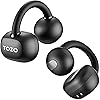
Image: Monster Airclip AC210 earbuds in their charging case.
2. Wearing the Earbuds
The Airclip AC210 earbuds are designed for an open-ear, secure fit. Follow these steps for optimal comfort and sound:
- Remove the earbuds from the charging case.
- Position the 'Monster Airclip AC210' earbud behind your ear, ensuring the speaker portion is aligned with your ear canal.
- Adjust each earbud to a 45-degree angle for optimal comfort and sound delivery. The flexible joint allows for adaptive fit.

Image: Step-by-step guide on how to wear the Monster Airclip AC210 earbuds.
3. Bluetooth Pairing
To connect your earbuds to a device:
- Ensure the earbuds are charged and removed from the charging case. They will automatically enter pairing mode (indicated by a flashing LED light, if present).
- On your device (smartphone, tablet, computer), enable Bluetooth.
- Search for available Bluetooth devices. Select "Monster Airclip AC210" from the list.
- Once connected, the earbuds will indicate successful pairing (e.g., a voice prompt or solid LED light).
- The earbuds will automatically reconnect to the last paired device when removed from the case, if Bluetooth is enabled on the device.
Operating Instructions
Touch Controls
The Monster Airclip AC210 earbuds feature intuitive touch controls on each earbud. Refer to the diagram below for specific functions:

Image: Detailed diagram of touch control functions for music and calls.
| Action | Left Earbud (L) | Right Earbud (R) |
|---|---|---|
| Volume Up | N/A | Single Tap (x1) |
| Volume Down | Single Tap (x1) | N/A |
| Next Track | N/A | Triple Tap (x3) |
| Previous Track | Triple Tap (x3) | N/A |
| Play/Pause | Double Tap (x2) on either L/R | |
| Answer/End Call | Double Tap (x2) on either L/R | |
| Reject Call | Press and Hold for 2 seconds on either L/R | |
| Activate Voice Assistant | Press and Hold for 2 seconds on either L/R | |
Power On/Off
- Power On: The earbuds automatically power on when removed from the charging case.
- Power Off: Place the earbuds back into the charging case to automatically power them off and begin charging.
Maintenance
Cleaning
Regular cleaning helps maintain optimal performance and hygiene:
- Gently wipe the earbuds and charging case with a soft, dry, lint-free cloth.
- Do not use abrasive cleaners, solvents, or aerosol sprays.
- Avoid getting moisture into any openings.
Storage
When not in use, store the earbuds in their charging case to protect them and keep them charged. Store in a cool, dry place away from extreme temperatures and direct sunlight.
Water Resistance (IPX6)
The earbuds are IPX6 water-resistant, meaning they can withstand high-pressure water jets from any direction. This makes them suitable for use during workouts and in light rain. However, they are not designed for submersion in water. Do not swim or shower with the earbuds.

Image: Monster Airclip AC210 earbuds demonstrating IPX6 water resistance.
Troubleshooting
If you encounter issues with your Monster Airclip AC210 headphones, please refer to the following common solutions:
| Problem | Possible Cause | Solution |
|---|---|---|
| Earbuds not powering on | Low battery | Place earbuds in the charging case and fully charge them. |
| Earbuds not pairing with device | Bluetooth off, out of range, or pairing mode not active | Ensure Bluetooth is enabled on your device. Place earbuds in pairing mode. Move earbuds closer to the device. Try forgetting the device in your Bluetooth settings and re-pairing. |
| No sound or low volume | Volume too low, improper fit, or connection issue | Increase volume on both earbuds and connected device. Adjust earbuds for a proper fit. Reconnect the earbuds to your device. |
| Intermittent connection | Interference, distance, or low battery | Move closer to your device. Avoid areas with strong Wi-Fi or other Bluetooth signals. Ensure earbuds are fully charged. |
| Microphone not working clearly | Microphone blocked or environmental noise | Ensure the microphone area is clear. Move to a quieter environment. |
Resetting the Earbuds
If issues persist, a factory reset may resolve them. Refer to the specific instructions in your included user manual for the exact reset procedure, as it can vary by model.
Specifications
Detailed technical specifications for the Monster Airclip AC210 Open Ear Headphones:
| Feature | Detail |
|---|---|
| Model Name | E118 (AC210) |
| Connectivity Technology | Bluetooth 6.0 |
| Ear Placement | Open Ear |
| Form Factor | Over Ear / Clip-On |
| Audio Driver Type | 14mm Dynamic Driver |
| Noise Control Features | Environmental Noise Cancellation (ENC) |
| Control Type | Touch Control |
| Water Resistance Level | IPX6 (Sweat-proof, Water Resistant) |
| Battery Life (Earbuds) | Up to 8 Hours |
| Total Playtime (with Case) | Up to 36 Hours |
| Charging Time | Approx. 8 Hours (for full system charge) |
| Material | Silicone |
| Item Weight (Earbud) | 5.1g (from feature bullets) |
| Item Weight (Total) | 4.6 ounces (approx. 130g) |
| Manufacturer | Monster |
Warranty Information
Monster products are manufactured to high-quality standards. This product is covered by a limited manufacturer's warranty. Please refer to the warranty card included in your package or visit the official Monster website for detailed terms and conditions regarding warranty coverage, duration, and claims procedures.
Customer Support
For further assistance, technical support, or inquiries regarding your Monster Airclip AC210 Open Ear Headphones, please contact Monster customer support. Contact information can typically be found on the official Monster website or in the documentation included with your product.
You may also visit the Monster Store on Amazon for additional product information and resources.


