
1. Introduction
Thank you for choosing the VINGLI 47" L-Shaped Home Office Desk. This desk is designed to maximize space efficiency while providing a functional and organized workspace. It features an L-shaped design, integrated charging station, fabric drawers, storage shelves, and an ergonomic monitor stand. This manual provides detailed instructions for assembly, operation, maintenance, and troubleshooting to ensure optimal use and longevity of your product.
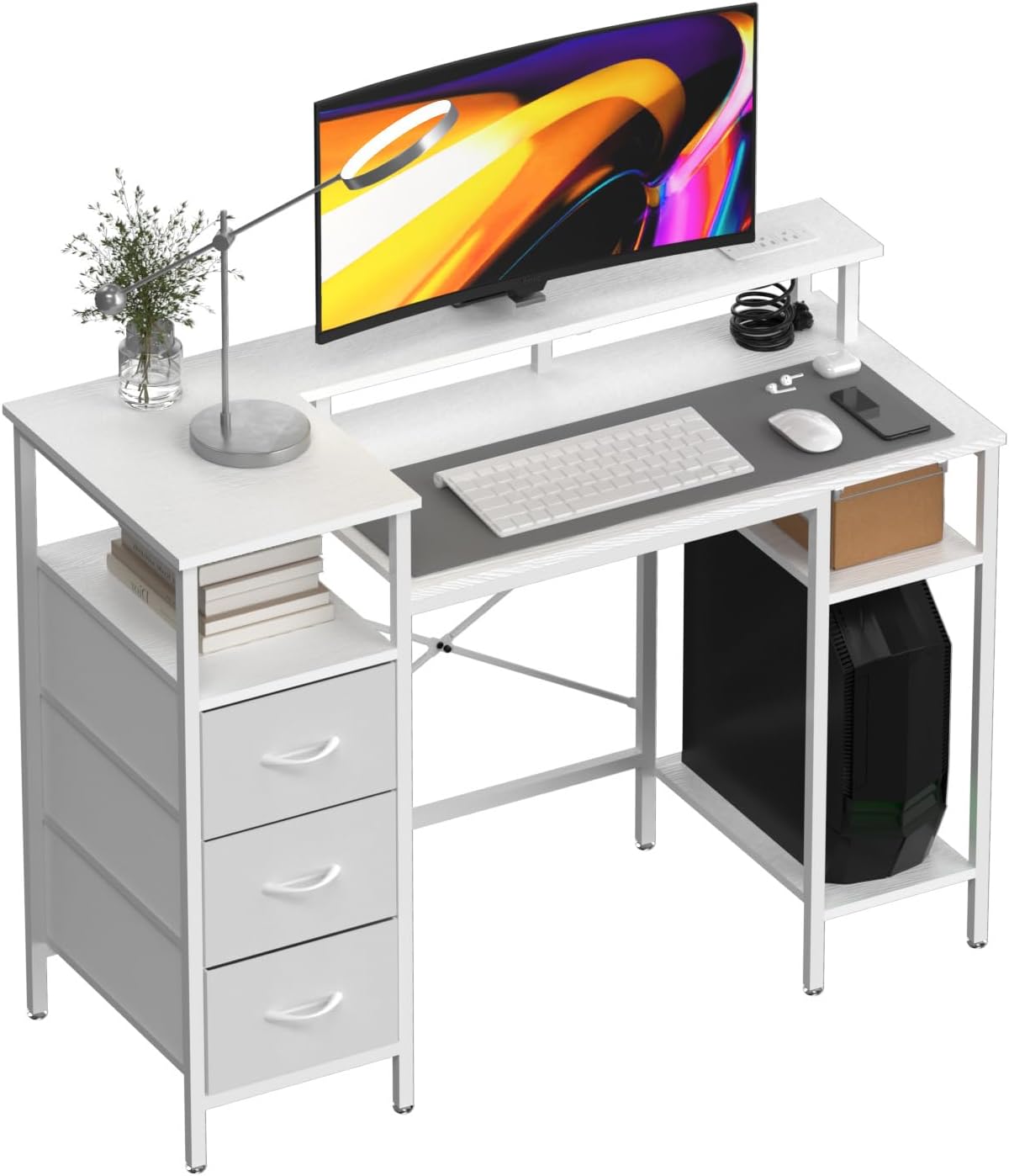
Image 1.1: VINGLI 47" L-Shaped Home Office Desk (White)
2. Safety Information
- Read all instructions carefully before assembly and use.
- Keep all small parts and packaging materials away from children and pets to prevent choking hazards.
- Ensure all screws and fasteners are securely tightened before use. Periodically check and re-tighten as necessary.
- Do not overload the desk or shelves beyond their recommended weight capacity.
- Place the desk on a level and stable surface to prevent tipping.
- Use caution when handling tools during assembly.
- Do not stand or sit on the desk.
- Keep liquids away from the integrated charging station to prevent electrical hazards.
3. Package Contents
Please verify that all components are present before beginning assembly. If any parts are missing or damaged, please contact customer support.
- Desk Panels (Main desktop, L-extension, monitor stand, shelves)
- Steel Frame Components
- Fabric Drawers (3 units)
- Integrated Charging Station (pre-installed in desktop)
- Adjustable Footpads
- Assembly Hardware (screws, bolts, Allen wrench)
- Instruction Manual

Image 3.1: Product Dimensions Overview
4. Setup and Assembly
Follow these steps carefully for proper assembly. It is recommended to assemble the desk with two people.
- Unpack and Identify Parts: Lay out all components on a clean, soft surface (e.g., a blanket or carpet) to prevent scratches. Refer to the parts list in your package to identify each piece.
- Assemble the Main Desk Frame: Connect the steel frame components for the main desk section using the provided screws and Allen wrench. Ensure all connections are snug but do not fully tighten until all parts are aligned.
- Attach the Main Desktop: Carefully place the main desktop panel onto the assembled frame. Secure it with the appropriate screws. Ensure the charging station is positioned correctly.
- Assemble the L-Extension Frame: Construct the steel frame for the L-shaped extension, including the supports for the fabric drawers and the lower shelf.
- Attach the L-Extension Desktop and Shelves: Mount the L-extension desktop panel and the lower shelf panels to their respective frames.
- Install the Monitor Stand: Attach the elevated monitor stand to the main desktop using the designated fasteners.
- Insert Fabric Drawers: Fold and insert the fabric drawers into their designated compartments within the L-extension.
- Install Adjustable Footpads: Screw the adjustable footpads into the bottom of all desk legs. Adjust them to ensure the desk is level and stable on your floor.
- Final Tightening: Once all components are in place and aligned, fully tighten all screws and fasteners.

Image 4.1: Assembled Desk with Storage and Surface Features

Image 4.2: Detail of Desk Shelves and Frame Structure
5. Operating Instructions
5.1 Using the Built-in Charging Station
The desk includes an integrated charging station for convenient power access.
- Connect the charging station's power cord to a standard wall outlet.
- The station provides 2 AC outlets, 1 USB port, and 1 Type-C port.
- Plug your devices directly into the appropriate ports for charging.
- Utilize the cable management holes to keep cords organized and prevent clutter.
5.2 Utilizing Storage Features
The desk offers various storage options to keep your workspace tidy.
- Fabric Drawers: Use the three fabric drawers for discreet storage of office supplies, documents, or personal items.
- Open Shelves: The open shelves are ideal for books, decorative items, or frequently accessed equipment like a printer or CPU.
- Monitor Stand: The elevated monitor stand not only improves ergonomics but also creates additional storage space underneath for keyboards, mice, or notebooks.

Image 5.1: Multi-functional Design Features

Image 5.2: Ergonomic Comfort with Elevated Monitor Stand
6. Maintenance
Proper care and maintenance will extend the life of your VINGLI desk.
- Cleaning: Wipe the desk surfaces with a soft, damp cloth. Avoid harsh chemicals or abrasive cleaners that may damage the finish. For stubborn marks, a mild soap solution can be used, followed by drying with a clean cloth.
- Frame Care: The steel frame can be cleaned with a damp cloth. Ensure it is dried thoroughly to prevent rust.
- Fabric Drawers: The fabric drawers can be spot cleaned with a mild detergent and water. Allow them to air dry completely before reinserting.
- Fastener Check: Periodically check all screws and bolts to ensure they remain tight. Re-tighten as needed to maintain stability.
- Avoid Direct Sunlight: Prolonged exposure to direct sunlight can cause fading or damage to the desk's finish.
7. Troubleshooting
If you encounter any issues with your desk, refer to the following common problems and solutions.
| Problem | Possible Cause | Solution |
|---|---|---|
| Desk is wobbly or unstable. | Loose fasteners; uneven floor. | Ensure all screws and bolts are fully tightened. Adjust the footpads on the bottom of the legs to level the desk. |
| Charging station not working. | Not plugged in; power outage; faulty device. | Verify the charging station's power cord is securely plugged into a working wall outlet. Check if the wall outlet has power. Test with a different device. If issues persist, contact customer support. |
| Fabric drawers do not slide smoothly. | Improper assembly; overloaded drawer. | Ensure the drawer supports are correctly installed. Check if the drawer is overloaded; remove some items. |
| Desk surface scratches easily. | Abrasive objects; improper cleaning. | Avoid dragging sharp or heavy objects across the surface. Use coasters for drinks. Clean with soft cloths only. |
8. Specifications
| Feature | Detail |
|---|---|
| Brand | VINGLI |
| Model Number | VL-Desk-9358 |
| Shape | L-Shape |
| Product Dimensions (D x W x H) | 47.24" x 18.9" x 34.65" |
| Color | White |
| Top Material Type | Engineered Wood |
| Base Material | Engineered Wood, Metal |
| Special Features | L-Shaped, Built-in Charging Station, Fabric Drawers, Storage Shelves, Monitor Stand, Adjustable Footpads |
| Charging Station | 2 AC Outlets, 1 USB Port, 1 Type-C Port |
| Drawer Type | Fabric Drawer |
| Mounting Type | Freestanding |
9. Warranty and Support
9.1 Warranty Information
VINGLI products are manufactured with quality and durability in mind. This product comes with a standard manufacturer's warranty against defects in materials and workmanship. Please retain your proof of purchase for warranty claims. Specific warranty duration and terms may vary; refer to your purchase documentation or contact VINGLI customer support for details.
9.2 Customer Support
If you have any questions, require assistance with assembly, or need to report missing/damaged parts, please contact VINGLI customer support. Our team is available to help you.
- Website: Visit the VINGLI Store on Amazon
- Email: Refer to your product packaging or VINGLI's official website for the most current contact email.
- Phone: Refer to your product packaging or VINGLI's official website for the most current contact number.