
1. Introduction
Thank you for choosing the Gosvor LiteVac G1 Robotic Pool Cleaner. This manual provides essential information for the safe operation, maintenance, and troubleshooting of your device. Please read it thoroughly before first use to ensure optimal performance and longevity of your pool cleaner.
2. Safety Information
Always adhere to the following safety guidelines to prevent injury or damage to the product:
- Do not operate the cleaner when people or pets are in the pool.
- Ensure the charging port is dry before connecting the charger.
- Use only the original charger provided by Gosvor.
- Do not attempt to disassemble or repair the unit yourself. Contact qualified service personnel.
- Store the cleaner in a cool, dry place away from direct sunlight when not in use.
- Keep the cleaner out of reach of children.
3. Product Overview
The Gosvor LiteVac G1 is an advanced robotic pool cleaner designed for efficient and comprehensive pool maintenance. It features intelligent navigation, 4-in-1 cleaning capabilities, powerful suction, and user-friendly operation via a mobile application.
Key Components:
- Main Unit: The robotic cleaner body with integrated motors and control system.
- Dual Brushes (260mm): For effective scrubbing of pool surfaces.
- Climbing Tracks: Enable movement on pool floors and walls.
- Top-Load Filter Basket (3.6L): Easy access for debris removal.
- Dual Filtration System: Includes 180µm standard filter and 3µm ultra-fine filter for various debris types.
- LED Indicators: Display operational status and battery level.
- Charging Adapter: For recharging the internal battery.

Image 3.1: The Gosvor LiteVac G1 Robotic Pool Cleaner operating in a pool.
4. Setup
4.1. Charging the Cleaner
Before initial use, fully charge the Gosvor LiteVac G1. The cleaner comes with one non-standard battery included.
- Ensure the cleaner is completely dry before charging.
- Connect the charging adapter to the cleaner's charging port.
- Plug the adapter into a power outlet.
- The LED indicator will show the charging status:
- Red Flashing: Battery <15%
- Blue Flashing: Battery 15-50%
- Green Flashing: Battery >50%
- Solid Green: Charging complete.
- A full charge typically takes approximately 3 hours.

Image 4.1: The robotic pool cleaner connected to its charger, showing LED indicators for charging status.
4.2. App Installation and Connection
The Gosvor LiteVac G1 can be controlled via a mobile application.
- Download the Gosvor app from your device's app store.
- Ensure your mobile device's Bluetooth is enabled.
- Place the cleaner in the pool.
- Open the app and follow the on-screen instructions to pair with your LiteVac G1.
- The app allows for mode selection, route customization, and OTA updates.

Image 4.2: Controlling the Gosvor LiteVac G1 via the mobile application. Note: The app does not connect underwater and does not collect personal data. Connection distance is limited to 10 meters.
5. Operating Instructions
5.1. Placing the Cleaner in the Pool
Gently lower the LiteVac G1 into the pool. Ensure it is fully submerged and air bubbles have escaped before starting operation.
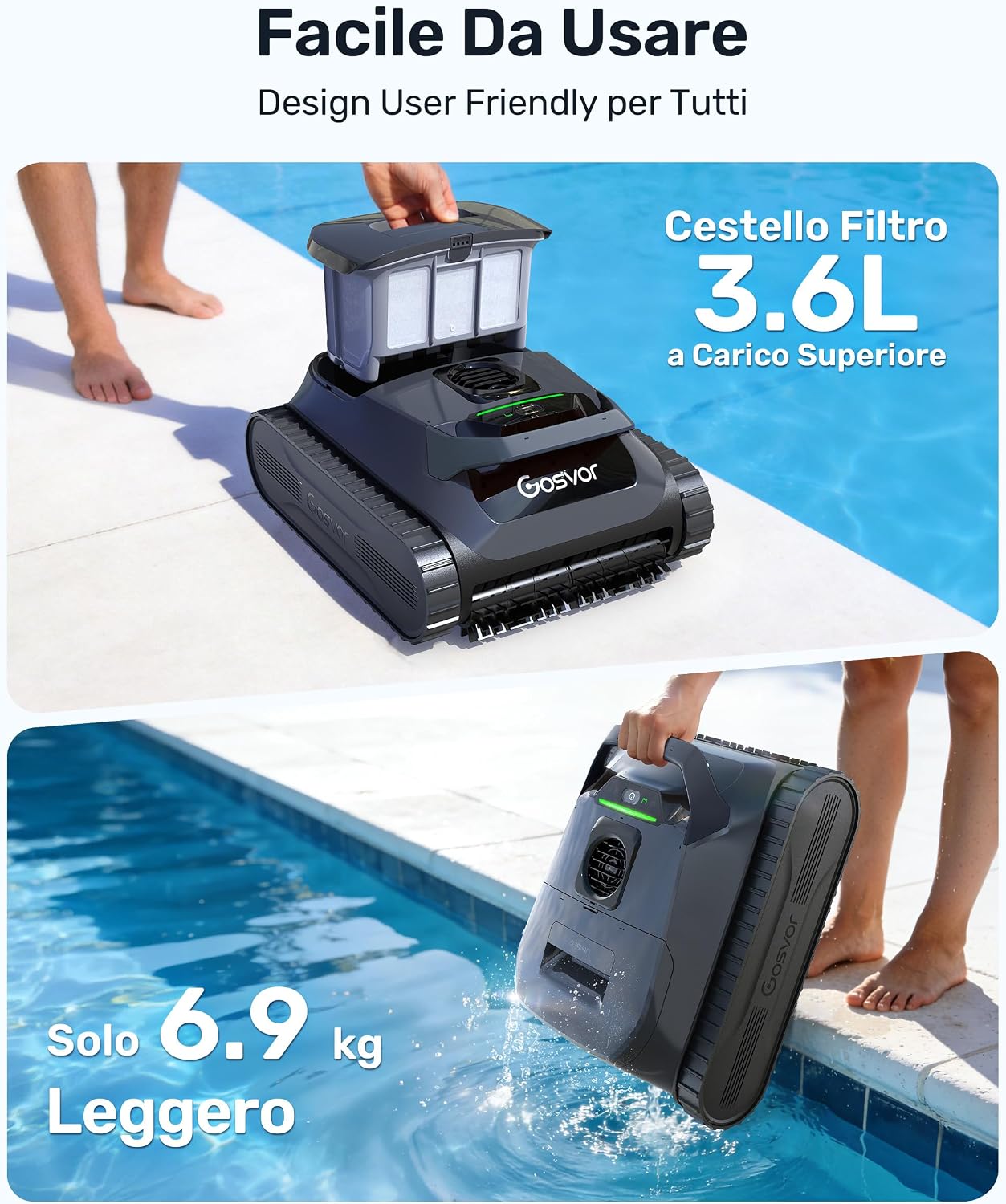
Image 5.1: Lowering the LiteVac G1 into the pool.
5.2. Selecting Cleaning Modes
The LiteVac G1 offers 5 cleaning modes, selectable via the app:
- Smart Mode: Comprehensive cleaning of floor, walls, and waterline.
- Floor Only Mode: Focuses cleaning solely on the pool floor.
- Walls Only Mode: Cleans pool walls and waterline.
- ECO Mode: Energy-saving mode for extended runtime (up to 200 minutes).
- Scheduled Mode: Allows setting a cleaning schedule.
The cleaner's intelligent planning uses a cross-pattern for flat bottoms and adaptive navigation to avoid getting stuck on complex surfaces. It can clean floors, walls, waterlines, and shallow areas greater than 30cm deep.

Image 5.2: Overview of cleaning modes and their approximate runtimes. ECO mode offers up to 200 minutes, while Smart/Floor/Wall modes offer up to 150 minutes.
5.3. Understanding LED Indicators
The LED indicator on the cleaner provides real-time status information:
- Red: Battery <15%
- Blue: Battery 15-50%
- Green: Battery >50%
- Flashing/Other: Indicates a potential issue or troubleshooting state.

Image 5.3: LED indicator states and their corresponding meanings.
6. Maintenance
Regular maintenance ensures the longevity and efficiency of your Gosvor LiteVac G1.
6.1. Cleaning the Filter Basket
The 3.6L top-load filter basket is designed for easy access and cleaning.
- After each cleaning cycle, remove the cleaner from the pool. The quick drainage feature minimizes weight.
- Open the top cover and lift out the filter basket.
- Empty collected debris.
- Rinse the filter basket thoroughly with a hose. For best performance, use a high-pressure hose after each use.
- The dual filtration system includes a 180µm standard filter for large debris (leaves, twigs, gravel, hair) and a 3µm ultra-fine filter for small particles (fine sand, dust, algae). Replace the filter every 30 cleaning cycles for optimal clarity.
- Reinsert the clean filter basket and close the top cover securely.

Image 6.1: Steps for easy retrieval, maintenance, and cleaning of the filter basket.

Image 6.2: Detailed view of the dual filtration system, showing which filter to use for different types of debris.
6.2. General Cleaning and Storage
- Wipe the exterior of the cleaner with a soft, damp cloth.
- Do not use harsh chemicals or solvents.
- Store the cleaner in a shaded, dry area when not in use, especially during off-season.
- Ensure the battery is charged to at least 50% before long-term storage.
7. Troubleshooting
If you encounter issues with your Gosvor LiteVac G1, refer to the following common problems and solutions:
| Problem | Possible Cause | Solution |
|---|---|---|
| Cleaner does not start | Low battery; Power button not pressed; Obstruction. | Charge the cleaner fully; Press the power button; Check for and remove any obstructions. |
| Poor cleaning performance | Full or dirty filter basket; Worn brushes; Incorrect cleaning mode. | Clean the filter basket; Inspect and replace brushes if necessary; Select an appropriate cleaning mode for your pool. |
| Cleaner gets stuck or cannot climb walls | Low battery; Obstruction; Pool surface issues; Incorrect app settings for steps/platforms. | Charge the cleaner; Remove obstructions; Ensure pool surfaces are free of excessive algae; Adjust app settings for steps/platforms. For mosaic tiles or large curvature edges, use the buoyancy foam (if included). |
| App cannot connect to cleaner | Bluetooth off; Cleaner out of range; App not updated. | Ensure Bluetooth is on; Keep mobile device within 10 meters of cleaner; Update the app to the latest version. |

Image 7.1: Tips for improving wall climbing performance on specific pool surfaces.
8. Specifications
| Feature | Detail |
|---|---|
| Model Number | PRE1-G |
| Product Dimensions | 36 x 21 x 44.3 cm |
| Product Weight | 7.5 kg |
| Battery Type | 1 Non-standard Battery (included) |
| Battery Weight | 730 Grams |
| Power Source | Battery |
| Max Pool Coverage | 200 m² |
| Max Runtime | 200 minutes (ECO Mode), 150 minutes (Other Modes) |
| Filtration Capacity | 15,000 LPH (Liters Per Hour) |
| Filter Basket Volume | 3.6 L |
| Filtration Fineness | Dual: 180µm (Standard) and 3µm (Ultra-fine) |
| Control Method | Application (Bluetooth) |
| Special Features | 4-in-1 Cleaning (Floor, Walls, Waterline, Shallow Areas), Intelligent Navigation, Ultralight Design |
| Assembly Required | No |
9. Warranty and Support
Gosvor is committed to providing high-quality products and customer satisfaction. For warranty information, technical support, or service inquiries, please refer to the contact details provided with your purchase or visit the official Gosvor website. Please retain your proof of purchase for warranty claims.


