
1. Introduction
This manual provides essential instructions for the safe and effective use of your TINKSEN S02 40-inch Retractable Selfie Stick Tripod. Designed for versatility, this device combines a selfie stick and a stable tripod, featuring a wireless remote control for convenient photography and videography with your smartphone.
Key features include:
- Sturdy and Stable Construction: Crafted from premium aluminum alloy and plastic materials for secure device positioning.
- Multi-Angle Shooting: Features a 180-degree rotating head and a 360-degree rotating bracket for diverse photography needs.
- Portable Design: Extends up to 40 inches and folds compactly for easy transport.
- Wireless Remote Control: Effortlessly pairs with your phone for remote photo and video capture.
- Versatile Compatibility: Works with most smartphones, suitable for various scenarios.
2. Product Overview and Components
Familiarize yourself with the components of your TINKSEN S02 Selfie Stick Tripod:
- Retractable Selfie Stick with integrated tripod base
- Smartphone Holder
- Wireless Bluetooth Remote Control (detachable)

This image displays the TINKSEN S02 selfie stick tripod in its two primary modes: as a handheld selfie stick and as a freestanding tripod. A smartphone is securely mounted in both configurations, demonstrating its versatility for various shooting needs.

This image highlights the key structural components of the device, including the silicone pads for secure phone gripping, the multi-section aluminum alloy rod for extension, the detachable wireless remote control, the stable tripod base, and anti-skid pads for enhanced stability.
3. Setup Instructions
3.1 Unfolding the Selfie Stick / Tripod
- Hold the handle firmly.
- Gently pull the top section upwards to extend the telescopic rod.
- To use as a tripod, unfold the three legs at the base of the handle until they lock into position. Ensure the tripod is placed on a flat, stable surface.
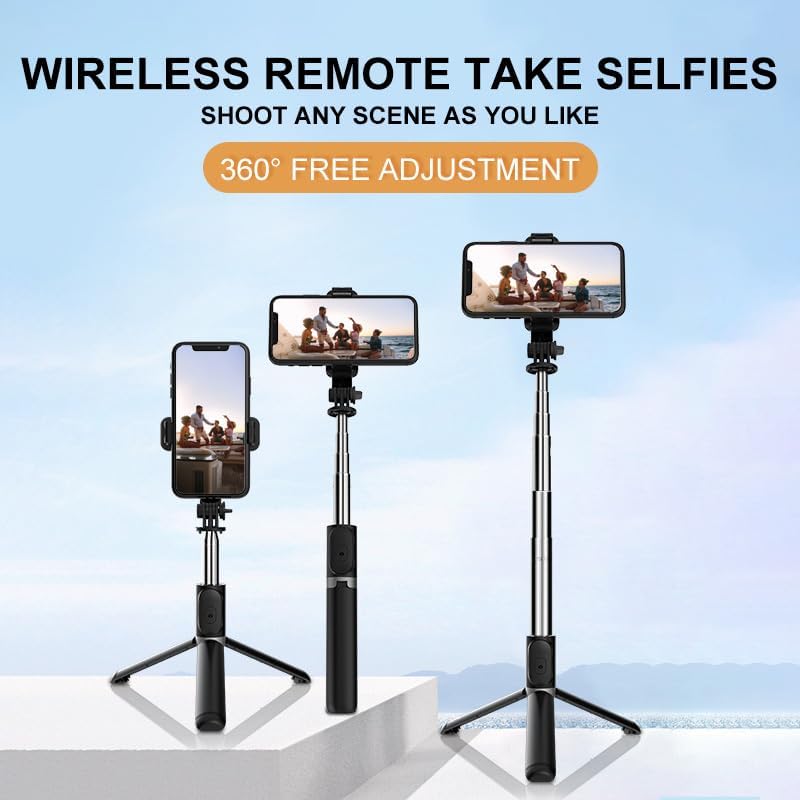
This image illustrates the TINKSEN S02 selfie stick tripod extended to different heights while in tripod mode, demonstrating its adjustable length for various shooting perspectives.
3.2 Attaching Your Smartphone
- Open the smartphone holder by pulling the top clamp upwards.
- Carefully place your smartphone into the holder, ensuring it is centered and securely gripped by the silicone pads.
- The holder supports both horizontal and vertical phone orientations.
3.3 Pairing the Wireless Remote Control
- Ensure the remote control has power. If not, check the battery.
- Turn on the remote control by pressing and holding the button until an indicator light flashes (usually blue).
- On your smartphone, go to Bluetooth settings and search for available devices.
- Select the device named 'SelfieCom' or similar from the list to pair. The indicator light on the remote will stop flashing once successfully paired.
- Open your phone's camera app. The remote control button will now act as a shutter button.

This image illustrates the wireless Bluetooth remote control, highlighting its function for one-click photo capture and indicating the Bluetooth pairing process.
4. Operating Instructions
4.1 Using as a Selfie Stick
- Extend the telescopic rod to your desired length (up to 40 inches).
- Hold the handle comfortably and position your phone for the desired shot.
- Use the wireless remote to capture photos or start/stop video recording.
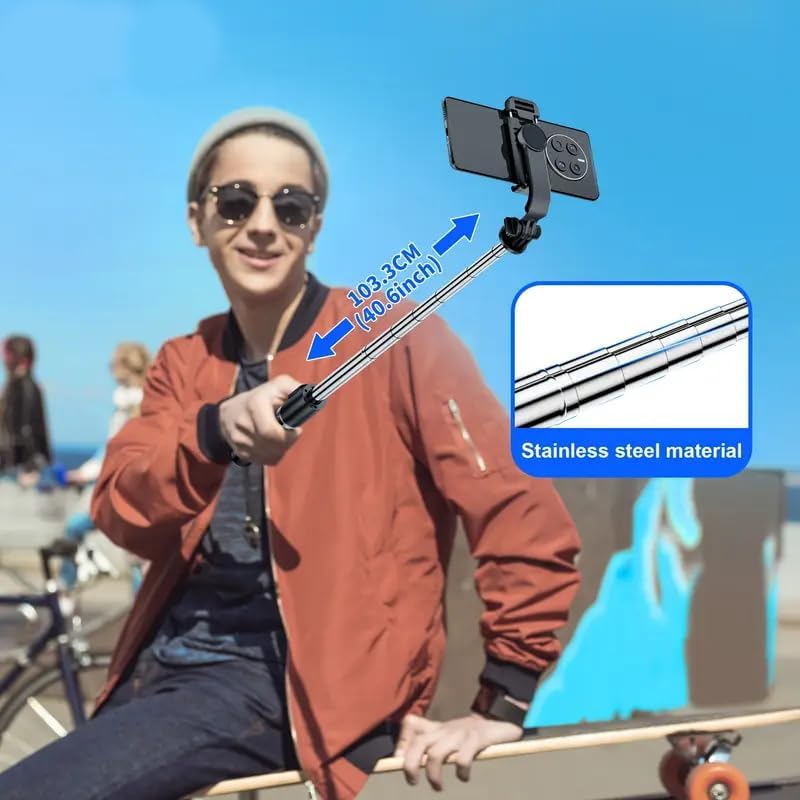
This image shows a user holding the TINKSEN S02 selfie stick fully extended to its maximum length of 40.6 inches (103.3 cm), emphasizing its reach and the durable stainless steel material of the telescopic rod.
4.2 Using as a Tripod
- Unfold the tripod legs and place the device on a stable, level surface.
- Adjust the telescopic rod to your preferred height.
- Position your phone using the adjustable head and bracket.
- Use the wireless remote for hands-free photo and video capture.

This image depicts the TINKSEN S02 selfie stick tripod in its stable tripod configuration, holding a smartphone, ideal for capturing group photos or maintaining steady shots in various settings.
4.3 Adjusting Angles
The smartphone holder offers flexible positioning:
- 180-degree Rotating Head: Tilt your phone forward or backward to find the optimal vertical angle.
- 360-degree Rotating Bracket: Rotate your phone horizontally to switch between landscape and portrait modes or adjust the horizontal viewing angle.

This image illustrates the multi-angle adjustment capabilities of the TINKSEN S02, showing 360-degree vertical rotation, 360-degree horizontal rotation, and 240-degree back-and-forth rotation of the phone holder for comprehensive shooting flexibility.
5. Maintenance
To ensure the longevity and optimal performance of your selfie stick tripod, follow these maintenance guidelines:
- Cleaning: Wipe the device with a soft, dry cloth. Avoid using abrasive cleaners or solvents.
- Storage: Store the device in a cool, dry place away from direct sunlight and extreme temperatures. Ensure it is fully collapsed before storage.
- Battery: If the remote control is not used for an extended period, consider removing its battery to prevent leakage.
6. Troubleshooting
If you encounter issues with your TINKSEN S02, refer to the following common problems and solutions:
- Remote Control Not Pairing:
- Ensure the remote control is powered on and its battery is charged.
- Turn off and on your phone's Bluetooth, then try pairing again.
- Make sure the remote is within range of your phone.
- Unstable Tripod:
- Ensure all three legs are fully extended and locked into position.
- Place the tripod on a flat, stable surface.
- Do not overload the device with accessories not intended for use with this product.
- Phone Not Holding Securely:
- Verify that your phone is properly centered and the holder's clamps are firmly gripping it.
- Ensure no obstructions prevent the clamps from closing fully.
7. Specifications
| Feature | Specification |
|---|---|
| Model Number | S02 |
| Product Dimensions (Folded) | 8.6 x 1.97 x 1.67 inches |
| Item Weight | 5.8 ounces (165g) |
| Maximum Height | 40 inches (103 cm) |
| Minimum Height (Folded Length) | 7.6 inches (19.4 cm) |
| Material | Aluminum Alloy, Acrylonitrile Butadiene Styrene (ABS) |
| Special Feature | Foldable, Retractable |
| Compatible Devices | Most Cellphones |
| Color | Black |
| Tripod Head Type | Ball Heads |
8. Warranty and Support
For warranty information or technical support, please refer to the product packaging or contact the retailer from whom you purchased the TINKSEN S02 Selfie Stick Tripod. Keep your proof of purchase for any warranty claims.


