
1. Introduction
Thank you for choosing the PISEN CCC Mag-Safe Power Bank, Model TP-D178. This portable charger is designed to provide convenient and efficient power for your mobile devices, featuring both Mag-Safe wireless charging and USB-C wired fast charging. Its compact design, integrated foldable stand, and comprehensive safety features make it an ideal companion for daily use and travel. This manual provides essential information for safe and optimal operation of your device.

An image showing the PISEN power bank with its foldable stand, highlighting its compact design and Mag-Safe compatibility.
2. Product Features
- Dual Charging Modes: Supports up to 15W Mag-Safe wireless charging and 20W USB-C Power Delivery (PD) fast charging.
- Simultaneous Charging: Charge two devices concurrently (one wired, one wireless) with a shared total output of 15W.
- Integrated Foldable Stand: Conveniently props up your phone for hands-free viewing during charging.
- Strong Magnetic Connection: Built-in N52 magnets ensure precise alignment and secure attachment for Mag-Safe compatible devices.
- Compact & Lightweight: Measures 4.17 x 2.72 x 0.63 inches and weighs only 0.29 lb, making it highly portable.
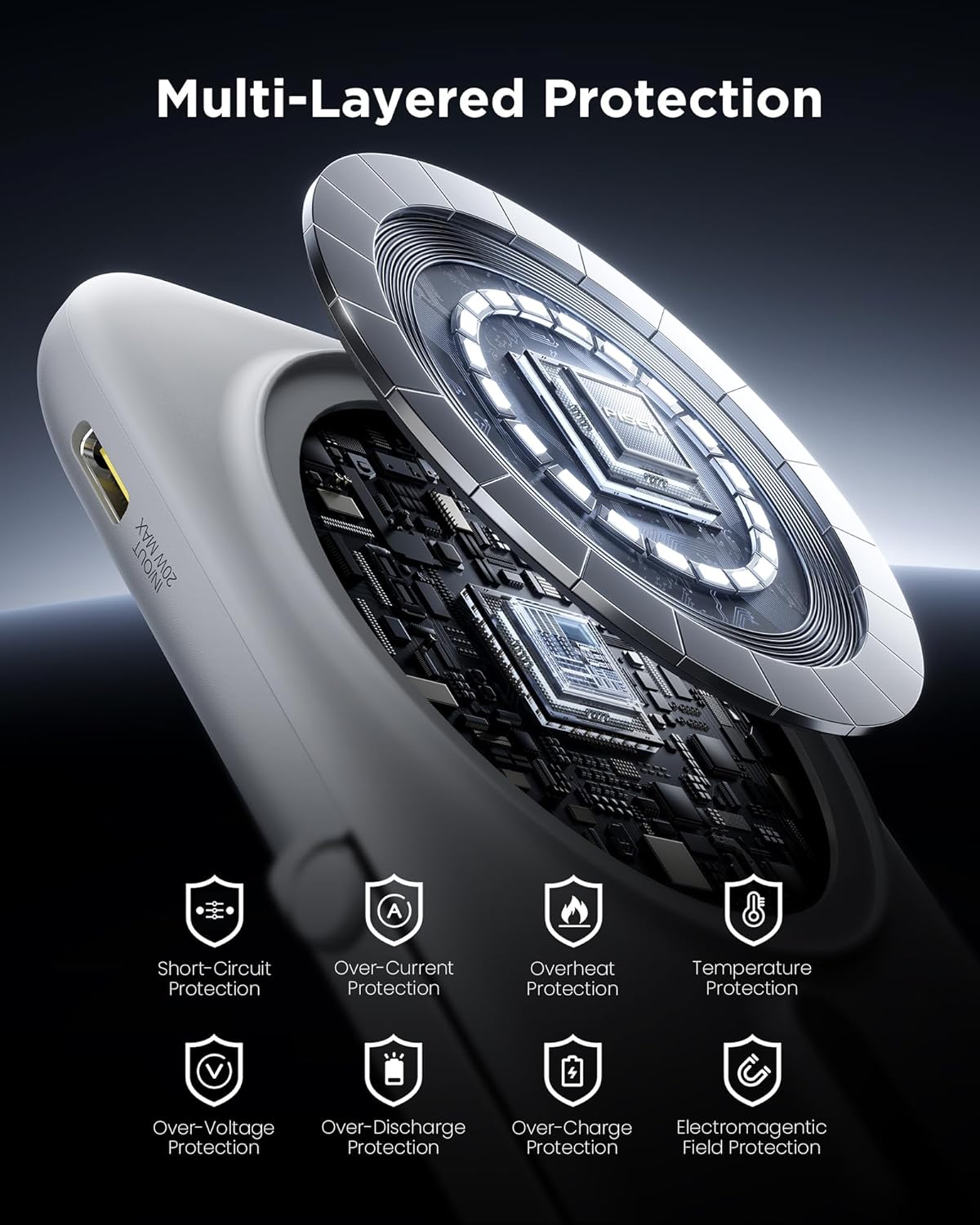
- Advanced Safety: Features NTC & smart chip temperature control and multi-layered protections including overdischarge, input voltage, short-circuit, over-current, and over-temperature protection.
- Certified & Flight-Approved: 3C and UL2056 certified, and flight-approved for safe travel.

This image illustrates the two primary charging methods: Mag-Safe wireless charging for iPhones and USB-C wired charging for various devices, showing the power bank attached to a phone and connected via cable.

The power bank is shown in a travel setting, highlighting its compact size (4.17x2.72x0.63 inches) and light weight (0.29 lb), making it ideal for travel and flight-approved.

This image demonstrates the versatility of the integrated foldable stand, allowing the power bank to prop up a phone for hands-free use during various activities like video calls or watching content.
A close-up view of the power bank securely attached to a smartphone via its N52 magnets, ensuring stable and precise alignment for charging without overlapping the camera.

An exploded view showing the internal components and various safety features, including short-circuit, over-current, overheat, temperature, over-voltage, over-discharge, over-charge, and electromagnetic field protection.
3. Setup
3.1 Initial Charging
- Before first use, fully charge your PISEN power bank.
- Connect the power bank to a USB-C power adapter (not included) using a USB-C to USB-C cable.
- The LED indicators on the power bank will illuminate to show the charging status. All indicators will be solid when fully charged.
3.2 Checking Battery Level
Press the power button once to check the remaining battery level. The LED indicators will light up to show the current charge:
- 4 LEDs: 75-100%
- 3 LEDs: 50-75%
- 2 LEDs: 25-50%
- 1 LED: 0-25%
4. Operating Instructions
4.1 Mag-Safe Wireless Charging
- Ensure your device is Mag-Safe compatible (e.g., iPhone 12 series and newer).
- Align the PISEN power bank with the back of your Mag-Safe compatible device. The strong N52 magnets will snap it into place.
- Wireless charging will begin automatically. The power bank supports 5W, 7.5W, 10W, and 15W wireless output, with 7.5W for iPhone series.
- For optimal wireless charging, use without a phone case or with a Mag-Safe compatible magnetic phone case. Avoid cases thicker than 2.5mm or non-magnetic cases, as they may affect charging efficiency.
4.2 USB-C Wired Charging
- Connect your device to the USB-C port on the power bank using a compatible USB-C to USB-C or USB-C to Lightning cable.
- The power bank will automatically detect and begin charging your device at up to 20W PD fast charging.
4.3 Simultaneous Charging
The power bank supports charging two devices simultaneously: one via Mag-Safe wireless and one via the USB-C port. The total shared output for simultaneous charging is 15W.
4.4 Using the Foldable Stand
Gently pull out the integrated metal stand from the back of the power bank. You can then prop up your phone in either portrait or landscape orientation for hands-free viewing while charging.
5. Maintenance
- Cleaning: Use a soft, dry cloth to clean the surface of the power bank. Do not use harsh chemicals or abrasive materials.
- Storage: Store the power bank in a cool, dry place away from direct sunlight and extreme temperatures.
- Safety: Avoid dropping, disassembling, or exposing the power bank to water or fire. Keep out of reach of children.
- Battery Care: To prolong battery life, fully charge and discharge the power bank at least once every three months if not in regular use.
6. Troubleshooting
- Power bank not charging: Ensure the USB-C cable and power adapter are functioning correctly and properly connected. Try a different cable or adapter.
- Device not charging wirelessly: Check if your device is Mag-Safe compatible. Ensure there are no foreign objects between the power bank and your device. Remove thick or non-magnetic phone cases.
- Device not charging via USB-C: Verify the cable is securely connected to both the power bank and your device. Try a different USB-C cable.
- Slow charging: Ensure you are using a fast-charging compatible cable and power adapter for optimal input/output speeds. Simultaneous charging may reduce individual device charging speeds.
- Magnetic connection is weak: Ensure your device is Mag-Safe compatible. Remove any non-magnetic cases or cases that are too thick.
- Power bank gets warm during use: It is normal for the power bank to become slightly warm during charging or discharging. If it becomes excessively hot, discontinue use and contact support.
7. Specifications
| Feature | Specification |
|---|---|
| Model Number | TP-D178 |
| Battery Capacity | 5000mAh |
| Wireless Output | 5W / 7.5W / 10W / 15W (Max) |
| USB-C Output | 20W (Max) |
| USB-C Input | 18W (Max) |
| Simultaneous Output | 15W (Max) |
| Dimensions (L x W x Th) | 4.17" x 2.72" x 0.63" |
| Weight | 0.29 lb |
| Battery Cell Type | Lithium Ion |
| Connector Type | USB Type C |
| Certifications | 3C, UL2056, Flight-Approved |
| Compatible Devices | Smartphones (iPhone 12-17 series), Tablets, AirPods, Smart Watches, Bluetooth Earbuds |
8. Warranty and Support
8.1 Warranty Information
The PISEN CCC Mag-Safe Power Bank (Model TP-D178) comes with a 1-year warranty from the date of purchase. This warranty covers manufacturing defects and ensures the product meets its specified performance standards under normal use. Please retain your proof of purchase for warranty claims.
8.2 Customer Support
For any questions, technical assistance, or warranty inquiries, PISEN offers 24/7 professional support. Please visit the official PISEN website or refer to the contact information provided with your product packaging to reach our customer service team.
9. Official Product Video
An official product video demonstrating the PISEN CCC Mag-Safe Power Bank's features, including its magnetic attachment, foldable stand, wired and wireless charging capabilities, and portability.
