Introduction
This manual provides comprehensive instructions for setting up, operating, maintaining, and troubleshooting your Lenovo IdeaPad 5 16AKP10 2-in-1 Laptop. Please read this manual thoroughly to ensure optimal performance and longevity of your device.
Product Overview
The Lenovo IdeaPad 5 16AKP10 is a versatile 16-inch 2-in-1 laptop designed for productivity and creativity. It features a WUXGA IPS touchscreen, AMD Ryzen AI 7 processor, and a flexible 360-degree hinge.
Key Features:
- AI-Driven Performance: Equipped with an AMD Ryzen AI 7 350 2.0GHz Processor and 50 TOPS NPU for enhanced AI workflows.
- Vivid Touchscreen: A 16-inch WUXGA IPS Low Blue Light Touchscreen with 1920x1200 resolution for clear and comfortable viewing.
- High-Speed Memory & Storage: Features 16GB LPDDR5x-6400 RAM and a 1TB Solid State Drive for fast performance and ample storage.
- Ultra-Fast Connectivity: Supports Wi-Fi 7 and Bluetooth 5.4 for reliable and high-speed wireless connections.
- Flexible 2-in-1 Design: A 360-degree hinge allows for multiple usage modes, including laptop, tent, stand, and tablet.
- Secure & User-Friendly: Includes Microsoft Pluton TPM 2.0, a 1080p IR webcam with privacy shutter, and a backlit keyboard with a dedicated Copilot key.
- ESET Home Security Essential: Comes with a 3-year license for comprehensive digital protection.
Visual Components:

Figure 1: The Lenovo IdeaPad 5 16AKP10 laptop displayed in tent mode, showcasing its flexible design, alongside the ESET Home Security Essential software box.
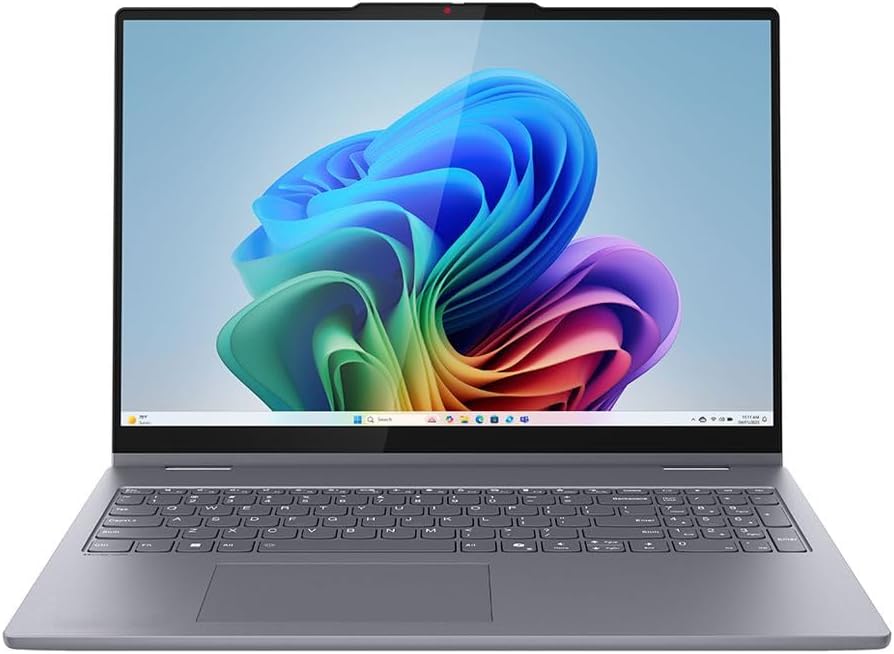
Figure 2: A direct front view of the Lenovo IdeaPad 5 16AKP10 laptop, open with the display active, highlighting the keyboard and trackpad.

Figure 3: An angled perspective of the Lenovo IdeaPad 5 16AKP10 laptop, showcasing its slim profile and screen clarity from the side.
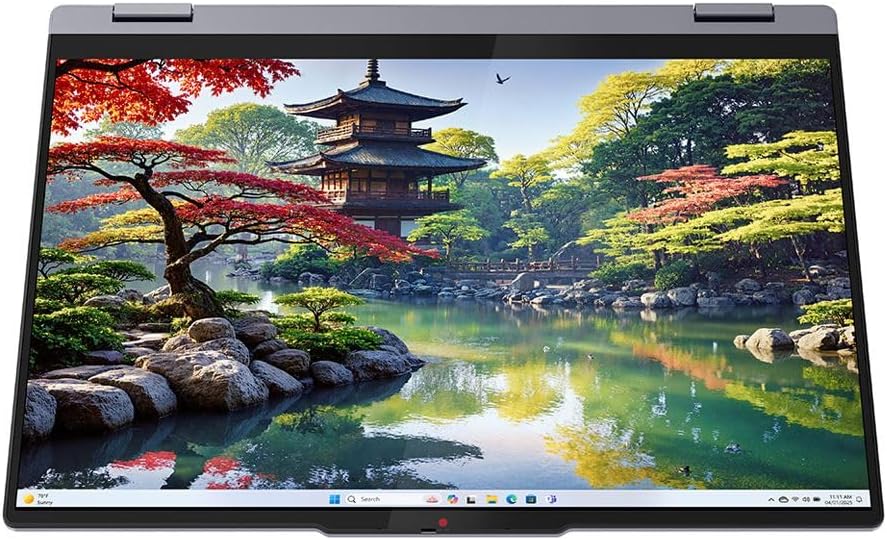
Figure 4: The Lenovo IdeaPad 5 16AKP10 configured in tablet mode, demonstrating its 360-degree hinge capability for touch-based interaction.

Figure 5: The rear view of the Lenovo IdeaPad 5 16AKP10 laptop, showing the chassis design and Lenovo branding.
Setup
- Unpack the Device: Carefully remove the laptop and all accessories from the packaging.
- Connect Power: Plug the power adapter into the laptop's charging port and then into a power outlet. Allow the battery to charge for at least 30 minutes before initial use.
- Power On: Open the laptop lid and press the power button, typically located on the side or top right of the keyboard deck.
- Initial Windows Setup: Follow the on-screen prompts to complete the Windows 11 Home setup, including language selection, network connection, and user account creation.
- ESET Anti-Virus Installation: Refer to the ESET Home Security Essential instructions provided separately to install and activate your 3-year anti-virus protection.
Operating Instructions
Using the 2-in-1 Functionality:
The 360-degree hinge allows the IdeaPad 5 to transform into various modes:
- Laptop Mode: Standard laptop configuration for typing and traditional computing.
- Tent Mode: Fold the display back to form an inverted 'V' shape, ideal for watching videos or presentations in confined spaces.
- Stand Mode: Fold the display back further, resting the keyboard face down, suitable for touch-based interaction or media consumption.
- Tablet Mode: Fold the display completely back against the base, converting the device into a large tablet for drawing, note-taking (with optional Lenovo Digital Pen), or browsing.
Touchscreen and Stylus Support:
Interact with the display using multi-touch gestures. For precise input, an optional Lenovo Digital Pen (sold separately) can be used for writing, drawing, and navigating.
Copilot Key:
Press the dedicated Copilot key on the keyboard to quickly access AI-powered assistance and features within Windows.
Connectivity:
- Wi-Fi 7: Connect to wireless networks for internet access. Navigate to Windows Settings > Network & Internet > Wi-Fi to manage connections.
- Bluetooth 5.4: Pair with Bluetooth-enabled devices such as headphones, mice, or keyboards. Access Bluetooth settings via Windows Settings > Bluetooth & devices.
Maintenance
- Cleaning: Use a soft, lint-free cloth slightly dampened with water or a screen cleaner to clean the display. For the keyboard and chassis, use a dry, soft cloth. Avoid harsh chemicals.
- Software Updates: Regularly check for and install Windows updates and Lenovo driver updates to ensure system stability and security. Access Windows updates via Settings > Windows Update.
- Battery Care: To prolong battery life, avoid extreme temperatures and do not leave the laptop fully charged or fully discharged for extended periods.
- Storage: When not in use, store the laptop in a cool, dry place away from direct sunlight.
Troubleshooting
| Problem | Possible Solution |
|---|---|
| Laptop does not power on. | Ensure the power adapter is securely connected and the outlet is functional. Try a different power outlet. If the battery is completely drained, it may take a few minutes to respond after plugging in. |
| Display is blank or flickering. | Restart the laptop. Check display settings in Windows. If connected to an external monitor, ensure the connection is secure. |
| Wi-Fi connection issues. | Verify Wi-Fi is enabled in Windows settings. Restart your router and the laptop. Check for updated Wi-Fi drivers. |
| Touchscreen not responding. | Restart the laptop. Ensure the screen is clean and free of debris. Check for updated touchscreen drivers in Device Manager. |
| System is slow or unresponsive. | Close unnecessary applications. Check Task Manager for processes consuming high resources. Ensure sufficient free storage space. Run a full system scan with ESET Anti-Virus. |
Specifications
| Feature | Detail |
|---|---|
| Brand | Lenovo |
| Model Name | IdeaPad 5 |
| Screen Size | 16 Inches |
| Hard Disk Size | 1000 GB (1TB SSD) |
| CPU Model | Ryzen AI 7 (AMD Ryzen AI 7 350 2.0GHz) |
| RAM Memory Installed Size | 16 GB (LPDDR5x-6400) |
| Operating System | Windows 11 Home |
| Special Features | Support Stylus, Webcam (1080p IR with privacy shutter), Fingerprint Reader, Backlit Keyboard, Copilot Key |
| Graphics Coprocessor | AMD Radeon 860M |
| Connectivity | Wi-Fi 7, Bluetooth 5.4 |
Warranty and Support
For information regarding your product's warranty, please refer to the warranty documentation included with your purchase or visit the official Lenovo support website. Technical support and service options are available through Lenovo's customer service channels.
The included ESET Home Security Essential comes with a 3-year license. For support related to the ESET software, please contact ESET customer support directly.
You can find additional support resources and contact information on the Lenovo Support Website.


