
1. Product Overview
The LIGE FV21-G Smart Watch is a versatile activity tracker designed for women, featuring a 1.43-inch AMOLED display, Bluetooth call functionality, and comprehensive health monitoring. This manual provides essential information for using your device effectively.

Image 1.1: LIGE FV21-G Smart Watch with mesh silver strap and an alternative pink silicone strap.
What's in the Box:
- 1 x LIGE FV21-G Smart Watch
- 1 x Mesh Strap
- 1 x Silicone Strap
- 1 x Instruction Manual
- 1 x Charging Cable
2. Setup Guide
2.1 Initial Charging
Before first use, fully charge your LIGE FV21-G Smart Watch. Connect the magnetic charging cable to the charging points on the back of the watch and plug the USB end into a compatible power source (e.g., computer USB port, USB wall adapter).

Image 2.1: Magnetic charging connection on the LIGE FV21-G Smart Watch.
2.2 App Installation and Pairing
- Download the "FitCloudPro" app from your smartphone's app store (compatible with Android 4.4+ or iOS 9.0+).
- Enable Bluetooth on your smartphone.
- On the watch, navigate to the settings and find the QR code. Scan this QR code using your smartphone's camera or the app's built-in scanner to initiate pairing.
- Follow the on-screen prompts in the app to complete the binding process. Ensure the watch remains within 10 meters of your phone for optimal data synchronization.
Video 2.2: This video demonstrates the unboxing and initial setup process, including app pairing for the LIGE FV21 Smart Watch.
2.3 Strap Replacement
The LIGE FV21-G Smart Watch comes with two interchangeable straps: a mesh silver strap and a silicone strap. To change the strap, locate the quick-release pins on the underside of the watch where the strap connects. Slide the pin to detach the current strap and attach the new one by aligning the pin with the lug holes and releasing it.

Image 2.3: The LIGE FV21-G Smart Watch includes both silicone and mesh straps.
3. Operating Instructions
3.1 Basic Navigation
- Touchscreen: Swipe left, right, up, or down to navigate through menus and features. Tap to select.
- Side Button: Press to wake the screen, return to the home screen, or access the app list.
3.2 Bluetooth Calling and Notifications
Once paired with your smartphone, the watch supports Bluetooth calls and notifications.
- Making/Answering Calls: Use the watch's dial pad or contact list to make calls. Incoming calls can be answered or declined directly from the watch.
- Notifications: Receive instant alerts for messages from apps like WhatsApp, Instagram, Facebook, and Twitter. Ensure push notifications are enabled in the FitCloudPro app settings.
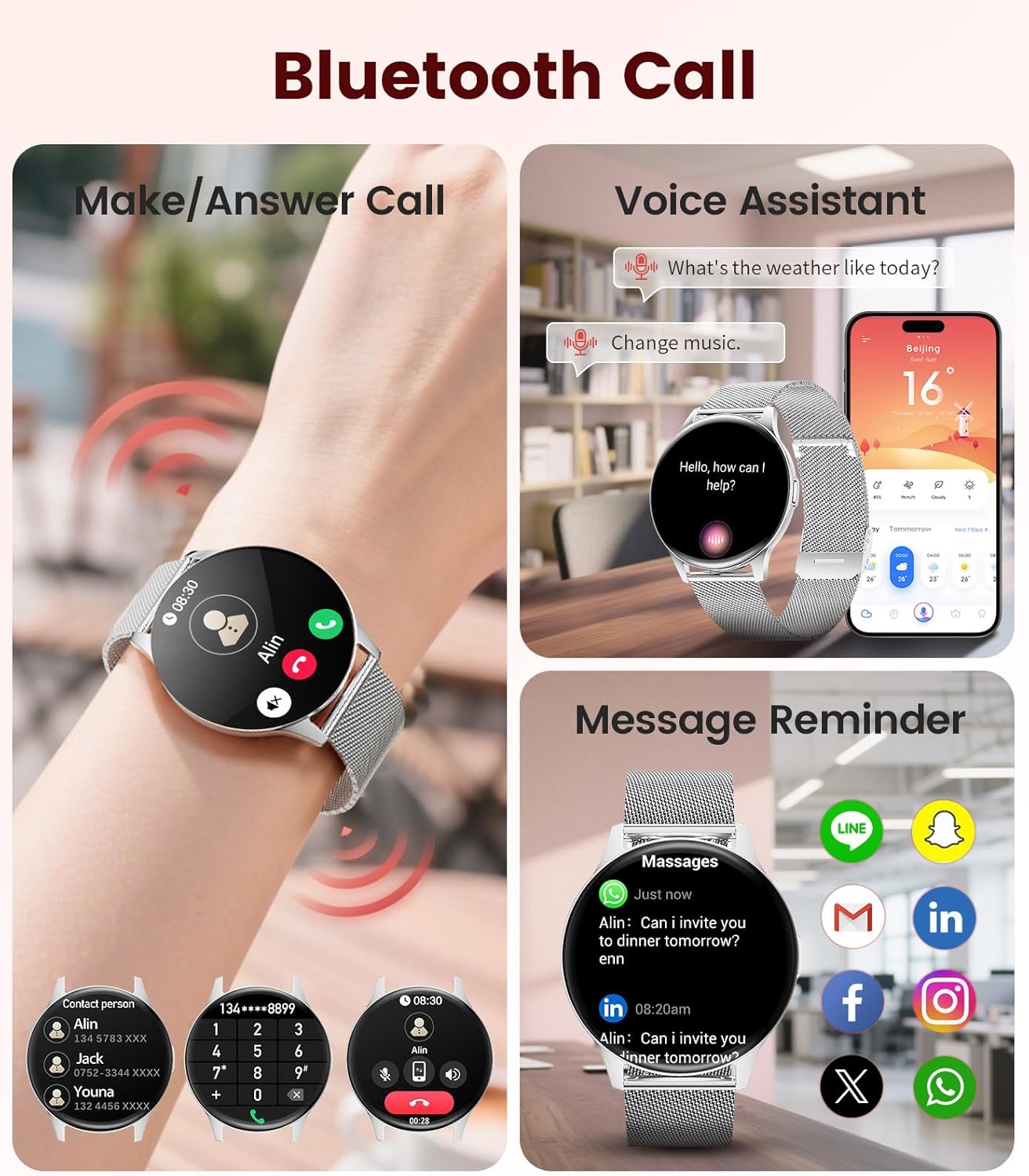
Image 3.1: Bluetooth call, voice assistant, and message reminder functions on the LIGE FV21-G Smart Watch.
3.3 Health Monitoring
The watch tracks various health metrics:
- Heart Rate: Monitors your heart rate continuously throughout the day.
- Blood Oxygen (SpO2): Measures your blood oxygen saturation levels.
- Sleep Monitoring: Tracks your sleep patterns, including deep sleep, light sleep, and awake times.
- Female Health Tracking: Provides menstrual cycle, ovulation, and safe period predictions. Set personalized reminders in the FitCloudPro app.

Image 3.2: Heart rate, blood oxygen, and sleep monitoring features.

Image 3.3: Female health and cycle tracking interface.
3.4 Sports Modes
The watch offers over 100 sports modes to track your activities. Select your desired sport from the watch menu to record data such as steps, distance, calories burned, and heart rate during exercise.

Image 3.4: Selection of over 100 sports modes.
3.5 Customizable Watch Faces
Choose from over 200 pre-designed watch faces or customize your own using photos through the FitCloudPro app.

Image 3.5: Customizable watch faces and app interface.
3.6 Additional Features
The LIGE FV21-G Smart Watch includes several other useful functions:
- Voice Assistant: Access your smartphone's voice assistant directly from the watch.
- Music Control: Control music playback on your smartphone.
- Remote Camera Control: Use the watch as a remote shutter for your smartphone camera.
- Weather Forecast: View current weather conditions and forecasts.
- Alarms & Timers: Set alarms and use timer functions.
- Find Phone: Locate your paired smartphone by making it ring.
- Sedentary Reminder: Receive alerts to move after periods of inactivity.
- Drinking Water Reminder: Get reminders to stay hydrated.
Video 3.6: This video highlights various features of the FV21 Smart Watch, including its design, sports modes, health monitoring, and smart functions like calls and notifications.
4. Maintenance
4.1 Cleaning Your Watch
- Regularly clean the watch screen and body with a soft, lint-free cloth.
- For the silicone strap, use mild soap and water. Rinse thoroughly and dry completely.
- For the mesh strap, use a soft brush to remove debris and wipe with a damp cloth. Ensure it is completely dry before wearing.
- Avoid using harsh chemicals or abrasive materials, as these can damage the watch.
4.2 Water Resistance
The LIGE FV21-G Smart Watch has an IP68 water resistance rating. This means it is resistant to dust and can withstand immersion in water up to 1.5 meters for up to 30 minutes. It is suitable for daily use, such as hand washing, rain, or brief splashes. However, it is not recommended for hot showers, saunas, or deep-water activities like swimming or diving, as steam and high water pressure can compromise the seals.

Image 4.1: The watch is IP68 waterproof, suitable for daily splashes.
4.3 Battery Care
- Charge the watch regularly to maintain battery health.
- Avoid extreme temperatures, which can degrade battery performance.
- If storing the watch for an extended period, charge it to about 50% and store it in a cool, dry place.
5. Troubleshooting
5.1 Watch Not Turning On
- Ensure the watch is fully charged. Connect it to the charger for at least 30 minutes.
- Press and hold the side button for 10-15 seconds to perform a forced restart.
5.2 Unable to Pair with Smartphone
- Make sure Bluetooth is enabled on your smartphone and the watch.
- Ensure the FitCloudPro app is installed and running.
- Keep the watch and smartphone close to each other (within 10 meters).
- Restart both the watch and your smartphone.
- If previously paired, try unpairing the device from your phone's Bluetooth settings and then re-pair through the app.
5.3 Inaccurate Health Data
- Ensure the watch is worn snugly on your wrist, but not too tight.
- Clean the sensors on the back of the watch.
- Environmental factors and individual physiology can affect sensor accuracy. The data is for reference and not for medical diagnosis.
5.4 Notifications Not Appearing
- Check if push notifications are enabled for specific apps within the FitCloudPro app.
- Ensure your smartphone's notification settings allow the FitCloudPro app to display alerts.
- Verify that the watch is connected via Bluetooth to your smartphone.
6. Specifications
| Feature | Detail |
|---|---|
| Model | FV21-G |
| Screen Size | 1.43 Inches AMOLED |
| Resolution | 466x466 HD |
| Thickness | 7.9 mm |
| Connectivity | Bluetooth 5.2 |
| Battery Capacity | 200 mAh |
| Battery Life | 5-7 days (typical use) |
| Water Resistance | IP68 |
| Compatibility | Android 4.4+ / iOS 9.0+ |
| App | FitCloudPro |
| Health Monitoring | Heart Rate, SpO2, Sleep, Female Health |
| Sports Modes | 100+ |
| Weight | 5.3 ounces |

Image 6.1: Product dimensions of the LIGE FV21-G Smart Watch.
7. Warranty and Support
LIGE provides professional customer service. If you encounter any questions regarding the quality, settings, or usage of your FV21 Smart Watch, please contact us through the Amazon platform where you purchased the product. Our team is dedicated to assisting you.
For further assistance, please refer to the contact information provided with your purchase or visit the official LIGE store on Amazon.
Note: Specific warranty terms and conditions may vary. Please consult your purchase documentation for detailed warranty information.


