
1. Introduction
Thank you for choosing the IAGREEA CG208 Conical Burr Coffee Grinder. This manual provides essential information for the safe and efficient operation, maintenance, and troubleshooting of your new coffee grinder. Please read all instructions carefully before first use and retain this manual for future reference.
2. Product Overview
The IAGREEA CG208 is an electric conical burr coffee grinder designed for precise and consistent grinding. It features 48 adjustable grind settings, an anti-static design, and versatile grounds collection tools to accommodate various brewing methods.
Key Features:
- Stainless Steel High-Hardness Burrs: Equipped with 420 stainless steel conical burrs for precise, low-temperature grinding, minimizing clumping.
- 48 Precise Grind Settings: Offers a wide range of settings suitable for espresso, pour-over, French press, and other brewing methods.
- Special Anti-Static Design: Reduces coffee powder flyaway for a cleaner grinding experience.
- One-Touch Operation: Simple button press to start grinding with timed settings.
- Versatile Grounds Collection: Includes interchangeable coffee grounds bowls and a detachable portafilter holder (compatible with 51mm and 58mm baskets).
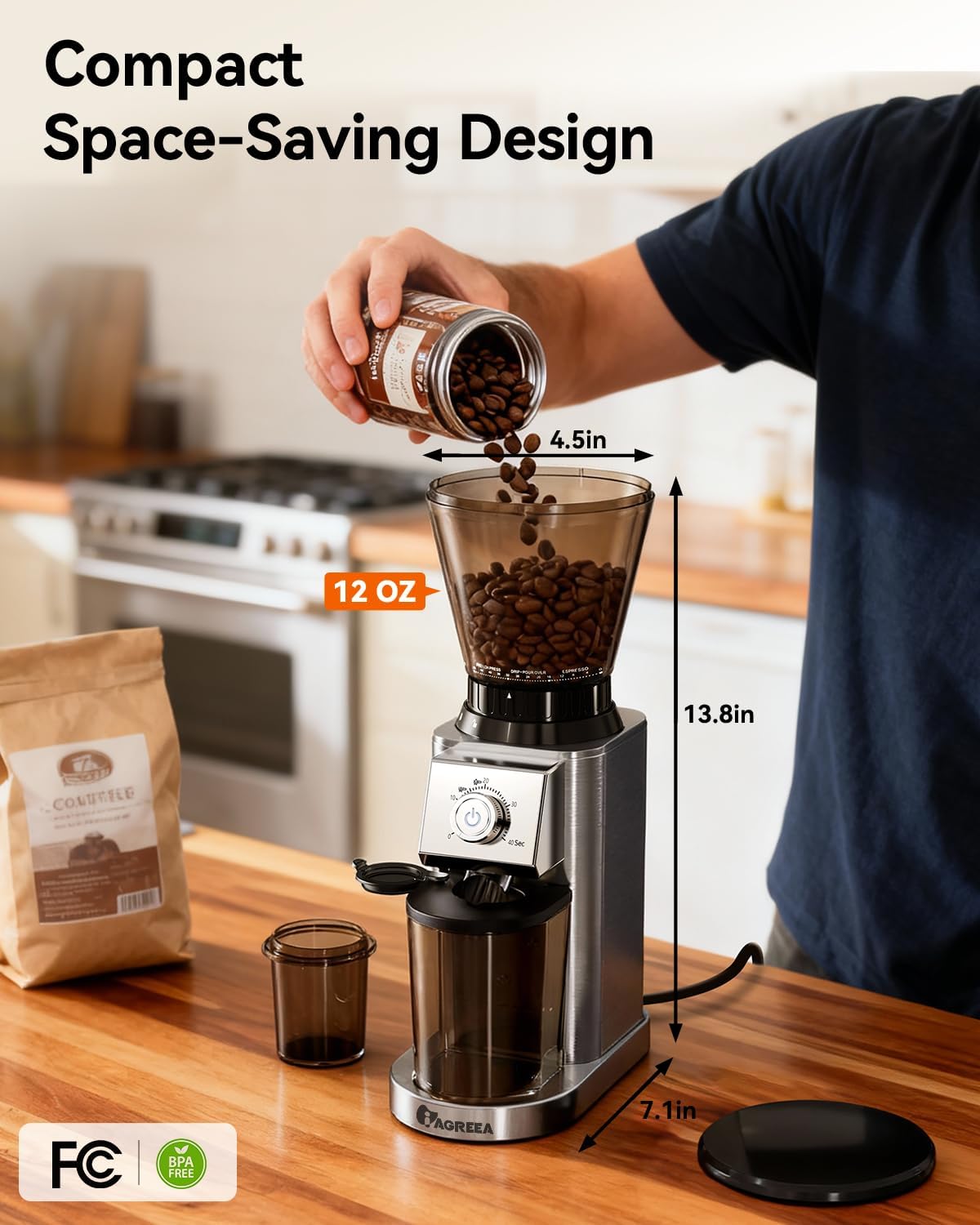
Figure 2.1: The IAGREEA CG208 Conical Burr Coffee Grinder, showcasing its compact design with the bean hopper and grounds container.
3. Setup
- Unpack: Carefully remove all components from the packaging. Verify that all parts listed in the 'Package Contents' (refer to Section 8) are present.
- Clean: Before first use, clean the bean hopper, grounds container, and removable burrs with a soft, damp cloth. Ensure all parts are completely dry before assembly.
- Assemble Bean Hopper: Place the bean storage container onto the grinder body. Rotate it clockwise until it locks securely into place. The grinder will not operate if the hopper is not correctly locked.
- Insert Grinding Disc: Ensure the detachable grinding disc is properly seated in the grinder body.
- Place Grounds Container: Position the desired grounds collection tool (grounds bowl or portafilter holder) under the grinding chute.
- Power Connection: Plug the power cord into a standard 120V electrical outlet.

Figure 3.1: Illustration of the conical burr coffee grinder assembly, highlighting the bean hopper and grounds container placement.
4. Operating Instructions
4.1 Filling the Bean Hopper
Open the lid of the bean hopper and pour whole coffee beans into the container. The hopper has a large 12oz capacity. Close the lid securely after filling.
4.2 Selecting Grind Size
The grinder offers 48 precise grind settings. Rotate the grind size selector ring located at the base of the bean hopper to your desired setting. Refer to the table below for recommended settings:
| Brewing Method | Recommended Grind Setting Range | Grind Type |
|---|---|---|
| Espresso | 0-16 | Fine |
| Drip / Pour Over | 16-32 | Medium |
| French Press | 32-48 | Coarse |

Figure 4.1: Visual guide to grind settings for French Press, Drip/Pour Over, and Espresso.
4.3 Setting Grind Time
Use the timer dial on the front panel to select the desired grinding duration, from 0 to 40 seconds. This allows for precise control over the amount of coffee ground.
4.4 Starting the Grinding Process
With the grounds collection tool in place and the grind time set, press the illuminated power button to start grinding. The grinder will automatically stop once the set time has elapsed.
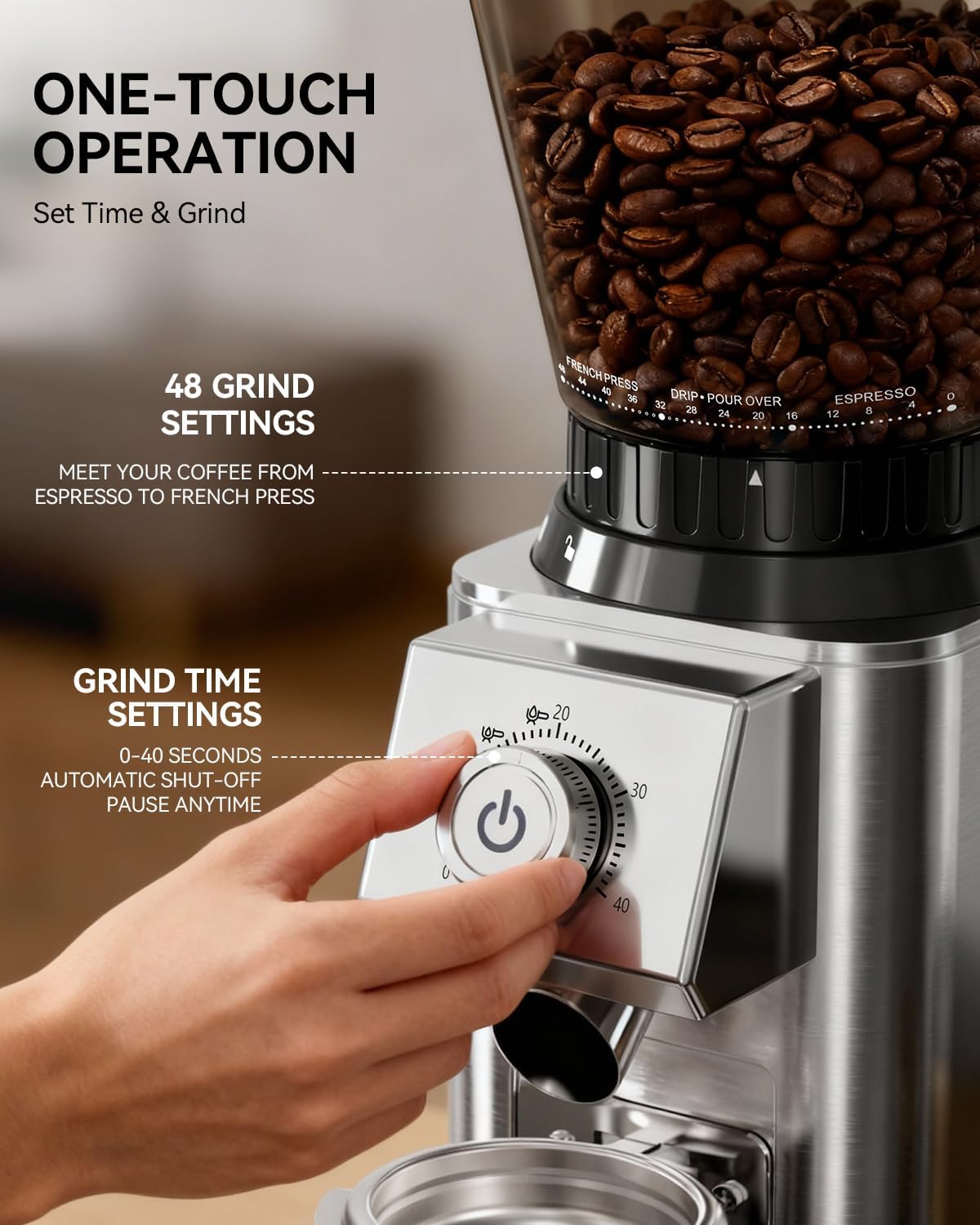
Figure 4.2: Close-up of the control panel showing the one-touch operation button and grind time settings.
4.5 Using the Portafilter Holder
The detachable portafilter holder can be attached to the grinder to allow direct grinding into your 51mm or 58mm portafilter basket. This minimizes mess and streamlines the espresso preparation process.

Figure 4.3: The coffee grinder demonstrating direct grinding into a portafilter using the included holder.
Video 4.1: Demonstration of the IAGREEA coffee grinder in use, highlighting its ease of operation and the quality of the grind.
5. Maintenance
Regular cleaning ensures optimal performance and extends the lifespan of your coffee grinder. Always unplug the grinder from the power outlet before cleaning.
5.1 Cleaning the Burrs
- Remove Bean Hopper: Rotate the bean hopper counter-clockwise to unlock and remove it from the grinder body.
- Remove Upper Burr: Gently lift the upper conical burr.
- Brush Clean: Use the provided cleaning brush to remove any residual coffee grounds from both the upper and lower burrs, as well as the grinding chamber.
- Reassemble: Reinsert the upper burr, ensuring it clicks into place. Then, reattach and lock the bean hopper.
5.2 Cleaning Other Parts
- Grounds Container/Portafilter Holder: Wash with warm, soapy water and rinse thoroughly. Ensure they are completely dry before reattaching.
- Grinder Body: Wipe the exterior of the grinder body with a soft, damp cloth. Do not immerse the grinder body in water.

Figure 5.1: Step-by-step guide for disassembling and cleaning the burrs of the coffee grinder.
Video 5.1: A user demonstrating the ease of operation and cleaning for the IAGREEA coffee grinder.
6. Troubleshooting
If you encounter any issues with your IAGREEA CG208 coffee grinder, please consult the following table before contacting customer support.
| Problem | Possible Cause | Solution |
|---|---|---|
| Grinder does not start | 1. Power cord not plugged in. 2. Bean hopper not securely locked. 3. Grind time not set. | 1. Ensure power cord is firmly plugged into an outlet. 2. Rotate bean hopper clockwise until it clicks into place. 3. Set the desired grind time using the dial. |
| Inconsistent grind | Burrs are dirty or clogged. | Clean the burrs thoroughly using the provided brush (refer to Section 5.1). |
| Excessive static/mess | Environmental factors or very dry beans. | The grinder has an anti-static design, but some static may occur. Ensure the grounds container is clean and dry. |
7. Specifications
- Model Number: CG208
- Brand: IAGREEA
- Color: Silver
- Grinding Mechanism: Conical Burr (420 Stainless Steel)
- Grind Settings: 48 Precise Settings
- Timed Grind: 0-40 Seconds
- Voltage: 120 Volts
- Item Weight: 5.63 pounds (2.56 Kilograms)
- Product Dimensions: 7.08"L x 4.53"W x 13.78"H
- Recommended Uses: Espresso, Pour-Over, French Press, Drip Coffee, Cold Brew, Single-Serve Coffee
8. Package Contents
The IAGREEA CG208 Conical Burr Coffee Grinder package includes the following items:
- Coffee grinder body
- Bean Storage Container
- Bean Storage Hopper Lid
- Large-Capacity Coffee Powder Container
- Small-Capacity Bottom Magnetic Powder Container
- Detachable Grinding Disc
- Detachable Powder Removal Bracket (Portafilter Holder)
- Cleaning Brush

Figure 8.1: An exploded view showing all components of the IAGREEA CG208 coffee grinder for easy identification.
9. Customer Support
For further assistance, product information, or warranty inquiries, please visit the official IAGREEA website or contact our customer service team. Contact details can typically be found on the product packaging or our official website.