Introduction
This manual provides essential information for the safe operation, assembly, maintenance, and troubleshooting of your QnQ SEL-H8 Electric Scooter. Please read this manual thoroughly before first use to ensure proper function and safety.

Image: The QnQ SEL-H8 Electric Scooter in its operational and folded states.
Safety Information
Your safety is paramount. Always adhere to local laws and regulations regarding electric scooter use. This scooter is UL2272 certified for safety and reliability.
General Safety Guidelines:
- Always wear a helmet and appropriate safety gear (knee pads, elbow pads).
- Do not ride in wet conditions, on slippery surfaces, or in heavy traffic.
- Ensure all components are securely fastened before each ride.
- Maintain a safe distance from other vehicles and pedestrians.
- Avoid sudden turns or maneuvers at high speeds.
- Do not exceed the maximum load capacity of 220 pounds.
- This scooter is designed for "Big Kids" as per age range description. Adult supervision is recommended for younger riders.

Image: Safety features including ultra-bright headlight, reflective strips, brake-activated taillight, and dual braking system.
Product Overview
Key Features:
- Motor: 250W Average Motor
- Max Speed: 15.5 mph (25 km/h)
- Max Range: Up to 12 miles per charge
- Tires: 8-inch solid rubber tires (maintenance-free, anti-puncture)
- Braking System: Dual Brakes (E-brake and rear fender foot brake)
- Load Capacity: 220 lbs (maximum)
- Special Features: Foldable design, Non-Slip Deck, Regenerative Braking System
- Certification: UL2272 Certified
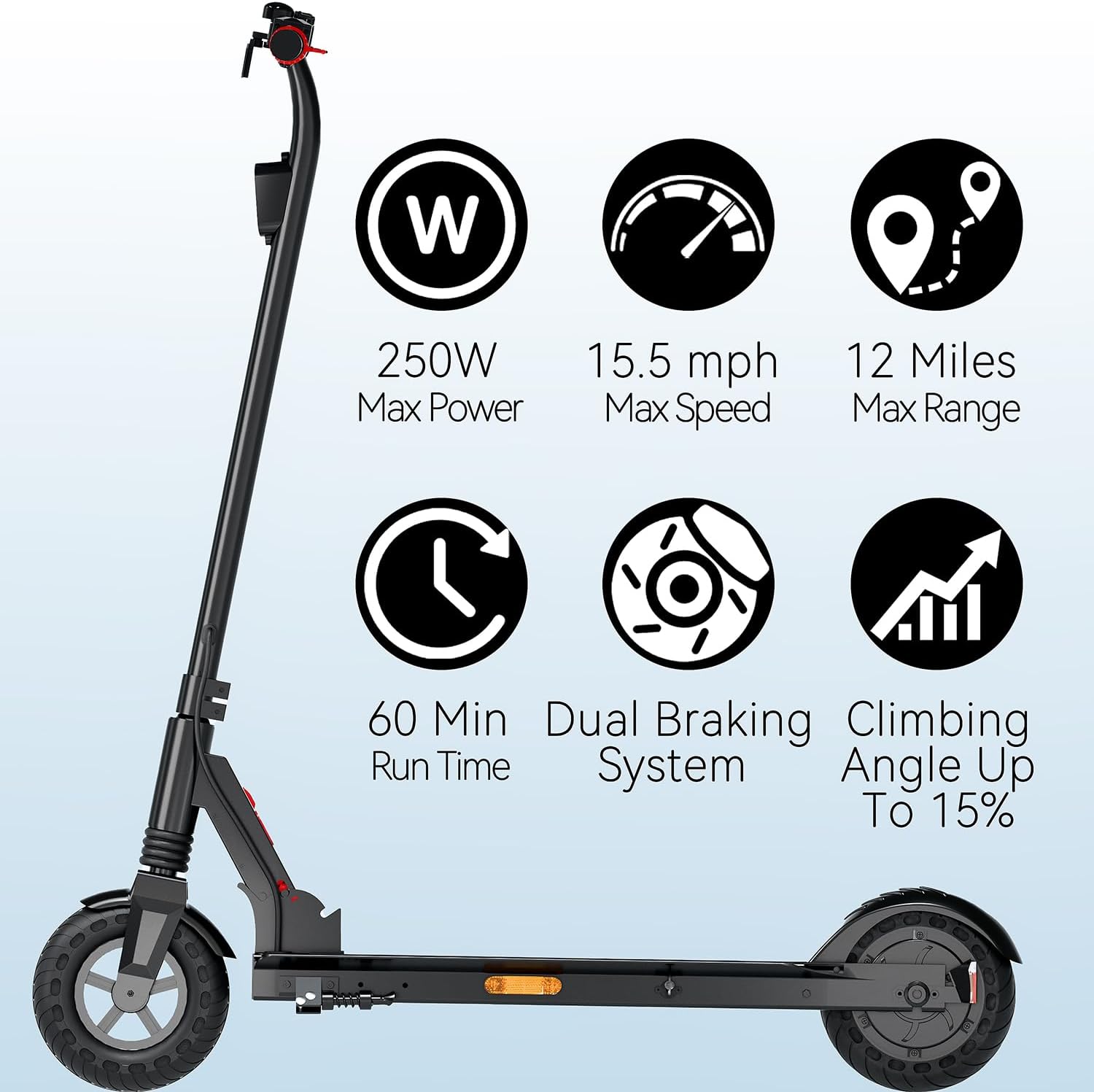
Image: Visual representation of key performance specifications.
Components:
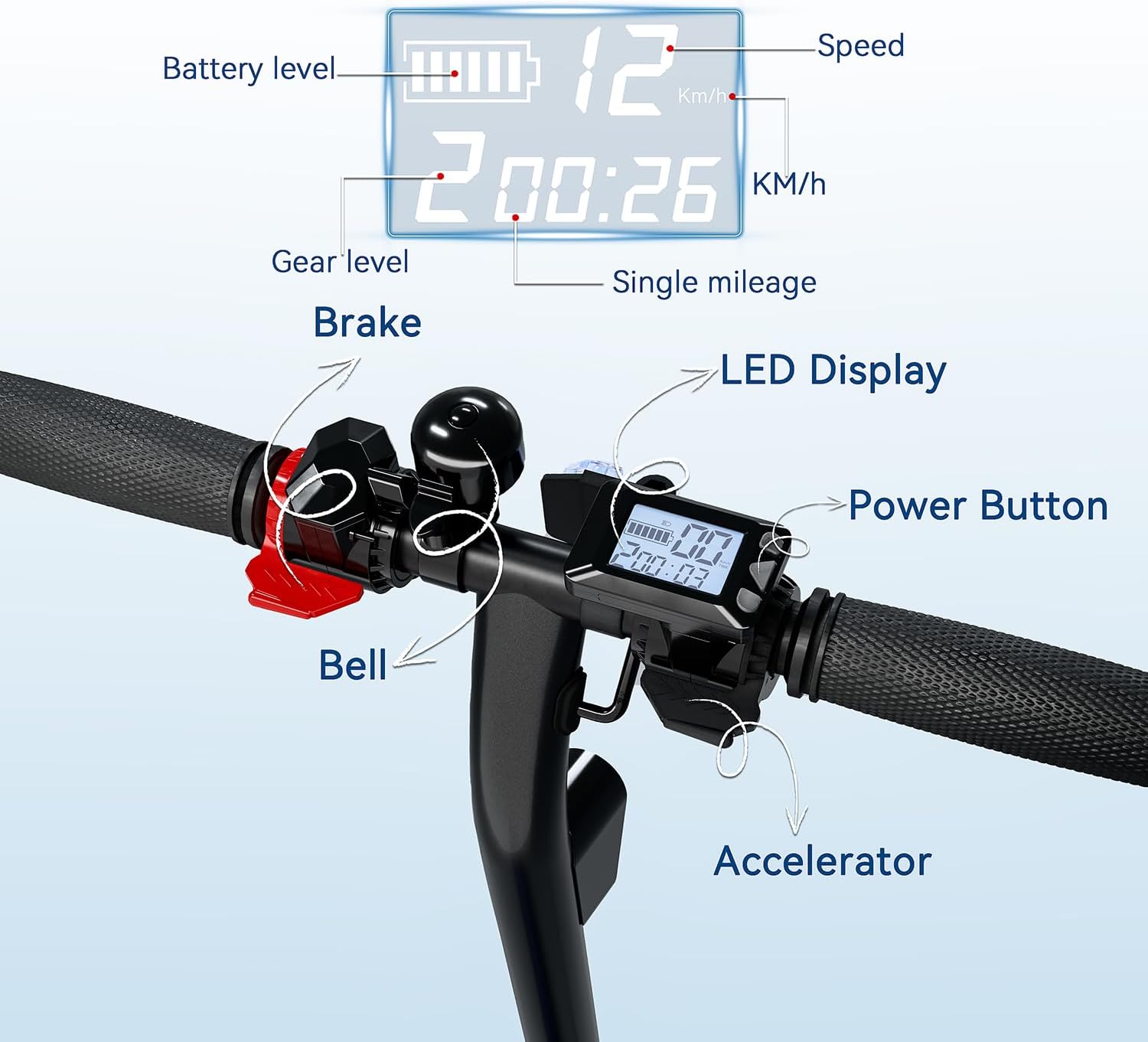
Image: Detailed view of the handlebar controls, including LED display, power button, bell, accelerator, and brake.
- Handlebar: Fixed type with grips.
- LED Display: Shows battery level, speed, gear level, and single mileage.
- Power Button: For turning on/off and mode selection.
- Accelerator: Thumb lever for speed control.
- Brake Lever: Activates the E-brake.
- Bell: For signaling.
- Headlight: Ultra-bright for visibility.
- Taillight: Brake-activated for rear visibility.
- Deck: Non-slip surface.
- Kickstand: For parking.
Setup and Initial Use
Unpacking:
Carefully remove all components from the packaging. Verify that all included components are present: Electric Scooter H8001, Charger, User Manual.
Assembly:
- Unfold the Scooter: Gently lift the handlebar stem until it locks into place. Ensure the folding mechanism is securely engaged.
- Attach Handlebars: If detached, slide the handlebars onto the stem and tighten any securing screws.
- Initial Charge: Before first use, fully charge the scooter battery. Refer to the "Charging" section for details.
Operating Instructions
Power On/Off:
- To Power On: Press and hold the Power Button on the handlebar until the LED display illuminates.
- To Power Off: Press and hold the Power Button until the LED display turns off.
Riding Modes (Speed Settings):
The scooter features three speed modes. Briefly press the Power Button while the scooter is on to cycle through the modes. The current mode will be indicated on the LED display.
- Mode 1 (Eco): Lowest speed, suitable for beginners or crowded areas.
- Mode 2 (Standard): Medium speed, balanced performance.
- Mode 3 (Sport): Maximum speed (up to 15.5 mph), for experienced riders in open areas.
Starting and Accelerating:
- Place one foot firmly on the deck.
- Push off with your other foot to gain initial momentum (kick-start).
- Once moving, gently press the Accelerator lever with your thumb to engage the motor and increase speed.
Braking:
The scooter is equipped with a dual braking system for responsive and reliable stops.
- E-brake: Pull the brake lever on the handlebar to activate the electronic brake. This also engages the regenerative braking system, converting kinetic energy back into battery power.
- Rear Fender Foot Brake: Press your foot down on the rear fender to engage the mechanical foot brake.
- For optimal stopping power, use both brakes simultaneously.
Charging
To charge your QnQ SEL-H8 Electric Scooter:
- Ensure the scooter is powered off.
- Locate the charging port, typically on the side of the deck.
- Connect the charger to the charging port, then plug the charger into a standard wall outlet.
- The charging indicator light on the charger will typically show red during charging and turn green when fully charged.
- A full charge takes approximately 6 hours. Do not overcharge.
- Disconnect the charger once charging is complete.
Important: Only use the charger provided with your scooter. Using an unauthorized charger may damage the battery and void your warranty.
Folding and Storage
The QnQ SEL-H8 features an easy-fold mechanism for convenient storage and transport.
To Fold:
- Ensure the scooter is powered off.
- Locate the folding latch or button near the base of the handlebar stem.
- Follow the specific instructions for your model to release the latch (e.g., push-button folding).
- Gently fold the handlebar stem downwards until it clicks into a locked position with the rear fender.
To Unfold:
- Release the folding latch.
- Lift the handlebar stem upwards until it locks securely into the riding position. Ensure it is fully locked before riding.

Image: Illustration of the scooter's folding mechanism and its compact form for carrying.
Maintenance
Regular maintenance ensures the longevity and safe operation of your scooter.
- Cleaning: Wipe the scooter with a damp cloth. Do not use high-pressure water or immerse the scooter in water.
- Tires: The 8-inch solid rubber tires are maintenance-free and anti-puncture, requiring no inflation. Periodically inspect them for wear or damage.
- Brakes: Regularly check the brake system for proper function. Ensure the brake lever provides firm resistance and the foot brake engages effectively.
- Fasteners: Periodically check all screws and bolts to ensure they are tight.
- Battery Care: Store the scooter in a cool, dry place. If storing for extended periods, charge the battery to about 50-70% every 30-60 days to prevent deep discharge.
Troubleshooting
| Problem | Possible Cause | Solution |
|---|---|---|
| Scooter does not power on. | Battery is depleted or not connected. | Charge the battery fully. Ensure all connections are secure. |
| Motor does not engage. | Scooter not kick-started, or accelerator issue. | Ensure you push off to gain initial momentum before pressing the accelerator. Check accelerator connection. |
| Reduced range or speed. | Low battery, riding conditions (hills, heavy load), or tire wear. | Fully charge the battery. Ride on flat surfaces. Check tire condition. |
| Brakes are not effective. | Brake cable loose or worn brake components. | Inspect brake cables and pads. Adjust or replace if necessary. |
If you encounter issues not listed here or require further assistance, please contact customer support.
Specifications
| Feature | Detail |
|---|---|
| Brand | QnQ |
| Model Name | SEL-H8 |
| Motor Power | 250W (Average) |
| Max Speed | 15.5 MPH (25 km/h) |
| Max Distance Range | 12 Miles |
| Weight Limit | 220 Pounds |
| Tire Size | 8 Inches |
| Tire Type | Solid Rubber (Anti-Puncture) |
| Brake Style | E-Brake, Rear Mudguard-Integrated Brake |
| Charging Time | 6 Hours |
| Frame Material | Alloy Steel |
| Product Dimensions (LxWxH) | 38.5" x 16.7" x 42.5" |
| Item Weight | 29 Pounds |
| Recommended Age Range | Big Kid |
| UL Certification | UL2272 Certified |
Warranty and Support
QnQ offers a 180-day limited warranty on critical parts of your electric scooter. This warranty covers manufacturing defects under normal use conditions.
For warranty claims, technical support, or any questions regarding your QnQ SEL-H8 Electric Scooter, please contact QnQ customer service. Refer to the contact information provided with your purchase or visit the official QnQ website.
When contacting support, please have your model name (SEL-H8) and purchase date available.


