
1. Introduction
This manual provides instructions for the assembly, operation, and maintenance of your GYMAX 2-in-1 Multi Game Table. This versatile tabletop game set allows for seamless transitions between foosball and hockey, offering entertainment for various ages and occasions. Please read this manual thoroughly before use to ensure proper setup and enjoyment of your game table.

Image 1.1: The GYMAX 2-in-1 Multi Game Table, illustrating both the foosball and hockey configurations, along with included accessories like soccer balls, pucks, and pushers.
2. Safety Information
- Ensure all components are securely assembled before playing.
- Keep small parts away from young children to prevent choking hazards.
- Do not stand or sit on the game table.
- Use only the provided accessories or approved replacements.
- Supervise children during play.
3. Package Contents
Verify that all items listed below are present in your package:
- 1 x 2-in-1 Game Table (Main unit)
- 2 x Soccer Balls
- 2 x Pucks
- 2 x Pushers
- 1 x User Guide (This document)

Image 3.1: A visual representation of the included accessories: two soccer balls, two red pucks, and two red pushers, alongside the foosball and hockey game boards.
4. Setup Instructions
The GYMAX 2-in-1 Multi Game Table is designed for straightforward assembly. Follow these general steps:
- Unpack Components: Carefully remove all parts from the packaging and lay them out on a clean, flat surface.
- Assemble Base (if applicable): If your model requires attaching legs or a base, follow the specific diagrams in the included user guide (if separate from this document) to secure them. For this tabletop model, ensure the main unit is stable.
- Install Game Rods (Foosball): For foosball, insert the player rods through the designated holes on the side of the table. Ensure the players are facing the correct direction and the handles are securely attached.
- Place Game Board: The game table features a reversible board.
- For Foosball: Place the board with the green foosball field facing upwards.
- For Hockey: Flip the board to display the white hockey rink surface upwards.
- Attach Scorers: Ensure the manual scorers are correctly positioned at each end of the table.
- Final Check: Verify that all connections are tight and the table is stable before beginning play.

Image 4.1: Detailed view of the game table's features, including non-slip grips on the handles, realistic player figures, convenient manual scorers, and goal boxes for ball retrieval.
5. Operating Instructions
5.1 Switching Between Games
To switch between foosball and hockey, simply remove the game rods (if playing foosball) and lift the game board. Flip the board to the desired game surface and place it back into the table frame. Reinsert the foosball rods if switching to foosball.

Image 5.1: Two children playing air hockey on the table, and a parent with a child playing foosball, demonstrating the dual functionality of the game set.
5.2 Playing Foosball
- Setup: Ensure the green foosball field is facing up. Place one soccer ball into the designated entry point or center of the field.
- Gameplay: Each player controls the rods on their side to move the player figures. Rotate and slide the rods to kick the ball towards the opponent's goal.
- Scoring: When a goal is scored, retrieve the ball from the goal box and adjust the manual scorer at your end of the table. The first player or team to reach a predetermined score wins.
5.3 Playing Hockey
- Setup: Ensure the white hockey rink is facing up. Each player takes a pusher and places a puck in the center of the rink.
- Gameplay: Use the pushers to hit the puck into the opponent's goal. The game relies on quick reflexes and hand-eye coordination.
- Scoring: When a goal is scored, retrieve the puck and adjust the manual scorer at your end of the table. The first player or team to reach a predetermined score wins.
6. Maintenance
- Cleaning: Wipe the game table surfaces with a soft, damp cloth. Avoid abrasive cleaners or solvents that could damage the finish.
- Storage: Store the game table in a dry place away from direct sunlight and extreme temperatures to prevent warping or damage.
- Rod Lubrication (Foosball): Periodically apply a small amount of silicone-based lubricant to the foosball rods for smooth operation.
- Check for Wear: Regularly inspect the table and accessories for any signs of wear or damage. Replace worn parts as needed.
7. Troubleshooting
- Sticky Foosball Rods: If rods are difficult to move, ensure they are clean and apply a silicone lubricant.
- Puck Not Sliding Smoothly (Hockey): Ensure the hockey surface is clean and free of debris.
- Missing Parts: Refer to the "Package Contents" section. If parts are missing upon arrival, contact customer support.
8. Specifications
| Feature | Detail |
|---|---|
| Model Number | GM2334 |
| Product Dimensions (L x W x H) | 27" x 15" x 4" (68.58 cm x 38.1 cm x 10.16 cm) |
| Net Weight | 7 lbs (3.18 kg) |
| Material | MDF, Stainless Steel, Plastic |
| Color | Natural Wood Finish |
| Games Included | Foosball, Hockey |
| Assembly Required | Yes |
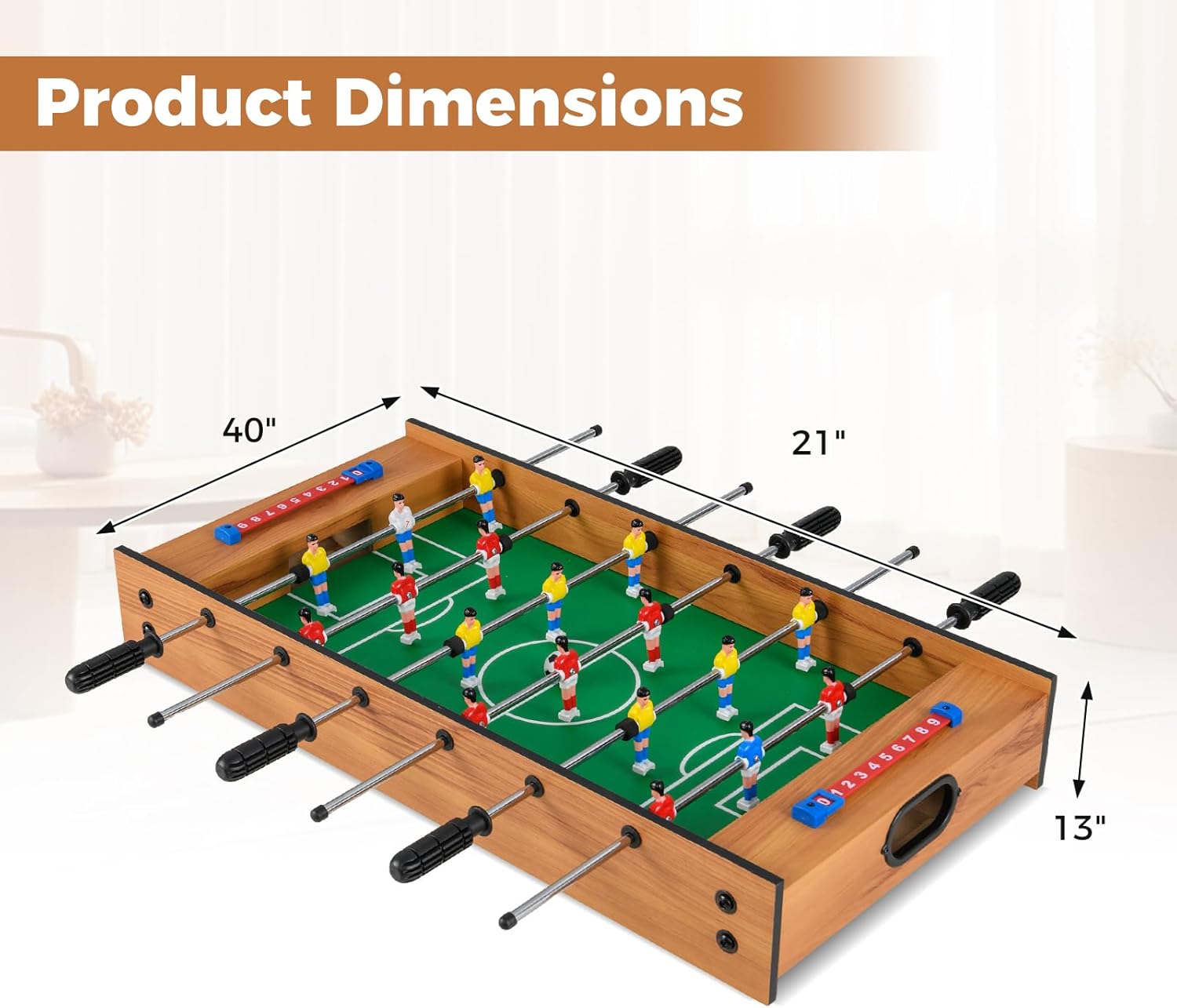
Image 8.1: A visual representation of the product dimensions. Note: The image depicts a larger table, but the product specifications confirm the tabletop model dimensions as 27"L x 15"W x 4"H.
9. Warranty and Support
9.1 Warranty Information
This GYMAX product comes with a 90-day warranty from the date of purchase. This warranty covers manufacturing defects and workmanship under normal use. It does not cover damage resulting from misuse, accidents, unauthorized modifications, or normal wear and tear.
9.2 Customer Support
For any questions, concerns, or assistance with your GYMAX 2-in-1 Multi Game Table, please contact our customer support team. Please have your model number (GM2334) and purchase information ready when contacting support.
Contact information can typically be found on the GYMAX official website or through your retailer's customer service portal.
