
1. Introduction
This manual provides detailed instructions for the setup, operation, maintenance, and troubleshooting of your LIGE DM6 GPS Smart Watch. Please read this manual thoroughly before using the device to ensure proper functionality and to maximize your user experience.
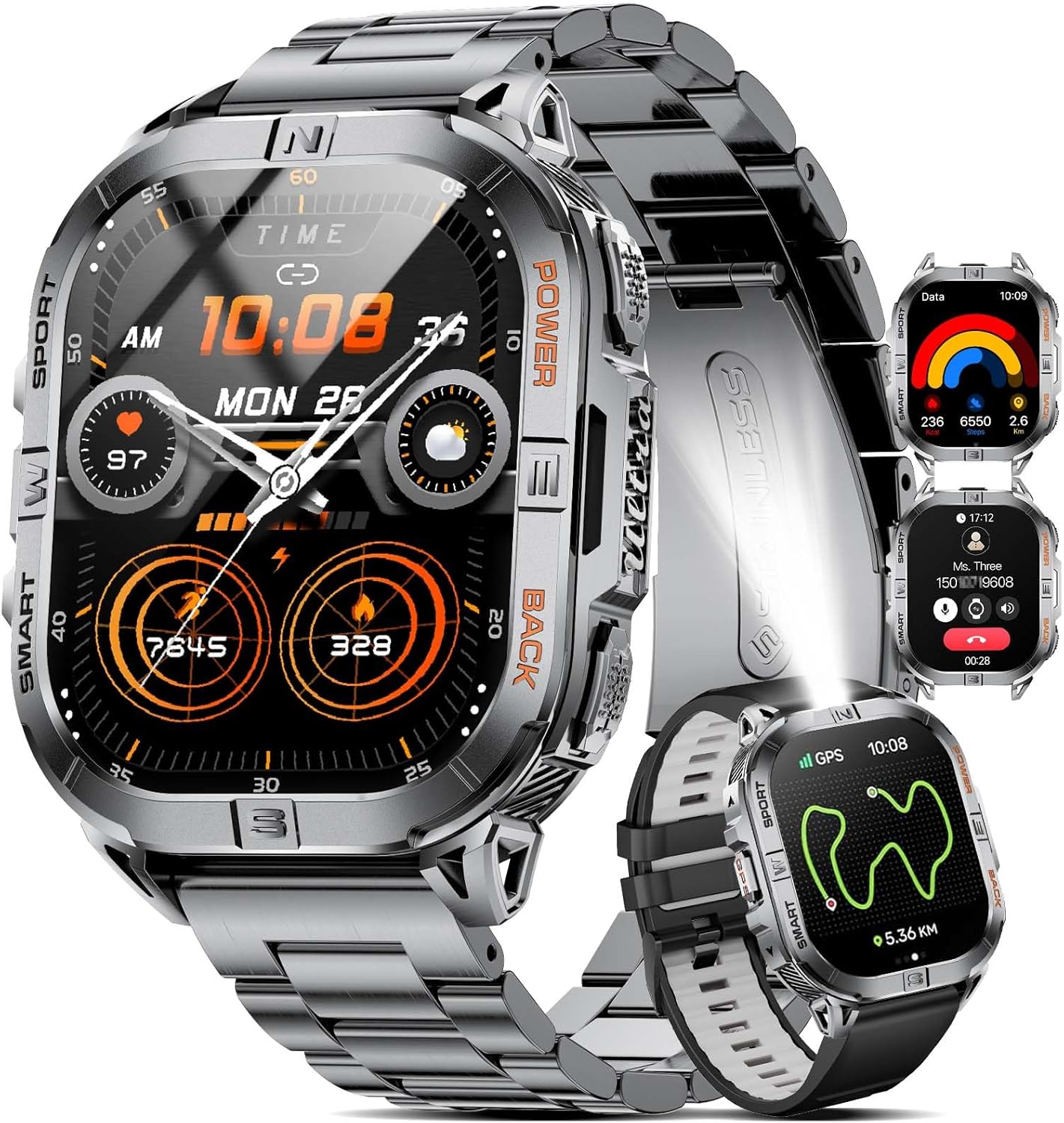
Image 1.1: The LIGE DM6 GPS Smart Watch, showcasing its main display and interchangeable straps.
2. What's in the Box
Upon opening your LIGE DM6 GPS Smart Watch package, you should find the following items:
- LIGE DM6 Smart Watch
- Type-C Charging Cable
- USB Charging Cable
- Stainless Steel Strap
- Silicone Strap
- Accessory Tools (for strap adjustment)
- Instruction Manual (this document)
3. Setup
3.1. Charging the Smart Watch
Before initial use, fully charge your LIGE DM6 Smart Watch. The watch is equipped with a 600mAh battery.
- Connect either the provided Type-C or USB charging cable to a compatible power source (e.g., computer USB port, wall adapter).
- Attach the magnetic end of the charging cable to the charging contacts on the back of the watch. The magnets will ensure correct orientation.
- The watch display will indicate charging status. A full charge typically takes approximately 2 hours.
Note: The watch is designed for long battery life, offering several days of use on a single charge.

Image 3.1: The LIGE DM6 Smart Watch connected to its charging cable, highlighting its 600mAh battery capacity.
3.2. Installing Watch Straps
Your LIGE DM6 Smart Watch comes with both a stainless steel strap and a silicone strap. You can switch between them using the quick-release spring bars.
- To remove a strap, locate the quick-release pin on the underside of the strap where it connects to the watch body. Slide the pin inwards and gently pull the strap away from the watch.
- To attach a strap, insert one end of the spring bar into the lug hole on the watch. Slide the quick-release pin inwards, align the other end of the spring bar with the opposite lug hole, and release the pin. Gently tug the strap to ensure it is securely fastened.
- For the stainless steel strap, use the provided accessory tool to adjust the link length for a comfortable fit.
3.3. App Download and Pairing
To unlock the full features of your LIGE DM6 Smart Watch, download the companion application and pair it with your smartphone.
- The recommended application is GloryFitPro. Search for "GloryFitPro" in your smartphone's app store (Google Play Store for Android, Apple App Store for iOS).
- Install the application on your smartphone.
- Ensure Bluetooth is enabled on your smartphone and the watch is powered on.
- Open the GloryFitPro app, follow the on-screen instructions to create an account (if required), and search for your LIGE DM6 device.
- Select your watch from the list of available devices to initiate the pairing process. Confirm any pairing requests on both your phone and watch.
Compatibility: Requires iOS 11.0 or above (iOS 13.0+ for calls) or Android 5.0 or above, with Bluetooth 4.0 or higher.
4. Operating Instructions
4.1. Basic Controls and Display
The LIGE DM6 Smart Watch features a 2.13-inch AMOLED HD touchscreen and multiple physical buttons for navigation.
- Touchscreen: Swipe left/right, up/down to navigate menus and access different functions. Tap to select.
- Top Right Button (Power): Short press to turn the display ON/OFF. Long press to access the power down menu.
- Bottom Right Button (Back): Can be assigned a function with a short press. A long press brings up the timer menu. In other menus, it functions as a back button.
- Left Button (GPS): A short press brings up the GPS tracked exercise options.
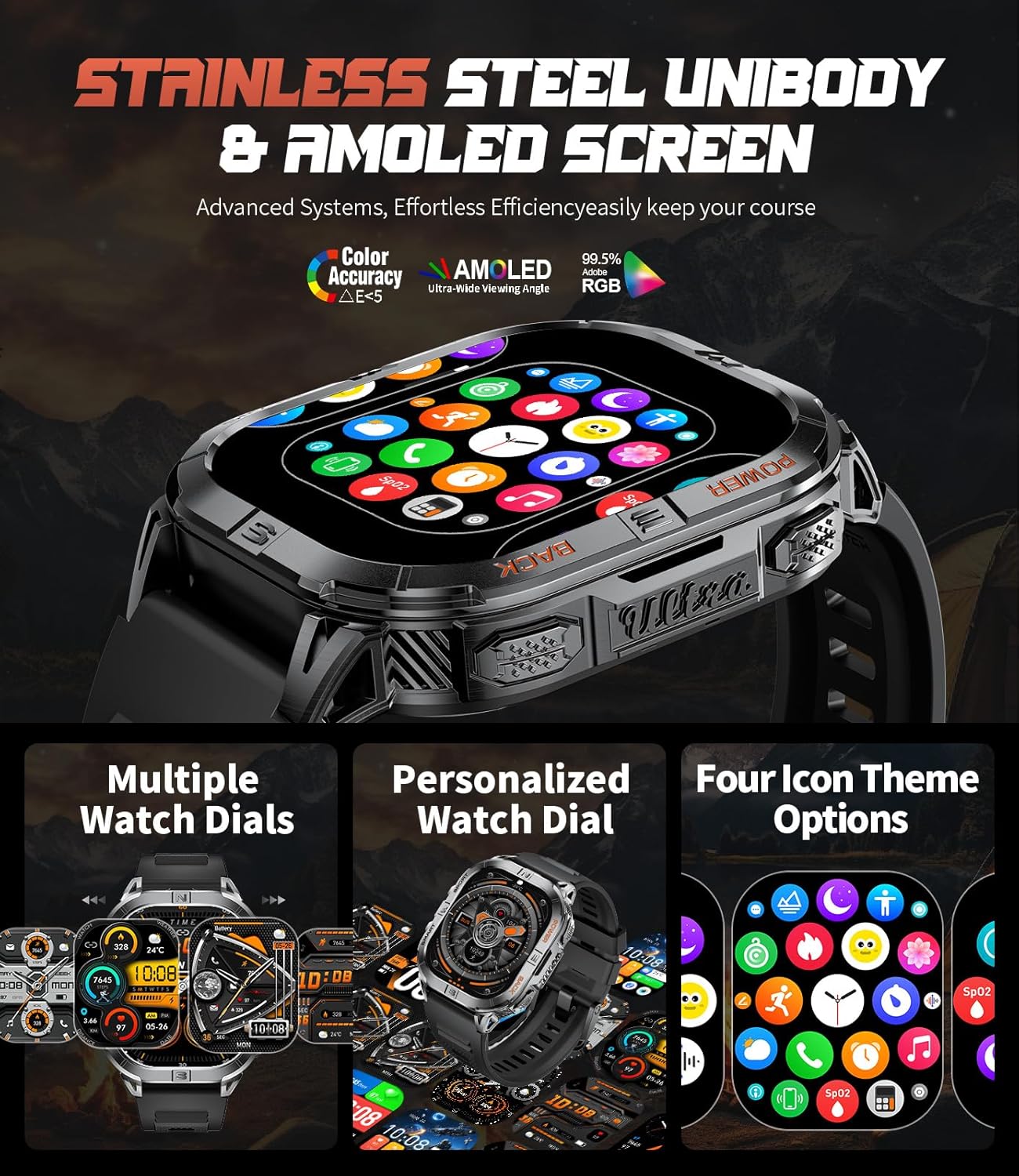
Image 4.1: The LIGE DM6 Smart Watch displaying its vibrant AMOLED screen and various customizable watch faces.
4.2. Bluetooth Calls and Notifications
Once paired with your smartphone, the DM6 allows you to manage calls and receive notifications directly on your wrist.
- Answering/Making Calls: With Bluetooth 5.3 connectivity, you can answer incoming calls or dial out directly from the watch. The watch has a built-in speaker and microphone.
- Message Notifications: Receive alerts for messages from various applications (e.g., SMS, WeChat, WhatsApp, Facebook, Instagram) directly on your watch display.

Image 4.2: The LIGE DM6 Smart Watch demonstrating its Bluetooth call functionality and displaying various message notifications.
4.3. GPS Sports Trajectory Tracking & Compass
The DM6 features built-in GPS and an electronic compass for outdoor activities.
- GPS Tracking: Accurately records your movement trajectories, distance, and speed during outdoor sports like running, cycling, and hiking.
- Compass: Provides real-time directional guidance, helping you navigate and avoid getting lost during adventures.
- Altimeter & Barometer: Measures current altitude and records changes in air pressure for 24 hours, useful for outdoor enthusiasts.
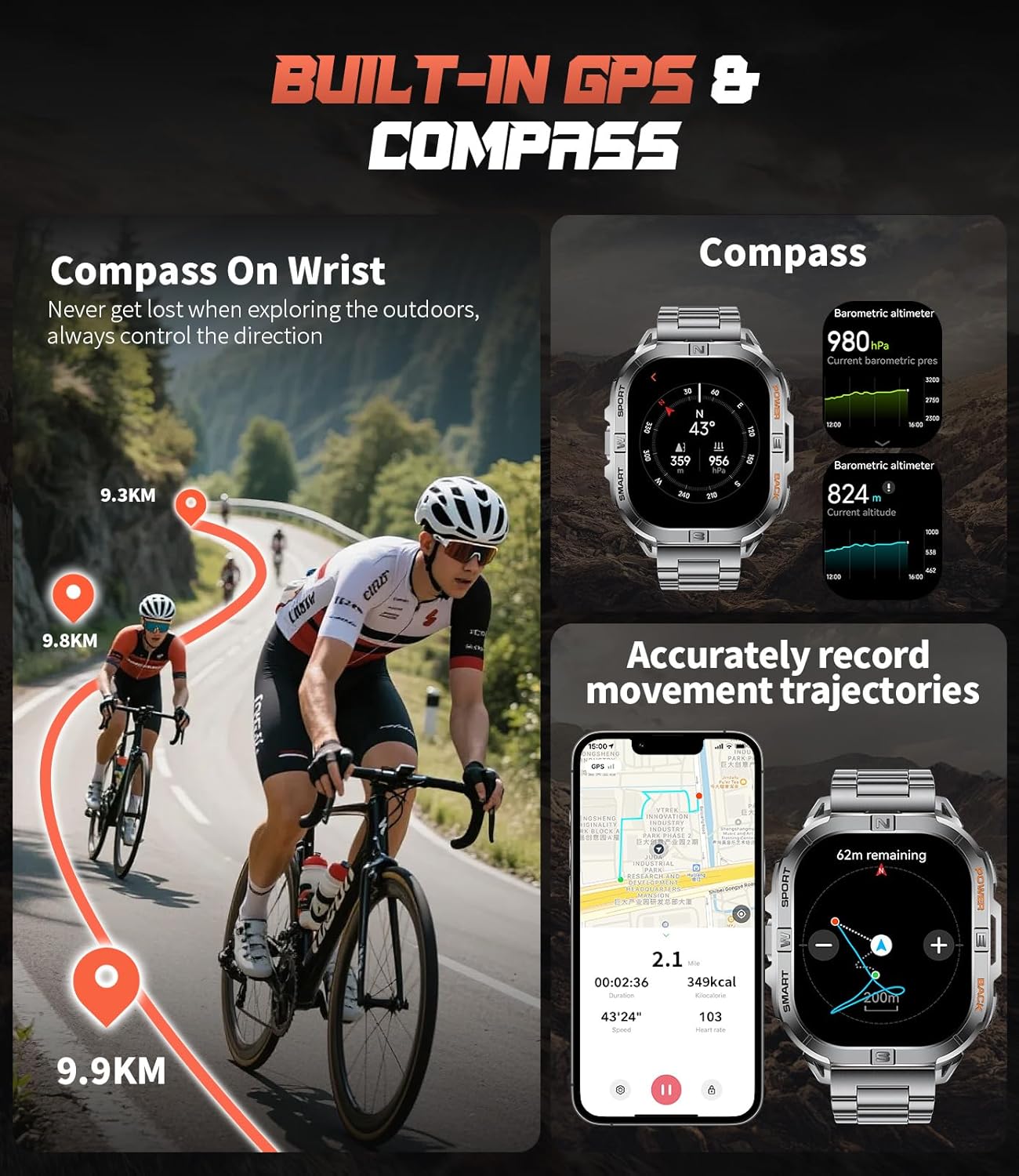
Image 4.3: The LIGE DM6 Smart Watch showcasing its integrated GPS for tracking movement and a digital compass for navigation.

Image 4.4: The LIGE DM6 Smart Watch providing outdoor assistance with displays for compass direction, current altitude, and barometric pressure.
4.4. LED Flashlight
The watch includes a convenient LED flashlight for various situations.
- Activation: Long press the bottom right button for 3 seconds to turn the flashlight ON/OFF. It can also be accessed via the watch's menu.
- Usage: Useful for night runs, camping, power outages, or other low-light conditions.

Image 4.5: The LIGE DM6 Smart Watch with its powerful LED flashlight illuminated, useful for various low-light scenarios.
4.5. Sports Modes
The DM6 supports over 170 sports modes to accurately track your exercise data.
- Selection: Access the sports modes menu via the watch interface or the dedicated GPS button.
- Tracking: Records data such as steps, distance, calorie consumption, and heart rate during activities like running, cycling, swimming, and gym training.

Image 4.6: The LIGE DM6 Smart Watch displaying its extensive range of over 100 sports modes for comprehensive activity tracking.
4.6. Health Monitoring
The watch provides various health monitoring features to help you track your well-being.
- Heart Rate Monitor: Continuously tracks your heart rate.
- Sleep Tracking: Monitors sleep stages (deep sleep, light sleep, awake time) and duration.
- Pedometer: Counts your daily steps and calculates distance.
- Stress Tracker: Provides insights into your stress levels.
- Calorie Counter: Estimates calories burned based on activity.

Image 4.7: The LIGE DM6 Smart Watch showcasing its health monitoring capabilities, including heart rate, stress levels, and detailed sleep tracking.
4.7. Additional Features
- Voice Assistant: Supports intelligent voice assistant for hands-free operation.
- Music Control: Control music playback on your smartphone (switch songs, adjust volume).
- Remote Camera Control: Use the watch to remotely trigger your phone's camera.
- Weather Forecast: Displays current weather information (requires app synchronization).
- Alarm Clock, Timer, Stopwatch, Calculator, Find Phone, Drinking Water Reminder, Sedentary Reminder, Do Not Disturb Mode.
5. Maintenance
5.1. Water Resistance
The LIGE DM6 Smart Watch has an IP68 waterproof rating, meaning it is resistant to dust and can withstand immersion in water up to 1.5 meters for 30 minutes. It is suitable for daily use, hand washing, and light rain.
- Avoid prolonged immersion in water, hot water, or steam.
- Do not operate the watch buttons underwater.
- After contact with water, especially saltwater, wipe the watch dry with a soft cloth.
5.2. Cleaning
Regular cleaning helps maintain the watch's appearance and functionality.
- Wipe the watch body and screen with a soft, lint-free cloth.
- For stubborn dirt, slightly dampen the cloth with water. Avoid using harsh chemicals or abrasive materials.
- Clean the charging contacts periodically to ensure proper charging.
- Clean the straps regularly, especially the silicone strap, to prevent skin irritation from sweat and dirt.
5.3. Battery Care
To prolong battery life:
- Avoid extreme temperatures.
- Charge the watch fully before long periods of inactivity.
- Do not let the battery completely drain frequently.
6. Troubleshooting
6.1. Watch Not Turning On
- Ensure the watch is fully charged. Connect it to the charger for at least 30 minutes.
- Try a long press on the power button (top right).
6.2. Unable to Pair with Smartphone
- Ensure Bluetooth is enabled on your smartphone and the watch.
- Make sure the watch is within Bluetooth range of your phone.
- Restart both your watch and smartphone.
- Check if the GloryFitPro app is updated to the latest version.
- If previously paired, try unpairing the device from your phone's Bluetooth settings and then re-pairing through the app.
6.3. Inaccurate Data Readings (e.g., steps, heart rate)
- Ensure the watch is worn snugly on your wrist, not too loose or too tight.
- Clean the sensors on the back of the watch.
- For GPS tracking, ensure you are in an open area with a clear view of the sky.
6.4. App Syncing Issues
- Open the GloryFitPro app manually to initiate synchronization. Some data may not sync automatically in the background.
- Ensure your phone has a stable internet connection.
7. Specifications
| Feature | Detail |
|---|---|
| Model Number | DM6 |
| Display | 2.13 Inches AMOLED HD Screen (410*502 resolution) |
| Battery Capacity | 600 mAh Lithium Polymer |
| Operating System | AsteroidOS |
| Connectivity | Bluetooth 5.3 |
| Water Resistance | IP68 |
| Sensors | GPS, Compass, Heart Rate, Pedometer, Barometric Altimeter |
| Special Features | 170+ Sports Modes, LED Flashlight, Bluetooth Calls, Notifications, Voice Assistant, Music Control, Remote Camera, Sleep Tracking, Stress Tracker, Calorie Counter, Alarm Clock, Timer, Stopwatch, Calculator, Find Phone, Drinking Water Reminder, Sedentary Reminder, Do Not Disturb Mode, Multi-Language |
| Compatibility | iOS 11.0+ (iOS 13.0+ for calls), Android 5.0+, BT4.0+ |
| Item Weight | 9.6 ounces |
| Dimensions | 8.07 x 3.74 x 0.91 inches (Package) |
8. Warranty and Support
Your LIGE DM6 Smart Watch comes with a 24-month warranty.
For any issues, questions, or concerns regarding accessories, quality, operation, or charging, please contact LIGE customer support. We offer 24-hour online support and aim to provide a solution within 24 hours.
Please refer to the contact information provided in your product packaging or visit the official LIGE website for support details.


