
Introduction
The ZOERAX WXQ-778-RE-T1 is an all-in-one tool designed for terminating Ethernet cables. It integrates cutting, stripping, and crimping functions into a single device, supporting various connector types including Cat5, Cat5e, Cat6, Cat6A, and Cat7 for both shielded and unshielded applications. This tool is engineered for efficiency and precision, particularly with pass-through RJ45 connectors.
Product Overview

Figure 1: Overview of the ZOERAX WXQ-778-RE-T1 Modular RJ45 Crimping Tool, highlighting its multi-functional design for cutting, stripping, and crimping various connectors.
This tool combines multiple functions to streamline network cable preparation. It features dedicated sections for cutting cable, stripping the outer jacket, and crimping both the connector and the metal clip for shielded connectors. The design includes clear markings for wire sequence to assist with correct pin alignment.
Setup
- Unlocking the Tool: The tool may be locked in a closed position for storage. To unlock, firmly press the handles together, and the locking pin should release, allowing the handles to open.
- Adjusting the Strain Latch Presser Bar: For optimal crimping, adjust the strain latch presser bar according to your cable type.
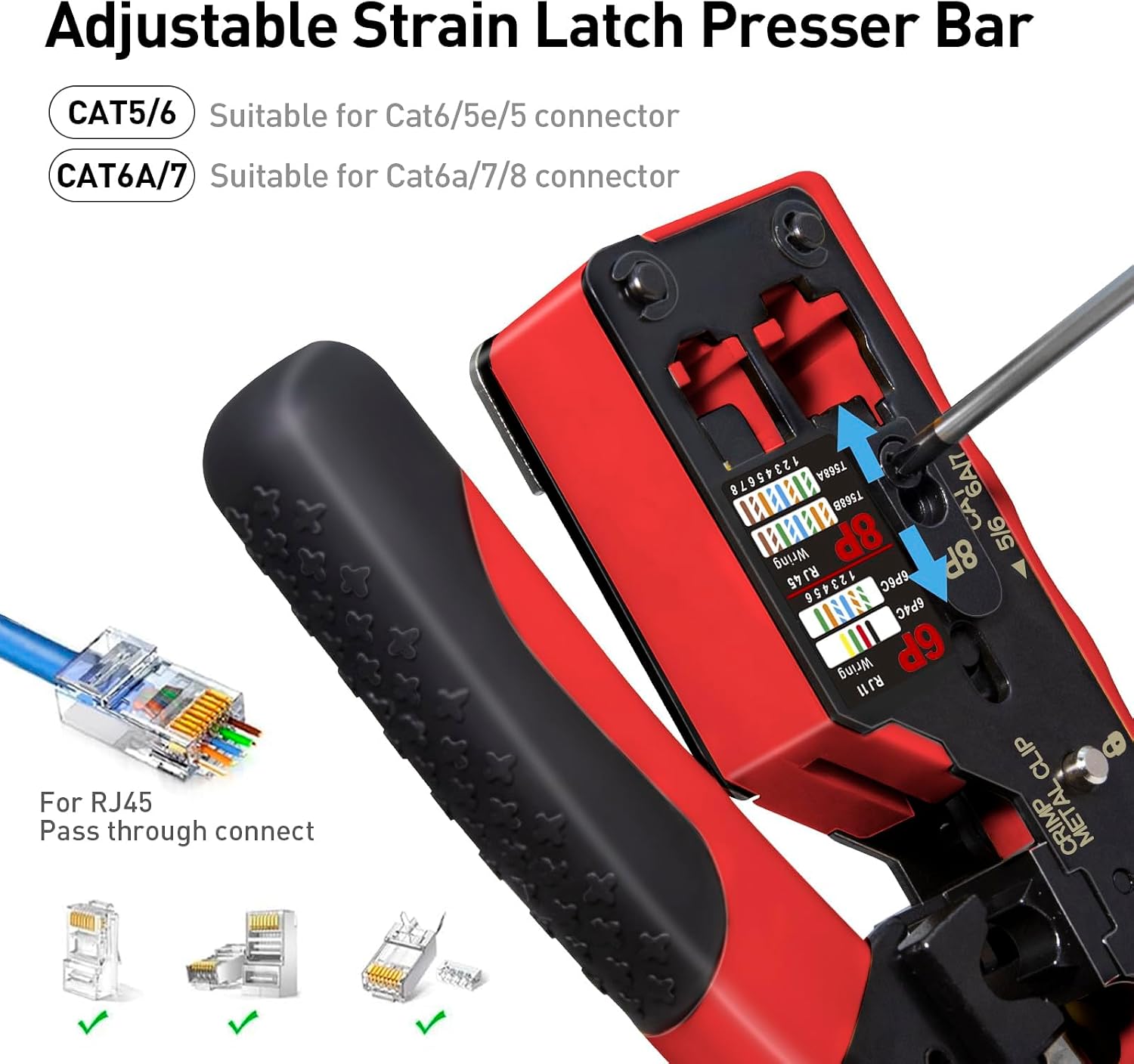
Figure 2: Adjusting the strain latch presser bar for different cable categories (CAT5/6 or CAT6A/7).
- For Cat5/5e/6 connectors, ensure the bar is set to the appropriate position.
- For Cat6A/7 connectors, adjust the bar as needed. Refer to the markings on the tool.
Operating Instructions: Making an RJ45 Cable
Follow these steps to create a custom RJ45 Ethernet cable using the pass-through method.
- Step 1: Trim Excess Cable
Use the integrated cutter to trim the cable to the desired length. Insert the cable into the "CUT" slot and squeeze the handles firmly.
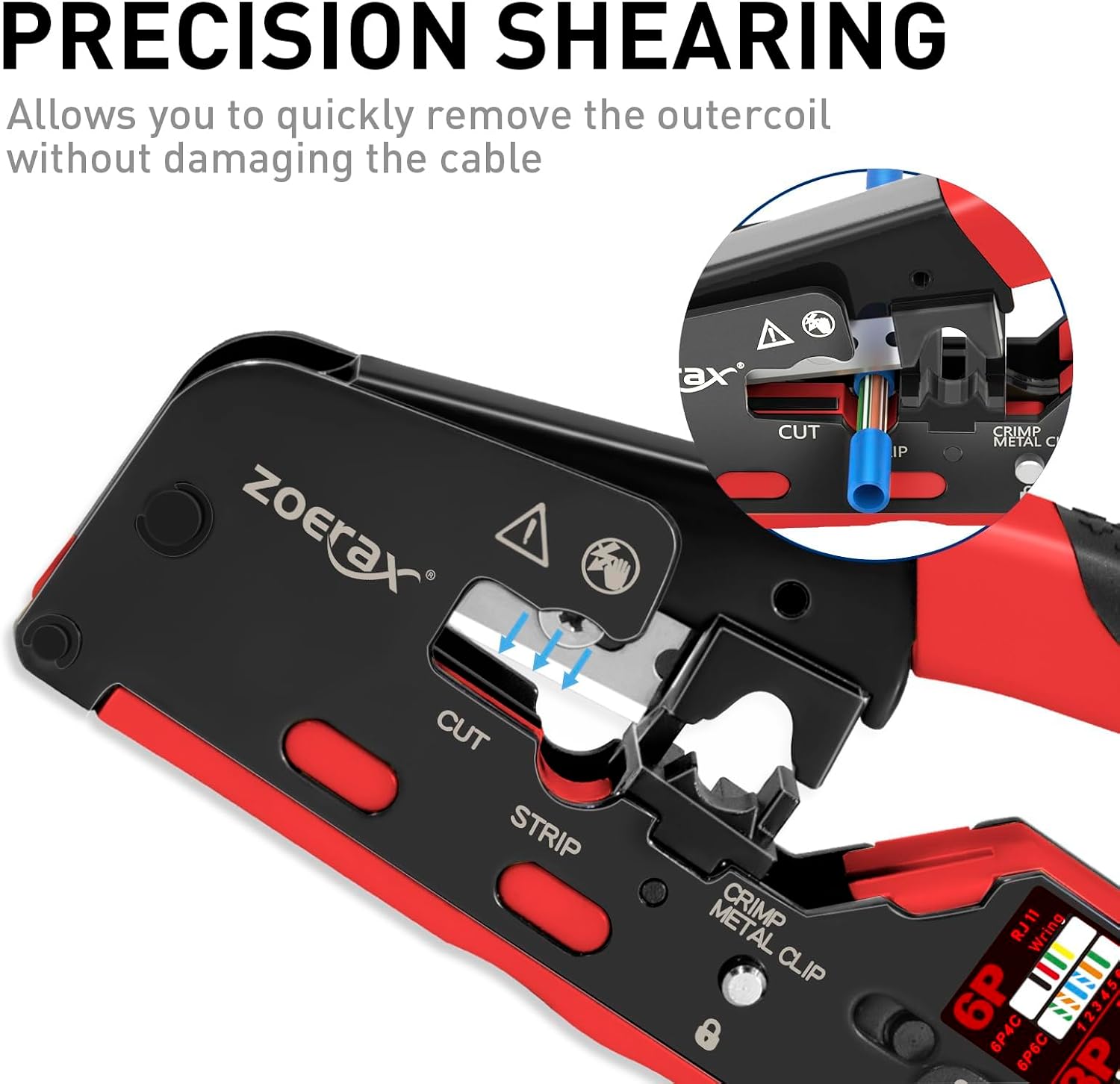
Figure 3: Precision shearing mechanism for cutting the cable.
- Step 2: Strip the Cable Jacket
Insert the cable end into the "STRIP" slot. Rotate the tool around the cable or squeeze gently to strip approximately 1 inch (2.5 cm) of the outer jacket, exposing the twisted pairs. Be careful not to cut the internal wires.

Figure 4: Stripping the cable jacket.
- Step 3: Separate and Arrange Wires
Untwist the exposed wire pairs and arrange them according to the T568A or T568B wiring standard. The tool has a diagram printed on it for reference.

Figure 5: Wiring diagrams for T568A/B standards.
- Step 4: Insert Wires into Pass-Through Connector
Carefully push the arranged wires through the pass-through RJ45 connector until they exit the front of the connector. Ensure the cable jacket is seated firmly inside the connector body.

Figure 6: Wires inserted into a pass-through RJ45 connector.
- Step 5: Crimp the Connector and Trim Excess Wires
Insert the prepared connector into the appropriate RJ45 crimping slot on the tool. Squeeze the handles firmly and completely. The tool will simultaneously crimp the pins into the wires and trim the excess wires flush with the connector face.

Figure 7: Crimping the connector and trimming excess wires.
- Step 6: Verify Connection
After crimping, inspect the connector to ensure all pins are properly seated and the wires are flush. Use an RJ45 cable tester (not included) to verify continuity and correct wiring.
Crimping Shielded Connectors
For shielded connectors, the tool includes a dedicated "CRIMP METAL CLIP" function. After crimping the pins as described above, position the connector's metal clip into the designated slot and squeeze the handles to secure the shield.
Figure 8: Crimping the metal clip for shielded connectors (refer to the 'CRIMP METAL CLIP' section on the tool in Figure 1).
Maintenance
- Blade Replacement: The tool comes with 2 replaceable blades. If the cutting or trimming performance degrades, replace the blade by carefully unscrewing the retaining screw and inserting a new blade. Ensure the new blade is securely fastened.
- Cleaning: Keep the tool clean and free of wire debris. Use a dry cloth to wipe down surfaces. Avoid using harsh chemicals.
- Storage: Store the tool in a dry environment. Utilize the locking mechanism to keep the handles closed for compact storage and to protect the blades.
Troubleshooting
- Inconsistent Cuts/Trims:
Ensure the cable is fully inserted into the cutting slot. If issues persist, the blade may be dull and require replacement (refer to Maintenance section).
- Wires Not Crimping Properly:
Verify that the RJ45 connector is fully seated in the crimping slot. Ensure the handles are squeezed completely until they meet. Check if the strain latch presser bar is correctly adjusted for your cable type (refer to Setup section).
- Difficulty Stripping Cable Jacket:
Ensure the cable is correctly positioned in the stripping slot. Apply firm but not excessive pressure. If the blade is dull, replace it.
Specifications
| Brand | ZOERAX |
| Model Number | WXQ-778-RE-T1 |
| Compatibility | Pass Through CAT5, CAT5E, CAT6, CAT6A, CAT7 RJ45 (8P8C), RJ12 (6P6C), RJ11 (6P4C) connectors |
| Functions | Crimper, Cutter, Stripper |
| Handle Material | Carbon Steel |
| Grip Type | Ergonomic |
| Included Components | 1 Crimping Tool, 2 Replaceable Blades |
Warranty and Support
The ZOERAX WXQ-778-RE-T1 Pass Through RJ45 Crimp Tool is backed by an 18-month warranty. For technical support, warranty claims, or further assistance, please contact ZOERAX customer service through their official channels or the retailer where the product was purchased.