
1. Introduction
This manual provides detailed instructions for the setup, operation, and maintenance of your TrophyRak 12-inch Large Digital Wall Clock. This clock features a large LED display with multiple color options, automatic brightness adjustment, Daylight Saving Time functionality, and a practical night light. Please read this manual thoroughly before use to ensure proper function and longevity of your device.
2. Product Features
- Large Display: 11.2-inch width and 4-inch height for clear visibility.
- Vibrant Color Options: Up to 8 color modes, including solid and RGB shades.
- Night Light: Soft night light with 10 adjustable brightness levels.
- Daylight Saving Time (DST): One-click adjustment for DST.
- Auto-Brightness: Built-in light sensor automatically adjusts screen brightness.
- Memory Backup: Preserves settings during power interruptions (requires CR2032 battery, not for clock operation).
3. Setup
3.1 Unpacking
Carefully remove all components from the packaging. Ensure you have the digital wall clock, 5V power adapter, power cable, remote control, and mounting hardware (screws and anchors).
3.2 Power Connection
This clock is corded electric and requires continuous power. Connect the provided power cable to the DC 5V/1A input port on the back of the clock and then plug the 5V power adapter into a standard electrical outlet. The clock will power on automatically.
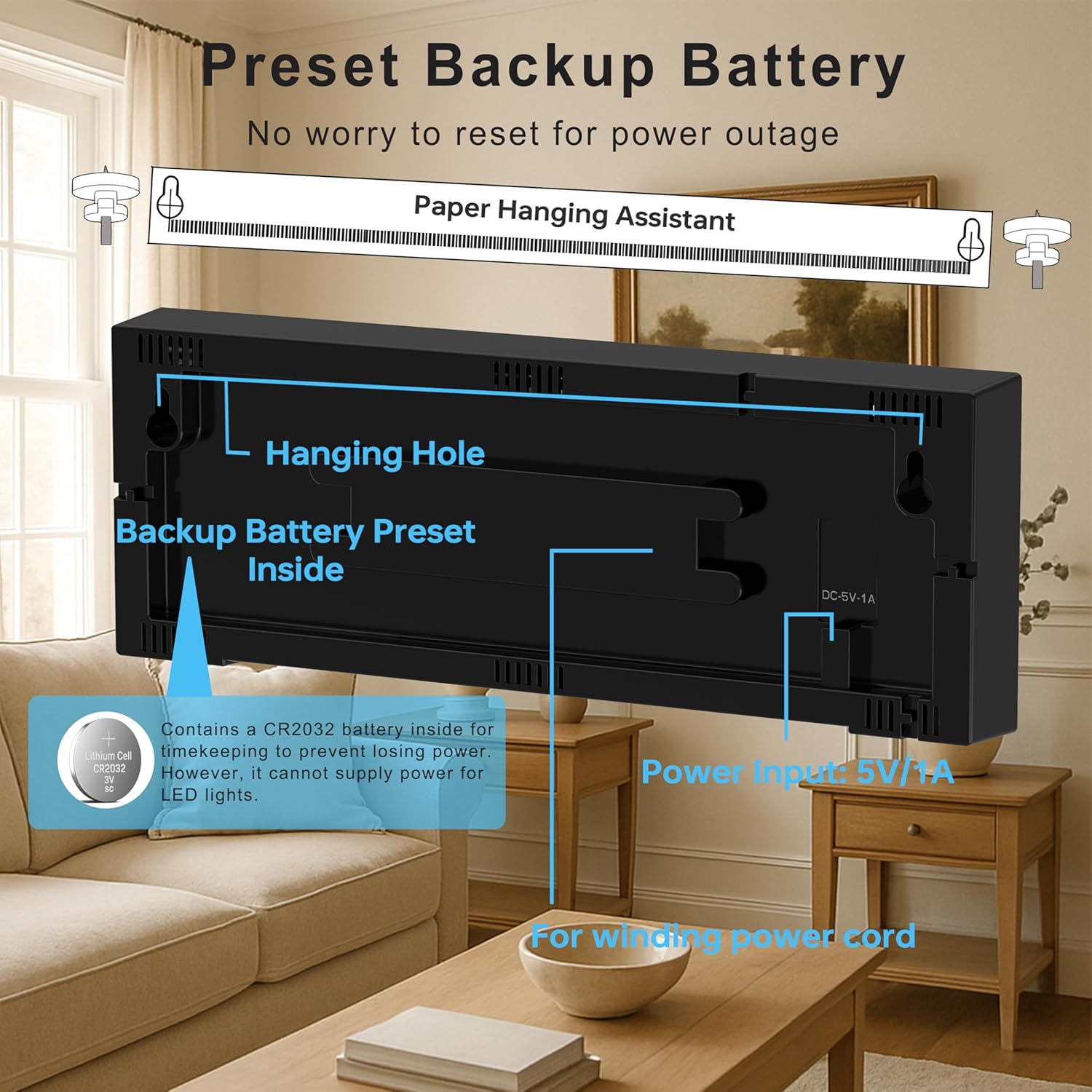
A built-in CR2032 battery (pre-installed) provides memory backup for settings during power outages. This battery does not power the LED display.
3.3 Mounting Options
The clock can be wall-mounted using the integrated hanging holes on the back. Use the provided screws and anchors suitable for your wall type. A paper hanging assistant is included to aid in precise placement.
4. Operating Instructions
All functions are controlled via the included remote control.
4.1 Time Setting
- Press the TIME SET button on the remote control.
- Use the + and - buttons to adjust the hour and minute.
- Press TIME SET again to confirm.
- To switch between 12-hour and 24-hour format, press the 12H/24H button.
4.2 Display Colors
The clock offers 8 color modes for the time display. Press the Display Colors button on the remote control to cycle through the available color options, including solid colors and dynamic RGB shades.

4.3 Brightness and Dimming
The clock features both manual and automatic brightness control:
- Manual Dimmer: Press the DIMMER button to adjust the screen brightness from high to low.
- Auto Dimmer: Press the AUTO DIMMER button to activate the built-in light sensor. The clock will automatically adjust its screen brightness according to the ambient light, ensuring optimal visibility day and night.

4.4 Daylight Saving Time (DST)
To adjust for Daylight Saving Time, press the DST button on the remote control. This feature allows for a quick one-click adjustment in spring and autumn.

4.5 Night Light Function
The clock includes a soft night light feature. Press the Light button on the remote control to turn the night light on or off. Use the + and - buttons to adjust its 10 brightness levels.

5. Maintenance
- Cleaning: Use a soft, dry cloth to clean the display and casing. Avoid abrasive cleaners or solvents.
- Power: Ensure the clock is connected to a stable 5V power source. Disconnect power during electrical storms or prolonged periods of non-use.
- Battery Replacement: The internal CR2032 battery is for memory backup only. If settings are lost after a power outage, replace the CR2032 battery. Refer to the diagram on the back of the clock for battery compartment access.
6. Troubleshooting
- Clock not powering on: Check if the power adapter is securely plugged into both the clock and the electrical outlet. Ensure the outlet is functional.
- Display too dim/bright: Adjust the brightness using the DIMMER buttons or activate AUTO DIMMER mode.
- Settings lost after power outage: The internal CR2032 backup battery may need replacement.
- Remote control not working: Ensure there are no obstructions between the remote and the clock. Check the remote control battery.
7. Specifications
| Feature | Specification |
|---|---|
| Brand | TrophyRak |
| Model Number | LLRK32096 |
| Display Type | Digital LED |
| Product Dimensions | 11.2"W x 4"H |
| Power Source | Corded Electric (5V/1A adapter included) |
| Special Features | Adjustable Brightness, Daylight Saving, Large Display, RGB Colors, Night Light |
| Item Weight | 1.08 pounds |
| Room Type | Bedroom, Classroom, Living Room |
8. Warranty and Support
For warranty information or technical support, please refer to the contact details provided with your purchase or visit the official TrophyRak website. Keep your purchase receipt for warranty claims.