
Important Safety Information
Please read all safety instructions carefully before using your new television. Keep this manual for future reference. Always follow basic safety precautions to reduce the risk of fire, electric shock, and injury.
- Do not expose the TV to rain or moisture.
- Do not open the TV casing; refer all servicing to qualified personnel.
- Ensure proper ventilation around the TV.
- Protect the power cord from being walked on or pinched.
- Unplug the TV during lightning storms or when unused for long periods.
1. Setup
1.1 Unpacking and Initial Inspection
Carefully remove the television and all accessories from the packaging. Check for any damage. The package should include:
- THOMSON 24HT2S15 Smart TV
- Remote Control
- Power Adapter
- User Manual (this document)
- Warranty Card
- TV Stands (2 pieces) and screws
1.2 Installing the TV Stands
Place the TV face down on a soft, flat surface to prevent screen damage. Attach the two stand feet to the designated slots on the bottom of the TV using the provided screws. Ensure they are securely fastened. The adjustable feet allow for two positions (60 cm or 30 cm apart) to fit your furniture.


1.3 Connecting External Devices
Refer to the diagram below for available ports and connect your devices accordingly.
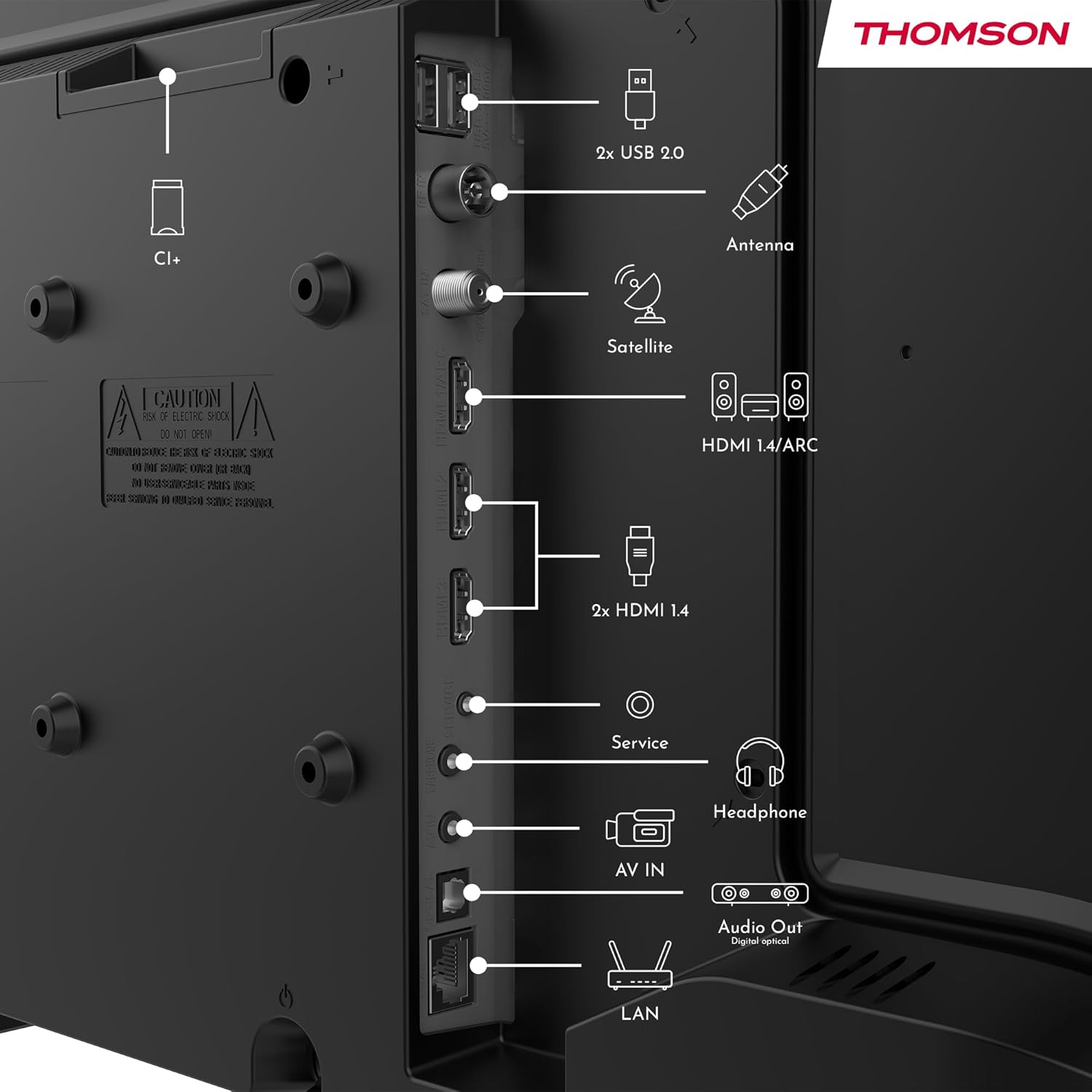
- Power: Connect the power adapter to the TV and then to a power outlet.
- Antenna/Satellite: Connect your terrestrial antenna or satellite dish cable to the respective inputs.
- HDMI: Use HDMI cables to connect devices like Blu-ray players, game consoles, or set-top boxes. HDMI 1.4/ARC supports Audio Return Channel.
- USB: Insert USB drives for media playback or software updates.
- LAN (Ethernet): Connect an Ethernet cable for a wired internet connection.
- Headphone: Connect headphones for private listening.
- Digital Optical Audio Out: Connect to an external sound system for high-quality audio.
- AV IN: For older devices using composite video and stereo audio cables.
- CI+ Slot: Insert a Conditional Access Module (CAM) for encrypted digital channels.
2. Operating Instructions
2.1 First-Time Setup and TiVo System
Upon first power-on, the TV will guide you through the initial setup process. This includes language selection, network connection (Wi-Fi or Ethernet), and channel scanning. The integrated TiVo system provides a user-friendly interface that combines live TV and streaming applications, offering personalized recommendations.

2.2 Remote Control Functions
The included remote control is backlit for easy use in low light and features direct access buttons for popular streaming services.

- Power Button: Turns the TV on or off.
- Voice Control Button: Activates the voice assistant for commands like searching for content or adjusting settings.
- Navigation Pad (Up/Down/Left/Right/OK): Navigates menus and selects options.
- Volume Up/Down: Adjusts the sound level.
- Channel Up/Down: Changes TV channels.
- Direct Access Buttons: One-touch access to Netflix, YouTube, Prime Video, Disney+, and Canal+.
- Back/Exit: Returns to the previous screen or exits the current menu.

2.3 Wireless Display (Screen Mirroring)
The Wireless Display function allows you to project the screen of your smartphone, tablet, or computer onto the TV. This feature is convenient for sharing photos, videos, or presentations.

2.4 Audio and Picture Settings
Your TV supports Dolby Audio for rich and precise sound, enhancing dialogues and immersion. HDR10 technology provides more natural images with balanced contrast and faithful colors for a realistic viewing experience.


Access the TV's settings menu to adjust picture modes (e.g., Standard, Dynamic, Movie), sound modes (e.g., Standard, Music, Movie), and other advanced options to customize your viewing experience.
3. Maintenance
3.1 Cleaning the TV Screen
Gently wipe the screen with a soft, lint-free cloth. For stubborn marks, slightly dampen the cloth with water or a specialized screen cleaner. Never spray liquid directly onto the screen.
3.2 Cleaning the TV Casing
Use a soft, dry cloth to wipe the TV casing. Avoid using abrasive cleaners, waxes, or solvents as they can damage the finish.
3.3 Remote Control Care
Keep the remote control dry and clean. Replace batteries when necessary, ensuring correct polarity. If the remote will not be used for an extended period, remove the batteries to prevent leakage.
4. Troubleshooting
If you encounter issues with your TV, refer to the following common problems and solutions before contacting support.
4.1 No Power
- Ensure the power cord is securely connected to both the TV and the power outlet.
- Check if the power outlet is working by plugging in another device.
- Press the power button on the TV itself, not just the remote.
4.2 No Picture, But Sound is Present
- Check the input source. Press the "Source" button on your remote and select the correct input (e.g., HDMI 1, Antenna).
- Ensure all cables (HDMI, antenna) are securely connected.
- Try restarting the TV and any connected devices.
4.3 No Sound, But Picture is Present
- Check the volume level and ensure the TV is not muted.
- Verify audio settings in the TV menu.
- If using external speakers, ensure they are properly connected and powered on.
4.4 Remote Control Not Working
- Replace the batteries with new ones, ensuring correct polarity.
- Ensure there are no obstructions between the remote and the TV's IR sensor.
- Point the remote directly at the TV.
4.5 Wi-Fi Connection Issues
- Ensure your Wi-Fi router is on and working correctly.
- Restart your router and the TV.
- Check the Wi-Fi password in the TV's network settings.
- Move the TV closer to the router or use a wired Ethernet connection if possible.
5. Specifications
| Model Number | 24HT2S15 |
| Screen Size | 24 inches (60 cm) |
| Display Technology | LED |
| Resolution | 768p (HD) |
| Refresh Rate | 60 Hz |
| Aspect Ratio | 16:9 |
| Special Features | TiVo System with Voice Control, Dolby Audio, HDR10, Wireless Display, Backlit Remote with Direct Access Buttons |
| Connectivity | Wi-Fi, Ethernet, HDMI (x3, one with ARC), USB (x2), Antenna, Satellite, AV In, Digital Optical Audio Out, Headphone Out, CI+ |
| Dimensions (W x H x D) | 53 x 37 x 8 cm (without stand) |
| Weight | 3.33 kg |
| Included Components | Power Adapter, Remote Control, User Manual, Warranty Card |
| Manufacturer | Streamview GmbH |
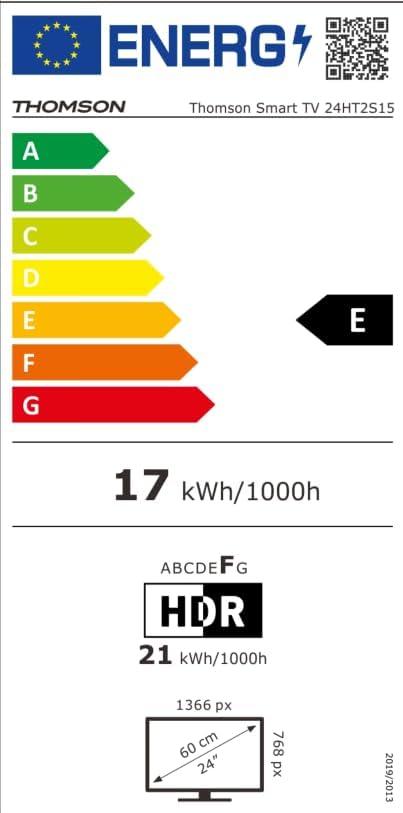
| Energy Efficiency Class | E |

6. Warranty and Support
Your THOMSON 24HT2S15 Smart TV comes with a warranty card included in the box. Please refer to this card for specific warranty terms and conditions applicable in your region.
For technical support, service, or warranty claims, please contact the manufacturer, Streamview GmbH, or your local authorized service center. Contact information can typically be found on the warranty card or the manufacturer's official website.
Manufacturer: Streamview GmbH
Website: www.streamview.com


