1. Introduction
This manual provides comprehensive instructions for the operation and maintenance of your SPYDERSX W-718 1080P Smart Watch Camera. This device is designed for discreet video recording, photo capture, and voice recording, featuring 32GB of built-in memory, motion detection, and OTG compatibility. Please read this manual thoroughly before using the product to ensure proper function and safety.

The SPYDERSX W-718 Smart Watch Camera, a black wrist-worn device, shown alongside its white product box.
2. Safety Information and Precautions
- Intended Use: This product is primarily a video camera. Its function as an actual timepiece is not guaranteed for accuracy.
- OTG Function Support: Support for the OTG function is outside the scope of standard product support.
- Ethical Use: Do not use this product for any malicious acts that infringe on privacy or violate nuisance prevention ordinances. Misuse of this device is strictly prohibited and the manufacturer is not responsible for any illegal activities.
- Heat Generation: The main unit may generate heat and become warm during use. This is considered normal operation and not a malfunction.
- Charging: Use only the provided USB cable for charging. Do not use damaged cables or chargers.
- Water Resistance: This device is for indoor use and is not waterproof. Avoid exposure to water or high humidity.
- Temperature: Avoid extreme temperatures. Do not expose the device to direct sunlight or store it in very hot or cold environments.
3. Package Contents
Please verify that all items listed below are included in your package:
- SPYDERSX W-718 Smart Watch Camera Main Unit
- USB Connection Cable
- Japanese Instruction Manual (PDF download version)
- Product Warranty Card (PDF download version)

An image showing the complete package contents of the SPYDERSX W-718: the main unit, a USB connection cable, and a note about the Japanese instruction manual and warranty being available as PDF downloads.
4. Product Overview
Familiarize yourself with the various parts of your SPYDERSX W-718 Smart Watch Camera:
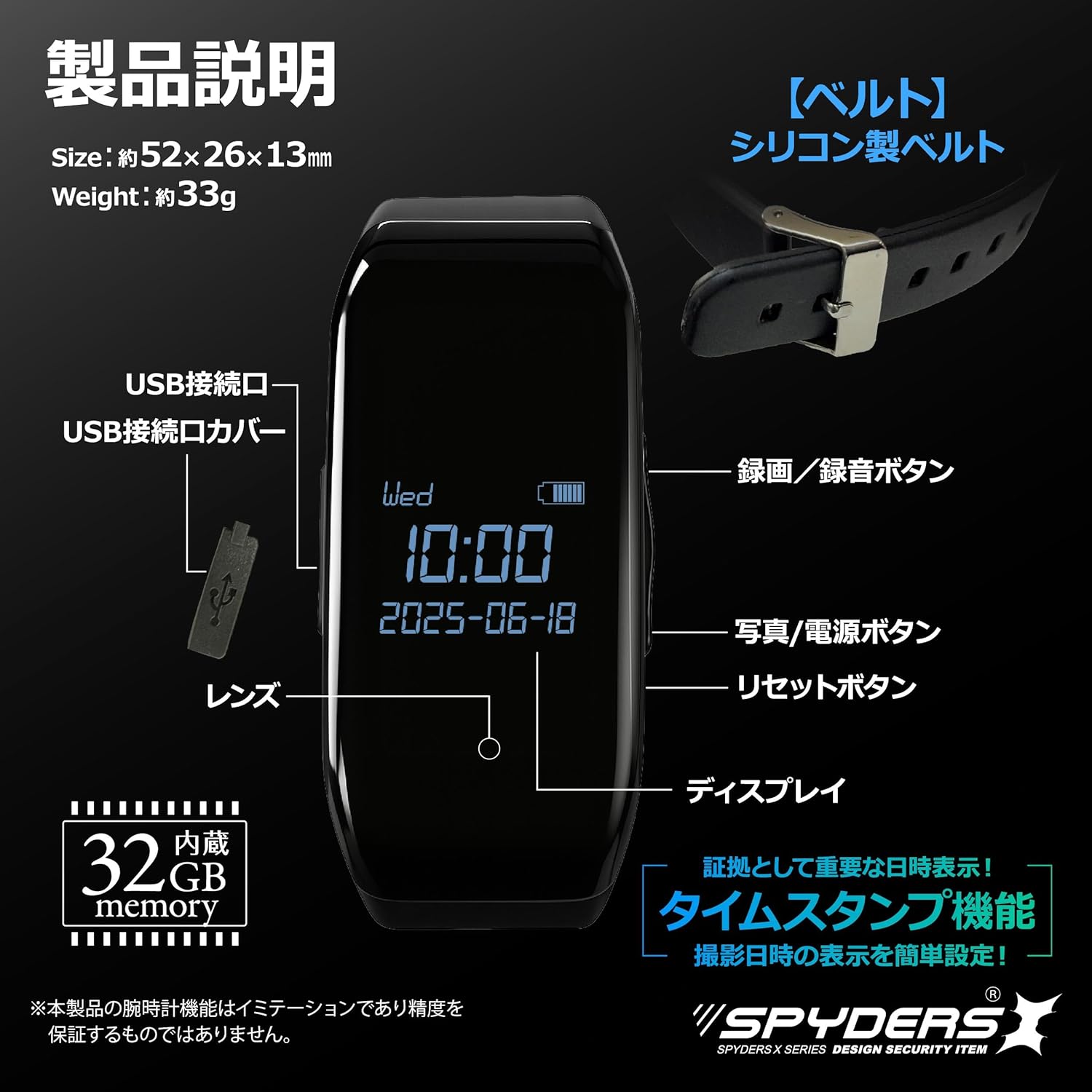
A detailed diagram of the SPYDERSX W-718 Smart Watch Camera, labeling its key components including the USB connection port, USB connection port cover, recording/voice recording button, photo/power button, reset button, lens, and display with timestamp function.
- Lens: The camera lens for video and photo capture.
- Display: Shows time, date, battery status, and recording indicators.
- USB Connection Port: Used for charging and data transfer. Covered by a protective cap.
- Recording/Voice Recording Button: Initiates and stops video or voice recording.
- Photo/Power Button: Powers the device on/off and captures still images.
- Reset Button: Used to reset the device if it becomes unresponsive.
5. Setup
5.1 Initial Charging
- Remove the USB connection port cover.
- Connect the provided USB cable to the device's USB port.
- Connect the other end of the USB cable to a USB power adapter (not included) or a computer's USB port.
- Allow the device to charge fully before first use. The display will indicate charging status.
5.2 Setting Date and Time (Timestamp)
The device features a timestamp function for recording the date and time on your captured media. Refer to the detailed PDF instruction manual for specific steps on how to set or adjust the date and time, as this may require connecting to a computer.
6. Operation
6.1 Power On/Off
- To Power On: Press and hold the Photo/Power Button for a few seconds until the display illuminates.
- To Power Off: Press and hold the Photo/Power Button for a few seconds until the display turns off.
6.2 Video Recording
The device supports 1080P, 720P, and 480P video resolutions at approximately 30 frames per second.
- Ensure the device is powered on.
- Press the Recording/Voice Recording Button once to start video recording. A recording indicator (e.g., a red dot or specific icon) will appear on the display.
- To stop recording, press the Recording/Voice Recording Button again. The recording indicator will disappear, and the video file will be saved.

This image demonstrates the versatility of the SPYDERSX W-718, showing it worn on a wrist and also placed on a table, indicating its use for discreet video recording in various settings.
6.3 Photo Capture
Capture still images at 1920x1080 resolution.
- Ensure the device is powered on.
- Briefly press the Photo/Power Button to take a photo. The display may flash briefly to indicate a photo has been taken.
6.4 Voice Recording
The device can record audio independently using its built-in high-performance microphone.
- Ensure the device is powered on.
- Refer to the detailed PDF instruction manual for specific steps to activate voice-only recording mode.
- Press the Recording/Voice Recording Button to start voice recording.
- Press the Recording/Voice Recording Button again to stop and save the audio file.

A graphic highlighting the voice recorder function of the SPYDERSX W-718, featuring a microphone icon and sound wave visualization, indicating its ability to record audio even when video capture is not feasible.
6.5 Motion Detection Recording
This feature allows the camera to automatically start recording when motion is detected, conserving memory and battery life.
- Activation of motion detection mode typically involves a specific button sequence or setting via a configuration file when connected to a PC. Consult the PDF manual for detailed instructions.
- Once activated, the device will automatically begin recording when movement is detected within its field of view and stop when motion ceases.
6.6 Loop Recording
When the internal 32GB memory is full, the loop recording function will automatically overwrite the oldest files to continue recording.
- This feature is usually enabled by default or can be configured via settings. Refer to the PDF manual for details.
6.7 External Power Function
For extended recording sessions, the device can be connected to an external power source.
- Connect the USB cable to the device and then to a USB AC adapter or power bank (sold separately).
- This allows for continuous operation without relying solely on the internal battery.

An illustration detailing three advanced features of the SPYDERSX W-718: motion detection recording (starts recording when movement is detected), external power capability (for extended recording), and loop recording (overwrites old data when memory is full).
6.8 Viewing Files (OTG Connection / PC Connection)
- OTG Connection: The device supports OTG (On-The-Go) connection, allowing direct viewing of files on compatible smartphones. Connect the device to your smartphone using an OTG adapter (not included). Note that support for the OTG function is outside the scope of standard product support.
- PC Connection: Connect the device to a computer using the provided USB cable. The device will appear as a removable storage drive, allowing you to access and transfer recorded video, photo, and audio files.
7. Maintenance
- Cleaning: Use a soft, dry cloth to clean the device. Do not use liquid cleaners or solvents.
- Storage: When not in use for extended periods, store the device in a cool, dry place away from direct sunlight. Ensure the battery is partially charged (around 50%) before storage to prolong battery life.
- Battery Care: Avoid fully discharging the battery frequently. Recharge the device when the battery level is low.
- Data Backup: Regularly back up important recordings to a computer or other storage device to prevent data loss.
8. Troubleshooting
| Problem | Possible Cause | Solution |
|---|---|---|
| Device does not power on. | Low battery; device frozen. | Charge the device fully. If unresponsive, press the reset button with a thin object. |
| Cannot record video/photo. | Memory full; incorrect mode; low battery. | Transfer files to a computer to free up space. Ensure correct recording mode is selected. Charge the device. |
| Poor video/audio quality. | Insufficient lighting; lens obstruction; device too far from audio source. | Ensure adequate lighting. Clean the lens. Position the device closer to the audio source. |
| Device gets warm during use. | Normal operation. | This is normal. If it becomes excessively hot or emits smoke/odor, discontinue use immediately and contact support. |
| Cannot connect to PC/smartphone. | Faulty USB cable; incorrect connection; driver issue. | Try a different USB port or cable. Ensure the device is powered on. For PC, check if drivers are installed (usually automatic). For OTG, ensure smartphone compatibility and correct adapter. |
9. Specifications
| Feature | Detail |
|---|---|
| Model Number | W-718 |
| Brand | SPYDERSX |
| Video Resolution | 1080p (1920x1080px), 720p (1280x720px), 480p (640x480px) |
| Frame Rate | ~30 FPS |
| Photo Resolution | 1920x1080px |
| Internal Memory | 32GB |
| Battery Type | Lithium Ion |
| Continuous Operation Time | Approximately 2 hours (on internal battery) |
| Storage Capacity (1080P) | Approximately 2.8 hours of video |
| Product Dimensions (LxWxH) | 5.2 x 2.6 x 1.3 cm |
| Product Weight | 33 g |
| Connection Protocol | USB connection |
| Mounting Type | Smartwatch type |
| Color | Black |
| Indoor/Outdoor Use | Indoor |

A visual representation of the SPYDERSX W-718's key features, including video resolutions, frame rate, photo size, voice recorder, motion detection, external power support, loop recording, timestamp, and 32GB built-in memory.

An image illustrating the SPYDERSX W-718's battery life of approximately 2 hours for continuous recording and its 32GB internal memory, capable of storing about 2.8 hours of 1080P video.
10. Warranty and Support
Your SPYDERSX W-718 Smart Watch Camera comes with a product warranty. The warranty card is provided as a PDF download.
- Initial Defect Support: In case of initial defects, please contact customer support for exchange or resolution.
- Product Support: SPYDERSX offers product support, including phone support, to assist with any issues you may encounter. Support is available until your issue is resolved.
- For detailed warranty terms and contact information, please refer to the PDF warranty card and the official SPYDERSX website.


Images representing SPYDERSX's commitment to customer support and phone assistance.


