
Introduction
This manual provides comprehensive instructions for the assembly, operation, and maintenance of your Keyluv Queen Size Upholstered LED Canopy Bed Frame. Please read all instructions carefully before assembly and use to ensure safe and proper functioning of the product. Keep this manual for future reference.
Important Safety Information
Always secure removable posts during use. Assemble according to instructions to prevent instability. Do not exceed 900 pounds weight capacity.
- Ensure all parts are present and undamaged before beginning assembly.
- Assembly should be performed by two adults.
- Place the bed frame on a soft surface (e.g., carpet) during assembly to prevent scratches.
- Do not overtighten screws during initial assembly; tighten fully once the frame is aligned.
- Regularly check all connections and fasteners to ensure they remain tight.
- Keep small parts and packaging materials away from children.
Package Contents
Before assembly, verify that all components listed below are present and in good condition. If any parts are missing or damaged, please contact customer support.
- Upholstered Headboard with LED Lights and Charging Station
- Footboard
- Side Rails (2)
- Canopy Posts (4, removable)
- Bed Slats and Support Legs
- Under-bed Storage Drawers (2)
- Hardware Pack (screws, bolts, washers, Allen wrench)
- Installation Manual
- LED Light Remote Control
Setup and Assembly
Follow these general steps for assembly. Refer to the detailed installation manual included in your package for specific diagrams and instructions.
- Prepare the Area: Clear a spacious area for assembly. Lay out all components and hardware.
- Assemble the Headboard: Attach any necessary support brackets to the upholstered headboard.
- Attach Side Rails: Connect the side rails to the headboard using the provided hardware. Ensure a secure fit.
- Install Bed Slats: Place the bed slats across the side rails and secure them. Attach any central support legs to the slats.
- Assemble the Footboard: Connect the footboard to the other end of the side rails.
- Install Canopy Posts (Optional): If desired, attach the four canopy posts to the corners of the bed frame. These posts are removable, allowing for a versatile design.
- Connect LED Lights and Charging Station: Plug in the LED lights and charging station according to the manual. Ensure proper cable management.
- Insert Storage Drawers: Slide the under-bed storage drawers into their designated positions beneath the bed frame.
- Final Tightening: Once the entire frame is assembled and aligned, go back and fully tighten all screws and bolts.

Figure 1: Bed frame dimensions and removable post configurations.

Figure 2: Assembled bed frame with canopy posts.
Operating Instructions
LED Lighting
The integrated LED lights in the headboard provide adjustable illumination. Use the included remote control to:
- Turn the lights On/Off.
- Adjust brightness levels.
- Change light colors (if RGB functionality is present).
- Select various lighting modes (e.g., static, flashing, fading).

Figure 3: Headboard with LED lights and charging station in use.
Charging Station
The headboard features a built-in charging station with USB ports and power outlets. To use:
- Ensure the bed frame is connected to a power source.
- Plug your devices (e.g., phone, tablet) into the available USB ports or power outlets.
- The charging station is designed for convenient access to power while in bed.
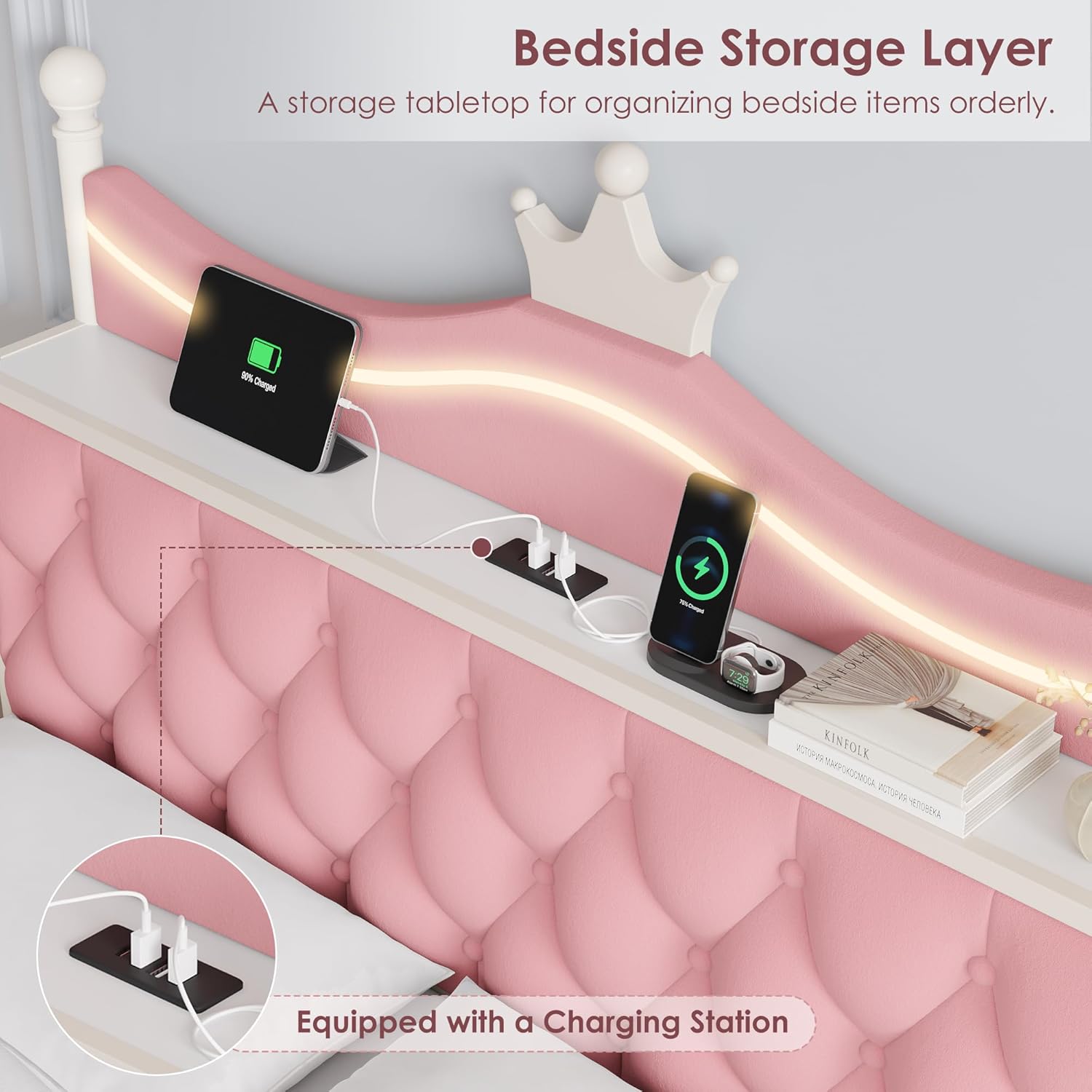
Figure 4: Detail of the charging station and storage shelf.
Removable Canopy Posts
The four canopy posts can be installed or removed to change the bed's aesthetic. To remove or install, follow the specific instructions in your assembly manual for detaching or securing the posts to the bed frame corners.
Storage Drawers
The under-bed storage drawers provide convenient space for organizing items. Simply pull the drawers out from beneath the bed frame to access their contents. Push them back in to keep your room tidy.

Figure 5: Under-bed storage drawer in use.

Figure 6: Under-bed storage space and clearance.
Video 1: Overview of the Keyluv Upholstered Canopy LED Bed Frame, demonstrating features like removable posts, LED lights, charging station, and storage drawers.
Maintenance
Cleaning the Upholstered Parts
- Vacuum regularly with an upholstery attachment to remove dust and debris.
- For spills, blot immediately with a clean, dry cloth. Do not rub.
- For stubborn stains, use a mild fabric cleaner following the product's instructions, testing on an inconspicuous area first.
- Avoid using harsh chemicals or abrasive cleaners, as they may damage the fabric.
Cleaning the Metal Frame
- Wipe the metal frame with a soft, damp cloth.
- Use a mild soap solution for more thorough cleaning, then wipe dry immediately to prevent rust.
- Avoid abrasive cleaners or scouring pads.
General Care
- Periodically check all bolts and screws to ensure they are tight. Retighten as necessary to maintain stability and prevent squeaking.
- Do not jump on the bed or subject it to excessive force.
Troubleshooting
LED Lights Not Working
- Check Power: Ensure the bed frame's power cord is securely plugged into a working electrical outlet.
- Remote Control: Verify the remote control has working batteries and is pointed directly at the receiver.
- Connections: Inspect all LED light connections to ensure they are properly seated.
Charging Station Not Functioning
- Power Connection: Confirm the bed frame is plugged into a live power outlet.
- Device Compatibility: Ensure your device is compatible with USB charging and the power outlets.
- Cable Integrity: Try a different charging cable to rule out a faulty cable.
Bed Frame Squeaking
- Tighten Hardware: Systematically check and tighten all bolts and screws on the frame.
- Slat Placement: Ensure all bed slats are correctly positioned and secured.
- Mattress: Sometimes the mattress itself can cause noise; try removing it temporarily to isolate the sound source.
Storage Drawers Not Sliding Smoothly
- Obstructions: Check for any items blocking the drawer's path or wheels.
- Alignment: Ensure the drawers are correctly aligned with the bed frame's base.
- Wheels: Inspect the drawer wheels for damage or debris.
Specifications
| Feature | Detail |
|---|---|
| Brand | Keyluv |
| Model Number | canopy bed frame |
| Size | Queen |
| Product Dimensions | 89.8"L x 62.6"W x 76.8"H |
| Color | Pink |
| Material | Fabric, Metal |
| Special Features | Charging Station, Four Poster Canopy Bed, LED Lighting, No Box Spring Needed, Storage Drawer |
| Included Components | Canopy Bed Frame, Charging Station, Drawer, Installation Manual, Led Lights |
| Compatible Mattress Size | 10-12 inch |
| Assembly Required | Yes |
| Ground To Item Distance | 11 Inches |
| Item Weight | 106.5 pounds |
| UPC | 632125677517 |
Warranty and Support
Keyluv products are manufactured with quality and care. This product comes with a standard manufacturer's warranty covering defects in materials and workmanship. Please refer to the warranty card included with your purchase for specific terms and conditions.
For technical assistance, missing parts, or warranty claims, please contact Keyluv customer support through the retailer where the product was purchased or visit the official Keyluv website for contact information.