
1. Introduction
This manual provides essential information for the safe operation, setup, and maintenance of your Trisomy B30 Walking Pad Treadmill. Please read all instructions carefully before using the product to ensure proper function and user safety. This walking pad is designed for home use, offering a versatile exercise solution with adjustable incline, multiple control options, and a space-saving foldable design.
2. Safety Information
- Always read and understand the entire manual before assembly or operation.
- Keep children and pets away from the treadmill during operation.
- Place the treadmill on a flat, stable surface with adequate clearance around it.
- Wear appropriate athletic footwear and clothing during use.
- Do not use the treadmill if you feel unwell, dizzy, or experience any pain. Consult a physician before starting any new exercise program.
- The emergency safety key must be attached to your clothing during use. If you fall or move too far back on the belt, the key will detach, stopping the treadmill.
- The maximum user weight capacity for this treadmill is 350 lbs. Do not exceed this limit.
- Ensure the power cord is not damaged and is placed where it will not be tripped over.
- Unplug the treadmill from the power outlet when not in use or before cleaning and maintenance.
3. Package Contents
Verify that all components are present in the package:
- Trisomy B30 Walking Pad Treadmill (Main Unit)
- User Manual (this document)
- Quick Installation Guide
- Remote Control
- Safety Lock Key
- Lubricant
- L-shaped Wrench
- Handlebar Fixing Nuts (x2)
- Slope Stand (x2)
- Slope Fixing Nut (x2)
- Pad Holder (for console)

4. Setup
4.1 Unfolding the Treadmill
- Carefully remove the treadmill from its packaging.
- Place the treadmill on a flat, stable surface.
- Lift the handlebar into the upright position.
- Secure the handlebar using the two handlebar fixing nuts. Turn them clockwise until tight.

4.2 Adjusting the Incline
The Trisomy B30 Walking Pad Treadmill offers 4 manual incline levels: 6%, 9%, 12%, and 15%. To adjust the incline:
- Ensure the treadmill is powered off and unplugged.
- Locate the incline adjustment points at the rear of the treadmill.
- Manually lift the rear of the treadmill and insert the slope stands into the desired incline level slots.
- Secure the slope stands with the slope fixing nuts. Ensure both sides are set to the same incline level for stability.


5. Operating Instructions
5.1 Powering On and Off
Connect the power cord to a grounded electrical outlet. Flip the main power switch located near the front of the treadmill to the 'ON' position. The display will illuminate. To power off, flip the switch to 'OFF' and unplug the unit.
5.2 Using the Console Controls
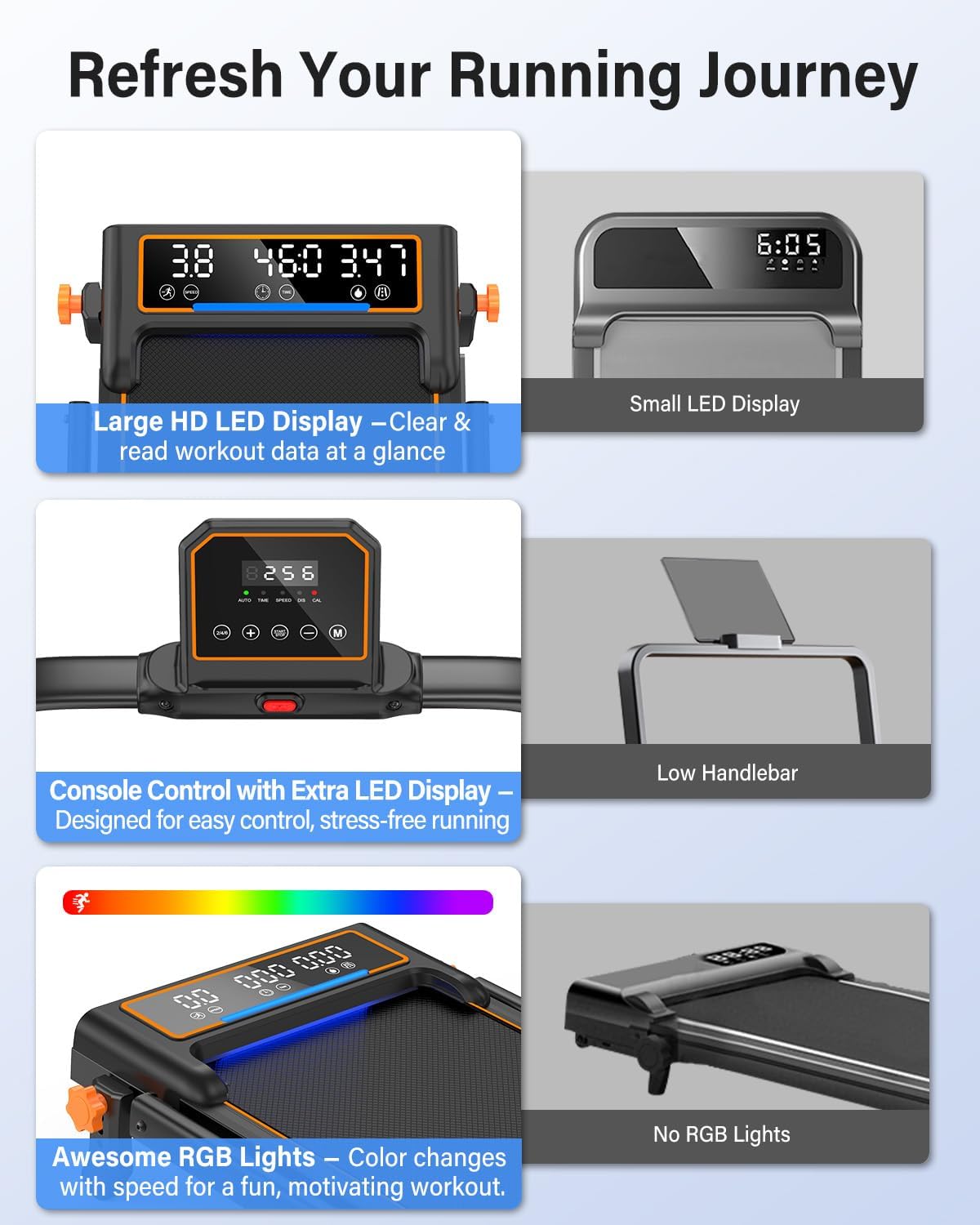
The main console on the handlebar features an HD LED display and control buttons:
- Start/Stop Button: Press to begin or end a workout.
- Speed +/- Buttons: Adjust the belt speed incrementally.
- Quick Speed Buttons (2/4/6 MPH): Instantly set the speed to 2, 4, or 6 MPH.
- Mode Button (M): Cycle through different workout modes or display metrics.
5.3 Using the Remote Control
The included remote control allows for convenient adjustment of speed and modes without reaching for the console. It mirrors the main functions of the console.
5.4 Workout Modes and Speed Ranges
The treadmill supports various activities:
- Walking Mode: 0.6 – 2.5 MPH (ideal for working or light activity).
- Jogging Mode: 2.5 – 4.0 MPH.
- Running Mode: Up to 6.0 MPH.

5.5 Dynamic RGB Lighting
The treadmill features dynamic RGB light strips that change color based on your speed, providing visual feedback and an engaging workout experience.

6. App Connectivity
The Trisomy B30 Walking Pad Treadmill can connect to a dedicated fitness application (e.g., FitShow) via Bluetooth. This app allows you to:
- Customize training plans.
- Record and track workout data (speed, time, distance, calories).
- Enjoy virtual running tracks for an immersive experience.
Refer to the Quick Installation Guide for instructions on downloading and pairing the app with your treadmill.

7. Maintenance
7.1 Running Belt Lubrication
Regular lubrication of the running belt is crucial for smooth operation and extending the treadmill's lifespan. Apply the provided lubricant under the running belt as instructed in the Quick Installation Guide. Frequency of lubrication depends on usage, typically every 30-50 hours of use.

7.2 Running Belt Adjustment
If the running belt drifts too far to one side or feels loose, it may need adjustment. Use the L-shaped wrench to make small adjustments to the rear roller bolts. Turn the bolt clockwise to tighten or counter-clockwise to loosen. Perform adjustments while the treadmill is running at a low speed (e.g., 1 MPH) without a user on it, until the belt is centered.

8. Troubleshooting
If you encounter any issues with your Trisomy B30 Walking Pad Treadmill, please refer to the troubleshooting section in the Quick Installation Guide or contact customer support.
- Treadmill not starting: Ensure the power cord is securely plugged in, the main power switch is ON, and the safety key is properly placed.
- Belt slipping: Adjust the running belt tension as described in Section 7.2.
- Unusual noise: Check for loose parts, ensure proper lubrication, and verify belt alignment.
9. Specifications
| Feature | Specification |
|---|---|
| Brand | Trisomy |
| Model Name | B30 |
| Product Dimensions (D x W x H) | 46.9" x 23.2" x 5.1" |
| Item Weight | 47 Pounds |
| Material | Alloy Steel |
| Maximum Speed | 6 Miles per Hour |
| Maximum Incline Percentage | 15% (4 manual levels) |
| Maximum Weight Recommendation | 350 Pounds |
| Maximum Horsepower | 3.5 HP |
| Special Features | Compact Design, Foldable, Manual Incline, Dual LED Display, RGB Light |
| Assembly Required | No (minimal setup) |
10. Warranty and Support
Your Trisomy B30 Walking Pad Treadmill comes with a 2-year warranty. Trisomy also provides lifetime technical support and 24/7 customer service to assist you with any inquiries or issues you may encounter.
For warranty claims, technical assistance, or general support, please refer to the contact information provided in your Quick Installation Guide or visit the official Trisomy support website.
11. Product Video
Watch this official product video for a visual guide on the walking pad with incline features.