
Pinmoco L104660FP-WHBEPM
Pinmoco 63-inch Fireplace TV Stand with 18-inch Electric Fireplace User Manual
Model: L104660FP-WHBEPM
Introduction
Thank you for choosing the Pinmoco 63-inch Fireplace TV Stand. This manual provides essential information for the safe assembly, operation, and maintenance of your new entertainment center with an integrated 18-inch electric fireplace. Please read all instructions carefully before use and retain this manual for future reference.
Important Safety Information
WARNING: Failure to follow these safety instructions may result in fire, electric shock, or injury.
- Avoid placing heavy objects on the top shelves to prevent tip-over.
- Keep flammable materials at least 3 feet away from the fireplace.
- Always unplug the fireplace when not in use or when leaving the room.
- Do not operate the fireplace if it feels hot to the touch.
- Keep children and pets away from the fireplace area.
- Ensure the unit is placed on a stable, level surface.
- Do not block air vents on the fireplace unit.
Product Overview
The Pinmoco 63-inch Fireplace TV Stand is designed to accommodate televisions up to 80 inches, offering both aesthetic appeal and functional storage. It features an 18-inch electric fireplace with adjustable heat and flame settings, along with LED lighting for enhanced ambiance. The unit includes storage cabinets and adjustable shelves.
Key Features:
- 2-in-1 Design: Combines a 63-inch TV stand with an 18-inch electric fireplace.
- Safe & Energy-Efficient Fireplace: Heats up to 400 sq. ft., adjustable temperature (62–92°F), flame color/dimmer options, overheating protection, FCC/ETL certified.
- Durable & Heavy-Duty Build: Constructed from premium P2 particle board with a 200 lbs weight capacity.
- Large Storage & Adjustable Shelves: Features a cabinet and 3-level LED open shelves for organization and display.
- Modern Design: Marble-textured finish, sleek lines, and acrylic side panels.
Product Dimensions and Capacity
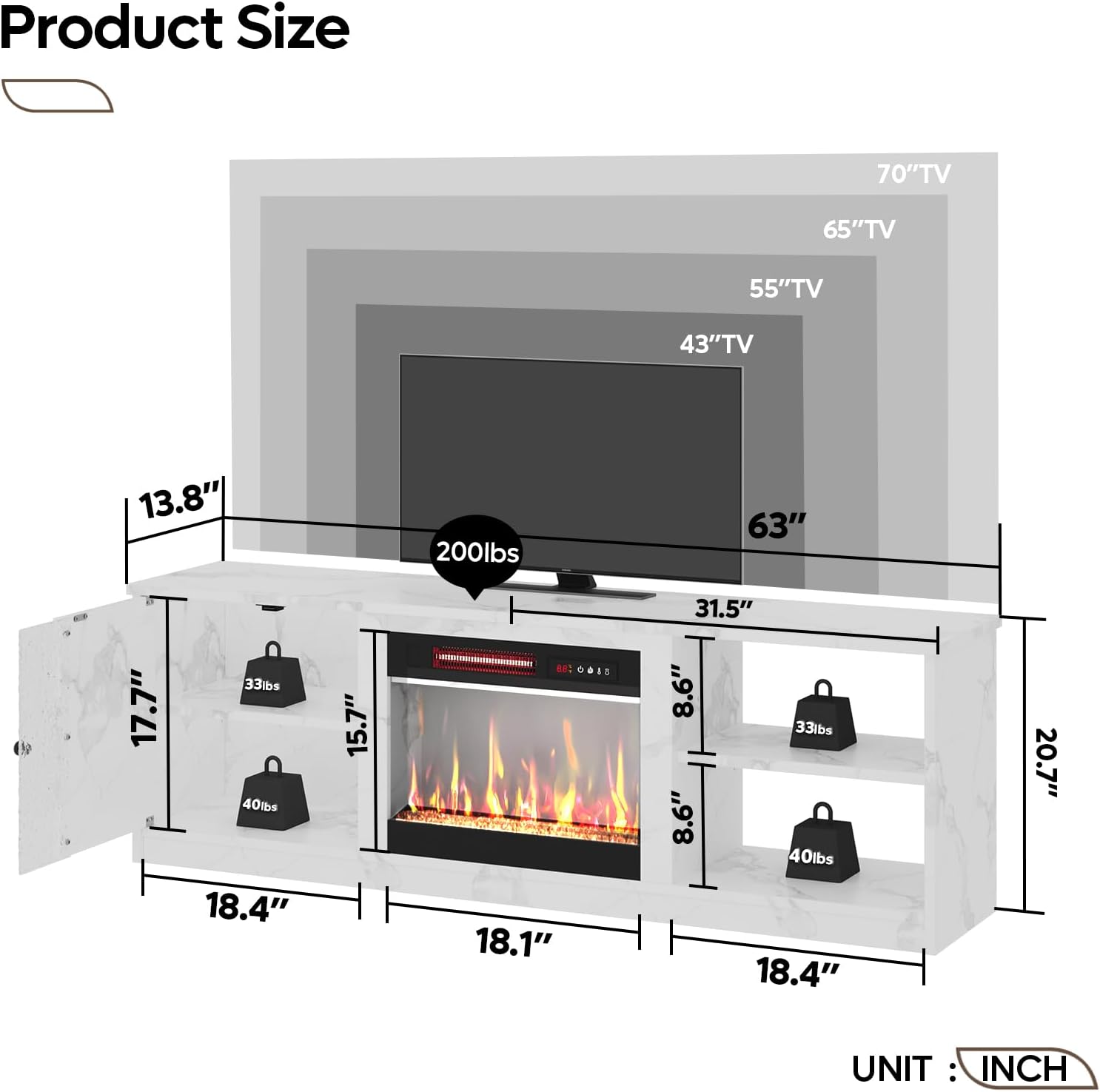
Figure 1: Product Dimensions and TV Compatibility. This diagram illustrates the overall dimensions of the TV stand, including its 63-inch width and 20.7-inch height. It also shows the internal dimensions of the storage compartments and the 18.1-inch width of the fireplace insert. The diagram indicates compatibility with TVs up to 80 inches and a maximum weight capacity of 200 lbs for the top surface.
Specifications
| Feature | Detail |
|---|---|
| Brand | Pinmoco |
| Model Number | L104660FP-WHBEPM |
| Colour | White |
| Product Dimensions | 160 x 35 x 53 cm (63 x 13.8 x 20.7 inches) |
| Maximum Weight Capacity | 200 Pounds |
| Material | Engineered Wood |
| Special Features | Unbreakable, 18-inch electric fireplace, LED lights |
| Item Weight | 30.2 kg |
| Recommended Uses | Entertainment Media |
| Mounting Type | Floor Mount |
| Included Components | 18-inch electric fireplace, TV stand, LED lights |
Setup and Assembly
This TV stand requires assembly. Please ensure all parts are present before beginning. It is recommended to assemble the unit on a soft, clean surface to prevent scratches.
General Assembly Steps (Refer to included hardware and diagram for detailed instructions):
- Unpack Components: Carefully remove all parts from the packaging and verify against the parts list.
- Assemble Frame: Connect the main structural panels using the provided hardware.
- Install Shelves: Insert adjustable shelves into the desired positions within the side cabinets.
- Integrate Fireplace Insert: Carefully slide the 18-inch electric fireplace into its designated central opening. Ensure it is securely seated.
- Attach Doors: Mount the cabinet doors, ensuring proper alignment and smooth operation.
- Install LED Lighting: Follow the specific instructions for attaching and connecting the LED light strips to the designated areas.
- Positioning: Place the assembled TV stand on a level surface, ensuring adequate clearance for ventilation around the fireplace.
Note: Detailed, step-by-step assembly instructions with diagrams are provided in the separate assembly guide included with your product.
Operating Instructions
Electric Fireplace Operation

Figure 2: Electric Fireplace Features. This image highlights the key features of the 18-inch electric fireplace insert, including its heating capacity of 400 sq. ft., a 0.5-9 hour timer, adjustable temperature settings from 62°F to 92°F, and overheating protection. It also notes that the flame and heat functions can be used independently.
The electric fireplace can be operated using the control panel on the unit or the included remote control.
- Power On/Off: Press the power button to turn the fireplace on or off.
- Heat Settings: Adjust the temperature between 62°F and 92°F. The heating function can be used independently of the flame effect.
- Flame Effects:
- Flame Color: Select from 7 different flame colors.
- Brightness: Adjust the flame brightness with 5 levels.
- Flame Speed: Choose from 5 flame speed settings.
- Timer: Set the operational timer for 0.5 to 9 hours.
- Overheating Protection: The unit is equipped with an automatic shut-off feature if it overheats.

Figure 3: Remote Control and Flame Customization. This image displays the remote control used to operate the electric fireplace, highlighting its capabilities for adjusting 7 flame colors, 5 brightness levels, and 5 flame speed settings. It also shows the LED lighting options with 7 main colors and 22 dynamic modes.
LED Lighting Operation
The integrated LED lighting system can be controlled to enhance the ambiance of your living space.
- Color Selection: Choose from 7 main LED colors.
- Dynamic Modes: Select from 22 dynamic lighting modes for various effects.
- Control the LED lights using the provided remote control.

Figure 4: Storage Cabinet and LED Shelves. This image illustrates the storage capabilities of the TV stand, featuring a cabinet and open shelves. The shelves are illuminated by LED lights, providing an attractive display for media devices, gaming consoles, and decorative items. The design emphasizes a clutter-free look.
Maintenance
Regular maintenance will ensure the longevity and optimal performance of your TV stand and electric fireplace.
- Cleaning the Stand: Wipe surfaces with a soft, damp cloth. Avoid harsh chemicals or abrasive cleaners that could damage the finish.
- Cleaning the Fireplace: Ensure the fireplace is unplugged and cool before cleaning. Use a soft, dry cloth to wipe the glass and exterior. Do not spray liquids directly onto the unit.
- Ventilation: Periodically check that the air intake and exhaust vents of the fireplace are clear of dust and debris to ensure proper airflow.
- Electrical Cords: Inspect the power cord for any signs of damage. Do not use the unit if the cord is damaged.
Troubleshooting
If you encounter issues with your Pinmoco Fireplace TV Stand, refer to the following common problems and solutions:
| Problem | Possible Cause | Solution |
|---|---|---|
| Fireplace does not turn on. | No power, power switch off, circuit breaker tripped. | Ensure unit is plugged in, check wall outlet, reset circuit breaker. |
| No heat, but flames are visible. | Heat function not activated, thermostat set too low, overheating protection activated. | Activate heat function, increase thermostat setting, unplug unit for 15 minutes to reset overheating protection. |
| Remote control not working. | Dead batteries, obstruction, remote out of range. | Replace batteries, remove obstructions, ensure remote is within operating range (max 49ft). |
| LED lights not working. | Loose connection, power issue. | Check all LED strip connections, ensure power supply is connected. |
If the problem persists after attempting these solutions, please contact customer support.
Warranty and Customer Support
Pinmoco products are manufactured with quality and durability in mind. For specific warranty details, please refer to the warranty card included with your purchase or contact Pinmoco customer service.
For technical assistance, missing parts, or any other inquiries, please contact our customer support team:
- Website: Pinmoco Official Store on Amazon
- Email: [Insert Customer Service Email Here - if available]
- Phone: [Insert Customer Service Phone Number Here - if available]
Please have your model number (L104660FP-WHBEPM) and purchase date ready when contacting support.
Related documentsL104660FP-WHBEPM


Ask a question about this manual
Ask about setup, troubleshooting, compatibility, parts, safety, or missing instructions. Manuals+ will review the question and use this page’s manual context to help answer it.