1. Introduction
Thank you for choosing the Grundig 50 GKU 700 50-inch 4K Ultra HD Smart Google TV. This manual provides essential information for the safe and efficient use of your new television. Please read these instructions thoroughly before operating the device and retain them for future reference.
2. Important Safety Information
To reduce the risk of electric shock, fire, or injury, always follow these basic safety precautions:
- Power Source: Connect the TV only to an AC power outlet of the specified voltage.
- Ventilation: Ensure adequate ventilation. Do not block ventilation openings.
- Water and Moisture: Do not expose the TV to rain or moisture. Do not place objects filled with liquids, such as vases, on the TV.
- Cleaning: Unplug the TV from the power outlet before cleaning. Use a soft, dry cloth. Do not use liquid cleaners or aerosol cleaners.
- Placement: Place the TV on a stable, level surface. Avoid placing it in direct sunlight or near heat sources.
- Servicing: Do not attempt to service this product yourself. Refer all servicing to qualified service personnel.
- Power Cord: Protect the power cord from being walked on or pinched, particularly at plugs, convenience receptacles, and the point where they exit from the apparatus.
3. Package Contents
Please check that all items are present in your package:
- Grundig 50 GKU 700 50-inch 4K Ultra HD Smart Google TV
- Remote Control
- Power Cable
- TV Stand (2 pieces)
- Screws for TV Stand
- User Manual (this document)
- Quick Start Guide

Image 1: Front view of the Grundig 50 GKU 700 TV with its stand. The screen displays a scenic landscape with mountains and a lake. The TV features a slim bezel and the Grundig logo at the bottom center.
4. Setup
4.1 Attaching the TV Stand
- Carefully place the TV screen-down on a soft, flat surface (e.g., a blanket or foam) to prevent damage.
- Identify the left and right stand pieces.
- Align each stand piece with the corresponding slots on the bottom of the TV.
- Secure the stands using the provided screws. Ensure they are tightened firmly.
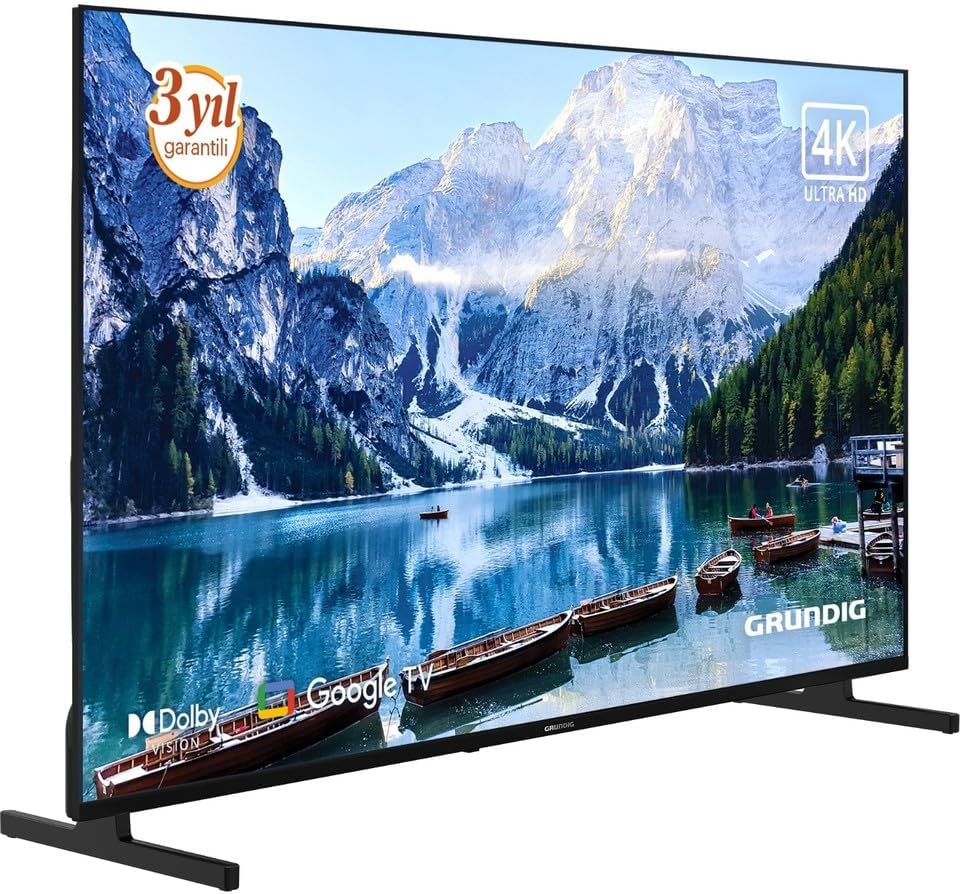
Image 2: Angled front view of the Grundig 50 GKU 700 TV, showcasing its slim design and the attached stand. The screen displays a vibrant image, highlighting the 4K Ultra HD capability.
4.2 Connecting Power
- Locate the power input port on the back of the TV.
- Connect the power cable securely to the TV.
- Plug the other end of the power cable into a wall outlet.

Image 3: Close-up view of the power input port located on the back of the Grundig TV, labeled "AC IN". A caution label regarding electric shock is visible nearby.
4.3 Connecting External Devices
Your Grundig TV offers various connection options:
- HDMI: For connecting Blu-ray players, game consoles, set-top boxes, etc. (HDMI 1, HDMI 2, HDMI 3 ports available).
- USB: For connecting USB storage devices to play media files. (USB 1, USB 2 ports available).
- Satellite/Antenna: For connecting a satellite dish or terrestrial antenna.
- Ethernet (LAN): For a wired internet connection.

Image 4: Detailed view of the connectivity panel on the back of the Grundig TV, showing multiple ports including USB, HDMI (HDMI 1/ARC, HDMI 2, HDMI 3), satellite/antenna input, and an Ethernet (LAN) port.

Image 5: Full rear view of the Grundig 50 GKU 700 TV, showing the overall design of the back panel and the central area where the power and input ports are located.
4.4 Initial Setup Wizard
After connecting power and turning on the TV for the first time, a setup wizard will guide you through:
- Language selection.
- Network connection (Wi-Fi or Ethernet).
- Google account sign-in (for Google TV features).
- Channel scanning (for satellite or terrestrial broadcasts).
5. Operating Your TV
5.1 Remote Control Overview
The remote control allows you to access all functions of your TV. Insert two AAA batteries (not included) into the remote control, ensuring correct polarity.

Image 6: Front view of the Grundig TV remote control. Key buttons include Power, Google Assistant (microphone), Settings, Input, Navigation Pad with OK button, Volume, Channel, Home, Mute, Netflix, YouTube, Prime Video, and Apps buttons, along with numeric keys.

Image 7: Angled view of the Grundig TV remote control, showing its ergonomic design and the layout of its buttons.
- Power Button: Turns the TV on or off.
- Google Assistant Button: Activates voice control for searching content or controlling the TV.
- Navigation Pad (Up/Down/Left/Right) and OK: For menu navigation and selection.
- Volume (+/-): Adjusts the volume level.
- Channel (Up/Down): Changes TV channels.
- Home Button: Returns to the Google TV home screen.
- Input Button: Selects input sources (HDMI, USB, Satellite, etc.).
- Netflix, YouTube, Prime Video, Apps Buttons: Direct access to streaming services and the app menu.
5.2 Google TV Interface
Your TV runs on Google TV, providing a personalized experience with content recommendations, access to a vast library of apps from the Google Play Store, and integrated Google Assistant functionality.
- Home Screen: Displays recommended content, installed apps, and quick access to settings.
- Apps: Download and manage your favorite streaming services and applications.
- Voice Control: Use the Google Assistant button on your remote to search for movies, check the weather, or control smart home devices.
6. Maintenance
6.1 Cleaning the TV
- Always unplug the TV before cleaning.
- Use a soft, dry, lint-free cloth to wipe the screen and cabinet.
- For stubborn marks on the screen, lightly dampen the cloth with water or a specialized screen cleaner (ensure it's safe for LED screens) and wipe gently. Do not spray liquid directly onto the screen.
- Avoid using abrasive cleaners, waxes, or solvents.
6.2 Software Updates
Your TV may receive software updates periodically to improve performance and add new features. Ensure your TV is connected to the internet to receive these updates. You can usually check for updates in the TV's settings menu under "System" or "About".
7. Troubleshooting
If you encounter issues with your TV, refer to the following common problems and solutions:
7.1 No Power
- Check if the power cable is securely plugged into both the TV and the wall outlet.
- Verify that the wall outlet is functioning by plugging in another device.
- Press the power button on the remote control or on the TV itself.
7.2 No Picture, But Sound is Present
- Ensure the correct input source is selected (e.g., HDMI 1, Satellite).
- Check the connections of external devices.
- Try restarting the TV and any connected devices.
7.3 No Sound, But Picture is Present
- Check the volume level and ensure the TV is not muted.
- If using external audio devices (soundbar, receiver), ensure they are properly connected and powered on.
- Check audio settings in the TV menu.
7.4 Remote Control Not Working
- Replace the batteries with new ones, ensuring correct polarity.
- Ensure there are no obstructions between the remote and the TV's IR sensor.
- If it's a Bluetooth remote, try re-pairing it with the TV (refer to TV settings for pairing instructions).
7.5 Network Connection Issues
- For Wi-Fi, ensure the router is on and within range. Try restarting the router.
- For wired connection, ensure the Ethernet cable is securely connected to both the TV and the router.
- Check network settings in the TV menu.
8. Specifications
| Feature | Specification |
|---|---|
| Brand | Grundig |
| Model Name | GE5T00 |
| Model Year | 2025 |
| Screen Size | 50 Inches |
| Display Technology | LED LCD |
| Resolution | 4K (3840 x 2160 Pixels) |
| Aspect Ratio | 16:9 |
| Refresh Rate | 60 Hz |
| Operating System | Google TV |
| Connectivity Technology | USB, HDMI, Ethernet, Satellite/Antenna |
| Included Components | Power Cable |
| Product Dimensions | 190.5 x 5.08 x 480.06 cm |
| Product Weight | 500 Grams |
| ASIN | B0FSG93693 |
9. Warranty and Support
Your Grundig 50 GKU 700 TV comes with a manufacturer's warranty. Please refer to the warranty card included in your package for specific terms and conditions. For technical support, service inquiries, or to register your product, please visit the official Grundig website or contact their customer service department. Contact information can typically be found on the Grundig website or in the documentation provided with your TV.
Online Support: www.grundig.com


