
1. Introduction
This manual provides detailed instructions for the safe and efficient operation of your Romicta AK50MAX Stereo Audio Amplifier. Please read this manual thoroughly before using the device and retain it for future reference.
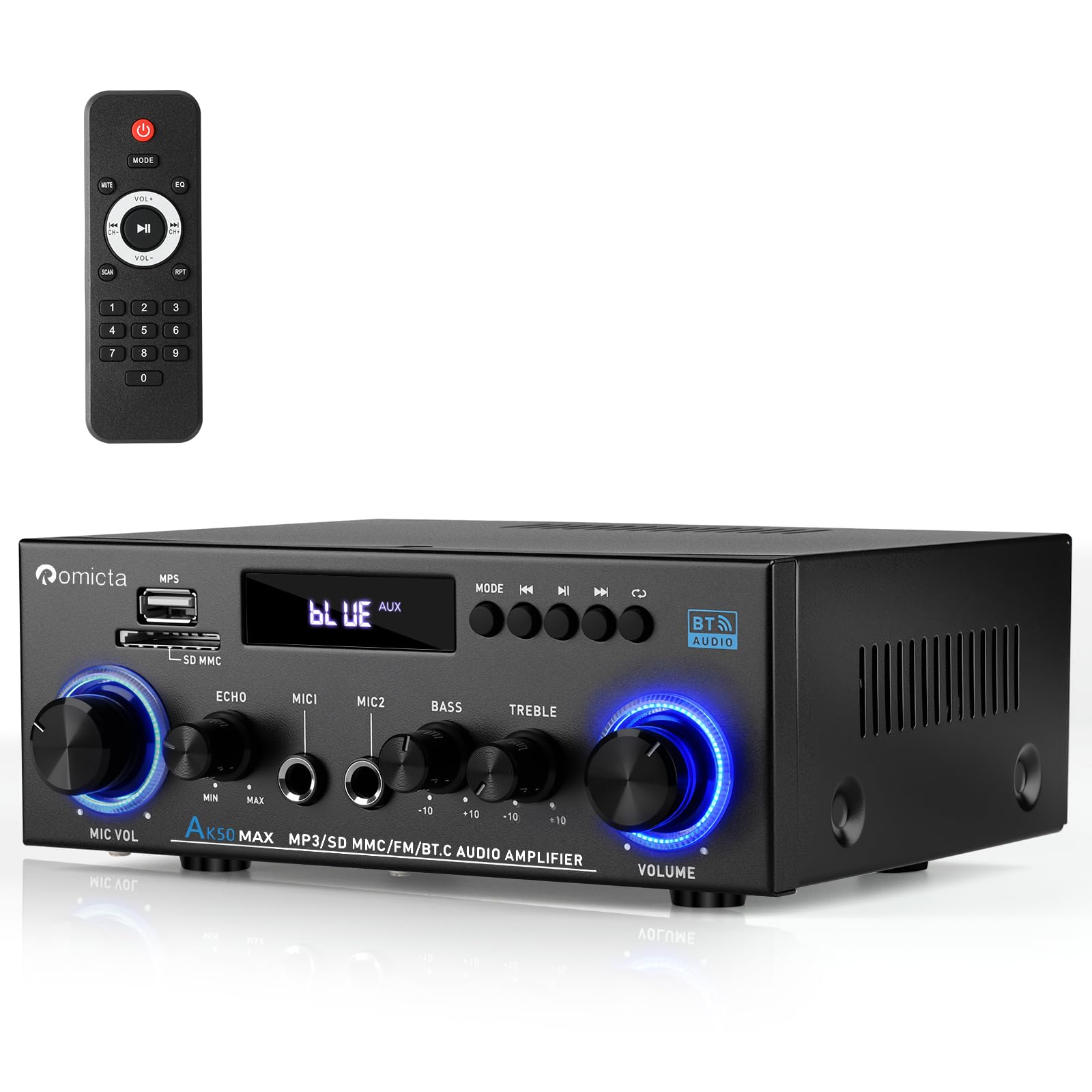
Figure 1: Romicta AK50MAX Stereo Audio Amplifier
2. Key Features
- Powerful Output: 400W+400W peak power, 50W+50W rated power. Supports 4-16 inch passive speakers and active subwoofers.
- Microphone Input & Output with Echo Control: Equipped with MIC input and output ports, plus an independent Echo adjustment knob for karaoke or announcements.
- Enhanced Bluetooth 5.0: Extended transmission range up to 50ft/15m (open area) and faster pairing for seamless wireless streaming.
- USB/SD Card Playback: Supports USB 2.0 flash drives and SD cards for direct MP3 playback.
- Tone & Volume Control: Independent knobs for Bass, Treble, Master Volume, Mic Volume, and Echo. Includes a remote control for convenience.
- Wide Compatibility: Connects with mobile phones, tablets, laptops, TVs, DVD players, home speakers, bookshelf speakers, gaming setups, car audio systems, and outdoor speakers.
3. What's in the Box
Verify that all items are present upon unpacking:
- 1x Romicta AK50MAX Stereo Audio Amplifier
- 1x Power Cable
- 1x FM Antenna
- 1x Remote Control
- 1x User Manual (this document)
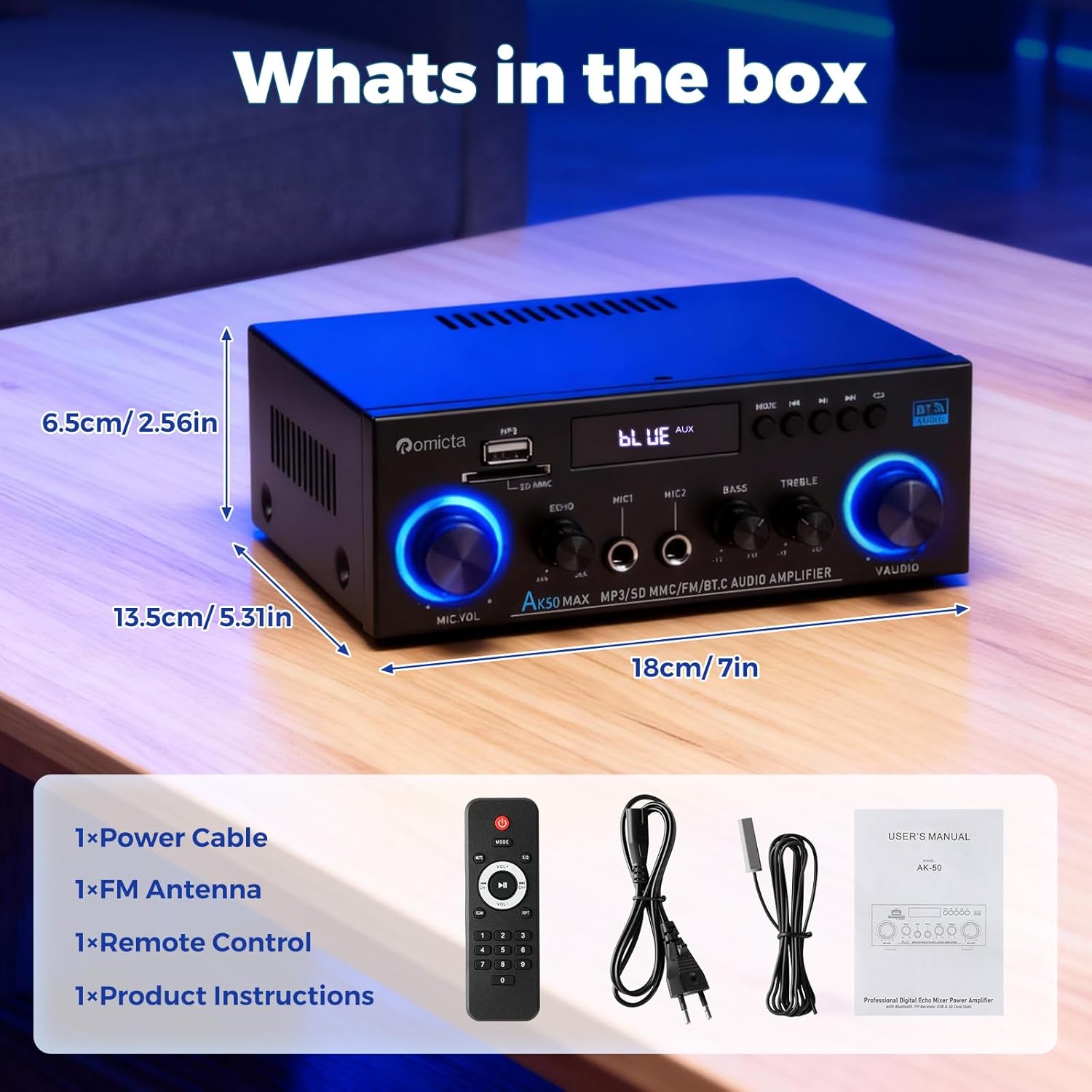
Figure 2: Package Contents
4. Product Overview
4.1 Front Panel

Figure 3: Front Panel Controls
- Power Switch: Turns the amplifier on/off.
- Bass/Treble Knobs: Adjust low and high frequencies.
- USB/SD Card Slots: For direct MP3 playback.
- Mode Button: Switches between input sources (AUX, USB, Bluetooth, FM, Optical, Coaxial).
- Playback Controls: Play/Pause, Previous/Next track.
- Volume Knob: Master volume control.
- MIC VOL Knob: Adjusts microphone volume.
- MIC 1/MIC 2 Inputs: 6.35mm jack for microphones.
- Echo/Delay Knobs: Adjust microphone echo and delay effects.
4.2 Back Panel
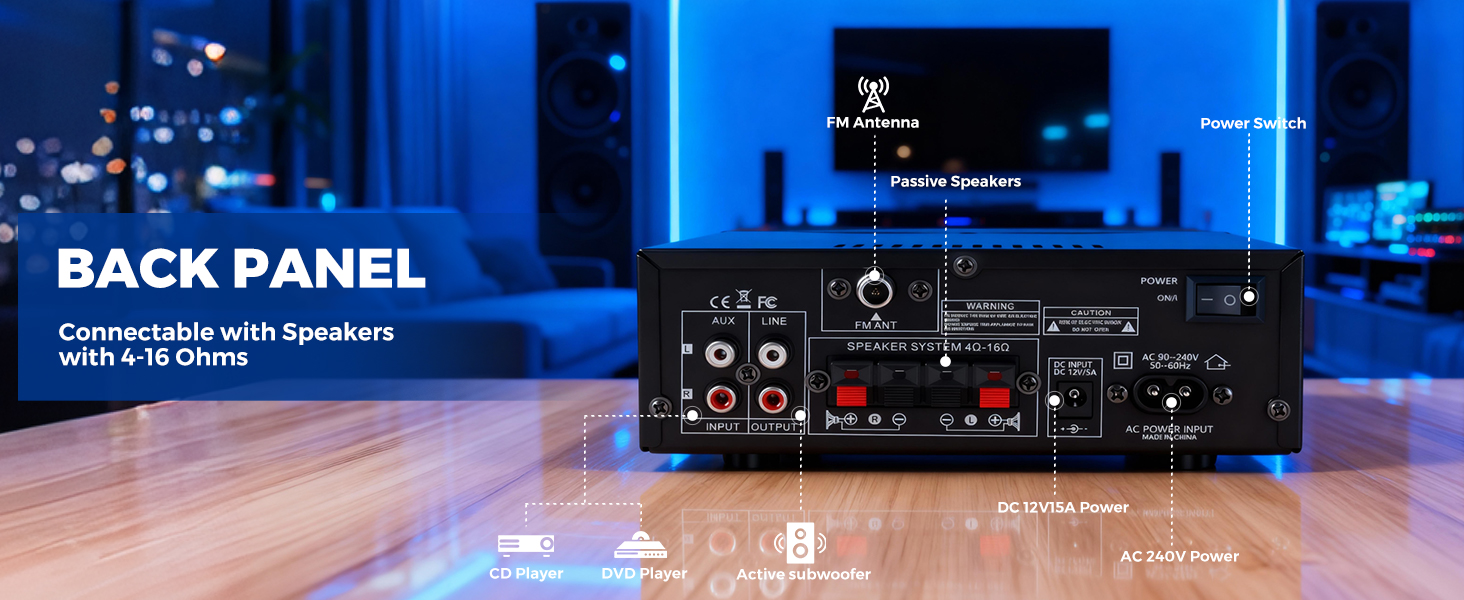
Figure 4: Back Panel Connections
- Optical/Coaxial Inputs: Digital audio inputs.
- AUX/Line Inputs (RCA): Analog audio inputs for external devices.
- Line Output (RCA): Audio output for connecting to other audio equipment or active subwoofers.
- Speaker Terminals: Connect passive speakers (4-16Ω impedance).
- DC Input: Power input (DC 12V/5A).
- AC Power Input: Connects to the main power supply (AC 90-240V, 50-60Hz).
- FM ANT: FM antenna connection port.
5. Setup Instructions
5.1 Connecting Speakers
Connect your passive speakers to the speaker terminals on the back panel. Ensure correct polarity (red to red, black to black) for optimal sound quality. The amplifier supports speakers with 4-16Ω impedance.
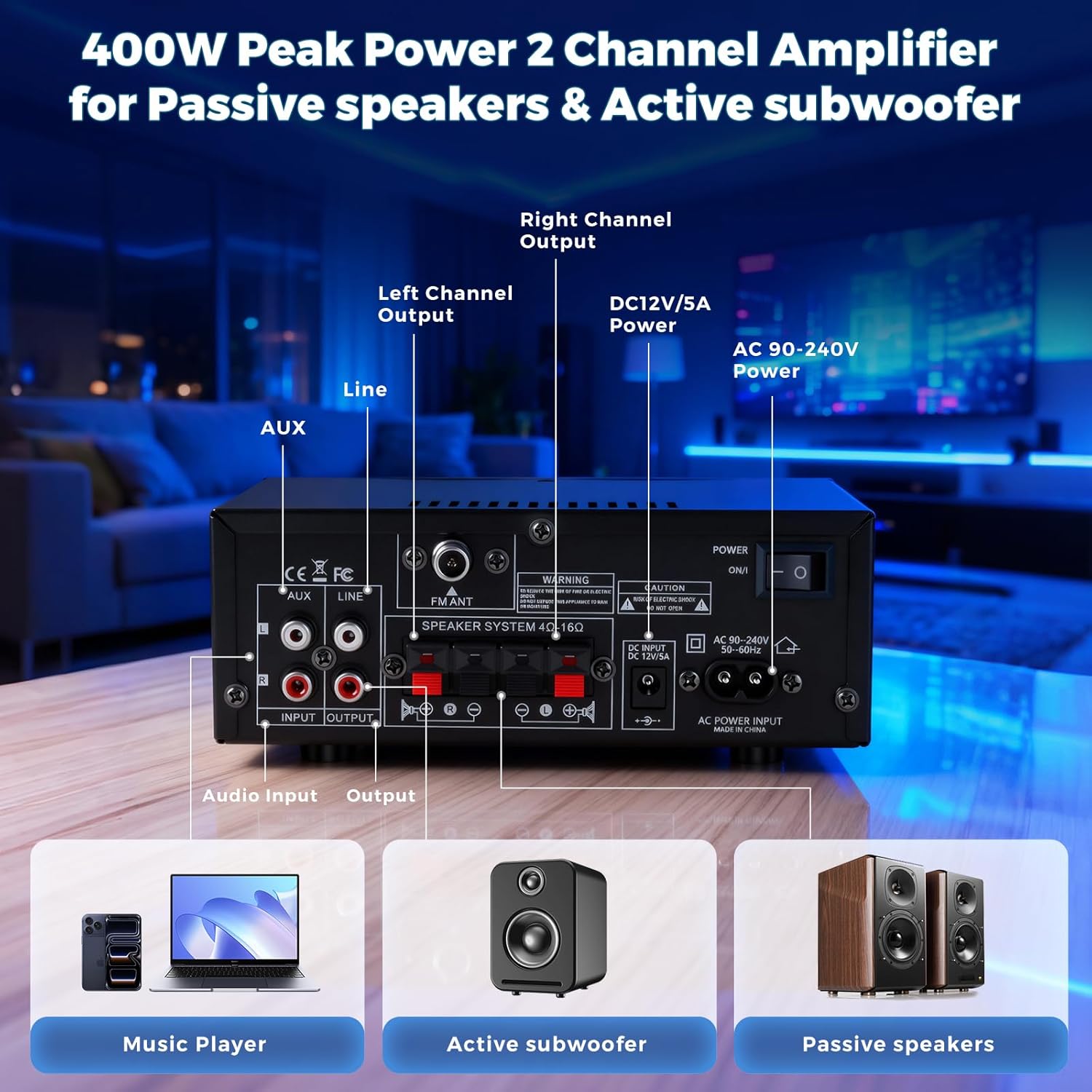
Figure 5: Speaker Connection Diagram
5.2 Connecting the FM Antenna
Attach the provided FM antenna to the 'FM ANT' port on the back of the amplifier for improved radio reception.
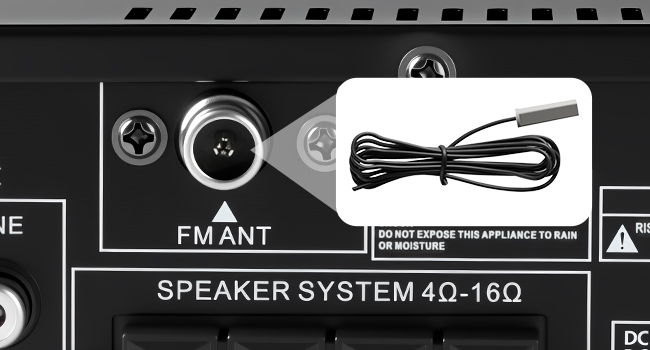
Figure 6: FM Antenna Connection
5.3 Power Connection
Connect the power cable to the 'AC Power Input' on the back panel and then plug it into a standard wall outlet. Alternatively, for DC power, use the 'DC Input 12V/5A' port.
Video 1: This Stereo Amplifier is Easy to Setup. This video demonstrates the basic setup process, including power and speaker connections.
6. Operating Instructions
6.1 Power On/Off
Press the Power switch on the front panel to turn the amplifier on or off. The display will illuminate when powered on.
6.2 Selecting Input Source
Press the 'Mode' button on the front panel or the remote control to cycle through available input sources: AUX, USB, Bluetooth, FM, Optical, and Coaxial.
6.3 Bluetooth Connectivity
1. Select 'Bluetooth' mode using the 'Mode' button. The display will show 'BLUE'.
2. On your device (phone, tablet, etc.), enable Bluetooth and search for 'AK50MAX'.
3. Select 'AK50MAX' to pair. Once connected, you can stream audio wirelessly.
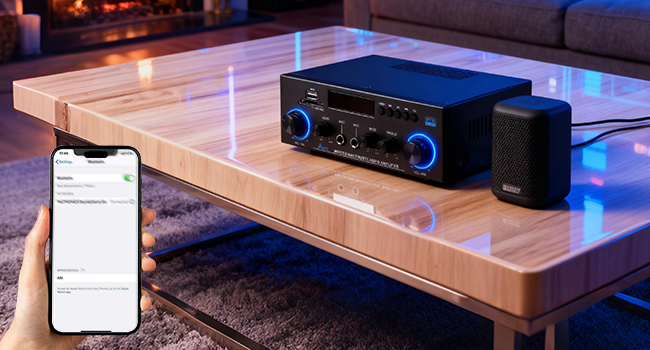
Figure 7: Bluetooth Pairing
6.4 USB/SD Card Playback
Insert a USB 2.0 flash drive or SD card into the respective slot on the front panel. The amplifier will automatically switch to USB/SD mode and begin playing MP3 files.
6.5 FM Radio Operation
1. Select 'FM' mode using the 'Mode' button.
2. Use the Previous/Next track buttons to manually tune or long-press to auto-scan for stations.
3. Ensure the FM antenna is properly connected for optimal reception.
6.6 Microphone Usage
1. Plug microphones into the 'MIC 1' or 'MIC 2' input jacks.
2. Adjust the 'MIC VOL' knob to control microphone volume.
3. Use the 'Echo' and 'Delay' knobs to add effects to the microphone audio.

Figure 8: Microphone Inputs and Controls
6.7 Tone and Volume Adjustment
Use the 'Bass', 'Treble', and 'Volume' knobs on the front panel to customize your audio output. The remote control also provides volume and EQ adjustments.

Figure 9: Tone Control Knobs
6.8 Remote Control
The included remote control allows for convenient adjustment of volume, input mode, EQ settings, and playback controls from a distance.
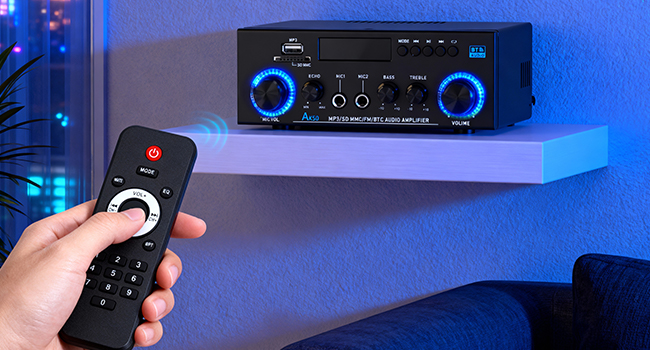
Figure 10: Remote Control
7. Maintenance
- Cleaning: Use a soft, dry cloth to clean the exterior of the amplifier. Do not use liquid cleaners or aerosols.
- Ventilation: Ensure adequate ventilation around the unit to prevent overheating. Do not block ventilation openings.
- Storage: When not in use for extended periods, store the amplifier in a cool, dry place away from direct sunlight and extreme temperatures.
8. Troubleshooting
| Problem | Possible Cause | Solution |
|---|---|---|
| No power | Power cable not connected; Power switch off | Check power cable connection; Turn on power switch |
| No sound output | Incorrect input source selected; Speaker wires loose/incorrectly connected; Volume too low; Device not paired (Bluetooth) | Select correct input mode; Check speaker connections and polarity; Increase volume; Re-pair Bluetooth device |
| Poor FM reception | FM antenna not connected or poorly positioned | Connect FM antenna; Adjust antenna position for better signal |
| Microphone not working | Microphone not plugged in; MIC VOL knob too low | Ensure microphone is securely plugged in; Increase MIC VOL |
| Remote control not working | Batteries depleted; Obstruction between remote and amplifier | Replace remote batteries; Remove any obstructions |
9. Specifications
- Brand: Romicta
- Model Number: AK-50 MAX
- Output Wattage: 800 Watts (Peak)
- Number of Channels: 2
- Connectivity Technology: Bluetooth, MIC, USB, RCA, AUX, FM
- Controller Type: Remote Control, Push Button
- Compatible Devices: Amplifier, PC, Smartphone, TV, Speakers
- Audio Output Mode: Stereo
- DC Input: 12V/5A
- AC Power: 90-240V, 50-60Hz
10. Warranty and Support
This product comes with a 30-day warranty. For any issues or support, please contact Romicta customer service.